Project 2: Bitwise Data Inspector
Build a CLI tool that reveals exactly how the machine stores integers and floating-point numbers, making bit-level representation tangible and predictable.
Quick Reference
| Attribute | Value |
|---|---|
| Language | C (alt: Rust, Zig, C++) |
| Difficulty | Intermediate |
| Time | Weekend–2 weeks |
| Chapters | 2, 3 |
| Coolness | ★★★☆☆ Genuinely Clever |
| Portfolio Value | Micro-SaaS/Pro Tool |
Learning Objectives
By completing this project, you will:
-
Master two’s complement representation: Instantly convert between decimal, binary, and hex for signed/unsigned integers; predict when overflow and underflow occur
-
Decode IEEE-754 floating-point: Extract sign, exponent, and mantissa fields; explain why
0.1 + 0.2 != 0.3and recognize NaN/Infinity patterns -
Understand endianness: Predict byte ordering on any architecture and correctly interpret multi-byte values in memory dumps
-
Reason about type conversions: Predict what happens during signed/unsigned casts, truncation, and sign extension without running code
-
Recognize dangerous patterns: Identify code vulnerable to integer overflow, signed comparison bugs, and floating-point precision loss
-
Build intuition for bit manipulation: Perform shifts, masks, and bitwise operations mentally with confidence
Theoretical Foundation
Why Binary Matters
At the hardware level, everything is binary. Your CPU, memory, and storage know nothing about “42” or “3.14”—they only see patterns of 0s and 1s. Understanding these patterns is essential because:
- Overflow bugs cause security vulnerabilities and crashes
- Precision loss corrupts financial calculations and scientific results
- Comparison failures break sorting and searching algorithms
- Memory corruption happens when you misunderstand data layout
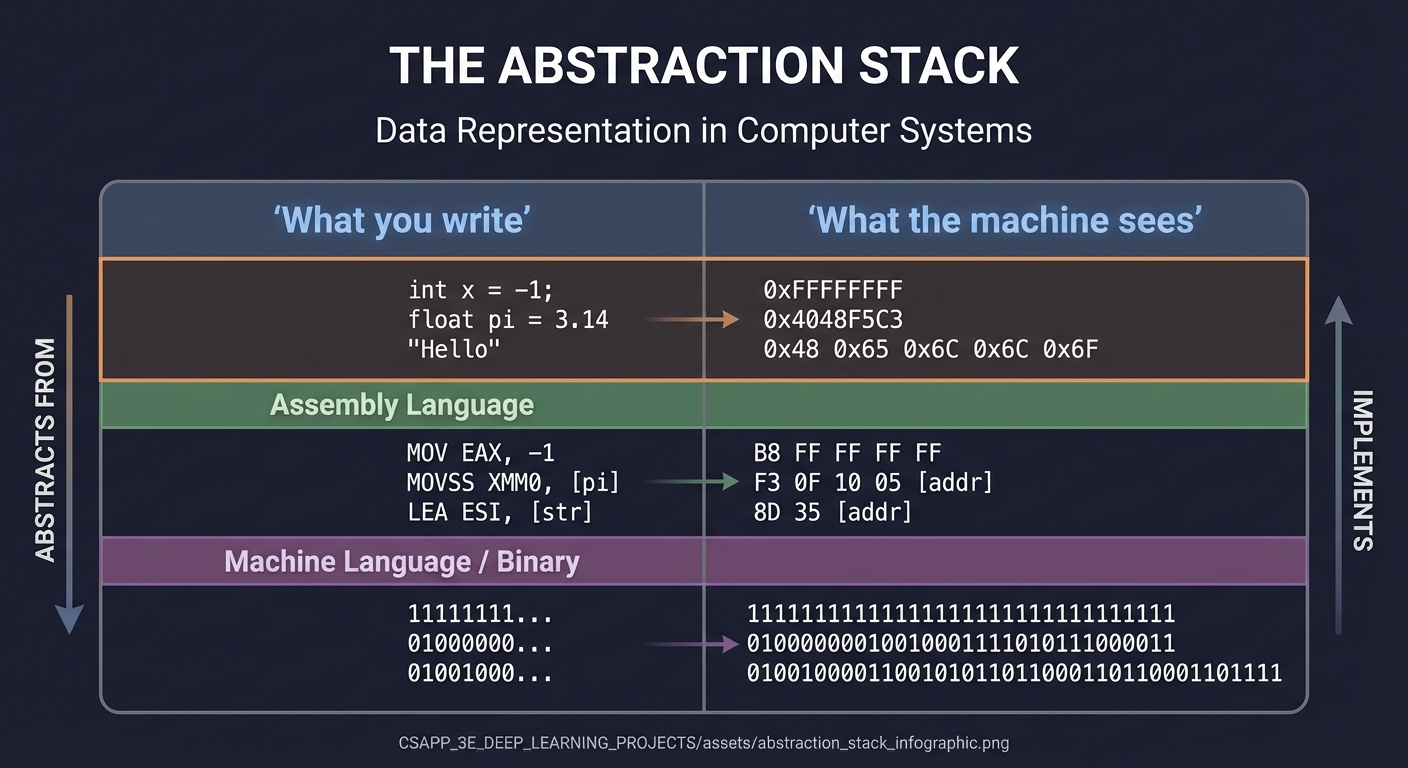
                    THE ABSTRACTION STACK

         What you write         What the machine sees
         ──────────────         ────────────────────
         int x = -1;      →     0xFFFFFFFF
         float pi = 3.14  →     0x4048F5C3
         "Hello"          →     0x48 0x65 0x6C 0x6C 0x6F
Unsigned Integers
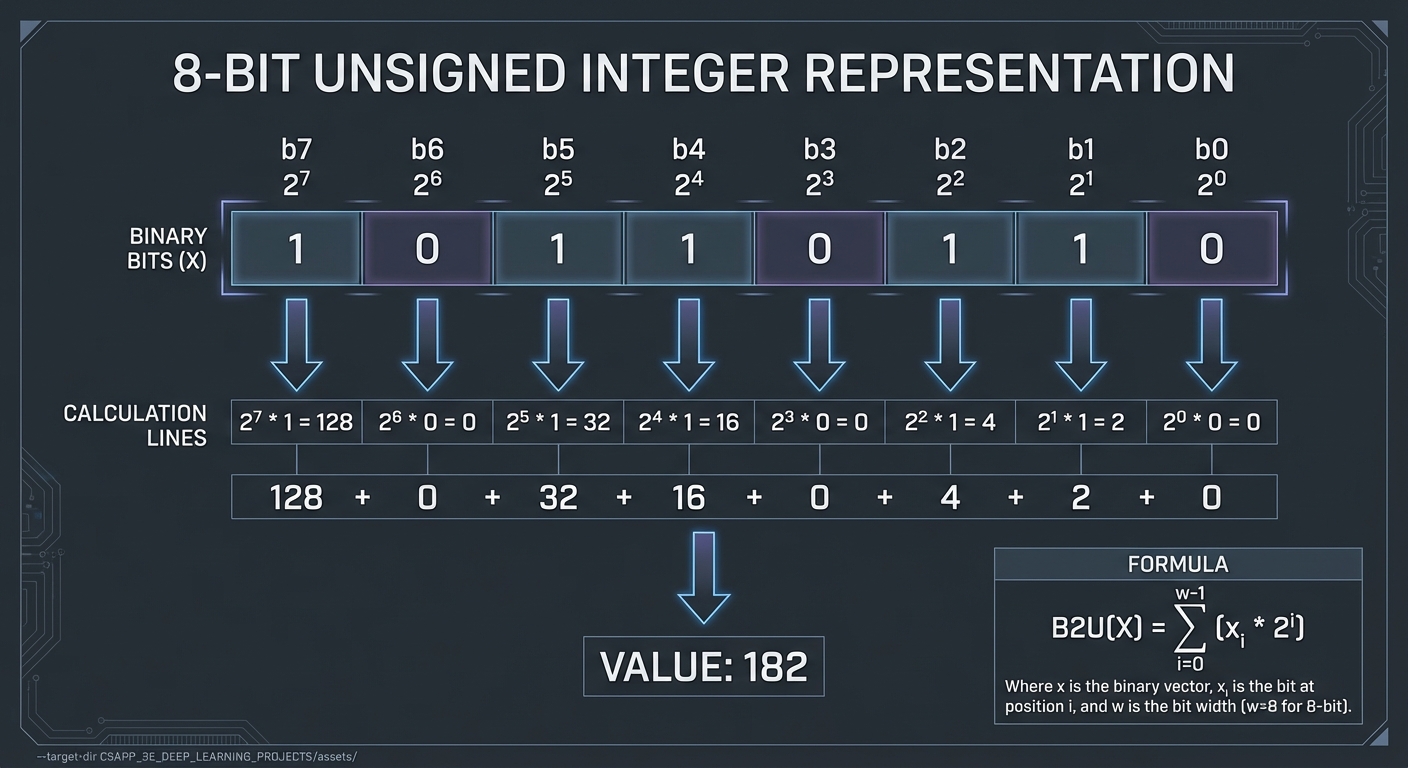
Unsigned integers are the simplest representation: pure positional binary.
         UNSIGNED INTEGER: 8-bit example
         ═══════════════════════════════

         Binary: 1 0 1 1 0 1 1 0
                 │ │ │ │ │ │ │ │
                 │ │ │ │ │ │ │ └── 2^0 × 0 =   0
                 │ │ │ │ │ │ └──── 2^1 × 1 =   2
                 │ │ │ │ │ └────── 2^2 × 1 =   4
                 │ │ │ │ └──────── 2^3 × 0 =   0
                 │ │ │ └────────── 2^4 × 1 =  16
                 │ │ └──────────── 2^5 × 1 =  32
                 │ └────────────── 2^6 × 0 =   0
                 └──────────────── 2^7 × 1 = 128
                                           ─────
                                  Value:    182

         Formula: B2U(X) = Σ(i=0 to w-1) xᵢ × 2^i
Range for w bits: 0 to 2^w - 1
| Bits | Type (C) | Min | Max |
|---|---|---|---|
| 8 | unsigned char |
0 | 255 |
| 16 | unsigned short |
0 | 65,535 |
| 32 | unsigned int |
0 | 4,294,967,295 |
| 64 | unsigned long |
0 | 18,446,744,073,709,551,615 |
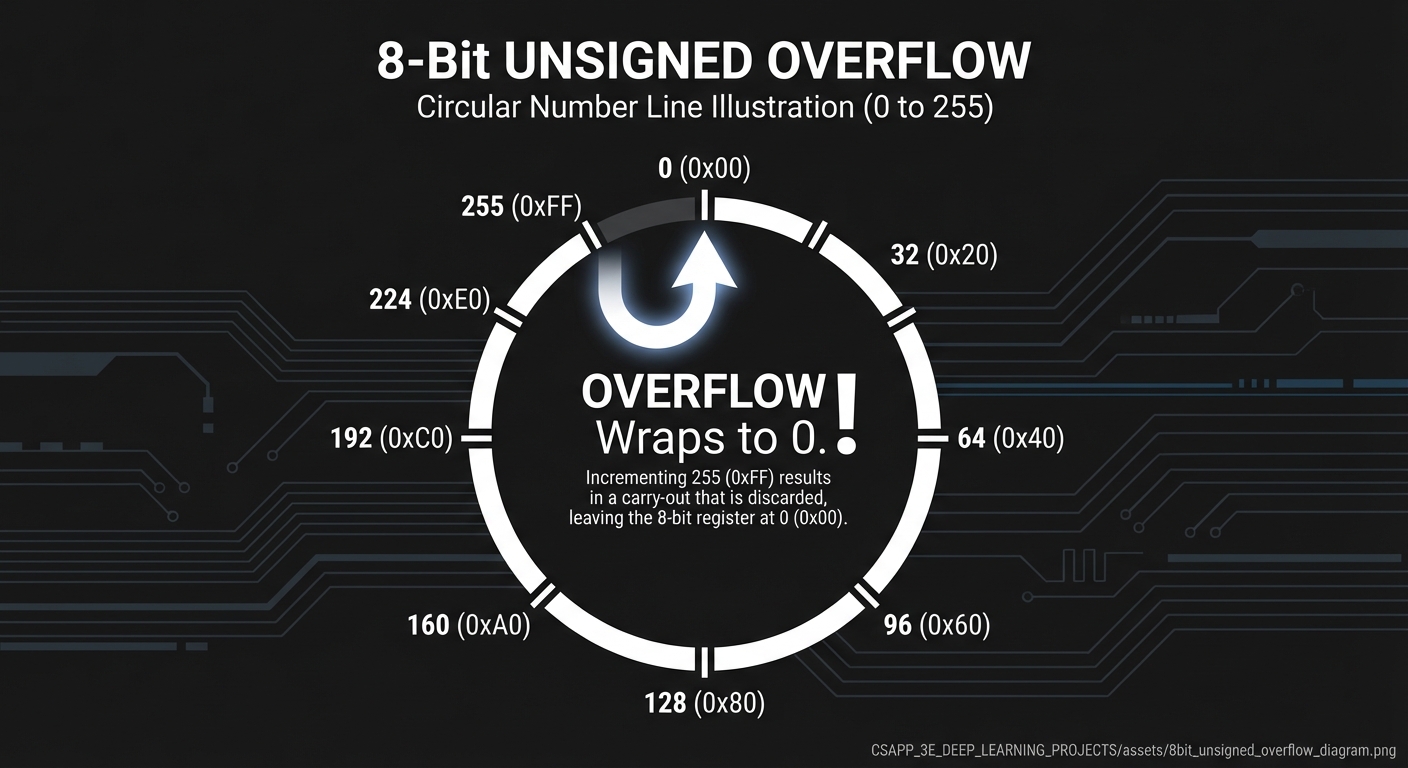
Overflow behavior: Wraps around modulo 2^w
         UNSIGNED OVERFLOW VISUALIZATION (8-bit)
         ═══════════════════════════════════════

         254 (0xFE)  →  255 (0xFF)  →  0 (0x00)  →  1 (0x01)
                            │
                            └── OVERFLOW! Wraps to 0

         The number line is actually a circle:

                     255 ──── 0
                    /          \
                  254            1
                  /              \
                ...              ...
                  \              /
                  129          126
                    \          /
                     128 ─── 127
Signed Integers: Two’s Complement
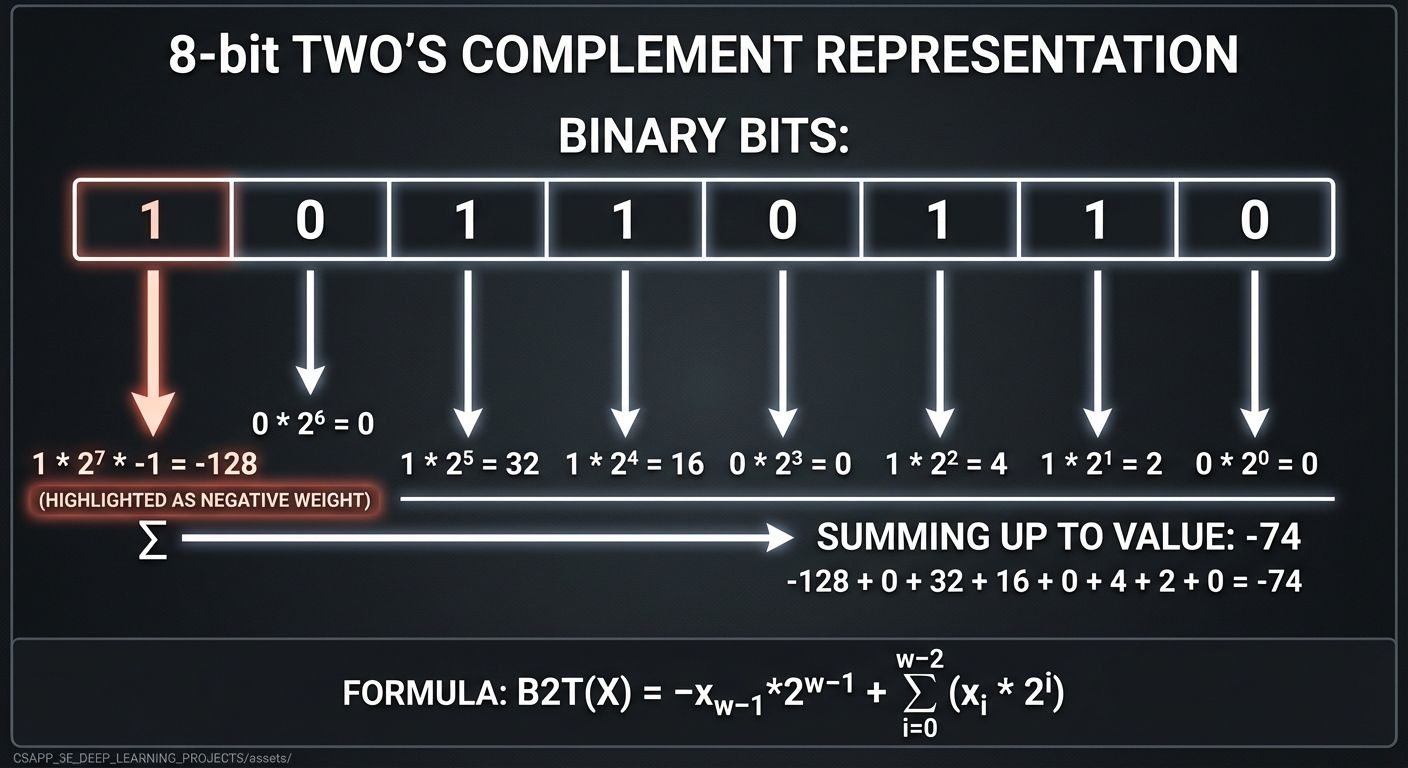
Two’s complement is the universal encoding for signed integers. The key insight: the most significant bit has negative weight.
         TWO'S COMPLEMENT: 8-bit example
         ════════════════════════════════

         Binary: 1 0 1 1 0 1 1 0
                 │ │ │ │ │ │ │ │
                 │ │ │ │ │ │ │ └── 2^0 × 0 =    0
                 │ │ │ │ │ │ └──── 2^1 × 1 =    2
                 │ │ │ │ │ └────── 2^2 × 1 =    4
                 │ │ │ │ └──────── 2^3 × 0 =    0
                 │ │ │ └────────── 2^4 × 1 =   16
                 │ │ └──────────── 2^5 × 1 =   32
                 │ └────────────── 2^6 × 0 =    0
                 └──────────────── 2^7 × 1 = -128  ← NEGATIVE weight!
                                            ─────
                                  Value:    -74

         Formula: B2T(X) = -x_(w-1) × 2^(w-1) + Σ(i=0 to w-2) xᵢ × 2^i
Why two’s complement?
- Single representation of zero: Unlike one’s complement or sign-magnitude
- Hardware simplicity: Addition works the same for signed and unsigned
- Easy negation: Flip bits and add 1
         NEGATION IN TWO'S COMPLEMENT
         ═════════════════════════════

         To negate a number: flip all bits, then add 1

         Example: negate 5 (8-bit)

           5 = 0000 0101
         ~5  = 1111 1010      (flip all bits)
         +1  = 1111 1011      (add 1)
          -5 = 1111 1011      (result: -5)

         Verify: -128 + 64 + 32 + 16 + 8 + 2 + 1 = -5 ✓
Range for w bits: -2^(w-1) to 2^(w-1) - 1
| Bits | Type (C) | Min | Max |
|---|---|---|---|
| 8 | signed char |
-128 | 127 |
| 16 | short |
-32,768 | 32,767 |
| 32 | int |
-2,147,483,648 | 2,147,483,647 |
| 64 | long |
-9,223,372,036,854,775,808 | 9,223,372,036,854,775,807 |
| Critical asymmetry: | TMin | = | TMax | + 1 |
         THE TWO'S COMPLEMENT NUMBER LINE (4-bit example)
         ═══════════════════════════════════════════════

         Binary    Unsigned    Signed
         ──────    ────────    ──────
         0000         0           0
         0001         1           1
         0010         2           2
         0011         3           3
         0100         4           4
         0101         5           5
         0110         6           6
         0111         7           7    ← Maximum positive
         ────────────────────────────
         1000         8          -8    ← TMin (no positive equivalent!)
         1001         9          -7
         1010        10          -6
         1011        11          -5
         1100        12          -4
         1101        13          -3
         1110        14          -2
         1111        15          -1
Signed overflow is UNDEFINED BEHAVIOR in C!
int x = INT_MAX;
x = x + 1;  // UNDEFINED! Compiler can do anything
Sign Extension and Truncation
When converting between different bit widths, you must handle the bits correctly.
Sign Extension (smaller to larger): Copy the sign bit into new positions
         SIGN EXTENSION: 8-bit to 16-bit
         ═════════════════════════════

         Positive number (5):
         0000 0101            →    0000 0000 0000 0101
         │                         ││││ ││││
         └─ sign bit is 0          └┴┴┴─┴┴┴┴── copy 0s into high bits

         Negative number (-5):
         1111 1011            →    1111 1111 1111 1011
         │                         ││││ ││││
         └─ sign bit is 1          └┴┴┴─┴┴┴┴── copy 1s into high bits

         This preserves the numeric value!
Zero Extension (unsigned): Always fill with zeros
         ZERO EXTENSION: 8-bit unsigned to 16-bit
         ═════════════════════════════════════════

         182 unsigned:
         1011 0110            →    0000 0000 1011 0110
                                   ││││ ││││
                                   └┴┴┴─┴┴┴┴── always fill with 0s
Truncation (larger to smaller): Keep only low-order bits
         TRUNCATION: 32-bit to 8-bit
         ═══════════════════════════

         0x12345678  →  0x78 (keep low byte only)

         Value changes! 305,419,896 → 120

         Effect: result = original mod 2^k
         where k = number of bits retained
Signed vs Unsigned Comparisons
When C compares signed and unsigned, it converts signed to unsigned first. This causes subtle bugs:
         DANGEROUS COMPARISON
         ═════════════════════

         int x = -1;
         unsigned int y = 0;

         if (x < y)     // What happens?
             printf("expected");
         else
             printf("SURPRISE!");

         Answer: SURPRISE!

         Why? x is converted to unsigned first:
              -1 as signed   = 0xFFFFFFFF
              Same bits as unsigned = 4,294,967,295

              4,294,967,295 > 0, so condition is FALSE
Conversion rules in C:
| Expression Type | If one operand is | Other operand becomes |
|---|---|---|
| Comparison | unsigned |
converted to unsigned |
| Arithmetic | unsigned |
converted to unsigned |
| Assignment | target type | converted to target type |
         COMPARISON CONVERSION TABLE
         ═══════════════════════════

         Type1       Type2        Comparison Type
         ─────       ─────        ───────────────
         int         int          signed
         unsigned    unsigned     unsigned
         int         unsigned     UNSIGNED ← danger!
         long        unsigned     depends on sizes
IEEE-754 Floating-Point Representation
Floating-point numbers use scientific notation in binary.
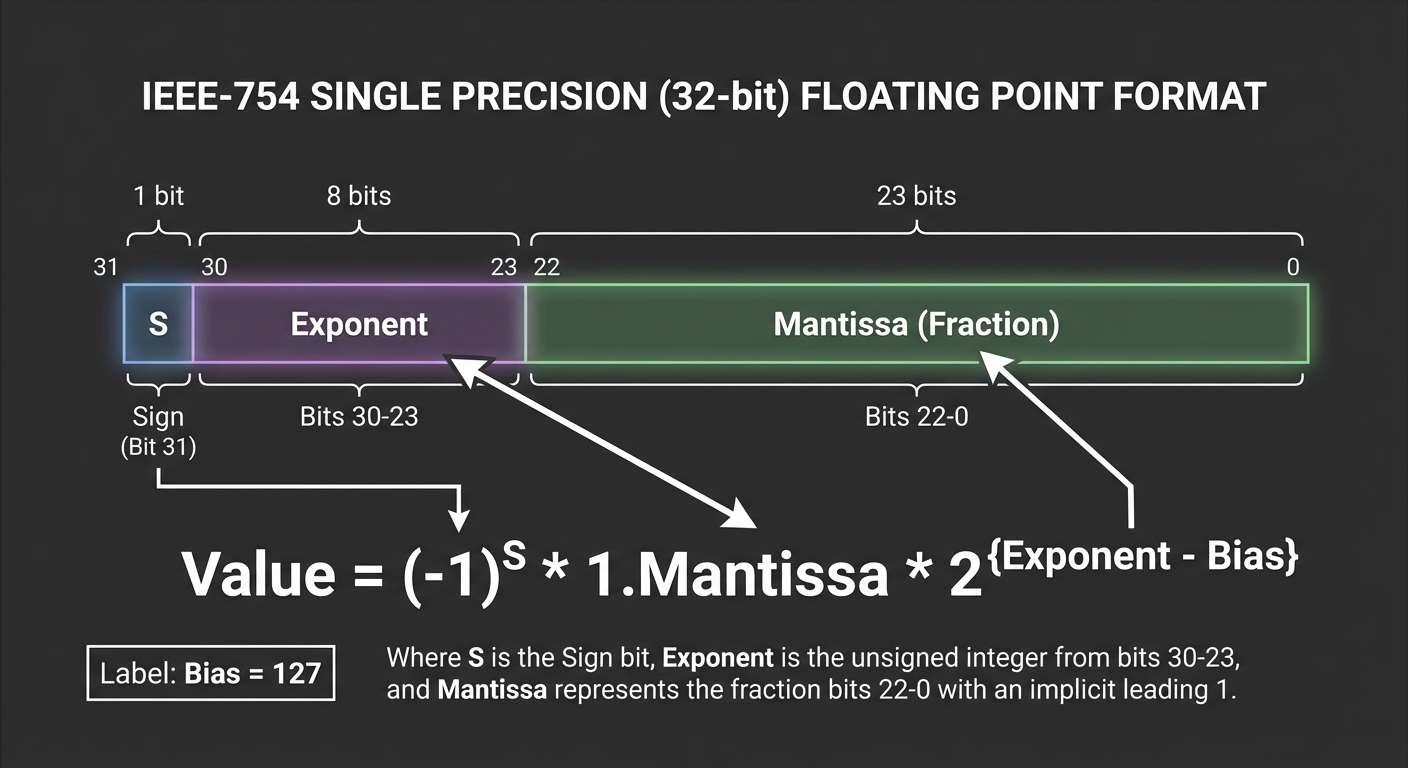
         IEEE-754 SINGLE PRECISION (32-bit)
         ═══════════════════════════════════

         ┌─────┬────────────────┬─────────────────────────────────────────────┐
         │  S  │   Exponent     │               Mantissa (Fraction)           │
         │ 1b  │    8 bits      │                   23 bits                   │
         └─────┴────────────────┴─────────────────────────────────────────────┘
         bit 31   bits 30-23                    bits 22-0

         Value = (-1)^S × 1.Mantissa × 2^(Exponent - Bias)

         Bias = 127 for single precision
         Bias = 1023 for double precision
Example: Encoding 13.625
         ENCODING 13.625 AS IEEE-754 SINGLE
         ═══════════════════════════════════

         Step 1: Convert to binary
                 13 = 1101 (binary)
                 0.625 = 0.101 (binary: 1/2 + 1/8)
                 13.625 = 1101.101

         Step 2: Normalize (scientific notation)
                 1101.101 = 1.101101 × 2^3
                            │       │
                            │       └── exponent = 3
                            └── mantissa (after the 1.)

         Step 3: Encode fields
                 Sign: 0 (positive)
                 Exponent: 3 + 127 = 130 = 1000 0010
                 Mantissa: 101 1010 0000 0000 0000 0000
                           (drop the implicit leading 1)

         Result: 0 10000010 10110100000000000000000
                 = 0x41590000
IEEE-754 Double Precision (64-bit)
         ┌─────┬──────────────────────┬──────────────────────────────────────────────────────────────────────┐
         │  S  │      Exponent        │                          Mantissa (Fraction)                        │
         │ 1b  │      11 bits         │                              52 bits                                │
         └─────┴──────────────────────┴──────────────────────────────────────────────────────────────────────┘
         bit 63    bits 62-52                                bits 51-0
Special Floating-Point Values
IEEE-754 reserves certain bit patterns for special values:
         SPECIAL VALUES IN IEEE-754
         ═══════════════════════════

         ┌────────────────────┬─────────────┬─────────────┬──────────────────┐
         │   Value            │  Exponent   │  Mantissa   │   Meaning        │
         ├────────────────────┼─────────────┼─────────────┼──────────────────┤
         │   +0.0             │  0000...0   │  0000...0   │  Positive zero   │
         │   -0.0             │  0000...0   │  0000...0   │  Negative zero   │
         │   Denormalized     │  0000...0   │  nonzero    │  Very small nums │
         │   Normalized       │  0<exp<max  │  any        │  Normal numbers  │
         │   +Infinity        │  1111...1   │  0000...0   │  Positive inf    │
         │   -Infinity        │  1111...1   │  0000...0   │  Negative inf    │
         │   NaN              │  1111...1   │  nonzero    │  Not a Number    │
         └────────────────────┴─────────────┴─────────────┴──────────────────┘
Denormalized (Subnormal) Numbers
When the exponent is all zeros, the implicit leading bit becomes 0 instead of 1. This allows representing numbers very close to zero:
         DENORMALIZED NUMBERS
         ═════════════════════

         Normal:      Value = 1.mantissa × 2^(exp - bias)
         Denormal:    Value = 0.mantissa × 2^(1 - bias)

         For single precision:
         Smallest normal:     1.0 × 2^-126  ≈ 1.18 × 10^-38
         Smallest denormal:   2^-23 × 2^-126 = 2^-149 ≈ 1.4 × 10^-45

         Denormals provide "gradual underflow" to zero
NaN Behavior
         NaN RULES
         ═════════

         NaN sources:
         - 0.0 / 0.0
         - infinity - infinity
         - infinity × 0
         - sqrt(-1)

         NaN properties:
         - NaN != NaN  (NaN is not equal to itself!)
         - NaN op anything = NaN (propagates)
         - x != x is TRUE only if x is NaN
Floating-Point Precision and Rounding
Floating-point cannot represent all real numbers exactly. Understanding this prevents bugs:
         WHY 0.1 + 0.2 != 0.3
         ═════════════════════

         0.1 in binary = 0.0001100110011001100110011...  (repeating!)

         This is like 1/3 in decimal: 0.333333...
         We can't store infinite digits, so we round.

         0.1 ≈ 0.10000000149... (single precision)
         0.2 ≈ 0.20000000298... (single precision)
         0.1 + 0.2 ≈ 0.30000000447...

         But 0.3 ≈ 0.30000001192...

         They're stored as different bit patterns!
Representable Numbers
         FLOATING-POINT NUMBER LINE (simplified)
         ═══════════════════════════════════════

         ─∞────┼────┼───┼──┼─┼┼┼┼┼┼┼┼┼┼┼┼┼┼─┼──┼───┼────┼────+∞
               │    │   │  │     0     │  │   │    │
               │    │   │  │           │  │   │    │
               │    │   │  │ very dense│  │   │    │
               │    │   │  │           │  │   │    │
               │    │   │  └───────────┘  │   │    │
               │    │   │   gaps grow →   │   │    │
               │    │   │                 │   │    │
               │    │   └── powers of 2 ──┘   │    │
               │    │       are EXACT         │    │
               │    │                         │    │

         Key insight: Precision is RELATIVE, not absolute.
         Large numbers have large gaps between representable values.
Rounding Modes
IEEE-754 defines rounding modes for when exact representation is impossible:
| Mode | Description | Example (to integer) |
|---|---|---|
| Round to nearest even | Default; ties go to even | 2.5 → 2, 3.5 → 4 |
| Round toward +∞ | Always round up | 2.1 → 3, -2.9 → -2 |
| Round toward -∞ | Always round down | 2.9 → 2, -2.1 → -3 |
| Round toward 0 | Truncate | 2.9 → 2, -2.9 → -2 |
Endianness
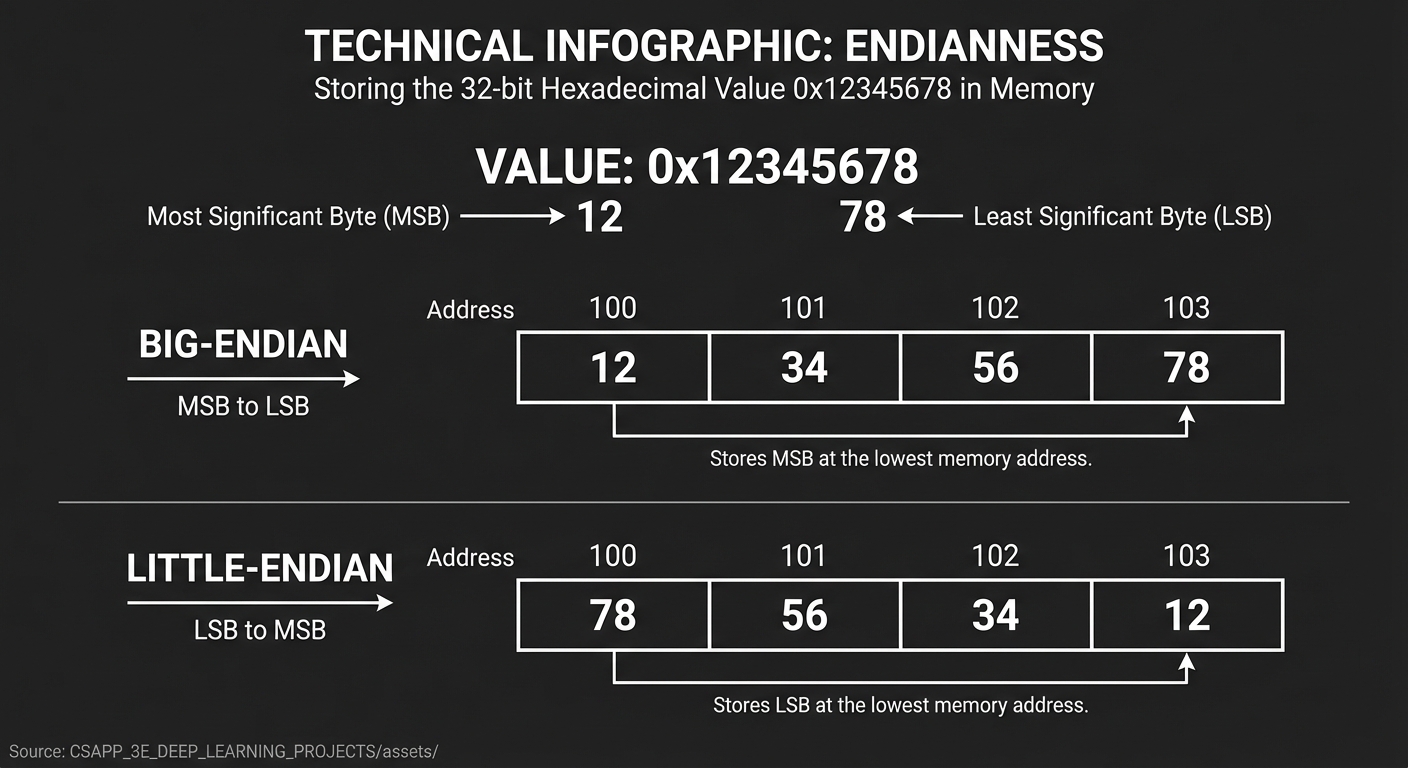
Endianness determines byte ordering in multi-byte values.
         ENDIANNESS: Storing 0x12345678 in memory
         ═════════════════════════════════════════

         Address:    100   101   102   103
                     ─── ─ ─── ─ ─── ─ ───

         Big-Endian:  12    34    56    78     (most significant first)
         (Network)    MSB ────────────→ LSB

         Little-Endian: 78    56    34    12   (least significant first)
         (x86, ARM)     LSB ────────────→ MSB


         Memory dump showing 0x12345678:

         Big-Endian:    0x64: 12 34 56 78
                              │  │  │  └── address 103
                              │  │  └───── address 102
                              │  └──────── address 101
                              └─────────── address 100

         Little-Endian: 0x64: 78 56 34 12
                              │  │  │  └── address 103
                              │  │  └───── address 102
                              │  └──────── address 101
                              └─────────── address 100
Why It Matters
         ENDIANNESS BUGS
         ═══════════════

         Network protocol sends big-endian, your machine is little-endian:

         Sent: 0x01 0x00     (value 256 in big-endian)
         Received: interpreted as 0x0001 (value 1 in little-endian)

         This is why we have ntohl(), htonl(), etc.:
         - htons/htonl: host to network (convert to big-endian)
         - ntohs/ntohl: network to host (convert from big-endian)
Detecting Endianness
int is_little_endian(void) {
    unsigned int x = 1;
    return *((unsigned char *)&x) == 1;
}
Data Alignment and Padding
Processors access memory most efficiently at aligned addresses:
         ALIGNMENT REQUIREMENTS
         ══════════════════════

         Type          Typical Alignment    Size
         ────          ─────────────────    ────
         char          1 byte               1 byte
         short         2 bytes              2 bytes
         int           4 bytes              4 bytes
         long          8 bytes              8 bytes
         float         4 bytes              4 bytes
         double        8 bytes              8 bytes
         pointer       8 bytes (64-bit)     8 bytes

         "Aligned" means: address % alignment == 0
Struct Padding
         STRUCT PADDING EXAMPLE
         ══════════════════════

         struct bad_layout {    // 24 bytes due to padding!
             char a;            // offset 0, size 1
             // 7 bytes padding
             double b;          // offset 8, size 8 (must be 8-aligned)
             char c;            // offset 16, size 1
             // 3 bytes padding
             int d;             // offset 20, size 4 (must be 4-aligned)
         };

         Memory layout:
         ┌───┬───────────────┬───────────────────────────────┬───┬───────┬───────────────┐
         │ a │   padding     │              b                │ c │  pad  │       d       │
         ├───┼───┬───┬───┬───┼───┬───┬───┬───┬───┬───┬───┬───┼───┼───┬───┼───┬───┬───┬───┤
         │ 0 │ 1 │ 2 │ 3 │ 4 │ 5 │ 6 │ 7 │ 8 │ 9 │10 │11 │12 │13 │14 │15 │16 │17 │18 │19 │
         └───┴───┴───┴───┴───┴───┴───┴───┴───┴───┴───┴───┴───┴───┴───┴───┴───┴───┴───┴───┘

         struct good_layout {   // 16 bytes with smart ordering!
             double b;          // offset 0, size 8
             int d;             // offset 8, size 4
             char a;            // offset 12, size 1
             char c;            // offset 13, size 1
             // 2 bytes padding for struct alignment
         };

         Rule: Order struct members from largest to smallest!
Project Specification
What You Will Build
A command-line data inspector that takes numeric values and displays:
- The exact byte-level representation
- Interpretation under different type assumptions
- Endianness information
- Warnings about potential issues (overflow, precision loss, special values)
Functional Requirements
Input Modes:
- Decimal integers:
inspect 42,inspect -127 - Hexadecimal:
inspect 0xDEADBEEF - Binary:
inspect 0b11010110 - Floating-point:
inspect 3.14159,inspect -0.0 - Raw bytes:
inspect --bytes "78 56 34 12"
Output Requirements:
- Show all bytes in hex
- Show binary representation
- Show interpretation as:
- Unsigned integer (various sizes)
- Signed integer (various sizes)
- IEEE-754 float/double (with field breakdown)
- Show endianness of current system
- Explain any special values (NaN, Inf, TMin)
Example Usage and Output
$ ./bitwise-inspector 42

═══════════════════════════════════════════════════════════════════════════════
                         BITWISE DATA INSPECTOR
                              Input: 42
═══════════════════════════════════════════════════════════════════════════════

BYTE REPRESENTATION (on little-endian system)
─────────────────────────────────────────────
  Memory order:    2A 00 00 00 00 00 00 00
  Logical order:   00 00 00 00 00 00 00 2A

BINARY VIEW (64-bit)
─────────────────────────────────────────────
  0000 0000 0000 0000 0000 0000 0000 0000
  0000 0000 0000 0000 0000 0000 0010 1010
                                    └┴┴┴──── 2 + 8 + 32 = 42

INTEGER INTERPRETATIONS
─────────────────────────────────────────────
  Type             Hex            Decimal
  ────             ───            ───────
  uint8_t          0x2A           42
  int8_t           0x2A           42
  uint16_t         0x002A         42
  int16_t          0x002A         42
  uint32_t         0x0000002A     42
  int32_t          0x0000002A     42
  uint64_t         0x000000000000002A     42
  int64_t          0x000000000000002A     42

FLOATING-POINT INTERPRETATION
─────────────────────────────────────────────
  As float (32-bit):  5.885e-44  (denormalized!)
    │ Sign:     0 (positive)
    │ Exponent: 00000000 (0) → denormalized
    │ Mantissa: 00000000000000000101010
    └── Formula: 0.mantissa × 2^(-126) = 5.88545e-44

  As double (64-bit): 2.075e-322 (denormalized!)

SYSTEM INFO
─────────────────────────────────────────────
  Endianness:   Little-endian (x86-64)
  sizeof(int):  4 bytes
  sizeof(long): 8 bytes

═══════════════════════════════════════════════════════════════════════════════
$ ./bitwise-inspector -1

═══════════════════════════════════════════════════════════════════════════════
                         BITWISE DATA INSPECTOR
                              Input: -1
═══════════════════════════════════════════════════════════════════════════════

BYTE REPRESENTATION (on little-endian system)
─────────────────────────────────────────────
  Memory order:    FF FF FF FF FF FF FF FF
  Logical order:   FF FF FF FF FF FF FF FF

BINARY VIEW (64-bit)
─────────────────────────────────────────────
  1111 1111 1111 1111 1111 1111 1111 1111
  1111 1111 1111 1111 1111 1111 1111 1111
  │
  └── Sign bit = 1 (negative in signed interpretation)

INTEGER INTERPRETATIONS
─────────────────────────────────────────────
  Type             Hex            Decimal
  ────             ───            ───────
  uint8_t          0xFF           255
  int8_t           0xFF           -1
  uint16_t         0xFFFF         65535
  int16_t          0xFFFF         -1
  uint32_t         0xFFFFFFFF     4294967295
  int32_t          0xFFFFFFFF     -1
  uint64_t         0xFFFFFFFFFFFFFFFF     18446744073709551615
  int64_t          0xFFFFFFFFFFFFFFFF     -1

  ⚠ WARNING: Same bits, vastly different unsigned/signed values!
    Comparing as signed vs unsigned can cause bugs.

FLOATING-POINT INTERPRETATION
─────────────────────────────────────────────
  As float (32-bit):  NaN (quiet)
    │ Sign:     1 (negative)
    │ Exponent: 11111111 (255) → special value
    │ Mantissa: 11111111111111111111111 (non-zero) → NaN
    └── NaN: Not a Number (invalid operation result)

  As double (64-bit): NaN (quiet)

═══════════════════════════════════════════════════════════════════════════════
$ ./bitwise-inspector 0.1

═══════════════════════════════════════════════════════════════════════════════
                         BITWISE DATA INSPECTOR
                              Input: 0.1 (floating-point)
═══════════════════════════════════════════════════════════════════════════════

AS DOUBLE (64-bit IEEE-754)
─────────────────────────────────────────────
  Hex:      0x3FB999999999999A

  Binary breakdown:
  ┌───┬─────────────────────┬──────────────────────────────────────────────────────────────┐
  │ S │      Exponent       │                         Mantissa                              │
  │ 0 │ 0 1 1 1 1 1 1 1 0 1 1│ 1 0 0 1 1 0 0 1 1 0 0 1 1 0 0 1 1 0 0 1 1 0 0 1 1 0 0 1 1 0 1 0│
  └───┴─────────────────────┴──────────────────────────────────────────────────────────────┘
    │            │                                     │
    │            │                                     └── Repeating pattern!
    │            └── 1019 (biased) → 1019 - 1023 = -4
    └── Positive

  Stored value: +1.1001100110011001100110011001100110011001100110011010 × 2^(-4)
  Exact decimal: 0.1000000000000000055511151231257827021181583404541015625

  ⚠ PRECISION WARNING:
    Input 0.1 cannot be exactly represented in binary floating-point!
    Error: +5.55e-18 (about 1 part in 10^17)

AS FLOAT (32-bit IEEE-754)
─────────────────────────────────────────────
  Hex:      0x3DCCCCCD

  Stored value: +1.10011001100110011001101 × 2^(-4)
  Exact decimal: 0.10000000149011611938476562500000

  ⚠ PRECISION WARNING:
    Float has less precision than double.
    Converting 0.1 to float loses ~7 decimal digits of precision.

═══════════════════════════════════════════════════════════════════════════════
$ ./bitwise-inspector --bytes "00 00 80 7F"

═══════════════════════════════════════════════════════════════════════════════
                         BITWISE DATA INSPECTOR
                              Input: raw bytes 00 00 80 7F
═══════════════════════════════════════════════════════════════════════════════

RAW BYTES
─────────────────────────────────────────────
  As entered:     00 00 80 7F
  Reversed:       7F 80 00 00

INTEGER INTERPRETATIONS (assuming little-endian input)
─────────────────────────────────────────────
  uint32_t (LE):  0x7F800000     2139095040
  int32_t (LE):   0x7F800000     2139095040
  uint32_t (BE):  0x0000807F     32895
  int32_t (BE):   0x0000807F     32895

FLOATING-POINT INTERPRETATION
─────────────────────────────────────────────
  As float (little-endian): +Infinity
    │ Sign:     0 (positive)
    │ Exponent: 11111111 (255) → special value
    │ Mantissa: 00000000000000000000000 (zero) → Infinity
    └── +Infinity: Result of overflow or 1/0

  ★ SPECIAL VALUE: This is IEEE-754 positive infinity!

═══════════════════════════════════════════════════════════════════════════════
Real World Outcome
When you complete this project, here’s exactly what you’ll see when running your tool:
$ ./bitwise-inspector -128

===============================================================================
                          BITWISE DATA INSPECTOR
                              Input: -128
===============================================================================

BYTE REPRESENTATION (little-endian system)
--------------------------------------------------------------------------------
  Memory order:    80 FF FF FF FF FF FF FF
  Logical order:   FF FF FF FF FF FF FF 80

BINARY VIEW (64-bit)
--------------------------------------------------------------------------------
  1111 1111 1111 1111 1111 1111 1111 1111
  1111 1111 1111 1111 1111 1111 1000 0000
  ^                                  ^
  |                                  +-- Lowest 7 bits = 0
  +-- Sign bit = 1 (negative in two's complement)

  Binary breakdown:
    Position 7: 1 x -128 = -128
    Position 6: 0 x   64 =    0
    Position 5: 0 x   32 =    0
    Position 4: 0 x   16 =    0
    Position 3: 0 x    8 =    0
    Position 2: 0 x    4 =    0
    Position 1: 0 x    2 =    0
    Position 0: 0 x    1 =    0
                          ------
    8-bit signed total:    -128  (TMin for 8-bit!)

INTEGER INTERPRETATIONS
--------------------------------------------------------------------------------
  Type             Hex                      Decimal
  ----             ---                      -------
  uint8_t          0x80                     128
  int8_t           0x80                     -128  <-- TMin (no positive equivalent!)
  uint16_t         0xFF80                   65408
  int16_t          0xFF80                   -128
  uint32_t         0xFFFFFF80               4294967168
  int32_t          0xFFFFFF80               -128
  uint64_t         0xFFFFFFFFFFFFFF80       18446744073709551488
  int64_t          0xFFFFFFFFFFFFFF80       -128

  SIGN EXTENSION ANALYSIS:
    Original 8-bit value: 0x80 (-128)
    Extended to 16-bit:   0xFF80 (sign bit copied to upper 8 bits)
    Extended to 32-bit:   0xFFFFFF80 (sign bit copied to upper 24 bits)
    Extended to 64-bit:   0xFFFFFFFFFFFFFF80 (sign bit copied to upper 56 bits)

  [!] SPECIAL VALUE: This is TMin (most negative value) for 8-bit signed!
      -(-128) = -128 in 8-bit arithmetic (negation wraps around)

FLOATING-POINT INTERPRETATION
--------------------------------------------------------------------------------
  As float (32-bit):   Hex: 0xFFFFFF80
    Sign:     1 (negative)
    Exponent: 11111111 (255) --> SPECIAL VALUE
    Mantissa: 11111111111111110000000 (non-zero)
    Result:   NaN (quiet) - Not a Number

  As double (64-bit):  Hex: 0xFFFFFFFFFFFFFF80
    Sign:     1 (negative)
    Exponent: 11111111111 (2047) --> SPECIAL VALUE
    Mantissa: 11111111111111111111...0000000 (non-zero)
    Result:   NaN (quiet) - Not a Number

SYSTEM INFO
--------------------------------------------------------------------------------
  Architecture:   x86_64 (little-endian)
  sizeof(int):    4 bytes
  sizeof(long):   8 bytes
  sizeof(float):  4 bytes
  sizeof(double): 8 bytes

===============================================================================


$ ./bitwise-inspector 0.1

===============================================================================
                          BITWISE DATA INSPECTOR
                              Input: 0.1 (floating-point)
===============================================================================

AS DOUBLE (64-bit IEEE-754)
--------------------------------------------------------------------------------
  Hex: 0x3FB999999999999A

  Field Breakdown:
  +---+---------------------+----------------------------------------------------+
  | S |      Exponent       |                    Mantissa                        |
  | 0 | 0 1 1 1 1 1 1 1 0 1 1| 1 0 0 1 1 0 0 1 1 0 0 1 1 0 0 1 1 0 0 1 1 0 0 1 1 0|
  +---+---------------------+----------------------------------------------------+
    |          |                              |
    |          |                              +-- Repeating pattern: 1001 1001 1001...
    |          +-- Biased exponent: 1019
    +-- Sign: positive                          Actual exponent: 1019 - 1023 = -4

  Calculation:
    Value = (-1)^0 x 1.1001100110011001100110011001100110011001100110011010 x 2^(-4)
    Value = 1.6 x 0.0625
    Value = 0.10000000000000000555111512312578270211815834045410156250

  [!] PRECISION WARNING:
      Input:       0.1 (exact decimal)
      Stored as:   0.10000000000000000555111512312578...
      Error:       +5.55e-18 (about 1 part in 10^17)

      Why? 0.1 in binary is:
        0.1 (decimal) = 0.0001100110011001100110011... (binary, repeating!)
      Just like 1/3 = 0.333... in decimal, 1/10 cannot be exactly represented in binary.

AS FLOAT (32-bit IEEE-754)
--------------------------------------------------------------------------------
  Hex: 0x3DCCCCCD

  Field Breakdown:
  +---+-------------+-------------------------------+
  | S |  Exponent   |           Mantissa            |
  | 0 | 0 1 1 1 1 0 1 1| 1 0 0 1 1 0 0 1 1 0 0 1 1 0 0 1 1 0 1|
  +---+-------------+-------------------------------+

  Stored value: 0.10000000149011611938476562500000

  [!] Float has only 23 mantissa bits (vs 52 for double)
      Additional precision loss when converting double to float!

COMPARISON: Why 0.1 + 0.2 != 0.3
--------------------------------------------------------------------------------
  0.1 as double: 0x3FB999999999999A
  0.2 as double: 0x3FC999999999999A
  Sum:           0x3FD3333333333334
  0.3 as double: 0x3FD3333333333333

  0.1 + 0.2 = 0.30000000000000004 (not exactly 0.3!)

===============================================================================
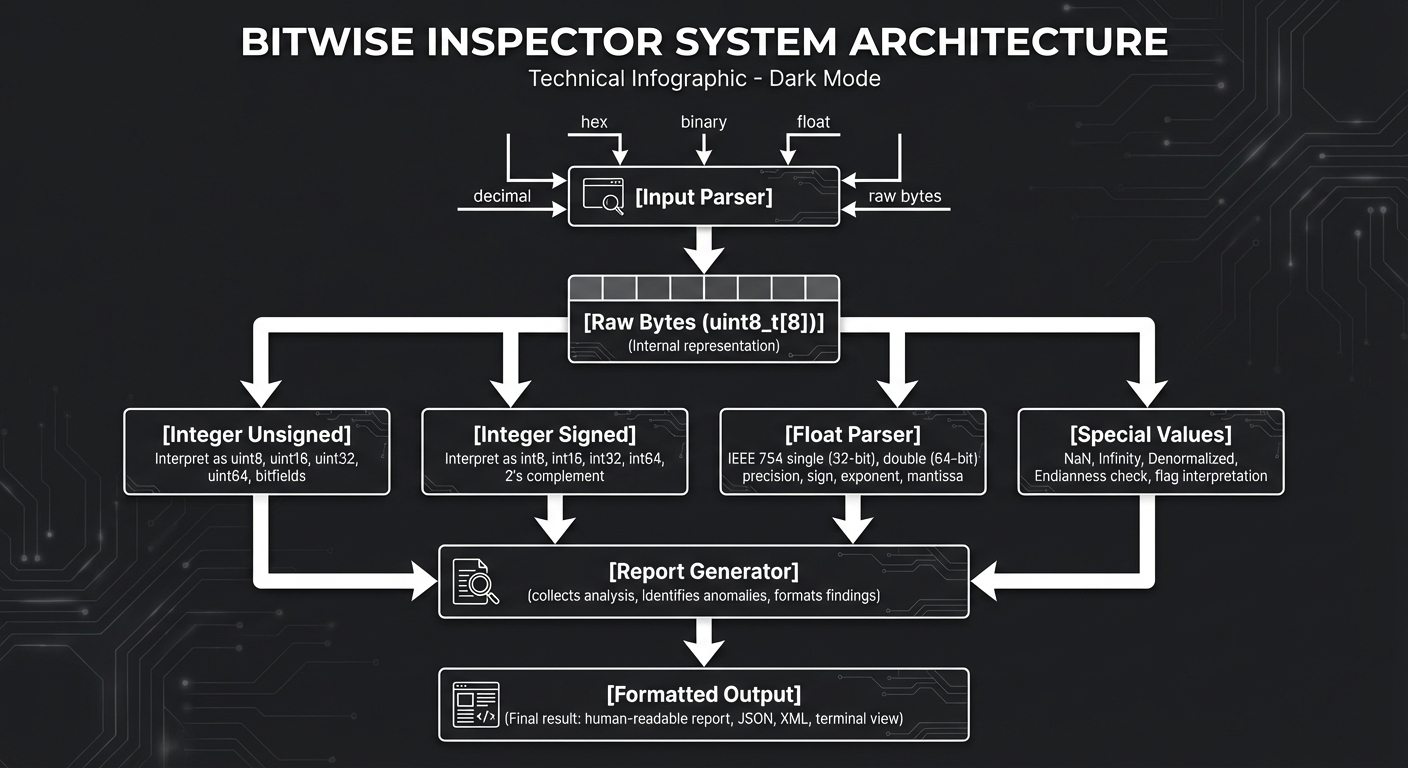
Solution Architecture
High-Level Design
         ┌─────────────────────────────────────────────────────────────────────┐
         │                        BITWISE INSPECTOR                            │
         ├─────────────────────────────────────────────────────────────────────┤
         │                                                                     │
         │   ┌───────────────┐                                                 │
         │   │  Input Parser │◀── decimal, hex, binary, float, raw bytes      │
         │   └───────┬───────┘                                                 │
         │           │                                                         │
         │           ▼                                                         │
         │   ┌───────────────┐                                                 │
         │   │  Raw Bytes    │  Canonical internal representation              │
         │   │  (uint8_t[])  │  (always 8 bytes for simplicity)                │
         │   └───────┬───────┘                                                 │
         │           │                                                         │
         │     ┌─────┴─────┬─────────────────┬───────────────────┐            │
         │     ▼           ▼                 ▼                   ▼            │
         │ ┌────────┐ ┌──────────┐    ┌────────────┐    ┌─────────────┐       │
         │ │Integer │ │ Integer  │    │   Float    │    │   Special   │       │
         │ │Unsigned│ │ Signed   │    │   Parser   │    │   Values    │       │
         │ └────┬───┘ └────┬─────┘    └─────┬──────┘    └──────┬──────┘       │
         │      │          │                │                  │              │
         │      └──────────┴────────────────┴──────────────────┘              │
         │                              │                                      │
         │                              ▼                                      │
         │                     ┌─────────────────┐                            │
         │                     │ Report Generator│                            │
         │                     └────────┬────────┘                            │
         │                              │                                      │
         │                              ▼                                      │
         │                       [Formatted Output]                            │
         │                                                                     │
         └─────────────────────────────────────────────────────────────────────┘
Module Structure
bitwise-inspector/
├── src/
│   ├── main.c              # Entry point, CLI argument parsing
│   ├── parser.c            # Parse input strings to raw bytes
│   ├── parser.h
│   ├── integer.c           # Integer interpretation and display
│   ├── integer.h
│   ├── floating.c          # IEEE-754 parsing and display
│   ├── floating.h
│   ├── endian.c            # Endianness detection and conversion
│   ├── endian.h
│   ├── display.c           # Formatted output generation
│   ├── display.h
│   └── util.c              # Helper functions
│   └── util.h
├── tests/
│   ├── test_parser.c
│   ├── test_integer.c
│   ├── test_floating.c
│   └── run_tests.sh
├── Makefile
└── README.md
Key Data Structures
/* Core representation: 8 bytes that can hold any value */
typedef struct {
    uint8_t bytes[8];       /* Raw byte storage */
    size_t num_bytes;       /* How many bytes are meaningful */
    int is_negative;        /* Was input a negative number? */
    int is_float;           /* Was input floating-point? */
    int is_double;          /* Was input double precision? */
} RawValue;

/* Integer interpretation */
typedef struct {
    uint64_t unsigned_val;
    int64_t signed_val;
    size_t width_bits;      /* 8, 16, 32, or 64 */
    int overflows_signed;   /* Would overflow if treated as signed */
} IntegerInterp;

/* IEEE-754 interpretation */
typedef struct {
    int sign;               /* 0 = positive, 1 = negative */
    int exponent_raw;       /* Raw biased exponent */
    int exponent_actual;    /* Actual exponent (unbiased) */
    uint64_t mantissa;      /* Raw mantissa bits */
    double value;           /* Computed floating value */

    /* Classification */
    enum {
        FP_NORMAL,
        FP_DENORMAL,
        FP_ZERO,
        FP_INFINITY,
        FP_NAN_QUIET,
        FP_NAN_SIGNALING
    } category;

    int is_double;          /* 32-bit vs 64-bit */
} FloatInterp;

/* System information */
typedef struct {
    int is_little_endian;
    size_t sizeof_int;
    size_t sizeof_long;
    size_t sizeof_ptr;
    size_t sizeof_float;
    size_t sizeof_double;
} SystemInfo;
Algorithm Overview
Main Algorithm Flow:
- Parse input -> Determine input type and convert to raw bytes
- Detect system -> Query endianness and type sizes
- Integer interpretations -> For each bit width (8, 16, 32, 64):
- Extract that many bytes
- Interpret as unsigned and signed
- Check for special values (TMin, max values)
- Float interpretations -> For float and double:
- Extract sign, exponent, mantissa fields
- Classify (normal, denormal, zero, infinity, NaN)
- Compute actual value
- Note precision issues
- Generate report -> Format all interpretations with ASCII diagrams
Implementation Guide
Development Environment Setup
# Required tools
# On macOS
xcode-select --install

# On Linux (Debian/Ubuntu)
sudo apt-get install gcc gdb build-essential

# Create project structure
mkdir -p bitwise-inspector/{src,tests,include}
cd bitwise-inspector
Implementation Phases
Phase 1: Foundation (Days 1-2)
Goals:
- Set up build system
- Implement endianness detection
- Create basic binary/hex output
Tasks:
- Create Makefile: ```makefile CC = gcc CFLAGS = -Wall -Wextra -std=c11 -g SRCDIR = src OBJDIR = obj SOURCES = $(wildcard $(SRCDIR)/*.c) OBJECTS = $(SOURCES:$(SRCDIR)/%.c=$(OBJDIR)/%.o) TARGET = bitwise-inspector
all: $(TARGET)
$(TARGET): $(OBJECTS) $(CC) $(OBJECTS) -o $@
$(OBJDIR)/%.o: $(SRCDIR)/%.c | $(OBJDIR) $(CC) $(CFLAGS) -c $< -o $@
$(OBJDIR): mkdir -p $(OBJDIR)
clean: rm -rf $(OBJDIR) $(TARGET)
2. Implement endianness detection:
```c
/* endian.c */
#include <stdint.h>

int detect_endianness(void) {
    uint32_t x = 0x01020304;
    uint8_t *ptr = (uint8_t *)&x;

    if (ptr[0] == 0x04) return 1;  /* Little-endian */
    if (ptr[0] == 0x01) return 0;  /* Big-endian */
    return -1;  /* Unknown */
}

void print_bytes(const void *ptr, size_t size) {
    const uint8_t *bytes = (const uint8_t *)ptr;
    for (size_t i = 0; i < size; i++) {
        printf("%02X ", bytes[i]);
    }
    printf("\n");
}
- Implement binary string conversion:
/* util.c */
void to_binary_string(uint64_t value, int bits, char *out) {
 for (int i = bits - 1; i >= 0; i--) {
     *out++ = (value >> i) & 1 ? '1' : '0';
     if (i > 0 && i % 4 == 0) *out++ = ' ';  /* Nibble separator */
 }
 *out = '\0';
}
Checkpoint: Program prints its own endianness and can show any integer in binary/hex.
Phase 2: Input Parsing (Days 3-4)
Goals:
- Parse decimal, hex, binary, and float inputs
- Handle negative numbers correctly
- Validate input
Tasks:
- Implement input type detection: ```c typedef enum { INPUT_DECIMAL, INPUT_HEX, INPUT_BINARY, INPUT_FLOAT, INPUT_BYTES, INPUT_INVALID } InputType;
InputType detect_input_type(const char *input);
2. Parse each type:
```c
int parse_decimal(const char *input, RawValue *out);
int parse_hex(const char *input, RawValue *out);      /* 0x prefix */
int parse_binary(const char *input, RawValue *out);   /* 0b prefix */
int parse_float(const char *input, RawValue *out);
int parse_bytes(const char *input, RawValue *out);    /* "XX XX XX" */
- Handle edge cases:
- Leading zeros
- Negative numbers with different bases
- Overflow during parsing
- Scientific notation for floats
Checkpoint: Can parse 42, -1, 0xDEAD, 0b1010, 3.14, 1e-10.
Phase 3: Integer Interpretation (Days 5-7)
Goals:
- Show signed/unsigned interpretations at all bit widths
- Detect and explain special values
- Show sign extension/truncation effects
Tasks:
- Implement multi-width interpretation:
void interpret_as_integers(const RawValue *val, IntegerInterp *results) { /* Interpret at 8, 16, 32, 64 bit widths */ uint64_t raw = bytes_to_uint64(val->bytes, val->num_bytes); /* 8-bit */ results[0].width_bits = 8; results[0].unsigned_val = raw & 0xFF; results[0].signed_val = (int8_t)(raw & 0xFF); /* 16-bit */ results[1].width_bits = 16; results[1].unsigned_val = raw & 0xFFFF; results[1].signed_val = (int16_t)(raw & 0xFFFF); /* ... and so on for 32, 64 */ } - Detect special values:
void check_special_integers(IntegerInterp *interp) { if (interp->width_bits == 32) { if (interp->signed_val == INT32_MIN) interp->is_tmin = 1; if (interp->signed_val == INT32_MAX) interp->is_tmax = 1; if (interp->unsigned_val == UINT32_MAX) interp->is_umax = 1; } /* Similar for other widths */ } - Generate warnings:
void warn_signed_unsigned_difference(const IntegerInterp *interp) {
 /* If MSB is 1, signed and unsigned interpretations differ wildly */
 uint64_t msb_mask = 1ULL << (interp->width_bits - 1);
 if (interp->unsigned_val & msb_mask) {
     printf("  ⚠ WARNING: MSB is set. Signed/unsigned interpretations differ!\n");
 }
}
Checkpoint: Correctly shows that 0xFF is 255 unsigned but -1 signed (8-bit).
Phase 4: Floating-Point Interpretation (Days 8-11)
Goals:
- Extract IEEE-754 fields
- Classify special values
- Compute actual values
- Show precision warnings
Tasks:
- Extract float fields:
void parse_ieee754_float(uint32_t bits, FloatInterp *out) { out->sign = (bits >> 31) & 1; out->exponent_raw = (bits >> 23) & 0xFF; out->mantissa = bits & 0x7FFFFF; /* Classify */ if (out->exponent_raw == 0) { if (out->mantissa == 0) out->category = FP_ZERO; else out->category = FP_DENORMAL; } else if (out->exponent_raw == 255) { if (out->mantissa == 0) out->category = FP_INFINITY; else if (out->mantissa & 0x400000) out->category = FP_NAN_QUIET; else out->category = FP_NAN_SIGNALING; } else { out->category = FP_NORMAL; } } - Compute actual value:
double compute_float_value(const FloatInterp *fp) { if (fp->category == FP_INFINITY) return fp->sign ? -INFINITY : INFINITY; if (fp->category == FP_NAN_QUIET || fp->category == FP_NAN_SIGNALING) return NAN; if (fp->category == FP_ZERO) return fp->sign ? -0.0 : 0.0; double mantissa_val; int exp_actual; if (fp->category == FP_DENORMAL) { mantissa_val = fp->mantissa / (double)(1 << 23); /* 0.mantissa */ exp_actual = -126; /* Fixed for denormals */ } else { mantissa_val = 1.0 + fp->mantissa / (double)(1 << 23); /* 1.mantissa */ exp_actual = fp->exponent_raw - 127; } double result = mantissa_val * pow(2, exp_actual); return fp->sign ? -result : result; } - Detect precision issues:
void warn_precision_loss(double original_input, double stored) {
 double diff = fabs(original_input - stored);
 double rel_error = diff / fabs(original_input);

 if (rel_error > 1e-15) {
     printf("  ⚠ PRECISION WARNING: Input cannot be exactly represented!\n");
     printf("     Requested: %.17g\n", original_input);
     printf("     Stored:    %.17g\n", stored);
     printf("     Error:     %.3e\n", diff);
 }
}
Checkpoint: Correctly identifies 0x7F800000 as +Infinity, 0xFFC00000 as NaN.
Phase 5: Display and Polish (Days 12-14)
Goals:
- Create formatted ASCII output
- Add binary diagrams
- Handle edge cases
- Add comparison mode
Tasks:
- Create field visualization:
void print_float_fields_diagram(const FloatInterp *fp) { printf(" Binary breakdown:\n"); printf(" ┌───┬─────────────────────┬───────────────────────────────────────┐\n"); printf(" │ S │ Exponent │ Mantissa │\n"); printf(" │ %d │ ", fp->sign); print_bits(fp->exponent_raw, 8); printf(" │ "); print_bits(fp->mantissa, 23); printf(" │\n"); printf(" └───┴─────────────────────┴───────────────────────────────────────┘\n"); } - Add comparison mode:
void compare_values(const char *input1, const char *input2) {
 RawValue v1, v2;
 parse_input(input1, &v1);
 parse_input(input2, &v2);

 printf("Comparing: %s vs %s\n", input1, input2);
 printf("Same bits?     %s\n", memcmp(v1.bytes, v2.bytes, 8) == 0 ? "YES" : "NO");
 printf("Same as int?   %s\n", to_int64(&v1) == to_int64(&v2) ? "YES" : "NO");
 printf("Same as float? %s\n", to_double(&v1) == to_double(&v2) ? "YES" : "NO");
}
Checkpoint: Full formatted output matching specification examples.
Testing Strategy
Test Categories
| Category | Purpose | Examples |
|---|---|---|
| Boundary Values | Test edge cases | 0, -1, MAX, MIN |
| Type Conversions | Verify cast behavior | -1 as unsigned, float to int |
| Special Values | Handle IEEE-754 specials | NaN, Infinity, denormals |
| Precision | Verify accuracy | 0.1, 0.3, large floats |
| Input Parsing | Handle all formats | hex, binary, scientific |
Critical Test Cases
Integer Tests:
/* Two's complement boundaries */
assert(inspect(0).signed_8 == 0);
assert(inspect(127).signed_8 == 127);
assert(inspect(128).signed_8 == -128);
assert(inspect(255).signed_8 == -1);
assert(inspect(-1).unsigned_8 == 255);

/* TMin special case */
assert(inspect(INT32_MIN).hex == "0x80000000");
assert(inspect(-INT32_MIN).value == INT32_MIN);  /* -TMin == TMin! */

/* Overflow detection */
assert(inspect(256).overflows_8bit == 1);
Floating-Point Tests:
/* Special values */
assert(inspect(0x7F800000).float_category == FP_INFINITY);
assert(inspect(0xFF800000).float_category == FP_INFINITY);  /* negative */
assert(inspect(0x7FC00000).float_category == FP_NAN);
assert(inspect(0x00400000).float_category == FP_DENORMAL);
assert(inspect(0x00000000).float_category == FP_ZERO);
assert(inspect(0x80000000).float_category == FP_ZERO);  /* -0.0 */

/* Precision tests */
assert(inspect("0.1").exact_representation == 0);
assert(inspect("0.5").exact_representation == 1);  /* 0.5 is exact! */
assert(inspect("0.25").exact_representation == 1);

/* NaN behavior */
float nan1 = inspect(0x7FC00000).float_value;
assert(nan1 != nan1);  /* NaN != NaN */
Endianness Tests:
/* Same bytes, different interpretations */
uint8_t bytes[] = {0x01, 0x02, 0x03, 0x04};
assert(interpret_le_32(bytes) == 0x04030201);
assert(interpret_be_32(bytes) == 0x01020304);
Test Data for Edge Cases
/* Integer edge cases */
{"0", "0x00", 0, 0},
{"-1", "0xFF", 255, -1},
{"127", "0x7F", 127, 127},
{"128", "0x80", 128, -128},
{"255", "0xFF", 255, -1},
{"-128", "0x80", 128, -128},
{"2147483647", "0x7FFFFFFF", 2147483647, 2147483647},
{"2147483648", "0x80000000", 2147483648, -2147483648},
{"-2147483648", "0x80000000", 2147483648, -2147483648},

/* Float edge cases */
{"0.0", "0x00000000", "zero"},
{"-0.0", "0x80000000", "negative zero"},
{"inf", "0x7F800000", "positive infinity"},
{"-inf", "0xFF800000", "negative infinity"},
{"nan", "0x7FC00000", "quiet NaN"},

/* Denormals */
{"1.4e-45", "0x00000001", "smallest positive denormal"},
{"1.17e-38", "0x00800000", "smallest positive normal"},

/* Precision edge cases */
{"0.1", "cannot be exactly represented"},
{"0.5", "exactly representable"},
{"16777216", "largest int exactly representable in float"},
{"16777217", "NOT exactly representable in float"},
Common Pitfalls & Debugging
Frequent Mistakes
| Pitfall | Symptom | Solution |
|---|---|---|
| Wrong printf format | Garbage output for 64-bit values | Use PRIu64, PRIx64 from <inttypes.h> |
| Signed right shift | Unexpected 1s in high bits | Use unsigned types for bit manipulation |
| Float comparison | NaN comparisons always false | Use isnan() from <math.h> |
| Endian confusion | Bytes in wrong order | Be explicit about byte order in code |
| Integer promotion | Silent widening changes values | Cast explicitly |
| Denormal handling | Wrong values near zero | Check exponent == 0 case |
Debugging Strategies
Print bytes explicitly:
void debug_print_bytes(const void *ptr, size_t n, const char *label) {
    fprintf(stderr, "[DEBUG] %s: ", label);
    const uint8_t *bytes = ptr;
    for (size_t i = 0; i < n; i++) {
        fprintf(stderr, "%02X ", bytes[i]);
    }
    fprintf(stderr, "\n");
}
Verify with known values:
/* These should always work */
float f = 1.0f;
uint32_t bits;
memcpy(&bits, &f, sizeof(bits));
assert(bits == 0x3F800000);  /* 1.0 has known encoding */

double d = 1.0;
uint64_t dbits;
memcpy(&dbits, &d, sizeof(dbits));
assert(dbits == 0x3FF0000000000000ULL);
Use union for type punning (carefully):
/* Note: technically undefined in C, but widely supported */
union {
    float f;
    uint32_t i;
} u;
u.f = 3.14f;
printf("3.14 as bits: 0x%08X\n", u.i);

/* Preferred approach: memcpy */
float f = 3.14f;
uint32_t bits;
memcpy(&bits, &f, sizeof(bits));  /* Safe and portable */
Common Calculation Errors
Wrong sign extension:
/* WRONG: sign-extends in 32-bit, then zero-extends to 64-bit */
int8_t x = -1;
uint64_t wrong = (uint64_t)(uint32_t)x;  /* 0x00000000FFFFFFFF */

/* RIGHT: sign-extend directly to 64-bit first */
int8_t x = -1;
uint64_t right = (uint64_t)(int64_t)x;   /* 0xFFFFFFFFFFFFFFFF */
Wrong float field extraction:
/* WRONG: shifts signed value */
int32_t bits = *(int32_t *)&my_float;
int exp = (bits >> 23) & 0xFF;  /* May have sign extension issues */

/* RIGHT: use unsigned */
uint32_t bits;
memcpy(&bits, &my_float, sizeof(bits));
unsigned exp = (bits >> 23) & 0xFF;  /* Always correct */
Extensions & Challenges
Beginner Extensions
- Add color output: Highlight special values in red, headers in blue
- JSON output mode:
--jsonfor machine-readable output - Interactive mode: Loop to inspect multiple values
- History: Remember and compare recent inspections
Intermediate Extensions
- Expression evaluation:
inspect "0xFF + 1"shows overflow - Type annotation:
inspect -t uint32_t 0xDEADBEEF - Struct layout: Show padding for struct definitions
- Memory dump mode: Read bytes from file or stdin
- x86 instruction bytes: Identify common instruction prefixes
Advanced Extensions
- Arbitrary precision: Handle >64 bit integers (use GMP)
- Extended precision: 80-bit x87 floats, 128-bit quad
- SIMD visualization: Show __m128, __m256 vector contents
- Debugger integration: Plugin for GDB/LLDB
- Web interface: WASM-compiled inspector in browser
Real-World Connections
Security Applications
Integer overflow vulnerabilities:
/* Classic vulnerability pattern */
size_t size = user_input;
size_t total = size * sizeof(struct item);  /* Can overflow! */
void *buf = malloc(total);  /* Allocates less than expected */
/* Buffer overflow when filling buf with 'size' items */
Your tool helps identify when values wrap around unexpectedly.
Floating-point comparison bugs:
/* Dangerous financial code */
if (balance - withdrawal == 0.0) {  /* May fail due to precision! */
    close_account();
}
Systems Programming
Network byte order:
/* Data from network is big-endian */
uint32_t net_value;
recv(sock, &net_value, 4, 0);
uint32_t host_value = ntohl(net_value);  /* Convert to host order */
Your tool shows exactly how byte ordering affects interpretation.
Binary file formats:
ELF header starts with:
7F 45 4C 46  →  ".ELF" magic number
02           →  64-bit
01           →  little-endian
Understanding byte-level representation is essential for parsing binary formats.
Embedded Systems
Fixed-point arithmetic:
/* When floats are too slow, use fixed-point */
typedef int32_t fixed_16_16;  /* 16 bits integer, 16 bits fraction */

fixed_16_16 a = 0x00018000;  /* 1.5 */
fixed_16_16 b = 0x00020000;  /* 2.0 */
fixed_16_16 c = (a * b) >> 16;  /* Multiply and shift */
Scientific Computing
Precision loss in accumulation:
float sum = 0.0f;
for (int i = 0; i < 1000000; i++) {
    sum += 0.1f;  /* Each addition loses precision */
}
/* sum is NOT 100000.0! Probably around 100958.xxx */
Catastrophic cancellation:
float a = 1.00000001f;
float b = 1.00000000f;
float diff = a - b;  /* Nearly all significant digits lost! */
Resources
Essential Reading
From Your Collection:
- CS:APP Chapter 2: “Representing and Manipulating Information” - The definitive treatment
- CS:APP Chapter 3: “Machine-Level Representation of Programs” - Data sizes and alignment
- Effective C, 2nd Edition: Chapter on integers and type conversions
Additional:
- “What Every Computer Scientist Should Know About Floating-Point Arithmetic” by David Goldberg - Essential float understanding
- IEEE 754-2019 Standard - Official floating-point specification
Online Tools for Verification
- IEEE-754 Floating Point Converter: https://www.h-schmidt.net/FloatConverter/IEEE754.html
- Two’s Complement Calculator: Various online tools
- Compiler Explorer (godbolt.org): See how C code becomes assembly
Related Projects
- Previous: P1 (Toolchain Explorer) - Understanding how data gets into binaries
- Next: P3 (Data Lab Clone) - Bit manipulation puzzles using these concepts
- Related: P4 (Calling Convention) - How data is passed at machine level
Video Resources
- CS:APP Video Lectures: CMU’s own lectures covering Chapter 2
- Ben Eater’s videos: Low-level computer concepts explained visually
Self-Assessment Checklist
Understanding Verification
Two’s Complement:
- I can convert any 8-bit value between signed and unsigned interpretations mentally
- I can explain why -(-128) == -128 in 8-bit signed arithmetic
- I know the range of signed and unsigned for any bit width
- I understand why signed overflow is undefined behavior in C
IEEE-754:
- I can identify the three fields in a float/double
- I understand why the leading 1 is implicit in normalized numbers
- I can recognize NaN, Infinity, and denormal patterns
- I can explain why 0.1 + 0.2 != 0.3
Endianness:
- I know which byte order my machine uses
- I can convert between big-endian and little-endian interpretations
- I understand when byte order matters (multi-byte values) and when it doesn’t (single bytes)
Implementation Verification
- Tool correctly parses decimal, hex, binary, and float inputs
- All integer interpretations (8, 16, 32, 64-bit, signed/unsigned) are correct
- IEEE-754 field extraction is correct for both float and double
- Special values (NaN, Infinity, denormals) are correctly identified
- Endianness is correctly detected and displayed
- Output format is clear and educational
Growth Verification
- I fixed at least one bug by examining raw byte patterns
- I can predict the output of my tool for new inputs before running it
- I understand common patterns that cause bugs (signed/unsigned comparison, precision loss)
- I can explain bit-level representation to someone else
Submission / Completion Criteria
Minimum Viable Completion:
- Parses integer inputs (decimal and hex)
- Shows byte representation
- Shows signed/unsigned interpretations for 32-bit
- Detects system endianness
Full Completion:
- All input formats work (decimal, hex, binary, float, bytes)
- All bit widths shown (8, 16, 32, 64)
- IEEE-754 interpretation with field breakdown
- Special value detection and explanation
- Clean formatted output with ASCII diagrams
- Test suite with edge cases
Excellence (Going Above & Beyond):
- Expression evaluation
- Comparison mode between values
- Interactive REPL mode
- Color terminal output
- Web or GUI interface
The Core Question You’re Answering
“When I write
int x = -1orfloat y = 0.1, what EXACTLY is stored in memory, and why does that sometimes cause surprising behavior?”
This project transforms the mystery of “the computer just stores numbers somehow” into a complete understanding of two’s complement integers, IEEE-754 floating point, and endianness. You’ll never again be surprised by signed/unsigned comparison bugs or floating-point precision issues.
Concepts You Must Understand First
Before starting this project, ensure you understand these concepts:
| Concept | Why It Matters | Where to Learn |
|---|---|---|
| Binary number system | Everything builds on this | CS:APP 2.1, any discrete math |
| Hexadecimal notation | Compact representation of bytes | CS:APP 2.1.3 |
| What a “byte” is | Fundamental unit of storage | CS:APP 2.1.1 |
| Pointers in C | You’ll cast pointers to examine bytes | Any C book, Ch. on pointers |
| printf format specifiers | For displaying values in different formats | C reference manual |
| Basic understanding of negative numbers in math | Context for two’s complement | High school math |
Questions to Guide Your Design
Work through these questions BEFORE writing code:
-
Type Punning: How do you safely view the bytes of a float? (Hint: memcpy is safer than pointer casting)
-
Endianness Detection: How can your program determine if it’s running on a big-endian or little-endian system?
-
Input Parsing: How will you distinguish between
42(integer),0x2A(hex),0b101010(binary), and42.0(float)? -
Width Handling: If the user enters
300, should you show 8-bit interpretation (which overflows) or just skip it? -
Float Field Extraction: How do you extract sign, exponent, and mantissa from a float? What bit masks do you need?
-
Special Value Detection: How do you detect NaN, Infinity, denormals, and negative zero?
-
Precision Display: How many decimal places should you show for floating-point values to be accurate but not misleading?
Thinking Exercise
Before writing any code, work through this by hand:
Exercise 1: Two’s Complement
For 8-bit signed integers, fill in this table:
| Binary | Unsigned | Signed |
|---|---|---|
| 0000 0000 | ? | ? |
| 0000 0001 | ? | ? |
| 0111 1111 | ? | ? |
| 1000 0000 | ? | ? |
| 1111 1111 | ? | ? |
| 1000 0001 | ? | ? |
Now verify: What is -5 in 8-bit binary? Hint: negate 5 (flip bits, add 1).
Exercise 2: IEEE-754 Encoding
Encode the number 5.75 as a 32-bit float:
- Convert 5.75 to binary: 5 = 101, 0.75 = 0.11, so 5.75 = 101.11
- Normalize: 101.11 = 1.0111 x 2^2
- Calculate biased exponent: 2 + 127 = 129 = 10000001
- Mantissa (drop the leading 1): 01110000000000000000000
- Sign: 0 (positive)
Final: 0 10000001 01110000000000000000000 = 0x40B80000
Verify using your completed tool or an online calculator.
Exercise 3: Why 0.1 + 0.2 != 0.3
- What is 0.1 in binary? (Hint: it’s repeating, like 1/3 in decimal)
- What happens when you truncate a repeating binary fraction?
- When you add two truncated values, is the error additive?
Hints in Layers
If you’re stuck, reveal hints one at a time:
Hint 1: Examining Bytes Safely
Don’t use pointer casting like *(uint32_t*)&f - it’s technically undefined behavior. Use memcpy instead:
float f = 3.14;
uint32_t bits;
memcpy(&bits, &f, sizeof(bits));  // Safe, portable
This is what the C standard guarantees will work.
Hint 2: Extracting Float Fields
For a 32-bit float:
uint32_t bits;
memcpy(&bits, &my_float, sizeof(bits));

int sign = (bits >> 31) & 1;
int exponent = (bits >> 23) & 0xFF;
uint32_t mantissa = bits & 0x7FFFFF;
For doubles, it’s 1 sign bit, 11 exponent bits, 52 mantissa bits.
Hint 3: Detecting Special Values
// For float (32-bit)
if (exponent == 0 && mantissa == 0) → Zero (check sign for +0 vs -0)
if (exponent == 0 && mantissa != 0) → Denormalized
if (exponent == 255 && mantissa == 0) → Infinity
if (exponent == 255 && mantissa != 0) → NaN
The standard library also provides isnan(), isinf(), fpclassify() in <math.h>.
Hint 4: Endianness Detection
int is_little_endian(void) {
    uint32_t x = 1;
    return *(uint8_t*)&x == 1;
}
On little-endian: the 1 is stored in the first byte. On big-endian: the 1 is stored in the last byte.
The Interview Questions They’ll Ask
After completing this project, you’ll be ready for these common interview questions:
- “What is two’s complement and why is it used?”
- Expected: Negation by flipping bits and adding 1; hardware can use the same circuits for signed/unsigned addition
- Bonus: Explain why there’s one more negative number than positive (TMin has no positive counterpart)
- “What happens when you cast a negative int to unsigned?”
- Expected: Bit pattern stays the same, interpretation changes; -1 becomes UINT_MAX
- Bonus: Explain why this causes bugs in comparisons like
if (signed_val < unsigned_val)
- “Why is 0.1 + 0.2 not equal to 0.3 in floating point?”
- Expected: 0.1 cannot be exactly represented in binary; accumulated rounding error
- Bonus: Explain the mantissa pattern that shows why (repeating 1001)
- “What is NaN and how do you check for it?”
- Expected: “Not a Number” from invalid operations like 0/0; NaN != NaN is true
- Bonus: Explain quiet vs signaling NaN, and the bit pattern (exponent all 1s, mantissa non-zero)
- “What’s the difference between big-endian and little-endian?”
- Expected: Byte order for multi-byte values; little-endian stores LSB first
- Bonus: Know which architectures use which (x86 is little, network byte order is big)
- “What is integer overflow and why is signed overflow undefined behavior in C?”
- Expected: Result wraps around; undefined because different hardware handles it differently
- Bonus: Explain how compilers exploit UB for optimization (can assume no overflow happened)
Books That Will Help
| Topic | Book | Chapter/Section |
|---|---|---|
| Unsigned integers | CS:APP 3rd Ed | Section 2.1.1-2.1.3 “Integral Data Types” |
| Two’s complement | CS:APP 3rd Ed | Section 2.2 “Two’s-Complement Encodings” |
| Integer conversions | CS:APP 3rd Ed | Section 2.2.4-2.2.6 “Conversions between Signed and Unsigned” |
| Integer overflow | CS:APP 3rd Ed | Section 2.3 “Integer Arithmetic” |
| IEEE-754 floats | CS:APP 3rd Ed | Section 2.4 “Floating Point” |
| Special float values | CS:APP 3rd Ed | Section 2.4.2 “IEEE Floating-Point Representation” |
| Floating-point operations | CS:APP 3rd Ed | Section 2.4.4-2.4.5 “Rounding”, “Floating-Point Operations” |
| Byte ordering | CS:APP 3rd Ed | Section 2.1.4 “Addressing and Byte Ordering” |
| The classic float paper | “What Every Computer Scientist Should Know About Floating-Point Arithmetic” | David Goldberg, 1991 |
| C type system | Effective C, 2nd Edition | Chapter 3 “Arithmetic Types” |
This guide was expanded from CSAPP_3E_DEEP_LEARNING_PROJECTS.md. For the complete learning path, see the project index.