Sprint: CRM Software Mastery - Real World Projects
Goal: Master CRM software architecture from first principles so you can design systems that teams actually adopt and rely on for revenue operations. You will learn why CRM projects fail in production, how to model customer and revenue data safely, and how to build low-friction workflows that improve seller behavior instead of fighting it. Across this sprint, you will build a complete CRM platform in incremental slices: data core, pipeline, activity capture, integrations, automation, extensibility, analytics, service, and platform governance. By the end, you will be able to defend architecture decisions with technical and business reasoning, and map your project work directly to enterprise product and platform roles.
Introduction
CRM software is a system for managing customer relationships as operational data, process state, and business decisions.
- What is CRM? A customer system of record plus execution layer for sales, service, and account growth.
- What problem does it solve today? It centralizes fragmented context (contacts, opportunities, communication history, tasks, support data) and turns that context into consistent action.
- What you will build in this sprint: 13 progressively connected projects ending in a production-grade multi-tenant CRM platform.
- In scope: data modeling, identity resolution, activity capture, workflow automation, analytics, extensibility, integration APIs, and governance.
- Out of scope: full ERP billing internals, legal contract lifecycle automation, and advanced ML model training pipelines.
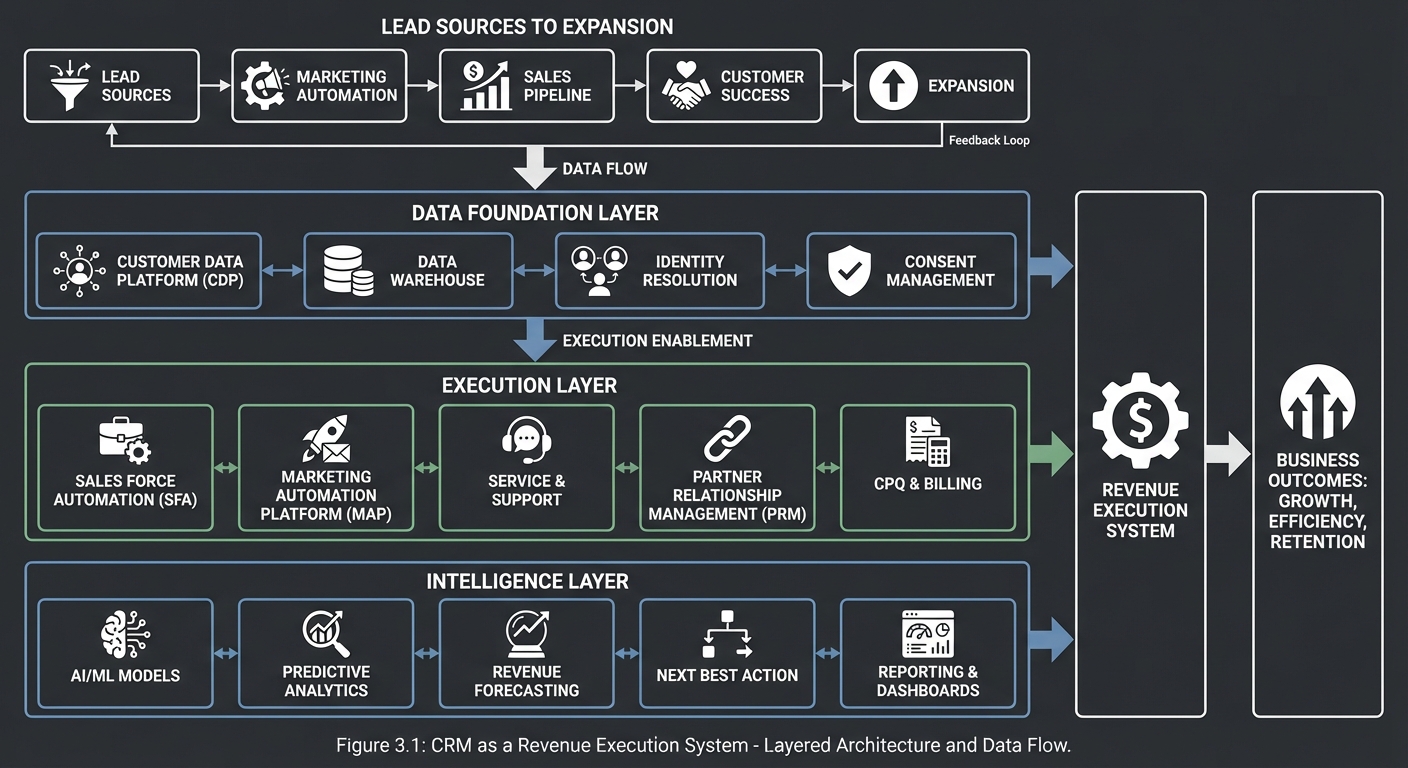
                         CRM as a Revenue Execution System

Lead Sources -> Lead Qualification -> Opportunity Management -> Service Feedback -> Expansion
     |                |                      |                     |                  |
     v                v                      v                     v                  v
+-------------------------------------------------------------------------------------------+
| Data Foundation: accounts, contacts, activities, products, cases, ownership, permissions |
+-------------------------------------------------------------------------------------------+
     |                |                      |                     |                  |
     v                v                      v                     v                  v
+-------------------------------------------------------------------------------------------+
| Execution Layer: pipeline board, routing, workflows, SLA timers, integrations, alerts    |
+-------------------------------------------------------------------------------------------+
     |                                                                                       |
     v                                                                                       v
+-------------------------------------------------------------------------------------------+
| Intelligence Layer: forecasting, health scoring, next best action, risk detection         |
+-------------------------------------------------------------------------------------------+
How to Use This Guide
- Read
## Theory Primerfirst. It is intentionally dense and gives the mental models needed to avoid shallow feature-by-feature implementation. - Start with one learning path from
## Recommended Learning Pathsand follow project order for your first pass. - Before coding each project, answer the
#### The Core Question You Are Answeringand#### Thinking Exercisesections. - Validate against
#### Definition of Donebefore moving on; avoid moving forward with uncertain assumptions. - Track one architecture decision per project: what tradeoff you made, why, and what production risk remains.
Prerequisites & Background Knowledge
Essential Prerequisites (Must Have)
- Working knowledge of SQL schema design, indexing, and transactional basics.
- Comfort with one backend stack (Python, TypeScript, Go, Java, or similar) and one frontend stack.
- Basic API design literacy (HTTP verbs, status codes, authentication basics).
- Familiarity with asynchronous processing patterns (queues, retries, idempotency).
- Recommended Reading: “Designing Data-Intensive Applications” by Martin Kleppmann - Ch. 1-5.
Helpful But Not Required
- OAuth2 and identity federation concepts.
- Event-driven architecture and change data capture.
- Business intelligence metric design.
Self-Assessment Questions
- Can you explain why two records that “look similar” should not always be auto-merged?
- Can you design an idempotent webhook consumer that safely retries?
- Can you defend when to use strict stage transition rules versus flexible workflow rules?
Development Environment Setup Required Tools:
PostgreSQL15+Redis7+Docker24+Node.js20+ orPython3.11+curlandjq
Recommended Tools:
- OpenTelemetry collector for tracing
- A queue runtime (RabbitMQ, NATS, or Kafka)
- A local email sandbox (MailHog or equivalent)
Testing Your Setup:
$ docker compose up -d
$ curl -s http://localhost:8080/health | jq .
{
  "status": "ok",
  "services": {"db": "up", "cache": "up", "queue": "up"}
}
Time Investment
- Simple projects: 4-8 hours each
- Moderate projects: 10-20 hours each
- Complex projects: 20-40 hours each
- Total sprint: 4-7 months, depending on project depth and testing rigor
Important Reality Check CRM engineering is less about building forms and more about managing messy operational truth. You will encounter contradictions in ownership, missing data, duplicate identities, inconsistent process definitions, and unstable integration semantics. Expect to revise data contracts and process boundaries repeatedly.
Big Picture / Mental Model
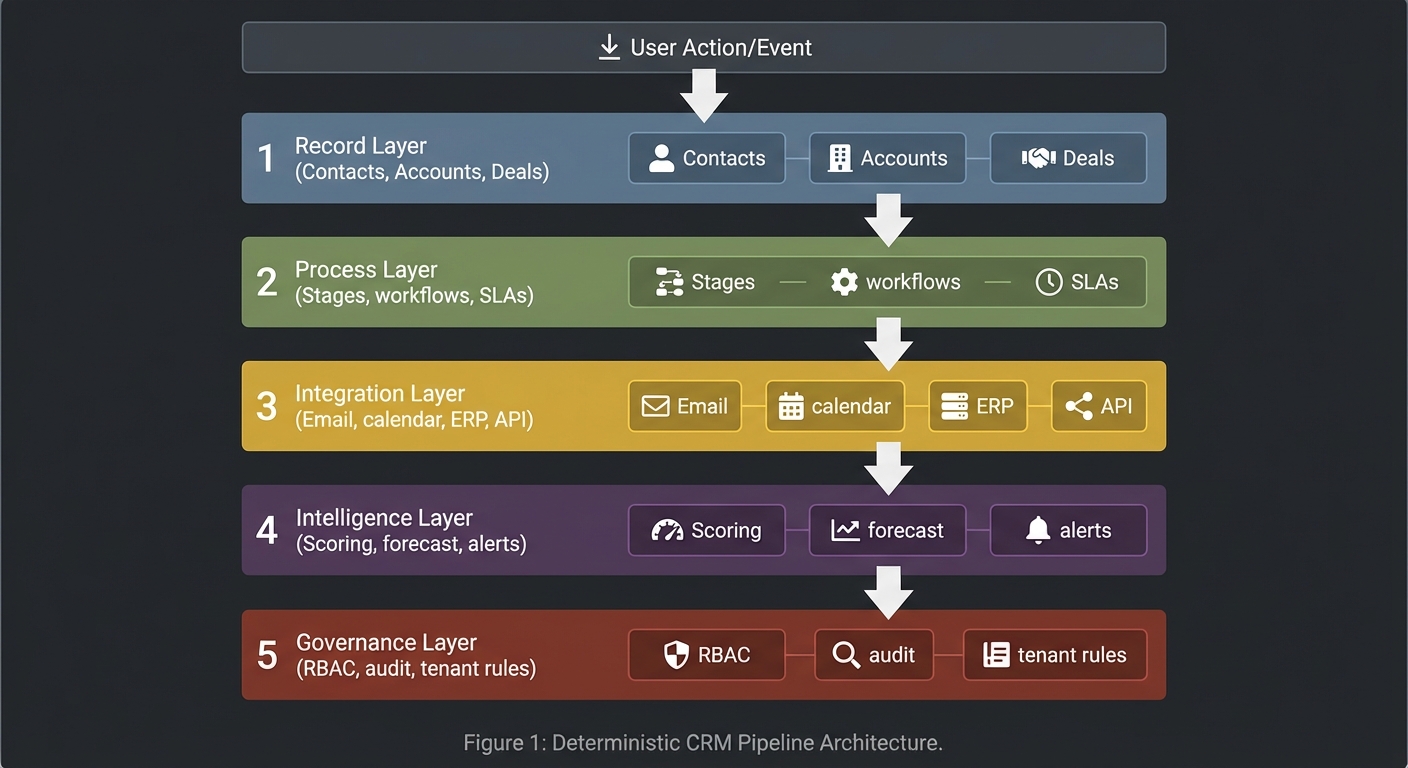
Treat CRM as a deterministic pipeline where each layer adds value while preserving auditability.
User Action/Event
      |
      v
+---------------------------+
| 1) Record Layer           |
| Contacts, Accounts, Deals |
+---------------------------+
      |
      v
+---------------------------+
| 2) Process Layer          |
| Stages, workflows, SLAs   |
+---------------------------+
      |
      v
+---------------------------+
| 3) Integration Layer      |
| Email, calendar, ERP, API |
+---------------------------+
      |
      v
+---------------------------+
| 4) Intelligence Layer     |
| Scoring, forecast, alerts |
+---------------------------+
      |
      v
+---------------------------+
| 5) Governance Layer       |
| RBAC, audit, tenant rules |
+---------------------------+
Core invariants you should enforce in every project:
- Data lineage is traceable from source event to user-visible state.
- Business rules are explicit, testable, and version-aware.
- Integrations are idempotent and observable.
- Metrics are reproducible from raw records and not hand-edited.
- Tenant and role boundaries are enforced centrally, not per endpoint.
Theory Primer
Concept 1: CRM Domain Modeling, Identity, and Data Quality
Fundamentals
CRM domain modeling is the practice of turning ambiguous commercial reality into stable entities and relationships that survive real operations. The core entities look simple at first: lead, contact, account, opportunity, activity, product, case, and task. The complexity appears when these entities overlap in time and ownership. A person can change companies, one company can have multiple legal entities, an email can involve multiple contacts and opportunities, and one opportunity can influence several downstream objects like tasks, quotes, or invoices. Good modeling requires explicit identity boundaries, lifecycle states, and relationship semantics. Data quality is not a cleanup phase after modeling; it is part of the model itself. If the model cannot represent uncertainty (possible duplicate, unverified contact, inferred association), the system will force users into bad data entry behavior and degrade trust. Domain modeling in CRM is therefore a reliability discipline: it determines whether later automation and analytics are valid or just mathematically polished noise.
Deep Dive
The first architectural decision in CRM data design is whether identity is represented as a single canonical record or a layered model with source identities plus resolved identities. In practice, a layered approach is safer. You ingest source records from forms, email systems, sales enrichment providers, and manual edits; then you resolve them into canonical entities through deterministic and probabilistic matching. This preserves provenance and avoids irreversible merges when data is incomplete. A canonical-only design seems cleaner but often destroys traceability and makes reconciliation impossible when external systems disagree.
A second decision is relationship cardinality and temporal validity. Many beginner systems hard-code a single account per contact and a single owner per opportunity. Real-world operations require time-aware relationships: a contact may have a historical employment link, an opportunity may have changing ownership over time, and account hierarchies may change through acquisition. You need relationship tables with effective date ranges and role types (decision maker, economic buyer, technical champion) to represent this accurately. Without temporal semantics, forecasting, attribution, and health scoring become unreliable.
Third, define lifecycle transitions explicitly. Leads do not simply “become” contacts; they transition based on qualification criteria. Opportunities should move through a controlled stage machine with validation rules, but rules should be configurable to avoid hard-coded process assumptions. Cases require SLA state, escalation timers, and closure conditions. Lifecycle design belongs in the domain model because process state drives automation and reporting. If state transitions are implicit in UI behavior, backend consistency cannot be guaranteed.
Fourth, data quality architecture needs first-class artifacts: duplicate candidates, confidence scores, merge policies, survivorship rules, and quality health metrics. Duplicate handling should never be a one-time migration job. New records continuously enter through integrations and manual entry, so matching and remediation pipelines must run continuously. Survivorship rules decide which value wins on merge (for example, verified email over imported email). Good systems keep both original and chosen values with evidence of decision path.
Fifth, indexing strategy must follow query intent, not only schema elegance. CRM workloads are read-heavy and filter-heavy: users search by name, domain, email, phone, owner, stage, next activity date, and risk flags. Use composite indexes for operational filters, full-text search for activity and note fields, and event tables for timeline reconstruction. Over-normalized schemas without retrieval strategy create acceptable migration demos but unusable operational systems.
Sixth, model uncertainty and incompleteness directly. Allow status flags such as unverified, source_conflict, possible_duplicate, and inferred_relationship. This prevents false precision and supports human review workflows. Systems that force absolute certainty at write time encourage users to input placeholder data just to satisfy mandatory fields, which later contaminates analytics.
Finally, domain model governance matters as much as schema design. Define ownership for each entity family, version model changes, and document semantic contracts. Revenue operations, sales leadership, and engineering must agree on definitions like “qualified lead” or “commit forecast”. If these definitions drift between teams, CRM becomes a political reporting tool rather than an operational system.
How this fit on projects
- Primary: Projects 1, 7, 10, 11, 13.
- Secondary: Projects 2, 8, 9.
Definitions & key terms
- Canonical Record: resolved entity representing one real-world object.
- Source Record: raw entity from a specific upstream system.
- Survivorship Rule: policy deciding which value wins during merge.
- Temporal Relationship: relation with effective start/end semantics.
- Confidence Score: numeric estimate of match quality.
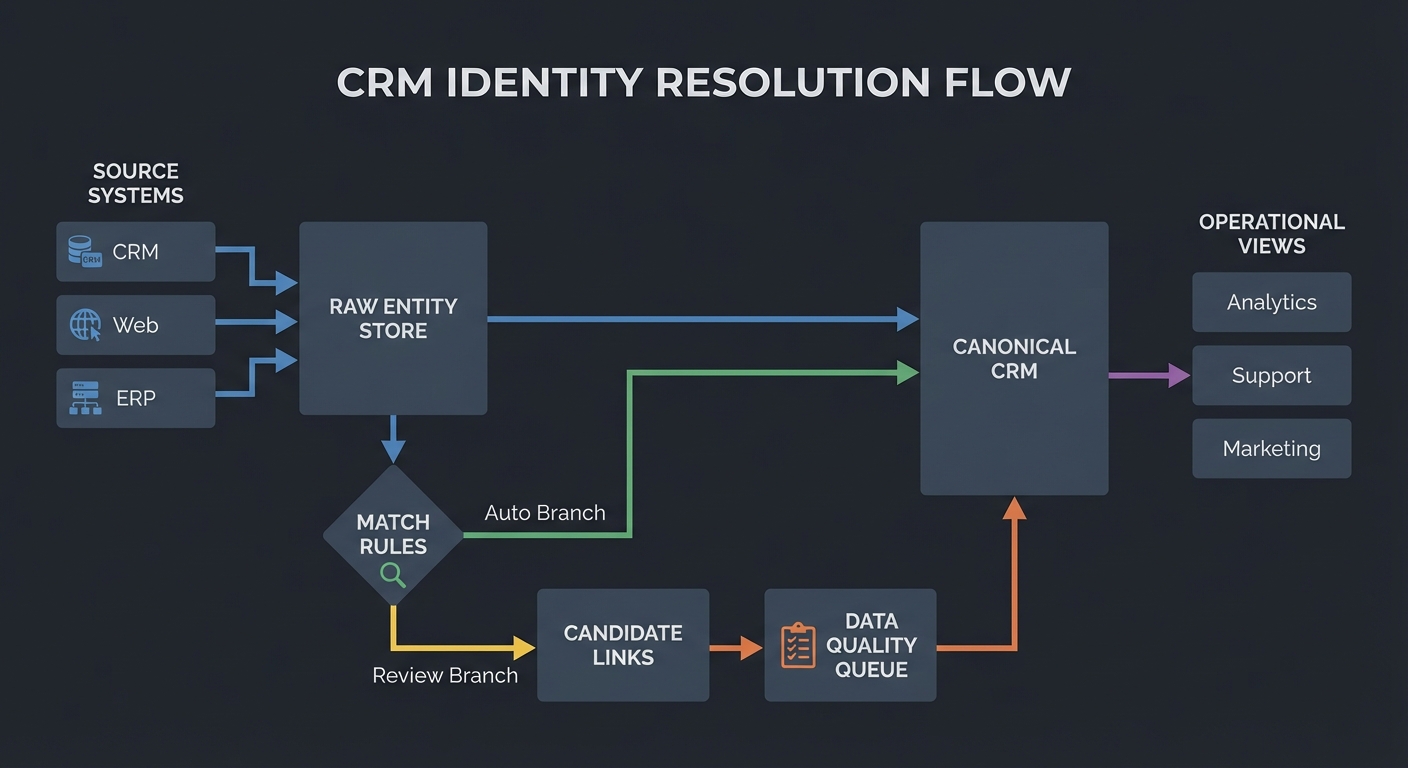
Mental model diagram
[Source Systems]
   |  (web form, email, import, API)
   v
[Raw Entity Store] --match rules--> [Candidate Links] --review/auto--> [Canonical CRM]
      |                                     |                                |
      |                                     v                                v
      +-----------------------------> [Data Quality Queue] ---------> [Operational Views]
How it works
- Ingest source records with immutable source identifiers.
- Normalize fields (name tokens, domain casing, phone format, locale handling).
- Run deterministic matches (exact email/domain rules) then probabilistic matches.
- Generate candidate links with confidence and explanation.
- Auto-merge above strict threshold; queue ambiguous cases for review.
- Apply survivorship rules and preserve lineage.
- Rebuild search/index projections and publish quality metrics.
Invariants:
- No canonical merge without traceable evidence.
- No destructive overwrite of original source payload.
Failure modes:
- False-positive merges that combine distinct people.
- False-negative matching that preserves duplicates.
- Relationship drift due to stale external references.
Minimal concrete example
INPUT A: "Alicia Smith", email: alicia@acme.com, company: ACME Inc.
INPUT B: "Alice Smith", email: a.smith@acme.com, company: Acme Corporation

RULES:
- domain_match(acme.com) -> +0.35
- name_similarity >= 0.88 -> +0.30
- title_overlap("VP Sales") -> +0.20
- conflicting_phone -> -0.10

score = 0.75  => queue for human review (auto-merge threshold = 0.85)
Common misconceptions
- “Duplicate handling is only for imports.” It is a continuous runtime concern.
- “One contact = one account forever.” Employment changes break this assumption.
- “Required fields guarantee quality.” Required placeholders often create worse data.
Check-your-understanding questions
- Why is source lineage required even after canonical merge?
- What is the risk of using only exact-match dedupe rules?
- Why should relationship tables include time windows?
- Why is a confidence threshold not enough by itself?
Check-your-understanding answers
- Lineage enables audit, rollback, and upstream reconciliation.
- You miss near-duplicates and accumulate fragmented engagement history.
- Commercial relationships change; time windows preserve analysis correctness.
- Thresholds need explanation, review policy, and survivorship semantics.
Real-world applications
- Sales and marketing contact resolution.
- Support and success account consolidation.
- M&A customer base unification.
Where you’ll apply it
Project 1,Project 7,Project 10,Project 11,Project 13.
References
- Martin Kleppmann, Designing Data-Intensive Applications (Ch. 2-3, 5).
- Thomas C. Redman, Data Quality: The Field Guide.
- Salesforce Data Model docs: Salesforce Data Model.
Key insights
- CRM trust is a data quality architecture problem before it is a UI problem.
Summary
- Use layered identity, temporal relationships, and explicit quality workflows.
- Preserve source lineage and make merge logic explainable.
Homework/Exercises to practice the concept
- Design a contact/account schema supporting employment history and role changes.
- Draft a survivorship policy for conflicting email, phone, title, and owner fields.
- Define three quality metrics you would publish weekly.
Solutions to the homework/exercises
- Use
contact,account, andcontact_account_relationshipwith effective date ranges. - Prefer verified/system-of-record values, keep alternate values, and log merge evidence.
- Duplicate candidate rate, unresolved conflict backlog, and stale critical field percentage.
Concept 2: Workflow Automation and Event-Driven CRM Process Design
Fundamentals
Workflow automation in CRM is the mechanism that turns passive records into active operational behavior. A CRM without automation is a database with manual reminders; a CRM with disciplined automation becomes a process engine that increases consistency and reduces latency. Events such as stage transitions, ownership changes, inactivity windows, SLA deadlines, and inbound communication should trigger deterministic actions: notifications, assignments, task creation, state updates, or external API calls. The core design problem is balancing flexibility for business teams with safety for platform integrity. If automation is too rigid, business teams bypass the system. If automation is too permissive, loops, duplicate actions, and hidden coupling appear. Event-driven architecture helps by separating event production from action execution, but only when idempotency, ordering strategy, retry behavior, and observability are explicit. Workflow design in CRM is therefore a control-systems problem: you are building feedback loops that shape human and system behavior.
Deep Dive
Start with event taxonomy. Not every database update deserves a business event. Define high-value domain events like opportunity.stage_changed, lead.qualified, case.sla_breached, and activity.no_touch_window_reached. Events should carry semantic payloads, version fields, actor context, and causation/correlation ids. Without this discipline, downstream automation becomes brittle because consumers cannot distinguish meaningful transitions from incidental updates.
Next, choose your delivery model. Synchronous rule execution during API writes gives immediate feedback but increases request latency and failure coupling. Asynchronous execution via queue decouples writes from side effects but introduces eventual consistency and retry complexity. Most CRM workloads benefit from a hybrid: enforce hard validation synchronously (for example, illegal stage transitions), dispatch side effects asynchronously (notifications, enrichment calls, analytics updates).
Idempotency is non-negotiable. Workflow actions should produce the same final state even if an event is delivered multiple times. Use idempotency keys derived from event id and action definition. Persist execution ledger entries and short-circuit duplicates. Without this, retry storms create repeated emails, repeated tasks, and repeated assignments that destroy trust quickly.
Loop prevention is another common failure point. Example: workflow A updates a field that triggers workflow B, which updates a field that retriggers A. Solve with execution depth limits, event origin metadata, and rule-level suppression guards. More advanced systems compute dependency graphs and reject cyclic workflow definitions at publish time.
Condition evaluation should separate expression parsing from evaluation runtime. Business-authored conditions often evolve. If expressions are hard-coded per rule, change velocity slows and testing becomes unreliable. Build an expression engine with typed operators, null behavior, and deterministic short-circuit semantics. Version expression schemas so old workflows continue to execute predictably.
Action execution requires transactional boundary design. A workflow may include internal updates plus external side effects. Use outbox/event relay patterns to ensure consistency between database state and emitted events. If you send external calls inside open DB transactions, lock contention and failure coupling increase. If you update DB after external calls, partial failures become hard to repair. The outbox pattern reduces this gap: commit intended actions atomically with domain update, then dispatch asynchronously with retries.
Observability is the difference between manageable automation and black-box chaos. You need per-workflow execution traces, action latency metrics, retry counts, dead-letter queues, and human-readable run histories. Business teams should be able to answer: “Why did this rule fire?” and “Why didn’t this rule fire?” without involving engineering every time.
Finally, governance: workflow authoring should include sandbox testing, approval checks for high-impact automations, and change logs. Teams should run deterministic replay tests against fixture events before publishing. This makes process changes auditable and reduces production surprise.
How this fit on projects
- Primary: Projects 3, 5, 8, 10, 12, 13.
- Secondary: Projects 2 and 9.
Definitions & key terms
- Domain Event: semantically meaningful business occurrence.
- Idempotency Key: stable key preventing duplicate effect execution.
- Outbox Pattern: atomic persistence of domain change plus pending events.
- Dead-Letter Queue: failed messages requiring remediation.
- Workflow Loop: cyclic automation chain causing repeated triggering.
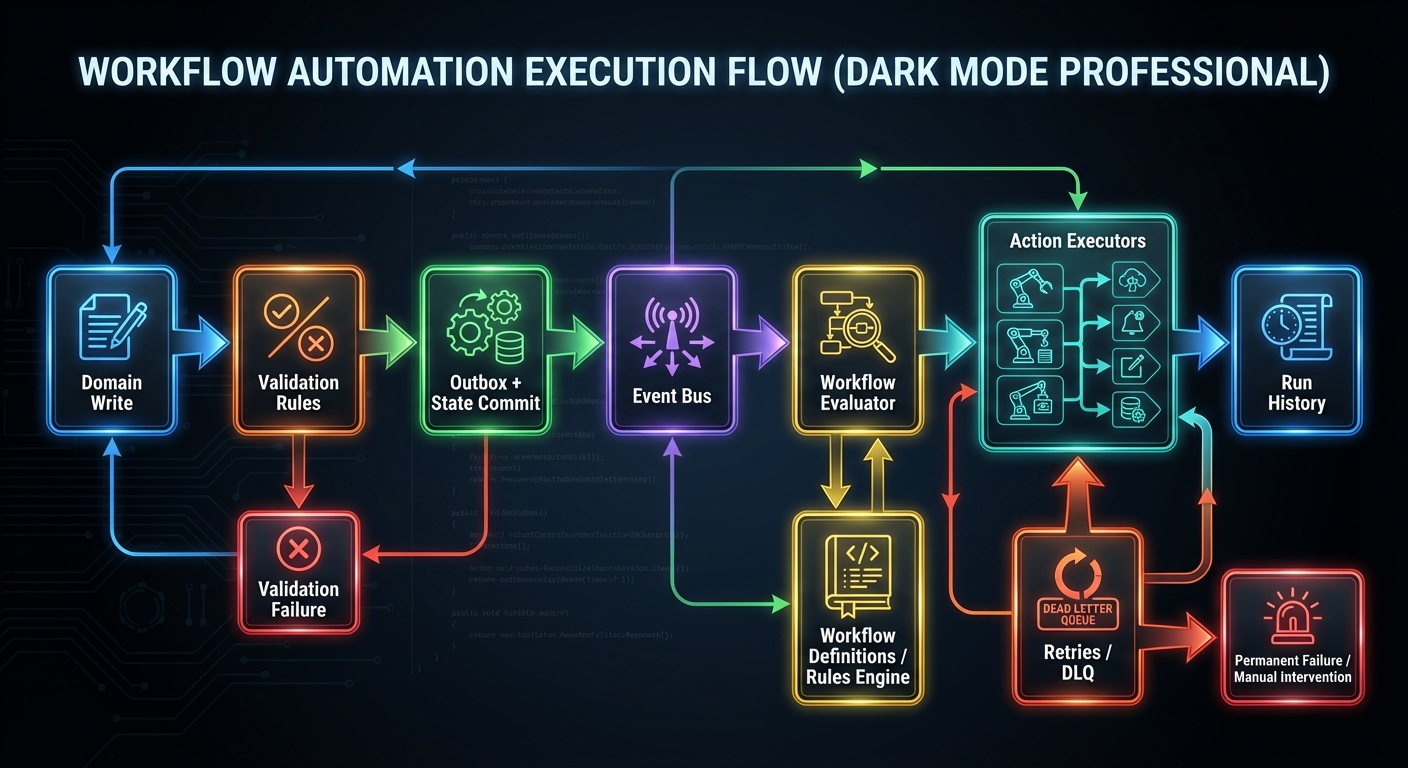
Mental model diagram
[Domain Write]
    |
    v
[Validation Rules] --> reject/accept
    |
    v
[Outbox + State Commit] --> [Event Bus] --> [Workflow Evaluator] --> [Action Executors]
                                           |                         |
                                           v                         v
                                       [Run History]             [Retries/DLQ]
How it works
- Detect domain event on validated state change.
- Persist event in outbox with event id and schema version.
- Relay to message bus; consumers evaluate matching workflow conditions.
- Generate deterministic action plan and execution ledger entries.
- Execute actions with idempotency checks and retry policy.
- Store result state, latency, and failure cause for each action.
Invariants:
- One business event maps to at most one successful execution per action idempotency scope.
- Workflow definition version is included in execution record.
Failure modes:
- Duplicate processing due to missing idempotency ledger.
- Hidden loops through chained field updates.
- Partial side effects without compensating action.
Minimal concrete example
WHEN event = opportunity.stage_changed
AND new_stage = "Proposal"
AND amount >= 50000
THEN
  ACTION assign_owner(team = "enterprise_pod")
  ACTION notify(channel = "#big-deals")
  ACTION create_task(type = "exec-brief", due = +1 day)

IDEMPOTENCY KEY = event_id + workflow_version + action_id
Common misconceptions
- “At-least-once delivery is fine without idempotency.” It is not.
- “Retries fix reliability by default.” Retries can amplify bad behavior.
- “Workflow UIs remove need for architecture.” They still need strict runtime contracts.
Check-your-understanding questions
- Why should hard validation and side effects use different execution boundaries?
- What data must be stored to make workflow runs explainable?
- How do you prevent workflow cycles before deployment?
- Why is outbox preferred over in-transaction external calls?
Check-your-understanding answers
- To preserve request latency and isolate external failure domains.
- Event payload, condition results, action plan, workflow version, and execution outcome.
- Build dependency graph checks and enforce max depth/origin guards.
- It ensures atomic intent recording and safe asynchronous dispatch.
Real-world applications
- Lead routing and SLA escalation engines.
- Sales process coaching and stale pipeline alerts.
- Service handoff automation.
Where you’ll apply it
Project 3,Project 5,Project 8,Project 10,Project 12,Project 13.
References
- Gregor Hohpe & Bobby Woolf, Enterprise Integration Patterns.
- Martin Kleppmann, Designing Data-Intensive Applications (Ch. 11).
- Temporal workflow patterns: Temporal Docs.
Key insights
- CRM automation quality is mostly determined by event contracts and idempotency discipline.
Summary
- Design meaningful events, execute side effects safely, and make every run explainable.
Homework/Exercises to practice the concept
- Model a stale-opportunity workflow with loop prevention rules.
- Define an idempotency key strategy for three different action types.
- Draft an operations dashboard for workflow health.
Solutions to the homework/exercises
- Trigger on inactivity timestamp change, suppress if origin equals workflow engine, max depth = 2.
- Use event+workflow+action key; include actor and target for scoped side effects.
- Include trigger volume, success rate, p95 latency, retry ratio, and DLQ backlog.
Concept 3: Integration Architecture, API Contracts, and Communication Systems
Fundamentals
CRM systems sit at the center of a broader business technology mesh. Integration architecture determines whether the CRM becomes a trusted system of coordination or a fragile data island. Core integrations include email and calendar providers, marketing systems, support platforms, product telemetry, billing systems, identity providers, and external partner APIs. Each integration introduces protocol semantics, rate limits, schema mismatches, authentication lifecycles, and ownership ambiguity. Good integration design starts with contracts: clear payload shapes, version strategy, idempotency behavior, error taxonomy, and replay guarantees. CRM engineers must reason about both request/response APIs and event-based exchange patterns. Communication systems, especially email threading and timeline capture, require protocol literacy (SMTP, IMAP, message headers) and careful data association logic. Integration architecture in CRM is therefore a consistency and operational resilience problem, not just an SDK wiring task.
Deep Dive
First, define integration boundaries by business capability, not by vendor endpoint list. Example boundaries include activity_capture, identity_sync, quote_export, and service_case_enrichment. These boundaries stabilize internal APIs even when vendors change. If your internal contracts mirror every vendor field directly, vendor changes leak across your platform and cause broad regressions.
Authentication and authorization need lifecycle management. OAuth2 access tokens expire; refresh tokens can be revoked. Integration services must track token state, retry with refresh where safe, and surface actionable errors for re-authentication. Do not embed token refresh logic into random business endpoints. Centralize connector auth state and expose clear connector health statuses.
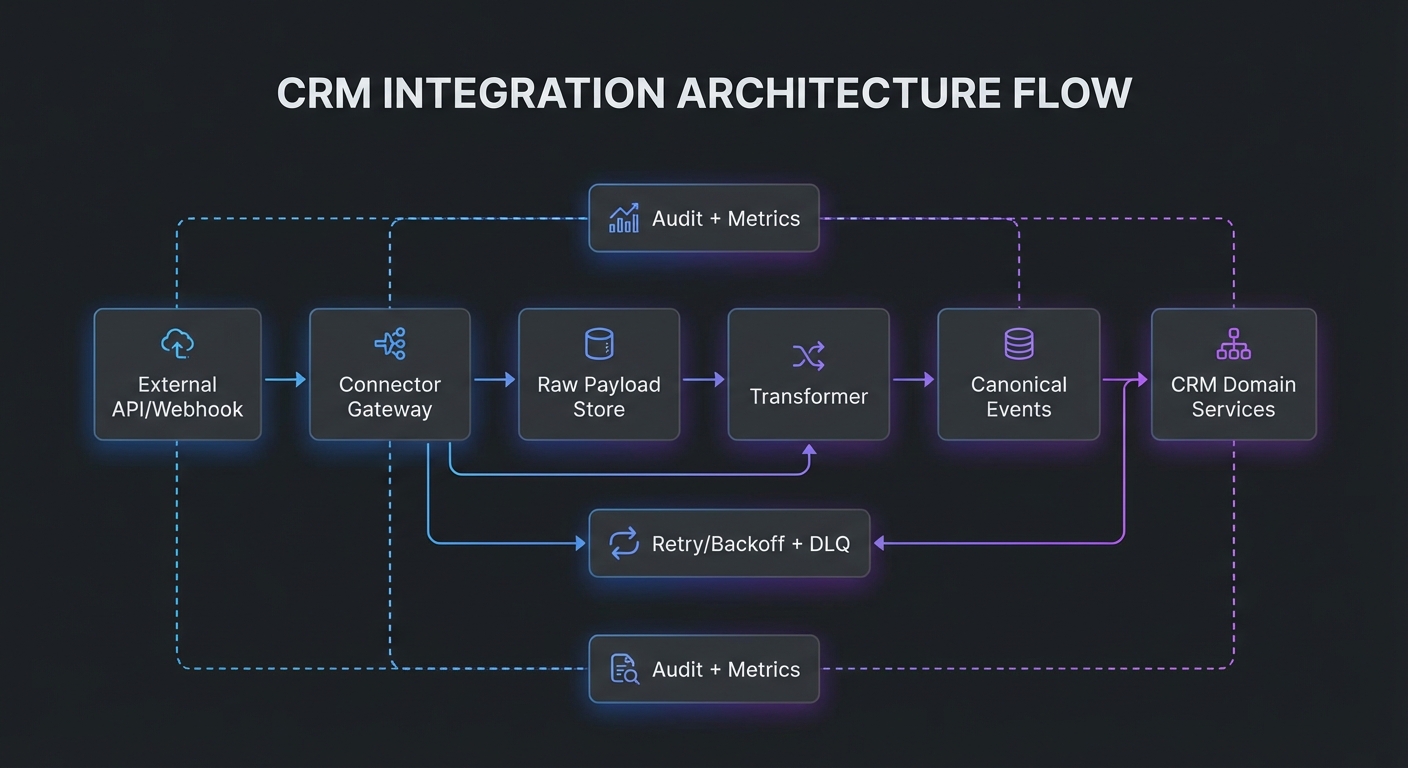
Event ingestion should separate raw payload persistence from transformed domain events. Persist raw payloads for audit and replay. Transform into canonical event envelopes that your CRM workflows consume. This allows schema evolution and resilient backfills. Raw payload storage with checksum and source metadata is critical when debugging mismatches between external systems and internal state.
API versioning strategy should support additive changes and explicit deprecation. For inbound APIs, version by path or header and publish schema docs with examples. For outbound webhooks, include event type version and signature mechanism. Consumers should be able to verify authenticity and detect schema changes safely. Webhook systems should support retry with exponential backoff, dead-letter routing, and replay window tooling.
Email integration deserves special treatment. Threading depends on headers like Message-ID, In-Reply-To, and References (RFC 5322). You need canonical conversation keys and fallback heuristics for missing headers. Sending from CRM while preserving mailbox consistency requires provider APIs or SMTP submission semantics aligned with user identity and folder behavior.
Rate limits and quotas require policy-aware schedulers. Integration jobs must prioritize high-value events and adaptively slow down before provider hard limits. Use token-bucket or leaky-bucket models per connector account. Observability should include per-connector call success rates, latency, quota burn, and error categories.
Conflict resolution policy must be explicit: source of truth priority, field-level ownership, and last-writer constraints. In multi-system environments, no field is universally authoritative. You need per-field conflict policy with audit trail.
Operationally, integration architecture needs runbooks: re-auth flow, replay procedures, schema incident response, and connector outage handling. Teams often underinvest here and overinvest in happy-path mapping code.
How this fit on projects
- Primary: Projects 3, 4, 7, 12, 13.
- Secondary: Projects 5 and 10.
Definitions & key terms
- Canonical Event Envelope: normalized event payload shape across connectors.
- Connector Health: runtime status of integration auth and sync viability.
- Schema Evolution: controlled payload changes across versions.
- Replay Window: period in which events can be re-delivered safely.
- Conversation Key: stable identifier tying messages into one thread.
Mental model diagram
[External API/Webhook]
        |
        v
[Connector Gateway] --auth/token--> [Raw Payload Store]
        |                                  |
        v                                  v
[Transformer] -------------------------> [Canonical Events] --> [CRM Domain Services]
        |                                                          |
        v                                                          v
[Retry/Backoff + DLQ]                                          [Audit + Metrics]
How it works
- Receive pull/push payload from external system.
- Validate signature/auth context and persist raw payload.
- Transform into canonical schema with version annotation.
- Publish canonical event and process domain side effects.
- Track acknowledgments and emit metrics.
- Retry failed deliveries with bounded policy and DLQ fallback.
Invariants:
- Raw payload remains immutable and replayable.
- Canonical event includes source id and schema version.
Failure modes:
- Silent schema drift causing mapping errors.
- Token refresh loops masking revoked credentials.
- Duplicate webhook deliveries creating duplicate records.
Minimal concrete example
INBOUND WEBHOOK
event_type: gmail.message.created.v1
source_id: gmail:msg:18ab32
payload_hash: 8ac9...

TRANSFORMED EVENT
type: activity.email_received.v1
conversation_key: <msg-abc@acme.com>
participants: ["bob@acme.com", "rep@yourcrm.com"]
linked_contact_id: contact_872
Common misconceptions
- “Integration is complete once API calls work.” Operations and replay are the hard parts.
- “Webhook retries can be infinite.” Infinite retries hide systemic failures.
- “One timestamp resolves all conflicts.” Source precedence is still required.
Check-your-understanding questions
- Why should raw payloads be stored even after successful transformation?
- What makes webhook handling idempotent?
- Why is connector health a first-class object?
- How do email threading headers influence CRM activity timelines?
Check-your-understanding answers
- Audit, replay, and schema debugging require original source data.
- Stable dedupe keys plus execution ledger and safe retry semantics.
- It centralizes auth/sync state and supports user remediation.
- They define message ancestry and conversation grouping.
Real-world applications
- Gmail/Outlook activity sync.
- ERP and billing handoff.
- Partner ecosystem event exchange.
Where you’ll apply it
Project 3,Project 4,Project 7,Project 12,Project 13.
References
- OAuth 2.0 RFC 6749: RFC 6749.
- IMAP RFC 3501: RFC 3501.
- Internet Message Format RFC 5322: RFC 5322.
- SMTP RFC 5321: RFC 5321.
- Google Gmail API docs: Gmail API.
- Microsoft Graph docs: Microsoft Graph.
Key insights
- Durable integration architecture is contract-driven and replay-friendly by design.
Summary
- Separate raw ingestion from canonical events, enforce idempotency, and operationalize connector health.
Homework/Exercises to practice the concept
- Define a canonical email activity schema with versioning strategy.
- Draft webhook retry and DLQ policy for an external partner.
- Design a connector health status model visible to admins.
Solutions to the homework/exercises
- Include source ids, conversation key, participants, timestamps, and schema version.
- Retry 6 times with exponential backoff, then route to DLQ with replay tooling.
- Track auth status, last sync time, quota state, and last error class.
Concept 4: CRM Analytics, Forecasting, and Decision Intelligence
Fundamentals
CRM analytics converts operational records into planning and execution intelligence. Basic reporting answers “what happened”; high-quality CRM intelligence supports “what is likely to happen” and “what should we do next.” Forecasting, risk detection, and prioritization depend on data quality, process consistency, and metric definitions. Intelligence features fail when teams skip metric semantics and rely on opaque score outputs. Good CRM analytics begins with clear metric contracts, reproducible pipelines, and explainable model outputs. Forecasts should be decomposable into components (pipeline coverage, stage probability, historical win rates, rep behavior signals). Health and risk scores should explain contributing factors and confidence boundaries. The goal is not AI novelty; the goal is better operational decisions with lower ambiguity.
Deep Dive
Start with metric ontology. Define core measures and dimensions explicitly: pipeline amount, weighted pipeline, coverage ratio, stage conversion, cycle time, slip rate, activity cadence, and forecast category. Each metric needs formula, grain, time window, inclusion criteria, and owner. Ambiguous metric definitions cause reporting disputes and erode trust faster than missing dashboards.
Forecasting architecture often uses a layered approach: deterministic baseline plus statistical adjustments. Baseline can come from weighted opportunities using stage probabilities. Statistical layer adds historical conversion behavior, rep-specific variance, seasonal effects, and deal aging features. Keep baseline and model outputs separate so teams can compare and challenge outcomes. Pure black-box forecasting is rarely adopted by sales leadership without transparent decomposition.
Data freshness and snapshot strategy are crucial. Revenue planning depends on point-in-time states. Use periodic snapshots of opportunities, stage, amount, owner, expected close date, and key risk indicators. Event sourcing patterns or daily snapshot tables both work; choose based on scale and replay needs. Without snapshots, historical trend analysis becomes impossible because current-state tables overwrite history.
Feature engineering for scoring should prioritize observability and causality over complexity. Useful features include days-in-stage relative to median, recent stakeholder engagement, response latency, decision-maker participation, legal/procurement signals, and product fit markers. Include negative evidence explicitly (silent periods, repeated close-date pushes, competitor mentions). Maintain feature dictionaries and drift monitoring.
Explainability is operationally mandatory. A score without rationale is ignored or gamed. Provide top contributing factors, confidence, and suggested next action. Distinguish between descriptive features (what is true) and actionable features (what can be influenced). This helps sales teams use scores as coaching inputs instead of arbitrary rankings.
Evaluation strategy should align with business cadence. Use backtesting on historical windows and compare against naive baselines (e.g., stage-weighted only). Track calibration (are 70% probability deals really closing ~70%?), precision/recall for risk flags, and business impact metrics such as reduced slip or improved conversion on prioritized leads.
Operationally, intelligence systems require feedback loops. Allow users to mark suggestions as useful/not useful, capture override reasons, and feed these outcomes into model and rule updates. This prevents static scoring models from decaying in relevance as processes and markets change.
Finally, governance and ethics matter. Avoid hidden proxies that encode bias (territory, title patterns, or account class without context). Audit scoring impact by segment and owner group. Intelligence should improve fairness and consistency, not reinforce existing inequities.
How this fit on projects
- Primary: Projects 2, 7, 9, 13.
- Secondary: Projects 3 and 8.
Definitions & key terms
- Weighted Pipeline: opportunity amount multiplied by probability.
- Coverage Ratio: pipeline relative to target quota.
- Calibration: alignment between predicted and observed outcomes.
- Feature Drift: distribution change in model inputs over time.
- Next Best Action: prioritized recommended operational action.
Mental model diagram
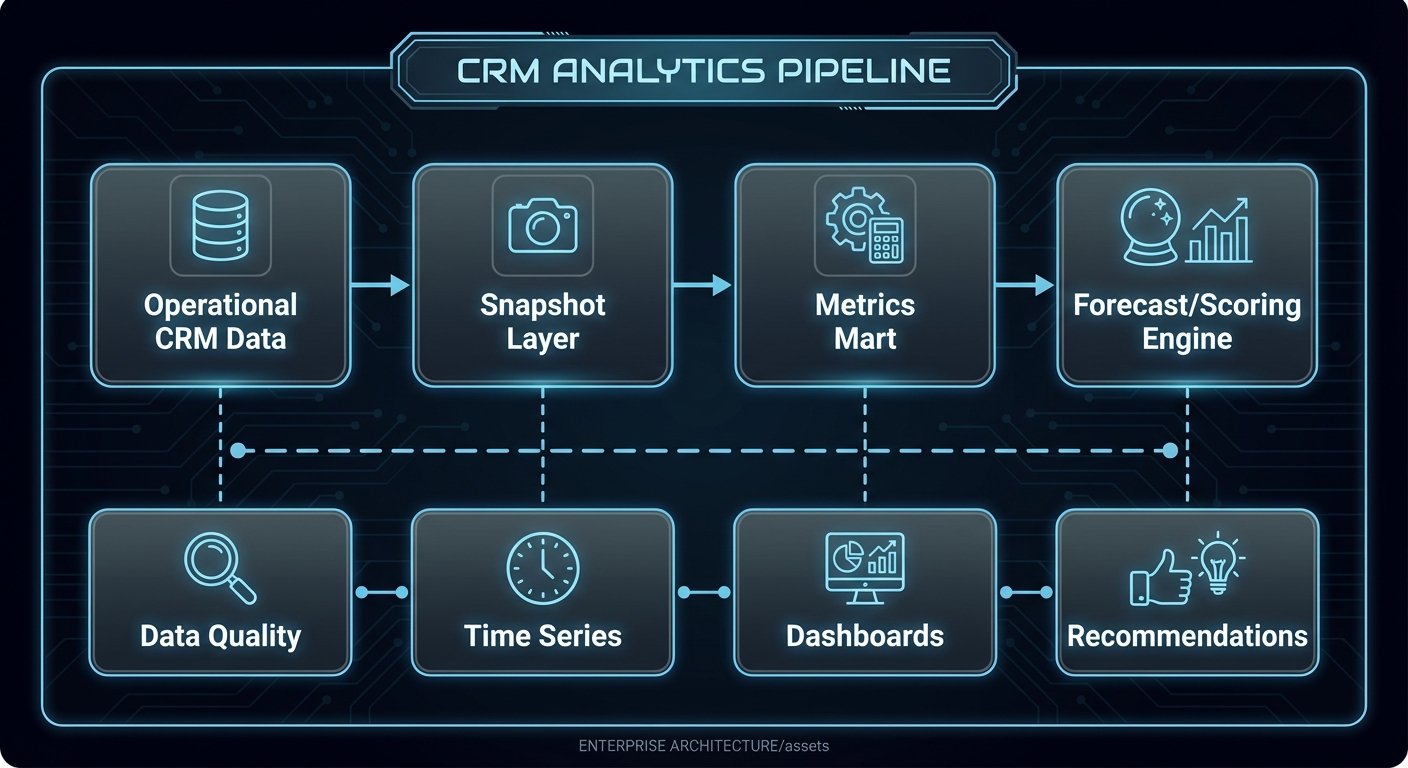
[Operational CRM Data] --> [Snapshot Layer] --> [Metrics Mart] --> [Forecast/Scoring Engine]
         |                         |                   |                    |
         v                         v                   v                    v
   [Data Quality]            [Time Series]       [Dashboards]      [Recommendations]
How it works
- Build daily (or finer) snapshots of core opportunity and activity states.
- Compute deterministic metrics and baseline forecast.
- Generate risk/priority features from behavior and process signals.
- Score opportunities/leads and attach factor explanations.
- Publish views by rep, manager, and exec personas.
- Track outcome accuracy and recalibrate probabilities.
Invariants:
- Forecast output is reproducible for any past snapshot date.
- Every score includes at least one explainability payload.
Failure modes:
- Metric drift caused by unannounced process changes.
- Overfitting to outdated sales motions.
- Model outputs used without confidence context.
Minimal concrete example
OPPORTUNITY: deal_902
amount = 120000
stage = Proposal
days_in_stage = 23 (median = 10)
recent_exec_touch = false
close_date_pushed_2x = true

RISK SCORE = 0.82 (high)
TOP FACTORS:
- days_in_stage anomaly +0.28
- repeated close-date push +0.22
- no executive stakeholder engagement +0.18
RECOMMENDED NEXT ACTION:
- schedule executive alignment call within 72h
Common misconceptions
- “More ML complexity equals better forecast.” Baseline quality often matters more.
- “One global probability table works forever.” Probabilities drift with process change.
- “Score rank is enough.” Teams need explanation and actionability.
Check-your-understanding questions
- Why are snapshots essential for forecasting credibility?
- What is the operational value of calibration metrics?
- How does explainability improve adoption?
- Why separate baseline forecast from model adjustment?
Check-your-understanding answers
- They preserve historical state required for trend and backtesting.
- They show whether probability estimates match reality.
- Users can trust and act on transparent reasoning.
- Separation makes model contribution measurable and debuggable.
Real-world applications
- Sales commit forecasting.
- Lead prioritization and routing.
- Renewal and churn risk management.
Where you’ll apply it
Project 2,Project 7,Project 9,Project 13.
References
- Chip Huyen, Designing Machine Learning Systems.
- Martin Kleppmann, Designing Data-Intensive Applications (streaming and batch views).
- Salesforce State of Sales report: State of Sales.
Key insights
- CRM intelligence succeeds when metrics are explicit, reproducible, and explainable.
Summary
- Build deterministic metric foundations first, then layer explainable predictive signals.
Homework/Exercises to practice the concept
- Define a forecast metric contract document for one business unit.
- Create a backtest plan comparing weighted baseline vs adjusted model.
- Design an explainability payload schema for lead score API responses.
Solutions to the homework/exercises
- Include formula, time grain, owner, exclusions, and QA checks per metric.
- Evaluate MAE/MAPE, calibration, and business outcomes on historical windows.
- Return top factors, confidence, historical comparisons, and recommended action.
Concept 5: Multi-Tenant Security, Governance, and Extensible Platform Design
Fundamentals
Enterprise CRM products are not single-team apps; they are shared platforms with tenant isolation, configurable data models, permission controls, audit trails, and policy governance. Multi-tenant architecture lets one service operate across many customers while preserving strict data boundaries and performance fairness. Extensibility lets each tenant adapt data models, workflows, and integration behavior to their business. Security and governance ensure this flexibility does not break compliance, privacy, or operational reliability. The architectural challenge is balancing tenant customization with platform invariants: predictable performance, safe upgrades, auditability, and supportability. A CRM platform must provide strong defaults (role-based access, field-level visibility, immutable audit events, schema validation) while allowing controlled extension. Governance is not just compliance overhead; it is a product capability that determines whether enterprises can safely deploy the CRM in regulated and high-risk environments.
Deep Dive
Begin with tenant isolation strategy. Common options include shared database/shared schema with tenant discriminator, shared database/separate schema, and separate database per tenant. Shared schema is operationally efficient but requires strict query guards, index strategy, and security testing. Separate database gives stronger blast-radius isolation but increases operational overhead. Many platforms use a tiered model: shared for most tenants, dedicated for high-compliance tiers.
Authorization should be layered: tenant boundary checks, role-based access control (RBAC), attribute/field-level policies, and record ownership semantics. Avoid endpoint-specific ad hoc checks. Build a centralized policy engine that evaluates action + resource + actor + context. Field-level security matters in CRM because sensitive data (salary estimates, legal notes, health information in service cases) may need restricted visibility.
Audit architecture should capture who changed what, when, from where, and why (if reason supplied). Store immutable audit events with before/after references. Distinguish user actions from system actions and include causation ids from workflow engines. Audit trails are required for incident investigation, compliance reporting, and trust building.
Extensibility design often starts with custom objects and fields. Metadata-driven architecture allows tenant-specific schema without code deploys. But unconstrained extensibility can degrade performance and consistency. Use typed field families, validation rules, indexing controls, and schema limits. Provide migration and rollback tooling for metadata changes. For query safety, generate query plans with whitelist fields and bounded complexity.
Versioning is critical for both API and metadata. Tenants may run different automation and custom schema versions. Platform changes should be backward-compatible or include migration gates and explicit deprecation schedules. Feature flags and phased rollout strategy reduce tenant disruption.
Performance fairness in multi-tenant systems requires quotas and workload shaping. Implement per-tenant rate limits, queue partitions, and resource accounting for heavy jobs (bulk import, large report export, workflow replay). Without fairness controls, one noisy tenant can degrade global experience.
Security operations need detection and response hooks: anomaly alerts for unusual data export patterns, admin privilege changes, failed auth spikes, and suspicious API token usage. Include key rotation practices, secret management, and encryption at rest/in transit.
Finally, governance should include change management UX. Admins need visibility into who changed workflows, permissions, fields, and integrations. Provide approval workflows for critical configuration changes and sandbox testing before production publish.
How this fit on projects
- Primary: Projects 6, 12, 13.
- Secondary: Projects 5, 10, 11.
Definitions & key terms
- Tenant Isolation: guarantees that one tenant cannot access another tenant’s data.
- RBAC: role-based control over allowed actions.
- Field-Level Security: permissions at attribute granularity.
- Metadata-Driven Model: schema behavior configured via metadata rather than code.
- Fairness Controls: quotas and throttles preventing noisy-neighbor impact.
Mental model diagram
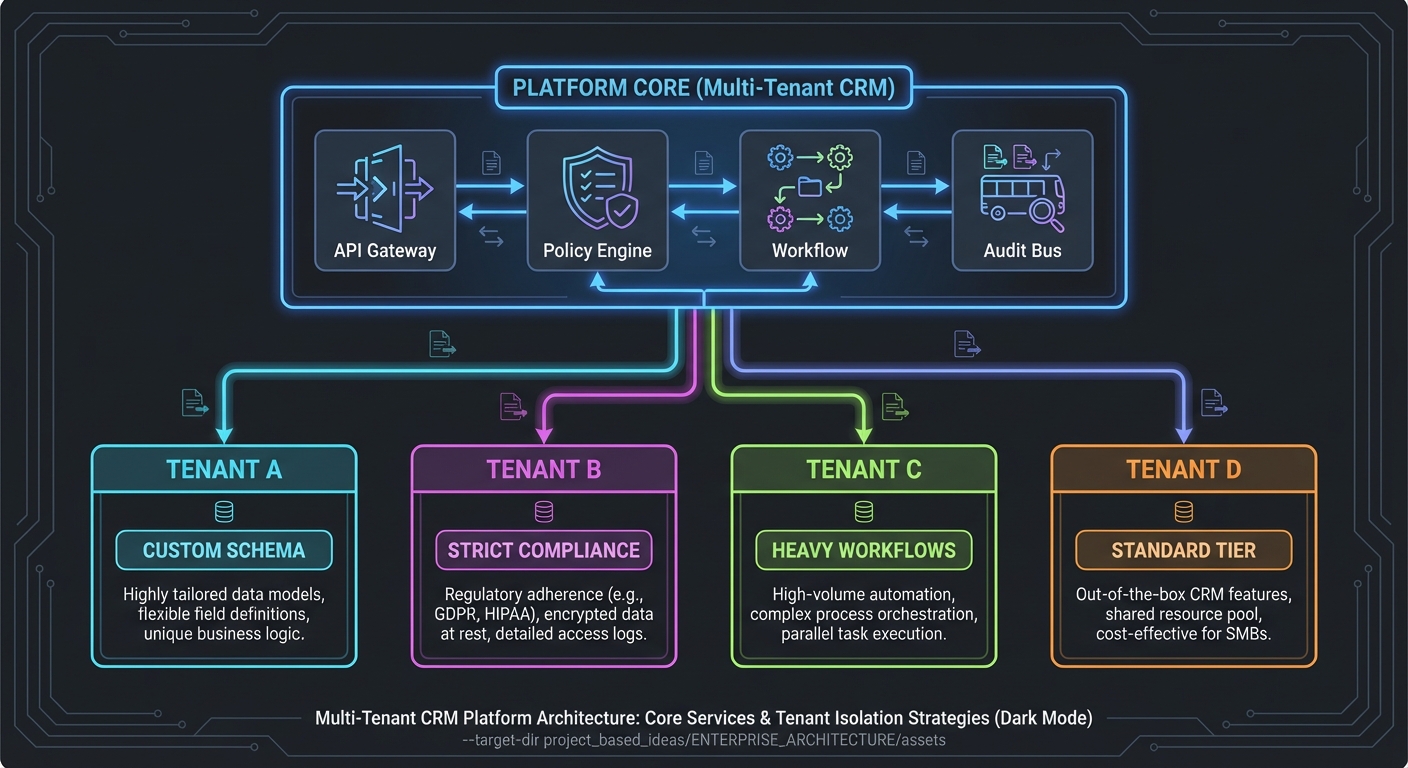
                    +------------------- Platform Core -------------------+
                    | API Gateway | Policy Engine | Workflow | Audit Bus |
                    +------------------------------------------------------+
                               |                  |                 |
             +-----------------+------------------+-----------------+
             |                 |                  |                 |
             v                 v                  v                 v
        [Tenant A]        [Tenant B]         [Tenant C]       [Tenant D]
        custom schema     strict compliance  heavy workflows   standard tier
How it works
- Resolve tenant context from auth/session boundary.
- Evaluate centralized policy engine for resource/action scope.
- Execute metadata-aware logic with tenant schema registry.
- Enforce quotas and workload partitioning per tenant.
- Emit immutable audit events for all sensitive operations.
- Provide configuration and release controls through admin governance UX.
Invariants:
- Tenant id is mandatory in every data access path.
- Policy checks occur before business logic execution.
Failure modes:
- Cross-tenant leakage from missing discriminator filters.
- Overly permissive custom field exposure.
- Upgrade regressions due to unversioned metadata behavior.
Minimal concrete example
REQUEST: tenant=finbank, actor=rep_221, action=read, resource=opportunity
POLICY RESULT:
- allow resource scope where owner_team in ["enterprise_east"]
- hide fields: ["internal_margin", "discount_override_reason"]
- log audit event id: aud_90f7
Common misconceptions
- “Tenant filter in SQL is enough for isolation.” It must be enforced end-to-end.
- “Custom objects are only a schema feature.” They are a governance and performance concern.
- “Audit logs can be reconstructed later.” Missing audit intent cannot be recreated.
Check-your-understanding questions
- Why centralize authorization instead of embedding checks per service?
- How do quotas protect platform reliability?
- Why should metadata changes be versioned and reviewable?
- What must every audit record include?
Check-your-understanding answers
- Centralization ensures consistency, debuggability, and lower policy drift risk.
- They prevent one tenant workload from degrading all others.
- It enables safe rollback, compatibility, and predictable behavior.
- Actor, action, resource, timestamp, tenant, and before/after context.
Real-world applications
- Enterprise SaaS CRM platforms.
- Regulated industry CRM deployments.
- Marketplace and partner-integrated CRM ecosystems.
Where you’ll apply it
Project 6,Project 12,Project 13.
References
- Mike Amundsen, Design and Build Great Web APIs.
- NIST Zero Trust Architecture SP 800-207: NIST SP 800-207.
- OWASP ASVS / API Security guidance: OWASP API Security.
Key insights
- Extensibility without governance creates unsafe, unsupportable CRM platforms.
Summary
- Build multi-tenant CRM as a policy-driven platform with explicit extension and audit controls.
Homework/Exercises to practice the concept
- Compare three tenant isolation models for your target customer segments.
- Draft a field-level security policy for opportunities and service cases.
- Design an admin approval workflow for risky configuration changes.
Solutions to the homework/exercises
- Choose hybrid model for cost/compliance balance and document migration triggers.
- Classify fields by sensitivity and bind visibility to role and team context.
- Require peer approval and sandbox replay test before production publish.
Glossary
- Account: Business entity you sell to or support.
- Contact: Person tied to one or more accounts over time.
- Opportunity: Revenue pursuit with stage-based lifecycle.
- Activity: Interaction artifact such as email, call, meeting, note, or task.
- Pipeline Coverage: Ratio of qualified pipeline value to quota target.
- SLA: Service Level Agreement with response or resolution commitments.
- Idempotency: Safe repeated processing that yields the same end state.
- Outbox Pattern: Reliable event emission technique coupled to transactional writes.
- Canonical Record: Resolved entity representing consolidated identity.
- DLQ: Dead-letter queue for events/messages that exceeded retry policy.
- Tenant: Isolated customer context in a shared SaaS platform.
- Field-Level Security: Permission control for specific attributes, not just records.
Why CRM Software Matters
CRM software matters because revenue execution is now digital, multi-channel, and collaborative across sales, service, and operations.
- Modern teams need shared context to coordinate outreach, qualification, negotiation, onboarding, support, and expansion.
- Process delays and data inconsistency directly impact conversion rates, cycle time, and retention.
- AI features in CRM only produce value when process and data foundations are reliable.
Real-world statistics and impact
- Salesforce State of Sales (published January 16, 2026) reports that 81% of sales teams are using or experimenting with AI, while many teams still struggle with data trust and process consistency. Source: Salesforce News.
- Nucleus Research (2024 update) reports average CRM return around $8.71 per $1 invested. Source: Nucleus Research.
- Grand View Research estimates the CRM market at $73.40B in 2024 with projected strong CAGR through 2030. Source: Grand View Research.
- Gartner market-share reporting indicates CRM remains a major enterprise application category with strong growth in cloud segments. Source: Gartner Press Release.
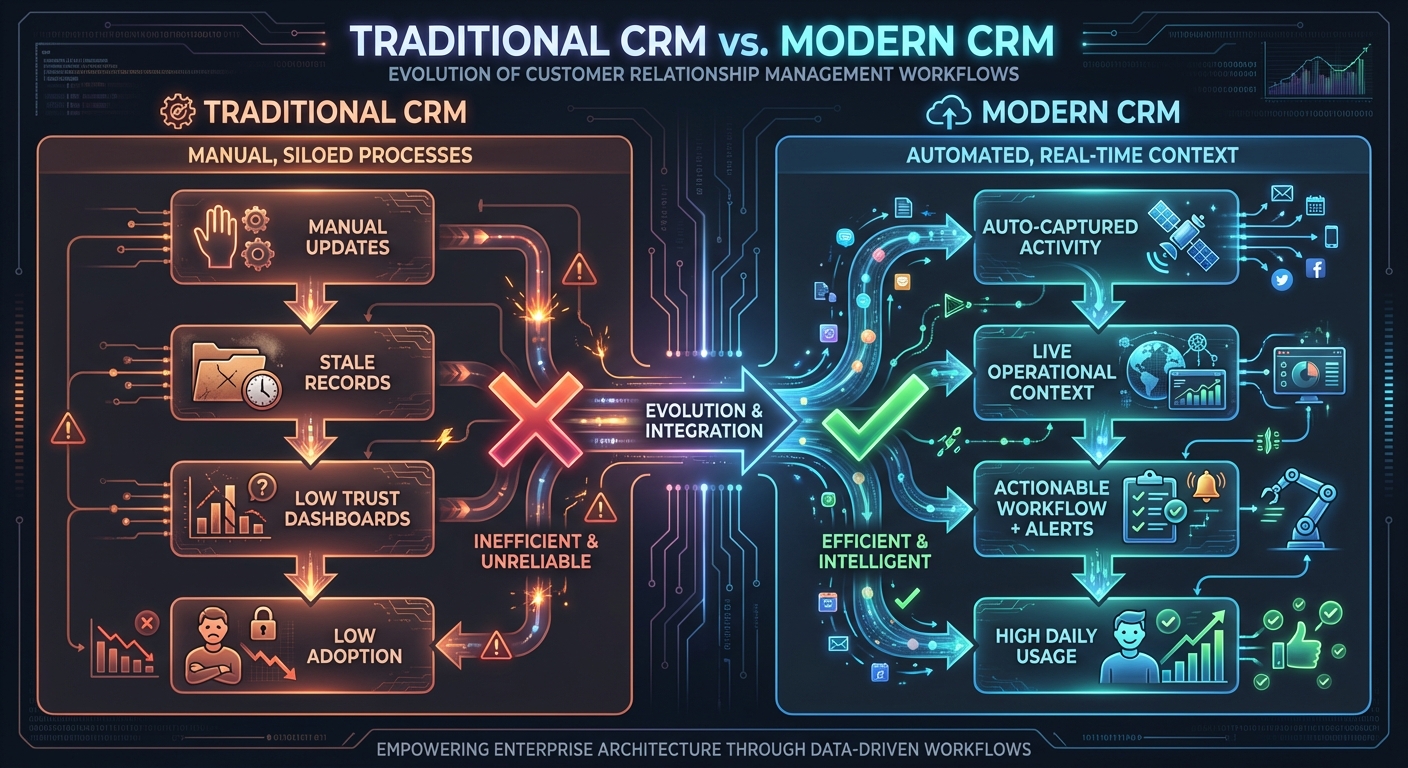
Traditional CRM (record-first)                  Modern CRM (execution-first)

[Manual updates]                                [Auto-captured activity]
      |                                                  |
      v                                                  v
[Stale records]                                  [Live operational context]
      |                                                  |
      v                                                  v
[Low trust dashboards]                            [Actionable workflow + alerts]
      |                                                  |
      v                                                  v
[Low adoption]                                    [High daily usage]
Context & Evolution
- Early CRM implementations optimized for managerial reporting.
- Cloud CRM shifted focus to usability and integration velocity.
- Current generation adds workflow automation and AI-assisted decisioning, increasing demand for data quality and governance maturity.
Concept Summary Table
| Concept Cluster | What You Need to Internalize |
|---|---|
| CRM Domain Modeling, Identity, and Data Quality | Design canonical entities with lineage, temporal relationships, and continuous quality controls so automation and reporting are trustworthy. |
| Workflow Automation and Event-Driven Process Design | Treat CRM changes as domain events and execute side effects with idempotency, observability, and loop prevention. |
| Integration Architecture, API Contracts, and Communication Systems | Separate raw integration payloads from canonical events, version contracts, and support replay-safe operation. |
| CRM Analytics, Forecasting, and Decision Intelligence | Build reproducible metric pipelines and explainable forecasting/risk models tied to operational action. |
| Multi-Tenant Security, Governance, and Extensible Platform Design | Enforce tenant boundaries, centralized policy, and safe metadata extensibility with audit and fairness controls. |
Project-to-Concept Map
| Project | Concepts Applied |
|---|---|
| Project 1: Contact Management Core | CRM Domain Modeling, Integration Architecture |
| Project 2: Sales Pipeline Kanban | CRM Domain Modeling, Analytics & Forecasting |
| Project 3: Activity Auto-Logger | Workflow Automation, Integration Architecture |
| Project 4: Email Integration Engine | Integration Architecture, Workflow Automation |
| Project 5: Workflow Automation Builder | Workflow Automation, Multi-Tenant Governance |
| Project 6: Custom Object Platform | Multi-Tenant Governance, CRM Domain Modeling |
| Project 7: 360 Customer Timeline | CRM Domain Modeling, Analytics & Forecasting |
| Project 8: Lead Routing & Territory Engine | Workflow Automation, Analytics & Forecasting |
| Project 9: Forecasting & Quota Analytics | Analytics & Forecasting, CRM Domain Modeling |
| Project 10: Case Management + SLA Automation | CRM Domain Modeling, Workflow Automation, Governance |
| Project 11: Identity Resolution & Dedupe Service | CRM Domain Modeling, Integration Architecture |
| Project 12: API & Integration Hub | Integration Architecture, Governance |
| Project 13: Full CRM Platform Capstone | All concept clusters |
Deep Dive Reading by Concept
| Concept | Book and Chapter | Why This Matters |
|---|---|---|
| CRM Domain Modeling, Identity, and Data Quality | Designing Data-Intensive Applications (Kleppmann) Ch. 2-3; Data Quality (Redman) selected chapters | Teaches modeling, indexing, and quality governance that drive trust. |
| Workflow Automation and Event-Driven Process Design | Enterprise Integration Patterns (Hohpe & Woolf) selected patterns; DDIA Ch. 11 | Gives event, messaging, and reliability patterns needed for automation. |
| Integration Architecture, API Contracts, and Communication Systems | Design and Build Great Web APIs (Amundsen); RFC 6749, RFC 3501, RFC 5321/5322 | Anchors integration in protocol and contract rigor. |
| CRM Analytics, Forecasting, and Decision Intelligence | Designing Machine Learning Systems (Huyen) selected chapters; DDIA Ch. 10-12 | Helps move from dashboards to decision support safely. |
| Multi-Tenant Security, Governance, and Extensible Platform Design | Fundamentals of Software Architecture (Richards & Ford) selected chapters; NIST SP 800-207 | Covers multi-tenant boundaries, policy engines, and governance tradeoffs. |
Quick Start: Your First 48 Hours
Day 1:
- Read the entire
## Theory Primeronce without coding. - Implement Project 1 skeleton and test record creation/search flows.
- Capture one unresolved modeling question and keep it visible.
Day 2:
- Complete Project 1
#### Definition of Done. - Start Project 2 visual pipeline and stage transition rules.
- Write a short note on where your schema choices will affect later projects.
Recommended Learning Paths
Path 1: Revenue Platform Engineer
- Project 1 -> Project 3 -> Project 5 -> Project 6 -> Project 12 -> Project 13
Path 2: Sales Operations Architect
- Project 1 -> Project 2 -> Project 8 -> Project 9 -> Project 13
Path 3: Customer Lifecycle Systems Engineer
- Project 1 -> Project 4 -> Project 7 -> Project 10 -> Project 13
Path 4: Data and Intelligence Builder
- Project 1 -> Project 7 -> Project 9 -> Project 11 -> Project 13
Success Metrics
- You can explain and defend your CRM domain model with temporal identity and quality controls.
- You can build and troubleshoot idempotent automation and integration flows.
- You can produce reproducible forecasts with factor-level explanation.
- You can enforce multi-tenant security and field-level governance in a configurable platform.
- You can ship a capstone where all major layers operate together with measurable reliability.
Project Overview Table
| Project | Difficulty | Time | Depth Focus | Primary Output |
|---|---|---|---|---|
| 1. Contact Management Core | Level 1 | 1 week | Data modeling | Contact/account API + dedupe basics |
| 2. Sales Pipeline Kanban | Level 2 | 1-2 weeks | Process state | Stage board + transition metrics |
| 3. Activity Auto-Logger | Level 2 | 2 weeks | Adoption automation | Auto-captured timeline events |
| 4. Email Integration Engine | Level 3 | 2 weeks | Protocol + sync | Thread-safe bidirectional email sync |
| 5. Workflow Automation Builder | Level 3 | 2-3 weeks | Event orchestration | Trigger-condition-action runtime |
| 6. Custom Object Platform | Level 4 | 3-4 weeks | Extensibility | Metadata-driven schema layer |
| 7. 360 Customer Timeline | Level 3 | 2-3 weeks | Aggregation UX | Unified customer timeline |
| 8. Lead Routing & Territory Engine | Level 3 | 2 weeks | Assignment logic | SLA-aware routing service |
| 9. Forecasting & Quota Analytics | Level 3 | 2-3 weeks | Forecasting | Manager forecast cockpit |
| 10. Case Management + SLA Automation | Level 3 | 2-3 weeks | Service workflow | Case queue with escalations |
| 11. Identity Resolution & Dedupe Service | Level 4 | 3 weeks | Data quality | Match/merge and review workflow |
| 12. API & Integration Hub | Level 4 | 3 weeks | Platform integration | Webhook + connector gateway |
| 13. Full CRM Platform Capstone | Level 5 | 8-12 weeks | System integration | End-to-end multi-tenant CRM |
Project List
The following projects guide you from foundational CRM modeling to a production-ready platform architecture.
Project 1: Contact Management Core
- File:
CRM_SOFTWARE_BUILDING_PROJECTS/P01-contact-management-core.md - Main Programming Language: Python (FastAPI)
- Alternative Programming Languages: Go, TypeScript, Ruby
- Coolness Level: Level 2: Practical but Forgettable
- Business Potential: 3. The Service & Support Model
- Difficulty: Level 1: Beginner
- Knowledge Area: Data modeling and CRUD foundations
- Software or Tool: Contact/account service
- Main Book: Designing Data-Intensive Applications by Martin Kleppmann
What you will build: A contact/account relationship service with search, duplicate detection, and merge review queue.
Why it teaches CRM fundamentals: It creates the identity and relationship base every later CRM workflow depends on.
Core challenges you will face:
- Entity boundaries -> maps to CRM domain modeling
- Duplicate candidates -> maps to data quality workflows
- Search speed -> maps to indexing strategy
Real World Outcome
You can create contacts/accounts, detect likely duplicates on import, and merge with audit lineage.
For API behavior - expected flow:
$ curl -X POST http://localhost:8080/contacts -d '{"first_name":"Alice","last_name":"Smith","email":"alice@acme.com"}'
{"contact_id":"ct_1001","status":"created","quality_flags":["email_verified"]}

$ curl -X POST http://localhost:8080/import -F file=@contacts_batch.csv
{"imported":820,"possible_duplicates":27,"queued_for_review":27}

$ curl http://localhost:8080/duplicates/queue
{"items":[{"candidate_id":"dup_381","left":"ct_1001","right":"ct_2044","score":0.89}]}
The Core Question You Are Answering
“How do we represent people and companies so downstream automation can trust the data instead of fighting it?”
This question matters because every later process quality depends on identity correctness.
Concepts You Must Understand First
- Canonical identity and lineage
- How do source records map to canonical records?
- Book Reference: DDIA Ch. 2-3.
- Duplicate detection heuristics
- What is the tradeoff between false positives and false negatives?
- Book Reference: Data Quality by Redman.
- Operational indexing
- Which search paths require composite indexes?
- Book Reference: DDIA Ch. 3.
Questions to Guide Your Design
- Identity policy
- Which fields are immutable IDs versus editable attributes?
- How will you represent uncertain matches?
- Merge safety
- Which fields follow survivorship rules?
- How will you preserve auditability?
Thinking Exercise
Merge Confidence Drill
Draw three contact examples that partially overlap and decide auto-merge vs manual review thresholds. Explain what evidence each threshold needs.
The Interview Questions They Will Ask
- “How do you design safe contact deduplication in a high-volume CRM?”
- “Why keep source lineage after merge?”
- “How do you avoid over-normalized schemas that hurt CRM search speed?”
- “What would you measure to track data quality health?”
- “When should duplicate decisions be manual?”
Hints in Layers
Hint 1: Start with explicit IDs
Define stable source_id, canonical_id, and merge_event_id before implementing API paths.
Hint 2: Split deterministic and probabilistic matching Run exact email/domain rules before fuzzy name similarity.
Hint 3: Use a review queue, not direct auto-merge For borderline scores, push to queue with explanation payload.
Hint 4: Add metrics early Track duplicate rate, merge accept rate, and merge rollback incidents.
Books That Will Help
| Topic | Book | Chapter |
|---|---|---|
| Entity modeling | Designing Data-Intensive Applications | Ch. 2 |
| Indexing and retrieval | Designing Data-Intensive Applications | Ch. 3 |
| Data quality governance | Data Quality (Redman) | Selected chapters |
Common Pitfalls and Debugging
Problem 1: “High false-positive duplicate merges”
- Why: Similar names without strong identity evidence.
- Fix: Raise auto-merge threshold; require email/domain corroboration.
- Quick test: Replay import fixture and verify false merge count decreases.
Problem 2: “Search is slow under large datasets”
- Why: Indexes optimized for writes only.
- Fix: Add composite and full-text indexes for frequent filters.
- Quick test: Compare p95 query latency before/after index updates.
Definition of Done
- Contacts, accounts, and relationship APIs are functional
- Duplicate queue produces explainable candidate pairs
- Merge events preserve lineage and audit logs
- Search remains fast on fixture dataset >100k records
Project 2: Sales Pipeline Kanban
- File:
CRM_SOFTWARE_BUILDING_PROJECTS/P02-sales-pipeline-kanban.md - Main Programming Language: TypeScript (React + Node.js)
- Alternative Programming Languages: Python + HTMX, Go + Templ, Elixir + LiveView
- Coolness Level: Level 3: Genuinely Clever
- Business Potential: 2. Micro-SaaS / Pro Tool
- Difficulty: Level 2: Intermediate
- Knowledge Area: Stage transitions and operational metrics
- Software or Tool: Pipeline board
- Main Book: Fundamentals of Software Architecture
What you will build: A stage-based pipeline board with conversion metrics and stale-deal alerts.
Why it teaches CRM fundamentals: Pipeline flow is the daily operational core for sales teams.
Core challenges you will face:
- Stage machine design -> maps to workflow semantics
- Shared state updates -> maps to collaboration consistency
- Metrics calculation -> maps to forecast foundations
Real World Outcome
Users can drag deals, enforce transition rules, and see weighted pipeline in real time.
For UI/Web app behavior:
- Board columns show stage totals and counts.
- Deal cards display amount, owner, age-in-stage, and risk flag.
- Managers can toggle “stale >14 days” highlight mode.
- Sidebar renders conversion and velocity metrics by stage.
The Core Question You Are Answering
“How do we make deal movement observable and predictable instead of anecdotal?”
Concepts You Must Understand First
- Finite stage state models
- Which transitions are legal?
- Book Reference: Domain-Driven Design Ch. 5-6.
- Weighted pipeline math
- How should probability tables be versioned?
- Book Reference: DDIA Ch. 10-12.
- Audit event tracking
- How do you retain transition accountability?
- Book Reference: DDIA Ch. 11.
Questions to Guide Your Design
- Stage policy
- Which required fields block stage progression?
- How do exceptions get approved?
- Risk visibility
- Which stale signals matter most?
- How will you avoid alert fatigue?
Thinking Exercise
Pipeline Health Walkthrough
Take 10 fictional opportunities and simulate one week of stage updates. Identify where data quality gaps break confidence in forecast output.
The Interview Questions They Will Ask
- “How do you design stage transition validation without overblocking sellers?”
- “What is weighted pipeline and when is it misleading?”
- “How do you audit manual probability overrides?”
- “How do you detect stale opportunities objectively?”
- “How would you model concurrent updates from two users?”
Hints in Layers
Hint 1: Treat stage updates as events Store previous stage, new stage, actor, and timestamp for each transition.
Hint 2: Separate strict and soft validations Hard-block illegal transitions; soft-warn risky transitions.
Hint 3: Keep metric formulas versioned Probability models change over time; tie output to version.
Hint 4: Build stale detection from relative baselines Use median days-in-stage by segment, not fixed global thresholds only.
Books That Will Help
| Topic | Book | Chapter |
|---|---|---|
| Workflow/state modeling | Domain-Driven Design | Ch. 5-6 |
| Event data and audit | Designing Data-Intensive Applications | Ch. 11 |
| Architecture tradeoffs | Fundamentals of Software Architecture | Selected chapters |
Common Pitfalls and Debugging
Problem 1: “Deals jump stages without required data”
- Why: Validation logic only in frontend.
- Fix: Enforce transition rules server-side.
- Quick test: Attempt invalid API transition and expect deterministic error.
Problem 2: “Pipeline totals inconsistent across screens”
- Why: Mixed live queries and cached stale aggregates.
- Fix: Standardize metric source and refresh policy.
- Quick test: Move one deal and verify all totals converge.
Definition of Done
- Stage transitions enforce backend rules
- Weighted pipeline and conversion metrics are accurate
- Transition history is queryable and auditable
- Stale-risk visualization works with deterministic criteria
Project 3: Activity Auto-Logger
- File:
CRM_SOFTWARE_BUILDING_PROJECTS/P03-activity-auto-logger.md - Main Programming Language: Python
- Alternative Programming Languages: Go, TypeScript, Rust
- Coolness Level: Level 4: Hardcore Tech Flex
- Business Potential: 4. Open Core Infrastructure
- Difficulty: Level 2: Intermediate
- Knowledge Area: Integration and background sync
- Software or Tool: Activity capture engine
- Main Book: Enterprise Integration Patterns
What you will build: A connector service that captures email/calendar activity and maps it to contacts/opportunities.
Why it teaches CRM fundamentals: Automated capture is the fastest path to higher CRM adoption.
Core challenges you will face:
- OAuth lifecycle handling -> maps to integration reliability
- Entity matching -> maps to identity resolution
- Retry safety -> maps to idempotent processing
Real World Outcome
System automatically ingests new activity events and updates contact timelines every few minutes.
For CLI operations - exact output:
$ crm-sync connector connect --provider gmail --user rep@acme.com
{"status":"connected","connector_id":"conn_22","scopes":["gmail.readonly","calendar.readonly"]}

$ crm-sync run --window "last_24h"
{"emails_ingested":54,"events_ingested":9,"linked_contacts":41,"unmatched_items":4}

$ crm-sync timeline --contact ct_1001
{"contact_id":"ct_1001","recent_activities":12,"last_touch":"2026-02-10T15:23:00Z"}
The Core Question You Are Answering
“How do we capture high-value customer activity without adding manual work for reps?”
Concepts You Must Understand First
- OAuth2 grant and token refresh
- What can fail in token lifecycle?
- Book Reference: RFC 6749.
- Event idempotency
- How do repeated events avoid duplicate activity rows?
- Book Reference: EIP.
- Match confidence
- How do you associate activity to the right contact?
- Book Reference: Data Quality.
Questions to Guide Your Design
- Connector reliability
- What retry policy should differ by error class?
- How do you expose connector health to admins?
- Timeline quality
- Which activities are filtered as low signal?
- How do you retain provenance to source messages?
Thinking Exercise
Event Replay Drill
Define one failed connector sync incident and design the replay strategy without duplicating activity records.
The Interview Questions They Will Ask
- “How do you design idempotent activity ingestion?”
- “What OAuth failures occur most in production?”
- “How do you monitor connector quality at scale?”
- “How do you prevent false activity-to-contact mappings?”
- “What is your replay strategy after outage recovery?”
Hints in Layers
Hint 1: Persist source event IDs Use source-specific identifiers as dedupe keys.
Hint 2: Store raw payload + transformed event This enables replay and mapping debugging.
Hint 3: Separate ingestion and matching steps Queue unmatched activities for delayed enrichment.
Hint 4: Publish connector health metrics Track last-success timestamp, quota state, and error bucket.
Books That Will Help
| Topic | Book | Chapter |
|---|---|---|
| Messaging reliability | Enterprise Integration Patterns | Retry and idempotency patterns |
| Data quality matching | Data Quality (Redman) | Selected chapters |
| API integration strategy | Design and Build Great Web APIs | Contract and lifecycle sections |
Common Pitfalls and Debugging
Problem 1: “Duplicate activity flood after retries”
- Why: Missing idempotency ledger.
- Fix: Persist idempotency key by source event + connector.
- Quick test: Replay same payload batch twice; verify no record growth.
Problem 2: “Connector silently stops syncing”
- Why: Token revoked but health state stale.
- Fix: Surface explicit auth-state transitions and user re-auth prompts.
- Quick test: Revoke token and verify connector status becomes
reauth_required.
Definition of Done
- OAuth connector lifecycle works with refresh and re-auth paths
- Activity ingestion is idempotent under replay/retry
- Timeline links are explainable and traceable
- Connector health dashboard surfaces actionable state
Project 4: Email Integration Engine
- File:
CRM_SOFTWARE_BUILDING_PROJECTS/P04-email-integration-engine.md - Main Programming Language: Go
- Alternative Programming Languages: Rust, Python, Elixir
- Coolness Level: Level 4: Hardcore Tech Flex
- Business Potential: 3. Service & Support Model
- Difficulty: Level 3: Advanced
- Knowledge Area: Protocols and thread reconstruction
- Software or Tool: Bidirectional email sync engine
- Main Book: TCP/IP Illustrated, Volume 1
What you will build: A robust inbound/outbound email sync service with accurate conversation threading.
Why it teaches CRM fundamentals: Email remains the canonical negotiation and relationship channel.
Core challenges you will face:
- Thread reconstruction -> maps to protocol semantics
- Outbound consistency -> maps to bidirectional sync
- Content safety -> maps to secure rendering
Real World Outcome
You can render conversation threads in CRM and send replies that appear correctly in provider mailboxes.
For API behavior - expected flow:
$ curl -X POST http://localhost:8080/email/send -d '{"thread_id":"thr_991","to":"bob@acme.com","subject":"Re: Proposal"}'
{"status":"accepted","message_id":"msg_777","provider_status":"queued"}

$ curl http://localhost:8080/threads/thr_991
{"messages":14,"participants":["rep@yourcrm.com","bob@acme.com"],"latest_direction":"outbound"}
The Core Question You Are Answering
“How do we make CRM email views as trustworthy as the user’s mailbox?”
Concepts You Must Understand First
- Email header semantics (Message-ID, References)
- Book Reference: RFC 5322.
- Provider sync models (push/pull)
- Book Reference: RFC 3501 + provider docs.
- Content sanitization
- Book Reference: OWASP API and XSS guidance.
Questions to Guide Your Design
- Thread identity
- What fallback rule handles missing headers?
- How will cross-account aliases map to one thread?
- Delivery guarantees
- How do you reconcile provider accepted vs delivered states?
- How do retries avoid duplicate sends?
Thinking Exercise
Thread Merge Scenario
Simulate two partial threads with missing References header and design a deterministic merge policy.
The Interview Questions They Will Ask
- “How do you reconstruct email conversations reliably?”
- “What are the edge cases in bidirectional email sync?”
- “How do you prevent duplicate outbound sends on retries?”
- “What makes HTML email rendering risky?”
- “How would you monitor sync lag and integrity?”
Hints in Layers
Hint 1: Prioritize protocol headers first Use RFC-compliant headers before subject-based heuristics.
Hint 2: Preserve raw MIME payloads Support forensic debugging and replay.
Hint 3: Separate send intent from provider dispatch Queue outbound jobs with idempotency keys.
Hint 4: Sanitize and strip active content Render safe HTML subset only.
Books That Will Help
| Topic | Book | Chapter |
|---|---|---|
| Email and message formats | RFC 5321 / RFC 5322 | Full spec sections |
| IMAP sync concepts | RFC 3501 | Full spec sections |
| Integration reliability | Enterprise Integration Patterns | Messaging patterns |
Common Pitfalls and Debugging
Problem 1: “Conversation split into multiple threads”
- Why: Header fallback rules inconsistent.
- Fix: Standardize thread key precedence and reconciliation policy.
- Quick test: Replay fixture set with broken headers and verify single thread mapping.
Problem 2: “Sent email duplicated in CRM”
- Why: Dispatch retries missing dedupe key.
- Fix: Use send-intent idempotency key persisted before dispatch.
- Quick test: Force retry and verify only one provider message ID stored.
Definition of Done
- Thread reconstruction handles standard and degraded header scenarios
- Outbound email appears in provider sent mailbox and CRM timeline
- Message rendering is sanitized and safe
- Sync lag and failure metrics are visible
Project 5: Workflow Automation Builder
- File:
CRM_SOFTWARE_BUILDING_PROJECTS/P05-workflow-automation-builder.md - Main Programming Language: Python
- Alternative Programming Languages: TypeScript, Go, Elixir
- Coolness Level: Level 4: Hardcore Tech Flex
- Business Potential: 4. Open Core Infrastructure
- Difficulty: Level 3: Advanced
- Knowledge Area: Trigger-condition-action engines
- Software or Tool: Automation builder
- Main Book: Enterprise Integration Patterns
What you will build: A no-code workflow engine with trigger, condition, action, and execution history.
Why it teaches CRM fundamentals: Process automation is the leverage layer that converts CRM data into daily action.
Core challenges you will face:
- Condition evaluation -> maps to rule engine design
- Action reliability -> maps to idempotent orchestration
- Loop prevention -> maps to graph and policy controls
Real World Outcome
Admins can publish automation rules and inspect deterministic execution history.
For CLI behavior - exact output:
$ crm workflow publish --file high_value_assignment.yaml
{"workflow_id":"wf_22","status":"active","version":3}

$ crm workflow test --workflow wf_22 --event fixture_stage_change.json
{"matched":true,"actions":["assign_owner","notify_slack","create_task"],"dry_run":true}

$ crm workflow runs --workflow wf_22 --last 24h
{"total":38,"succeeded":37,"failed":1,"avg_latency_ms":142}
The Core Question You Are Answering
“How do we let business teams automate safely without turning CRM into an unpredictable black box?”
Concepts You Must Understand First
- Event contracts and versioning
- Book Reference: EIP.
- Idempotent action design
- Book Reference: DDIA Ch. 11.
- Graph cycle detection
- Book Reference: standard algorithm texts.
Questions to Guide Your Design
- Safety controls
- Which actions require admin approval?
- How do you sandbox-test workflow changes?
- Runtime semantics
- How do retries interact with side effects?
- How do you expose condition evaluation traces?
Thinking Exercise
Automation Loop Simulation
Design two workflows that would accidentally trigger each other and define prevention controls at publish and runtime.
The Interview Questions They Will Ask
- “How do you make no-code automation reliable?”
- “How do you prevent circular workflow triggers?”
- “How do you audit why a rule fired?”
- “How do you manage workflow version rollbacks?”
- “How do you test workflow changes safely?”
Hints in Layers
Hint 1: Treat workflow definitions as versioned artifacts Never mutate active definitions in place.
Hint 2: Compute action plan before execution Persist plan and trace before side effects.
Hint 3: Add origin metadata to all generated events Use it to suppress self-trigger recursion.
Hint 4: Provide replay tooling Replay selected events against candidate workflow versions.
Books That Will Help
| Topic | Book | Chapter |
|---|---|---|
| Messaging and orchestration | Enterprise Integration Patterns | Selected patterns |
| Event logs and consistency | Designing Data-Intensive Applications | Ch. 11 |
| Domain behavior modeling | Domain-Driven Design | Ch. 6-8 |
Common Pitfalls and Debugging
Problem 1: “Unexpected repeated actions”
- Why: Missing idempotency key scope.
- Fix: Key on event + workflow version + action type.
- Quick test: Replay same event and verify no duplicate side effects.
Problem 2: “Business cannot explain why rule didn’t run”
- Why: Condition trace not persisted.
- Fix: Store per-clause evaluation results in run history.
- Quick test: Inspect failed run and verify clause-level explanation.
Definition of Done
- Workflow publish/test/run lifecycle is complete
- Loop prevention and idempotency controls are enforced
- Execution history is explainable and searchable
- Replay testing supports safe change management
Project 6: Custom Object Platform
- File:
CRM_SOFTWARE_BUILDING_PROJECTS/P06-custom-object-platform.md - Main Programming Language: Python + PostgreSQL
- Alternative Programming Languages: Go, Elixir, TypeScript
- Coolness Level: Level 5: Pure Magic
- Business Potential: 5. Industry Disruptor
- Difficulty: Level 4: Expert
- Knowledge Area: Metadata-driven platform design
- Software or Tool: Custom object engine
- Main Book: Designing Data-Intensive Applications
What you will build: A metadata-driven model that allows tenant admins to define custom objects/fields and relationships.
Why it teaches CRM fundamentals: Extensibility is what differentiates a CRM app from a CRM platform.
Core challenges you will face:
- Schema flexibility -> maps to metadata architecture
- Query safety -> maps to platform governance
- Performance controls -> maps to multi-tenant fairness
Real World Outcome
Admins can define new object types without code deployment and query them safely.
For API behavior - expected flow:
$ curl -X POST http://localhost:8080/metadata/objects -d '{"name":"Project","fields":[{"name":"budget","type":"currency"}]}'
{"object_api_name":"Project__c","status":"created","field_count":1}

$ curl -X POST http://localhost:8080/query -d '{"object":"Project__c","filters":[{"field":"budget","op":">","value":100000}]}'
{"records":12,"query_ms":43}
The Core Question You Are Answering
“How do we give each customer custom schema power without sacrificing platform safety and performance?”
Concepts You Must Understand First
- Metadata-driven runtime design
- Book Reference: DDIA Ch. 4-5.
- Dynamic validation and policy
- Book Reference: Fundamentals of Software Architecture.
- Tenant isolation constraints
- Book Reference: NIST SP 800-207.
Questions to Guide Your Design
- Schema governance
- Which field types and limits are allowed?
- How do you handle breaking metadata changes?
- Runtime query model
- How do you prevent unsafe query construction?
- How do you index custom fields predictably?
Thinking Exercise
Custom Object Stress Test
Plan a scenario with 200 tenant-defined fields and identify indexing and validation constraints required to keep queries responsive.
The Interview Questions They Will Ask
- “How would you design custom objects in a multi-tenant CRM?”
- “What are the tradeoffs between EAV and JSONB approaches?”
- “How do you secure tenant-defined fields?”
- “How do you prevent runaway query complexity?”
- “How do you migrate metadata safely?”
Hints in Layers
Hint 1: Version metadata definitions Treat each publish as immutable schema version.
Hint 2: Enforce typed field families Limit arbitrary type creation for safety.
Hint 3: Generate query plans from allowlisted field descriptors Never trust raw client field expressions.
Hint 4: Add per-tenant schema limits Cap field counts and query depth.
Books That Will Help
| Topic | Book | Chapter |
|---|---|---|
| Flexible schema tradeoffs | Designing Data-Intensive Applications | Ch. 4-5 |
| Architecture governance | Fundamentals of Software Architecture | Selected chapters |
| SQL anti-pattern awareness | SQL Antipatterns | EAV-related sections |
Common Pitfalls and Debugging
Problem 1: “Custom query path degrades globally”
- Why: Missing query complexity limits.
- Fix: Bound filters, joins, and sort fields; add quotas.
- Quick test: Run stress query suite and verify bounded latency.
Problem 2: “Metadata update breaks existing automation”
- Why: In-place mutation without versioning.
- Fix: Publish new metadata version with migration path.
- Quick test: Replay old workflow events against new schema in sandbox.
Definition of Done
- Admins can create custom objects and fields safely
- Dynamic queries are validated and performance-bounded
- Metadata versions are immutable and auditable
- Tenant isolation and permissions apply to custom data
Project 7: 360 Customer Timeline
- File:
CRM_SOFTWARE_BUILDING_PROJECTS/P07-customer-360-timeline.md - Main Programming Language: TypeScript (React)
- Alternative Programming Languages: Python + HTMX, Go + Templ, Elixir + LiveView
- Coolness Level: Level 4: Hardcore Tech Flex
- Business Potential: 4. Open Core Infrastructure
- Difficulty: Level 3: Advanced
- Knowledge Area: Aggregation and decision UX
- Software or Tool: Customer 360 dashboard
- Main Book: Designing Data-Intensive Applications
What you will build: A unified customer timeline combining sales, activity, and service events.
Why it teaches CRM fundamentals: The 360 view is where relationship intelligence becomes operational.
Core challenges you will face:
- Cross-source aggregation -> maps to canonical modeling
- Timeline rendering performance -> maps to indexing/caching
- Insight overlays -> maps to analytics explainability
Real World Outcome
Users can open one account and see complete cross-team context with fast filters.
For UI/Web app behavior:
- Header panel shows account profile, health, and open revenue.
- Timeline displays chronological events with source badges.
- Filter drawer supports event type, owner, and date range.
- Insight panel highlights risk factors and next recommended action.
The Core Question You Are Answering
“How do we turn fragmented customer interactions into one decision-ready operational narrative?”
Concepts You Must Understand First
- Aggregation model design
- Book Reference: DDIA Ch. 3-5.
- Pagination and retrieval patterns
- Book Reference: DDIA Ch. 3.
- Explainable insights
- Book Reference: Designing Machine Learning Systems.
Questions to Guide Your Design
- Timeline semantics
- Which event types belong in the default view?
- How do you merge near-duplicate events?
- Performance strategy
- Which precomputed views should be materialized?
- How do you keep freshness without heavy recomputation?
Thinking Exercise
360 Walkthrough Exercise
Use one enterprise account scenario and map every event source needed for an accurate executive briefing.
The Interview Questions They Will Ask
- “How do you architect a performant Customer 360 timeline?”
- “What events should be denormalized for read speed?”
- “How do you handle stale integration data in timeline views?”
- “How do you avoid noisy insight panels?”
- “How would you monitor timeline correctness?”
Hints in Layers
Hint 1: Keep canonical events immutable Derive timeline projections from immutable event records.
Hint 2: Materialize account-level slices Precompute hot views for large accounts.
Hint 3: Separate event ordering policy Use deterministic tie-breakers for same-timestamp events.
Hint 4: Add insight confidence labels Display confidence and supporting factors.
Books That Will Help
| Topic | Book | Chapter |
|---|---|---|
| Read model optimization | Designing Data-Intensive Applications | Ch. 3-5 |
| Event views and projections | Designing Data-Intensive Applications | Ch. 11 |
| Explainable analytics UX | Designing Machine Learning Systems | Selected chapters |
Common Pitfalls and Debugging
Problem 1: “Timeline misses events intermittently”
- Why: Projection lag or failed consumer offsets.
- Fix: Add projection lag monitoring and replay tooling.
- Quick test: Publish known fixture events and verify complete projection output.
Problem 2: “Account page is slow for high-activity customers”
- Why: Heavy live joins without precomputed views.
- Fix: Materialize timeline slices and cache hot windows.
- Quick test: Benchmark p95 load for >50k event accounts.
Definition of Done
- Unified timeline includes sales, activity, and service records
- Filters and pagination remain responsive at scale
- Insight cards include factor explanations
- Data freshness and lag metrics are visible
Project 8: Lead Routing & Territory Engine
- File:
CRM_SOFTWARE_BUILDING_PROJECTS/P08-lead-routing-territory-engine.md - Main Programming Language: Go
- Alternative Programming Languages: Python, TypeScript, Elixir
- Coolness Level: Level 4: Hardcore Tech Flex
- Business Potential: 4. Open Core Infrastructure
- Difficulty: Level 3: Advanced
- Knowledge Area: Assignment policy and SLA control
- Software or Tool: Routing and territory service
- Main Book: Fundamentals of Software Architecture
What you will build: A deterministic routing engine that assigns inbound leads by territory, segment, and workload fairness.
Why it teaches CRM fundamentals: Routing quality directly affects conversion speed and rep trust.
Core challenges you will face:
- Policy precedence -> maps to rule hierarchy design
- Fairness and load balance -> maps to operational constraints
- SLA timers -> maps to workflow reliability
Real World Outcome
New leads are assigned within SLA with transparent routing rationale.
For API behavior - expected flow:
$ curl -X POST http://localhost:8080/routing/evaluate -d '{"lead_id":"ld_991","country":"US","employee_count":350,"industry":"FinTech"}'
{"owner":"rep_102","territory":"NA-ENT-FIN","reason":["segment=enterprise","industry=fintech","least_loaded_rep"],"sla_minutes":15}
The Core Question You Are Answering
“How do we route leads quickly and fairly while preserving policy transparency?”
Concepts You Must Understand First
- Rule precedence and fallback design
- Book Reference: EIP patterns.
- Workload fairness metrics
- Book Reference: architecture operations references.
- SLA breach handling
- Book Reference: workflow reliability chapters.
Questions to Guide Your Design
- Routing logic
- How do segment, region, and product fit interact?
- What is fallback path when no exact owner matches?
- Operational quality
- How do you detect assignment skew?
- How do you reassign safely after inactivity?
Thinking Exercise
Territory Collision Drill
Define two overlapping territory rules and decide deterministic tie-break behavior and audit output.
The Interview Questions They Will Ask
- “How do you build deterministic lead routing?”
- “How do you balance fairness with strategic account ownership?”
- “How do you monitor SLA breaches in routing systems?”
- “How do you test routing policy changes before rollout?”
- “How do you explain assignment decisions to end users?”
Hints in Layers
Hint 1: Separate matching from selection First collect eligible owners; then apply tie-break policy.
Hint 2: Persist decision traces Store rule path and scored candidates for every assignment.
Hint 3: Build a fallback tree Territory owner -> segment pool -> default queue.
Hint 4: Expose fairness dashboards Track assignment distribution and response-time variance.
Books That Will Help
| Topic | Book | Chapter |
|---|---|---|
| Policy engine architecture | Fundamentals of Software Architecture | Selected chapters |
| Event-driven SLA handling | Enterprise Integration Patterns | Routing and process patterns |
| Data and metrics design | Designing Data-Intensive Applications | Ch. 10-11 |
Common Pitfalls and Debugging
Problem 1: “Leads routed to wrong region”
- Why: Ambiguous territory conditions.
- Fix: Normalize geography metadata and enforce precedence order.
- Quick test: Run deterministic fixtures by country/state combinations.
Problem 2: “One rep receives disproportionate volume”
- Why: Tie-break logic ignores workload state.
- Fix: Incorporate active-load weighting into final selection.
- Quick test: Simulate burst input and verify distribution bounds.
Definition of Done
- Routing engine returns deterministic owner and rationale
- SLA timing and escalation logic is implemented
- Fallback routing handles no-match scenarios safely
- Fairness and routing accuracy metrics are visible
Project 9: Forecasting & Quota Analytics
- File:
CRM_SOFTWARE_BUILDING_PROJECTS/P09-forecasting-quota-analytics.md - Main Programming Language: Python
- Alternative Programming Languages: TypeScript, Go, R
- Coolness Level: Level 3: Genuinely Clever
- Business Potential: 3. Service & Support Model
- Difficulty: Level 3: Advanced
- Knowledge Area: Revenue metrics and forecast modeling
- Software or Tool: Forecast cockpit
- Main Book: Designing Machine Learning Systems
What you will build: A manager-facing forecasting workspace with baseline and adjusted forecast views.
Why it teaches CRM fundamentals: Forecast integrity is where CRM credibility is tested by leadership.
Core challenges you will face:
- Metric contract definition -> maps to analytics governance
- Baseline vs adjusted model -> maps to explainable intelligence
- Snapshot integrity -> maps to reproducible reporting
Real World Outcome
Managers can inspect commit/probable categories, forecast confidence, and risk factors by team.
For CLI behavior - exact output:
$ crm-forecast snapshot build --date 2026-02-10
{"snapshot_id":"snap_2026_02_10","opportunities":8421,"status":"ready"}

$ crm-forecast run --snapshot snap_2026_02_10 --team enterprise-east
{"baseline":12.4,"adjusted":10.9,"quota":11.5,"coverage":1.08,"risk_deals":17}
The Core Question You Are Answering
“How do we produce a forecast that leadership can challenge, trust, and act on?”
Concepts You Must Understand First
- Forecast metric ontology
- Book Reference: analytics/BI references.
- Calibration and backtesting
- Book Reference: Designing Machine Learning Systems.
- Snapshot and time-series semantics
- Book Reference: DDIA Ch. 10-12.
Questions to Guide Your Design
- Forecast architecture
- What belongs in baseline vs model adjustment?
- How will users inspect factor contributions?
- Data governance
- How do process changes affect metric comparability?
- How do you detect feature drift?
Thinking Exercise
Forecast Reconciliation Drill
Take one quarter of synthetic pipeline data and compare baseline, adjusted model, and actual outcome. Explain deltas.
The Interview Questions They Will Ask
- “What makes CRM forecasts unreliable?”
- “How do you evaluate forecast model quality?”
- “Why separate baseline and model-adjusted outputs?”
- “How do you communicate uncertainty to executives?”
- “How do you prevent metric definition drift?”
Hints in Layers
Hint 1: Start with deterministic baseline Implement stage-weighted forecast before advanced scoring.
Hint 2: Version metric definitions Forecast outputs must include metric/version metadata.
Hint 3: Add explanation payloads Return top positive and negative contributing factors.
Hint 4: Build backtest harness first Validate model impact against historical snapshots.
Books That Will Help
| Topic | Book | Chapter |
|---|---|---|
| Forecast modeling lifecycle | Designing Machine Learning Systems | Selected chapters |
| Data snapshots and pipelines | Designing Data-Intensive Applications | Ch. 10-12 |
| Executive reporting architecture | Fundamentals of Software Architecture | Reporting tradeoff chapters |
Common Pitfalls and Debugging
Problem 1: “Forecast swings unpredictably”
- Why: Uncontrolled metric or probability table changes.
- Fix: Version model and metrics; compare outputs per version.
- Quick test: Recompute same snapshot and verify deterministic output.
Problem 2: “Managers distrust score outputs”
- Why: Missing factor-level explanations.
- Fix: Include transparent risk/boost factors and confidence.
- Quick test: Validate that each score has at least three factor traces.
Definition of Done
- Forecast workspace shows baseline and adjusted outputs
- Backtest and calibration reports are available
- Risk factors are explainable per opportunity
- Metric definitions are versioned and auditable
Project 10: Case Management + SLA Automation
- File:
CRM_SOFTWARE_BUILDING_PROJECTS/P10-case-management-sla-automation.md - Main Programming Language: TypeScript
- Alternative Programming Languages: Python, Go, Java
- Coolness Level: Level 3: Genuinely Clever
- Business Potential: 3. Service & Support Model
- Difficulty: Level 3: Advanced
- Knowledge Area: Service operations and escalations
- Software or Tool: Case workflow engine
- Main Book: Enterprise Integration Patterns
What you will build: A case management system with SLA clocks, queue assignment, and escalation workflows.
Why it teaches CRM fundamentals: Service quality directly affects renewals and expansion revenue.
Core challenges you will face:
- SLA timing states -> maps to workflow precision
- Queue ownership model -> maps to operational governance
- Escalation policy -> maps to event orchestration
Real World Outcome
Support teams can process cases with visible SLA status and automatic escalation triggers.
For API behavior - expected flow:
$ curl -X POST http://localhost:8080/cases -d '{"account_id":"acc_551","severity":"high","channel":"email"}'
{"case_id":"cs_1771","status":"open","first_response_due":"2026-02-11T14:00:00Z"}

$ curl http://localhost:8080/cases/cs_1771/timeline
{"events":["created","assigned","first_response_sent"],"sla_state":"on_track"}
The Core Question You Are Answering
“How do we enforce reliable service commitments without manual chasing?”
Concepts You Must Understand First
- SLA policy modeling
- Book Reference: operations architecture references.
- Queue and ownership semantics
- Book Reference: DDD and process modeling chapters.
- Escalation event design
- Book Reference: EIP patterns.
Questions to Guide Your Design
- SLA logic
- Which events pause or resume SLA clocks?
- How do business hours and holidays affect timers?
- Escalation strategy
- What thresholds trigger severity escalation?
- How do you avoid alert fatigue for managers?
Thinking Exercise
SLA Failure Postmortem Mockup
Create one case timeline where SLA breached. Identify which event or policy gap caused the breach and how to prevent recurrence.
The Interview Questions They Will Ask
- “How do you model SLA timers across time zones and business hours?”
- “How do you design case escalation rules?”
- “How do you audit case state changes?”
- “How do you prioritize queues fairly?”
- “What metrics prove service workflow quality?”
Hints in Layers
Hint 1: Use explicit timer events Persist start/pause/resume/breach as distinct timeline events.
Hint 2: Isolate calendar logic Business-hour calculations should be centralized and testable.
Hint 3: Keep escalation idempotent Escalation actions should not repeat on every timer tick.
Hint 4: Expose SLA dashboards by queue Track at-risk and breached counts in near real time.
Books That Will Help
| Topic | Book | Chapter |
|---|---|---|
| Workflow/event patterns | Enterprise Integration Patterns | Process control patterns |
| Service system architecture | Fundamentals of Software Architecture | Reliability and operations |
| Data audit/event design | Designing Data-Intensive Applications | Ch. 11 |
Common Pitfalls and Debugging
Problem 1: “SLA timers drift during daylight saving changes”
- Why: Local-time arithmetic in timer jobs.
- Fix: Normalize to UTC and apply calendar conversion layer.
- Quick test: Replay DST transition fixture and verify deadline correctness.
Problem 2: “Escalation triggers repeatedly”
- Why: Missing escalation execution marker.
- Fix: Persist escalation state and idempotency key.
- Quick test: Force repeated checks and verify single escalation event.
Definition of Done
- Cases track lifecycle and SLA states accurately
- Queue assignment and reassignment policies work
- Escalation automation is deterministic and idempotent
- Service metrics dashboard surfaces at-risk and breach trends
Project 11: Identity Resolution & Dedupe Service
- File:
CRM_SOFTWARE_BUILDING_PROJECTS/P11-identity-resolution-dedupe-service.md - Main Programming Language: Python
- Alternative Programming Languages: Go, TypeScript, Java
- Coolness Level: Level 4: Hardcore Tech Flex
- Business Potential: 4. Open Core Infrastructure
- Difficulty: Level 4: Expert
- Knowledge Area: Entity resolution and merge governance
- Software or Tool: Identity resolution microservice
- Main Book: Data Quality by Thomas Redman
What you will build: A service that continuously scores potential duplicates, supports review, and applies survivorship policies.
Why it teaches CRM fundamentals: High data quality is the backbone of trustworthy automation and analytics.
Core challenges you will face:
- Matching strategies -> maps to data science + rules blend
- Human-in-the-loop decisions -> maps to operational governance
- Merge rollback safety -> maps to audit and lineage controls
Real World Outcome
Data stewards can review duplicate candidates, approve merges, and inspect full merge lineage.
For CLI behavior - exact output:
$ crm-identity score --dataset daily_ingest_2026_02_10
{"records_scanned":92041,"candidates":1382,"auto_merge":244,"manual_review":1138}

$ crm-identity review next
{"candidate_id":"cand_819","left":"ct_8821","right":"ct_1732","score":0.83,"reasons":["domain_match","name_similarity"]}

$ crm-identity merge --candidate cand_819 --decision approve
{"merge_event_id":"mrg_441","canonical_contact":"ct_1732","status":"completed"}
The Core Question You Are Answering
“How do we improve CRM data quality continuously without creating unsafe automatic merges?”
Concepts You Must Understand First
- Deterministic vs probabilistic matching
- Book Reference: Data Quality.
- Survivorship and conflict policy
- Book Reference: DDIA Ch. 2-3.
- Audit and rollback workflows
- Book Reference: DDIA Ch. 11.
Questions to Guide Your Design
- Match policy
- Which features are strong identity signals?
- How do thresholds differ by data source quality?
- Merge governance
- Which merges are auto-approved?
- How do you support merge undo with minimal side effects?
Thinking Exercise
False Merge Recovery Drill
Define a rollback plan for one incorrect merge that already triggered downstream workflow updates.
The Interview Questions They Will Ask
- “How do you evaluate dedupe quality in production?”
- “What is a safe auto-merge threshold policy?”
- “How do you handle merge rollback?”
- “How do you prevent dedupe from becoming a bottleneck?”
- “How do you expose merge confidence to users?”
Hints in Layers
Hint 1: Keep candidate scoring explainable Return feature contributions, not just one score.
Hint 2: Build decision queues by confidence band Auto/high-confidence, review/borderline, reject/low-confidence.
Hint 3: Store reversible merge operations Represent merge as events with undo metadata.
Hint 4: Publish quality KPIs weekly Monitor precision/recall estimates and review backlog.
Books That Will Help
| Topic | Book | Chapter |
|---|---|---|
| Data quality strategy | Data Quality (Redman) | Selected chapters |
| Entity and event lineage | Designing Data-Intensive Applications | Ch. 2-3, 11 |
| Architecture governance | Fundamentals of Software Architecture | Governance sections |
Common Pitfalls and Debugging
Problem 1: “Review queue grows without bound”
- Why: Thresholds too strict and no prioritization.
- Fix: Add confidence tiers and priority scoring.
- Quick test: Process fixture batch and verify bounded queue growth.
Problem 2: “Cannot explain why merge happened”
- Why: Scoring evidence not persisted.
- Fix: Save rule/feature contributions with merge event.
- Quick test: Audit one merge and verify full rationale payload exists.
Definition of Done
- Matching service emits explainable candidate scores
- Review workflow supports approve/reject with rationale
- Merge events are reversible and auditable
- Data quality KPI dashboard is implemented
Project 12: API & Integration Hub
- File:
CRM_SOFTWARE_BUILDING_PROJECTS/P12-api-integration-hub.md - Main Programming Language: Go
- Alternative Programming Languages: TypeScript, Python, Java
- Coolness Level: Level 4: Hardcore Tech Flex
- Business Potential: 4. Open Core Infrastructure
- Difficulty: Level 4: Expert
- Knowledge Area: External platform interfaces and governance
- Software or Tool: API gateway + webhook hub
- Main Book: Design and Build Great Web APIs
What you will build: A versioned API gateway with outbound webhook delivery, replay tools, and partner auth controls.
Why it teaches CRM fundamentals: A CRM platform succeeds only if it interoperates safely with the ecosystem.
Core challenges you will face:
- API versioning -> maps to contract lifecycle
- Webhook reliability -> maps to retry and DLQ semantics
- Tenant-aware throttling -> maps to governance and fairness
Real World Outcome
External systems can subscribe to CRM events and consume stable API contracts with replay support.
For API behavior - expected flow:
$ curl -X POST http://localhost:8080/webhooks -d '{"tenant":"acme","event":"opportunity.stage_changed.v1","url":"https://partner.example/hook"}'
{"webhook_id":"wh_144","status":"active"}

$ curl -X POST http://localhost:8080/webhooks/wh_144/replay -d '{"from":"2026-02-09T00:00:00Z"}'
{"accepted":true,"estimated_events":382}
The Core Question You Are Answering
“How do we expose CRM data and events externally without sacrificing contract stability or tenant safety?”
Concepts You Must Understand First
- API contract versioning
- Book Reference: Amundsen API design chapters.
- Webhook delivery guarantees
- Book Reference: EIP.
- Tenant-aware rate limiting
- Book Reference: platform architecture references.
Questions to Guide Your Design
- Contract policy
- How are additive and breaking changes managed?
- How do consumers discover schema versions?
- Operational resilience
- How do retries and DLQ recovery work?
- How are signed payloads validated?
Thinking Exercise
Partner Outage Simulation
Design behavior when a partner endpoint fails for 6 hours: retry pattern, DLQ usage, and replay strategy.
The Interview Questions They Will Ask
- “How do you design stable CRM APIs for ecosystem partners?”
- “How do you guarantee webhook reliability?”
- “How do you handle schema evolution without breaking consumers?”
- “How do you isolate noisy integrations by tenant?”
- “How do you secure webhook payloads?”
Hints in Layers
Hint 1: Make event type versions explicit
Use names like opportunity.stage_changed.v1.
Hint 2: Persist delivery attempts and status Store every attempt for replay and support.
Hint 3: Sign outbound payloads Require consumer-side signature verification.
Hint 4: Add replay windows and quotas Prevent unbounded partner catch-up floods.
Books That Will Help
| Topic | Book | Chapter |
|---|---|---|
| API lifecycle and contracts | Design and Build Great Web APIs | Versioning chapters |
| Event reliability patterns | Enterprise Integration Patterns | Retry/DLQ patterns |
| Multi-tenant operations | Fundamentals of Software Architecture | Scale and governance chapters |
Common Pitfalls and Debugging
Problem 1: “Webhook consumer sees duplicates”
- Why: At-least-once delivery misunderstood.
- Fix: Document idempotency contract and include event IDs.
- Quick test: Redeliver same event and verify consumer dedupe behavior.
Problem 2: “API consumers break on field additions”
- Why: Clients parse rigidly with strict schemas.
- Fix: Publish compatibility guidelines and schema evolution policy.
- Quick test: Introduce additive field in test API and run contract suite.
Definition of Done
- Versioned API endpoints and schemas are published
- Webhook retries, DLQ, and replay workflows operate correctly
- Payload signatures and tenant throttles are enforced
- Integration observability dashboards are in place
Project 13: Full CRM Platform Capstone
- File:
CRM_SOFTWARE_BUILDING_PROJECTS/P13-full-crm-platform-capstone.md - Main Programming Language: Go (backend) + TypeScript (frontend)
- Alternative Programming Languages: Rust + React, Elixir + LiveView, Python + HTMX
- Coolness Level: Level 5: Pure Magic
- Business Potential: 5. Industry Disruptor
- Difficulty: Level 5: Master
- Knowledge Area: Full platform integration and operations
- Software or Tool: Production-grade CRM platform
- Main Book: Fundamentals of Software Architecture + Designing Data-Intensive Applications
What you will build: An end-to-end multi-tenant CRM that integrates all prior projects into one governed platform.
Why it teaches CRM fundamentals: This is the complete systems challenge: design, reliability, usability, and governance under one architecture.
Core challenges you will face:
- Cross-module consistency -> maps to bounded contexts and contracts
- Scale/reliability goals -> maps to distributed system operations
- Security/governance -> maps to enterprise platform readiness
Real World Outcome
You can demo a realistic enterprise scenario: inbound lead -> routed owner -> opportunity lifecycle -> auto-captured activity -> workflow execution -> forecast update -> case escalation -> partner webhook.
For CLI behavior - exact output:
$ crm-platform demo run --scenario enterprise-fintech
{"scenario":"enterprise-fintech","status":"completed","duration_s":74,"events":192,"errors":0}

$ crm-platform metrics summary --window 24h
{"api_p95_ms":58,"workflow_success_rate":0.992,"sync_lag_s":41,"forecast_refresh_min":15}
The Core Question You Are Answering
“Can one CRM platform unify data, process, integration, and intelligence with enterprise-grade safety and adoption?”
Concepts You Must Understand First
- System boundaries and contracts
- Book Reference: Fundamentals of Software Architecture.
- Reliability and observability operations
- Book Reference: DDIA Ch. 8-12.
- Security and governance posture
- Book Reference: NIST SP 800-207 and OWASP references.
Questions to Guide Your Design
- Architecture integration
- Which modules are strongly consistent vs eventually consistent?
- How do you enforce contract tests across services?
- Operational readiness
- Which SLOs are mandatory before production?
- How will incident response and replay workflows operate?
Thinking Exercise
Capstone Readiness Review
Run a design review and document top five failure scenarios plus mitigation plans.
The Interview Questions They Will Ask
- “How do you design a multi-tenant CRM platform end-to-end?”
- “Which consistency tradeoffs are acceptable in CRM workflows?”
- “How do you ensure AI features remain trustworthy?”
- “What SLOs and alerts would you define first?”
- “How do you handle schema and workflow evolution without downtime?”
Hints in Layers
Hint 1: Use contract tests between modules Validate assumptions before runtime integration.
Hint 2: Stage rollout with feature flags Deploy safely and isolate high-risk changes.
Hint 3: Build replay and reconciliation tooling Every integration/event path needs deterministic recovery.
Hint 4: Define SLOs per subsystem API latency, workflow success, connector lag, forecast freshness.
Books That Will Help
| Topic | Book | Chapter |
|---|---|---|
| Systems architecture | Fundamentals of Software Architecture | Selected chapters |
| Data and distributed reliability | Designing Data-Intensive Applications | Ch. 8-12 |
| Production ML operations | Designing Machine Learning Systems | Deployment chapters |
Common Pitfalls and Debugging
Problem 1: “Feature works in isolation but fails in full flow”
- Why: Cross-service contract mismatch.
- Fix: Add end-to-end fixture scenarios and contract CI checks.
- Quick test: Run deterministic end-to-end scenario nightly.
Problem 2: “Tenant data leak risk discovered late”
- Why: Policy checks implemented inconsistently.
- Fix: Centralize authz and add tenant-isolation test suite.
- Quick test: Run forbidden cross-tenant API test matrix.
Definition of Done
- End-to-end enterprise scenario completes with deterministic outputs
- Platform SLO dashboards and alerting are active
- Multi-tenant security, audit, and governance controls are enforced
- Documentation includes architecture decisions and incident runbooks
Project Comparison Table
| Project | Difficulty | Time | Depth of Understanding | Fun Factor |
|---|---|---|---|---|
| 1. Contact Management Core | Level 1 | 1 week | Medium | ★★★☆☆ |
| 2. Sales Pipeline Kanban | Level 2 | 1-2 weeks | Medium | ★★★★☆ |
| 3. Activity Auto-Logger | Level 2 | 2 weeks | High | ★★★★☆ |
| 4. Email Integration Engine | Level 3 | 2 weeks | High | ★★★★☆ |
| 5. Workflow Automation Builder | Level 3 | 2-3 weeks | High | ★★★★★ |
| 6. Custom Object Platform | Level 4 | 3-4 weeks | Very High | ★★★★★ |
| 7. 360 Customer Timeline | Level 3 | 2-3 weeks | High | ★★★★☆ |
| 8. Lead Routing & Territory Engine | Level 3 | 2 weeks | High | ★★★★☆ |
| 9. Forecasting & Quota Analytics | Level 3 | 2-3 weeks | Very High | ★★★★☆ |
| 10. Case Management + SLA Automation | Level 3 | 2-3 weeks | High | ★★★★☆ |
| 11. Identity Resolution & Dedupe Service | Level 4 | 3 weeks | Very High | ★★★★☆ |
| 12. API & Integration Hub | Level 4 | 3 weeks | Very High | ★★★★☆ |
| 13. Full CRM Platform Capstone | Level 5 | 8-12 weeks | Mastery | ★★★★★ |
Recommendation
If you are new to CRM architecture: Start with Project 1, then Project 2, then Project 3. This sequence builds the adoption-critical basics first.
If you are a sales operations engineer: Start with Project 2, Project 8, and Project 9. These projects align directly with forecasting and routing outcomes.
If you want platform-level mastery: Focus on Project 5, Project 6, Project 12, then Project 13. This path teaches the architecture patterns behind modern extensible CRM products.
Final Overall Project: Revenue Operating System CRM
The Goal: Combine Projects 3, 5, 8, 9, 10, and 12 into one cohesive revenue operating system with a shared data core from Projects 1 and 11.
- Build a cross-domain event contract and ensure every module emits canonical events.
- Implement a unified operations console showing workflow, routing, SLA, and forecast health.
- Add tenant governance controls, configuration approvals, and replay tooling.
Success Criteria: A deterministic scenario can run end-to-end from lead capture to service escalation and forecast update with full audit trace and zero manual data stitching.
From Learning to Production: What Is Next
| Your Project | Production Equivalent | Gap to Fill |
|---|---|---|
| Contact Management Core | Salesforce/HubSpot account-contact services | Global identity at large scale and governance operations |
| Workflow Automation Builder | Salesforce Flow / HubSpot Workflows / Temporal-backed automation | Sandbox testing, governance approval, and enterprise observability |
| Custom Object Platform | Salesforce Platform custom objects | Metadata migrations, compatibility contracts, and hard multi-tenant SLOs |
| Forecasting & Quota Analytics | Revenue intelligence suites | Model governance, calibration operations, and executive change management |
| API & Integration Hub | Enterprise integration platform | Partner lifecycle ops, contract testing, and incident replay discipline |
| Full CRM Platform Capstone | Commercial SaaS CRM product | Compliance readiness, cost efficiency, and enterprise-grade support model |
Summary
This learning path covers CRM software architecture through 13 hands-on projects that move from foundational records to a full multi-tenant platform.
| # | Project Name | Main Language | Difficulty | Time Estimate |
|---|---|---|---|---|
| 1 | Contact Management Core | Python | Level 1 | 1 week |
| 2 | Sales Pipeline Kanban | TypeScript | Level 2 | 1-2 weeks |
| 3 | Activity Auto-Logger | Python | Level 2 | 2 weeks |
| 4 | Email Integration Engine | Go | Level 3 | 2 weeks |
| 5 | Workflow Automation Builder | Python | Level 3 | 2-3 weeks |
| 6 | Custom Object Platform | Python + PostgreSQL | Level 4 | 3-4 weeks |
| 7 | 360 Customer Timeline | TypeScript | Level 3 | 2-3 weeks |
| 8 | Lead Routing & Territory Engine | Go | Level 3 | 2 weeks |
| 9 | Forecasting & Quota Analytics | Python | Level 3 | 2-3 weeks |
| 10 | Case Management + SLA Automation | TypeScript | Level 3 | 2-3 weeks |
| 11 | Identity Resolution & Dedupe Service | Python | Level 4 | 3 weeks |
| 12 | API & Integration Hub | Go | Level 4 | 3 weeks |
| 13 | Full CRM Platform Capstone | Go + TypeScript | Level 5 | 8-12 weeks |
Expected Outcomes
- You can design CRM systems that maximize adoption by minimizing operational friction.
- You can implement reliable automation and integration with strong observability.
- You can build explainable forecasting and decision-support layers tied to execution.
- You can enforce multi-tenant governance and security in an extensible platform.
Additional Resources and References
Standards and Specifications
- OAuth 2.0 (RFC 6749): https://www.rfc-editor.org/rfc/rfc6749
- IMAP4rev1 (RFC 3501): https://www.rfc-editor.org/rfc/rfc3501
- SMTP (RFC 5321): https://www.rfc-editor.org/rfc/rfc5321
- Internet Message Format (RFC 5322): https://www.rfc-editor.org/rfc/rfc5322
Industry Analysis
- Salesforce State of Sales (2026): https://www.salesforce.com/news/stories/sales-ai-state-of-sales-report/
- Nucleus Research CRM ROI (2024): https://nucleusresearch.com/research/single/crm-pays-back-8-71-for-every-dollar-spent/
- Grand View Research CRM Market (2024): https://www.grandviewresearch.com/industry-analysis/customer-relationship-management-crm-market
Official Product/Platform Documentation
- Salesforce data model guidance: https://developer.salesforce.com/docs/platform/data-models/guide/introduction.html
- Gmail API docs: https://developers.google.com/workspace/gmail/api
- Microsoft Graph overview: https://learn.microsoft.com/graph/overview
- OWASP API Security: https://owasp.org/www-project-api-security/
- NIST Zero Trust Architecture (SP 800-207): https://csrc.nist.gov/pubs/sp/800/207/final
Books
- Designing Data-Intensive Applications by Martin Kleppmann - data, reliability, and event systems foundations.
- Enterprise Integration Patterns by Gregor Hohpe and Bobby Woolf - workflow and integration pattern language.
- Fundamentals of Software Architecture by Mark Richards and Neal Ford - architecture tradeoffs and governance.
- Design and Build Great Web APIs by Mike Amundsen - API lifecycle and contract design.
- Designing Machine Learning Systems by Chip Huyen - production intelligence lifecycle.