Learning the AI SDK (Vercel) Deeply
Goal: Master the Vercel AI SDK through hands-on projects that teach its core concepts by building real applications. By the end of these projects, you will understand how to generate text and structured data from LLMs, implement real-time streaming interfaces, build autonomous agents that use tools, and create production-ready AI systems with proper error handling, cost tracking, and multi-provider support.
Why the AI SDK Matters
In 2023, when ChatGPT exploded onto the scene, developers scrambled to build AI-powered applications. The problem? Every LLM provider had a different API. OpenAI used one format, Anthropic another, Google yet another. Code written for one provider couldn’t be ported to another without significant rewrites.
Vercel’s AI SDK solved this problem with a radical idea: a unified TypeScript interface that abstracts provider differences. Write once, run on any model. But it’s not just about abstraction—the SDK provides:
- Type-safe structured output with Zod schemas
- First-class streaming with Server-Sent Events and React hooks
- Tool calling that lets LLMs take actions, not just generate text
- Agent loops that run autonomously until tasks complete
Today, the AI SDK powers thousands of production applications. Understanding it deeply means understanding how modern AI applications are built.
The AI SDK in the Ecosystem
┌─────────────────────────────────────────────────────────────────────────────┐
│                         YOUR APPLICATION                                      │
│                                                                               │
│   ┌───────────────────────────────────────────────────────────────────────┐  │
│   │                         AI SDK (Unified API)                           │  │
│   │                                                                        │  │
│   │   ┌─────────────┐  ┌─────────────┐  ┌─────────────┐  ┌─────────────┐  │  │
│   │   │ generateText │  │ streamText  │  │generateObject│ │ streamObject│  │  │
│   │   │   Batch      │  │  Real-time  │  │ Structured  │  │  Streaming  │  │  │
│   │   │   Output     │  │  Streaming  │  │   Output    │  │  Structured │  │  │
│   │   └─────────────┘  └─────────────┘  └─────────────┘  └─────────────┘  │  │
│   │                                                                        │  │
│   │   ┌──────────────────────────────┐  ┌────────────────────────────────┐│  │
│   │   │       Tools & Agents          │  │     React/Vue/Svelte Hooks    ││  │
│   │   │   stopWhen, prepareStep,      │  │   useChat, useCompletion,     ││  │
│   │   │   tool(), Agent class         │  │   useObject                   ││  │
│   │   └──────────────────────────────┘  └────────────────────────────────┘│  │
│   │                                                                        │  │
│   └────────────────────────────────┬──────────────────────────────────────┘  │
│                                    │                                          │
│                    Provider Abstraction Layer                                 │
│                                    │                                          │
│   ┌────────────┬──────────────┬────┴─────┬──────────────┬────────────────┐   │
│   │            │              │          │              │                │   │
│   ▼            ▼              ▼          ▼              ▼                ▼   │
│ ┌──────┐   ┌──────────┐   ┌───────┐  ┌───────┐   ┌──────────┐   ┌───────┐   │
│ │OpenAI│   │Anthropic │   │Google │  │Mistral│   │ Cohere   │   │ Local │   │
│ │ GPT  │   │ Claude   │   │Gemini │  │       │   │          │   │Models │   │
│ └──────┘   └──────────┘   └───────┘  └───────┘   └──────────┘   └───────┘   │
└─────────────────────────────────────────────────────────────────────────────┘
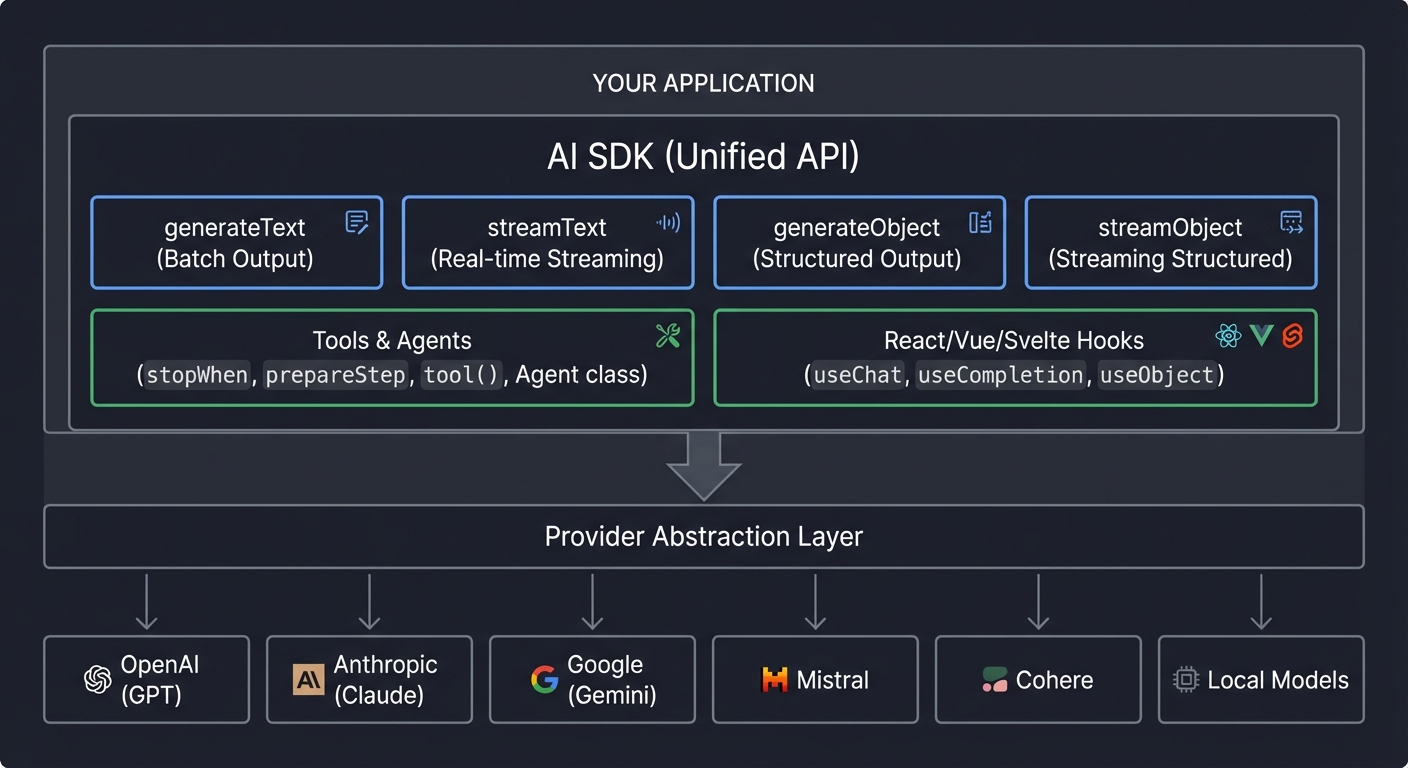
Core Concepts Deep Dive
Before diving into projects, you must understand the fundamental concepts that make the AI SDK powerful. Each concept builds on the previous one—don’t skip ahead.
1. Text Generation: The Foundation
At its core, the AI SDK does one thing: sends prompts to LLMs and gets responses back. But HOW you get those responses matters enormously.
┌────────────────────────────────────────────────────────────────────────────┐
│                    TEXT GENERATION PATTERNS                                  │
├────────────────────────────────────────────────────────────────────────────┤
│                                                                              │
│   generateText (Blocking)                 streamText (Real-time)             │
│   ─────────────────────────               ──────────────────────             │
│                                                                              │
│   Client          Server                  Client          Server             │
│      │               │                       │               │               │
│      │──── POST ────►│                       │──── POST ────►│               │
│      │               │                       │               │               │
│      │   (waiting)   │ ◄─────────────────┐   │   (waiting)   │ ◄──────────┐  │
│      │               │ Processing LLM    │   │               │ Start LLM  │  │
│      │               │ response...       │   │◄── token ─────│            │  │
│      │               │ (could be 10s+)   │   │◄── token ─────│ streaming  │  │
│      │               │                   │   │◄── token ─────│            │  │
│      │◄─ COMPLETE ───│ ──────────────────┘   │◄── token ─────│            │  │
│      │               │                       │◄── [done] ────│ ───────────┘  │
│      │               │                       │               │               │
│                                                                              │
│   USE WHEN:                               USE WHEN:                          │
│   • Background processing                 • Interactive UIs                  │
│   • Batch operations                      • Chat interfaces                  │
│   • Email drafting                        • Real-time feedback               │
│   • Agent tool calls                      • Long-form generation             │
│                                                                              │
└────────────────────────────────────────────────────────────────────────────┘
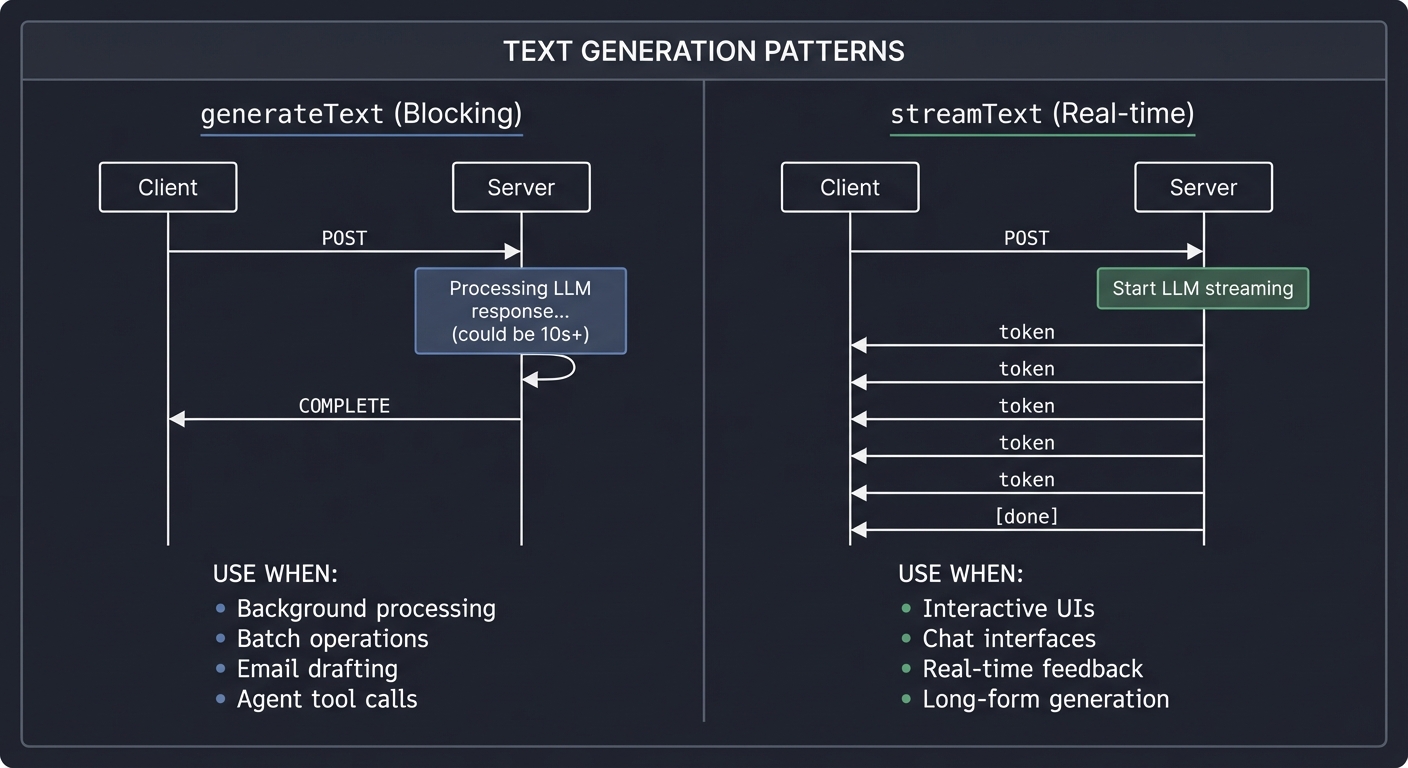
Key Insight: generateText blocks until the full response is ready. streamText returns an async iterator that yields tokens as they’re generated. For a 500-word response, generateText makes the user wait 5-10 seconds for anything to appear; streamText shows the first word in milliseconds.
// Blocking - waits for complete response
const { text } = await generateText({
  model: openai('gpt-4'),
  prompt: 'Explain quantum computing in 500 words'
});
console.log(text); // Full response after ~10 seconds

// Streaming - yields tokens as they arrive
const { textStream } = await streamText({
  model: openai('gpt-4'),
  prompt: 'Explain quantum computing in 500 words'
});
for await (const chunk of textStream) {
  process.stdout.write(chunk); // Each word appears immediately
}
2. Structured Output: Type-Safe AI
Raw text from LLMs is messy. You ask for JSON, you might get markdown. You ask for a number, you might get “approximately 42.” generateObject solves this by enforcing Zod schemas:
┌────────────────────────────────────────────────────────────────────────────┐
│                    STRUCTURED OUTPUT FLOW                                    │
├────────────────────────────────────────────────────────────────────────────┤
│                                                                              │
│   User Input                  Schema Definition              Typed Output    │
│   ──────────                  ─────────────────              ────────────    │
│                                                                              │
│   "Spent $45.50 on      ┌─────────────────────┐         {                    │
│    dinner with client    │  z.object({         │           amount: 45.50,    │
│    at Italian            │    amount: z.number │           category:         │
│    restaurant            │    category: z.enum │             "dining",       │
│    last Tuesday"         │    vendor: z.string │           vendor: "Italian  │
│                          │    date: z.date()   │             Restaurant",    │
│         │                │  })                 │           date: Date        │
│         │                └──────────┬──────────┘         }                   │
│         │                           │                       ▲                │
│         │                           │                       │                │
│         └───────────────────────────┼───────────────────────┘                │
│                                     │                                        │
│                              ┌──────┴──────┐                                 │
│                              │ generateObject│                                │
│                              │    + LLM     │                                │
│                              └─────────────┘                                 │
│                                                                              │
│   The LLM "sees" the schema and generates valid data.                        │
│   If validation fails, AI SDK throws AI_NoObjectGeneratedError.              │
│                                                                              │
└────────────────────────────────────────────────────────────────────────────┘
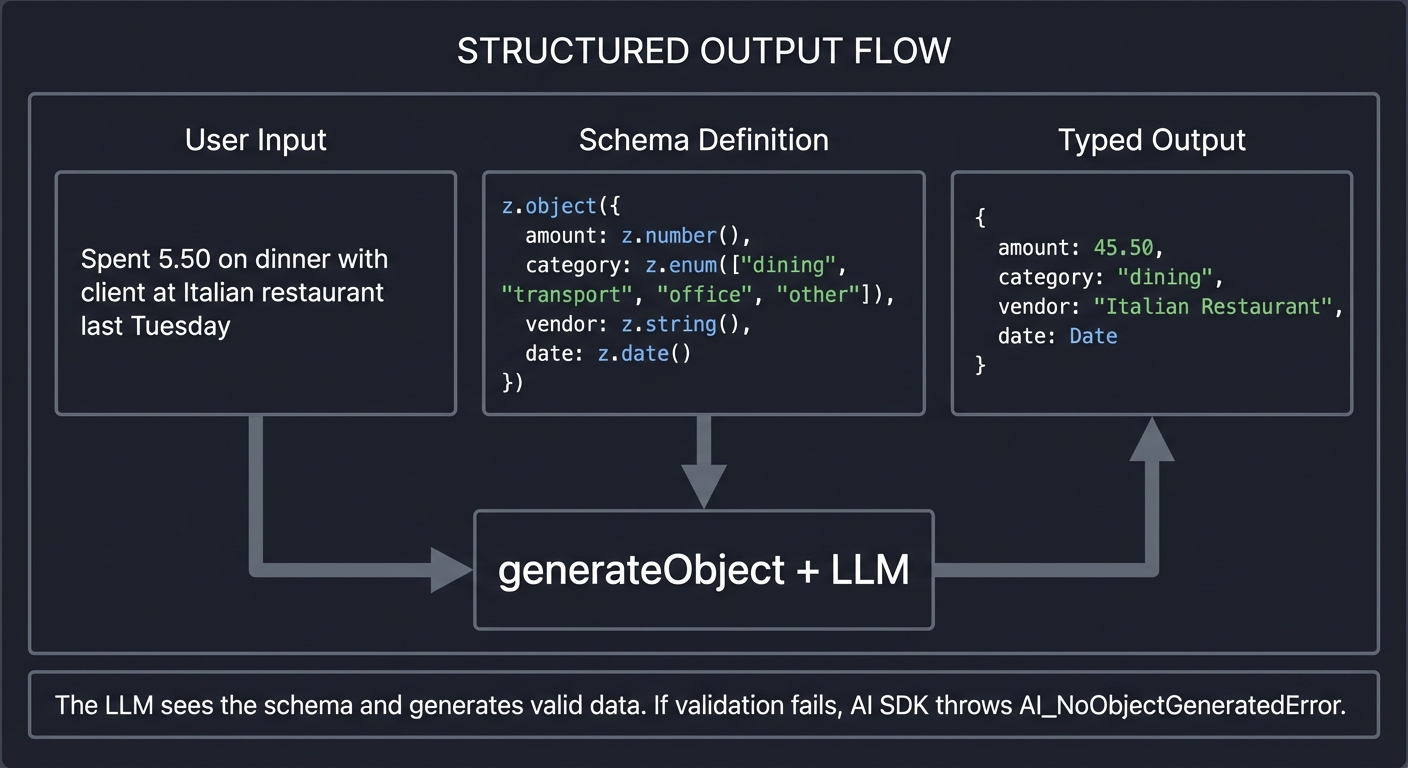
Key Insight: Schema descriptions are prompt engineering. The LLM reads your schema including field descriptions to understand what you want. Better descriptions = better extraction.
const expenseSchema = z.object({
  amount: z.number().describe('The monetary amount spent in dollars'),
  category: z.enum(['dining', 'travel', 'office', 'entertainment'])
    .describe('The expense category for accounting'),
  vendor: z.string().describe('The business name where money was spent'),
  date: z.date().describe('When the expense occurred')
});

const { object } = await generateObject({
  model: openai('gpt-4'),
  schema: expenseSchema,
  prompt: 'Spent $45.50 on dinner with client at Italian restaurant last Tuesday'
});

// object is fully typed: { amount: number, category: "dining" | ..., ... }
3. Tools: AI That Takes Action
Text generation is passive—the AI talks, you listen. Tools make AI active—the AI can DO things.
┌────────────────────────────────────────────────────────────────────────────┐
│                       TOOL CALLING FLOW                                      │
├────────────────────────────────────────────────────────────────────────────┤
│                                                                              │
│   ┌──────────────────────────────────────────────────────────────────────┐  │
│   │                           Tool Registry                               │  │
│   │                                                                       │  │
│   │   ┌─────────────┐   ┌─────────────┐   ┌─────────────┐               │  │
│   │   │ getWeather  │   │ searchWeb   │   │ sendEmail   │               │  │
│   │   │             │   │             │   │             │               │  │
│   │   │ description:│   │ description:│   │ description:│               │  │
│   │   │ "Get current│   │ "Search the │   │ "Send an    │               │  │
│   │   │  weather    │   │  web for    │   │  email to   │               │  │
│   │   │  for city"  │   │  information│   │  a recipient│               │  │
│   │   │             │   │  "          │   │  "          │               │  │
│   │   │ input:      │   │ input:      │   │ input:      │               │  │
│   │   │  {city}     │   │  {query}    │   │  {to,subj,  │               │  │
│   │   │             │   │             │   │   body}     │               │  │
│   │   └─────────────┘   └─────────────┘   └─────────────┘               │  │
│   └──────────────────────────────────────────────────────────────────────┘  │
│                                    │                                         │
│                                    │ LLM sees descriptions                   │
│                                    │ and chooses which to call               │
│                                    ▼                                         │
│   ┌──────────────────────────────────────────────────────────────────────┐  │
│   │  User: "What's the weather in Tokyo and email it to john@example.com" │  │
│   │                                                                        │  │
│   │  LLM Reasoning:                                                        │  │
│   │   1. I need weather data → call getWeather({city: "Tokyo"})           │  │
│   │   2. I need to send email → call sendEmail({to: "john@...", ...})     │  │
│   │                                                                        │  │
│   │  SDK executes tools, returns results to LLM                            │  │
│   │  LLM generates final response incorporating tool results               │  │
│   └──────────────────────────────────────────────────────────────────────┘  │
│                                                                              │
└────────────────────────────────────────────────────────────────────────────┘
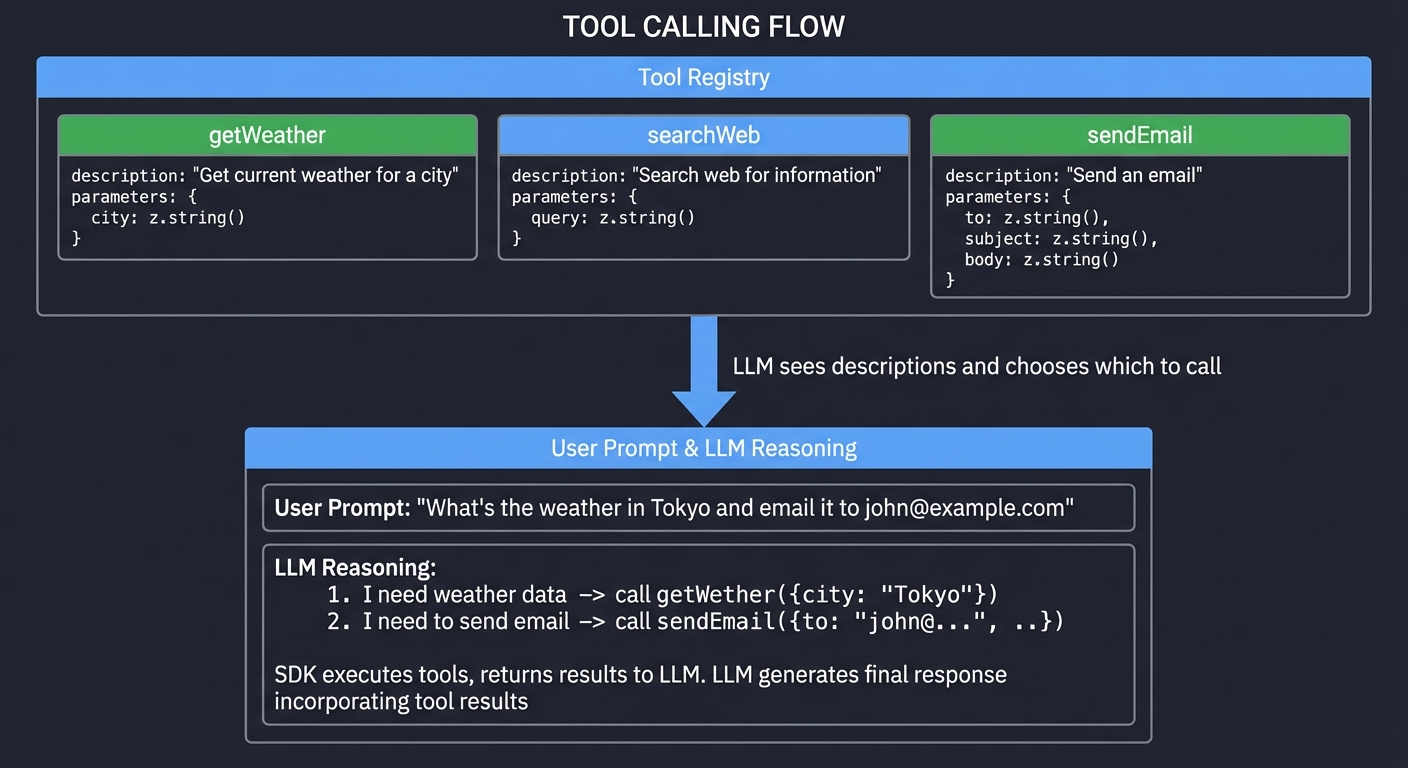
Key Insight: The LLM decides WHEN and WHICH tools to call based on your descriptions. You don’t control the flow—you define capabilities and let the LLM orchestrate.
const tools = {
  getWeather: tool({
    description: 'Get current weather for a city',
    parameters: z.object({
      city: z.string().describe('City name')
    }),
    execute: async ({ city }) => {
      const response = await fetch(`https://api.weather.com/${city}`);
      return response.json();
    }
  })
};

const { text, toolCalls } = await generateText({
  model: openai('gpt-4'),
  tools,
  prompt: 'What is the weather in Tokyo?'
});
// LLM called getWeather, got result, and incorporated it into response
4. Agents: Autonomous AI
A tool call is a single action. An agent is an LLM in a loop, calling tools repeatedly until a task is complete.
┌────────────────────────────────────────────────────────────────────────────┐
│                         AGENT LOOP ARCHITECTURE                              │
├────────────────────────────────────────────────────────────────────────────┤
│                                                                              │
│   User Goal: "Research quantum computing and write a summary"               │
│                                                                              │
│   ┌────────────────────────────────────────────────────────────────────┐    │
│   │                        AGENT LOOP                                   │    │
│   │                                                                     │    │
│   │   ┌─────────────────────────────────────────────────────────────┐  │    │
│   │   │  prepareStep: Inject accumulated context                     │  │    │
│   │   │    • "You have learned: [facts from previous steps]"        │  │    │
│   │   │    • "Sources visited: [urls]"                              │  │    │
│   │   └──────────────────────────┬──────────────────────────────────┘  │    │
│   │                              │                                      │    │
│   │                              ▼                                      │    │
│   │   ┌─────────────────────────────────────────────────────────────┐  │    │
│   │   │  LLM Decision: What should I do next?                        │  │    │
│   │   │                                                              │  │    │
│   │   │  Step 1: "I need to search" → webSearch("quantum computing")│  │    │
│   │   │  Step 2: "I should read this" → readPage("nature.com/...")  │  │    │
│   │   │  Step 3: "I found facts" → extractFacts(content)            │  │    │
│   │   │  Step 4: "Need more info" → webSearch("quantum error...")   │  │    │
│   │   │  ...                                                         │  │    │
│   │   │  Step N: "I have enough" → synthesize final answer          │  │    │
│   │   └──────────────────────────┬──────────────────────────────────┘  │    │
│   │                              │                                      │    │
│   │                              ▼                                      │    │
│   │   ┌─────────────────────────────────────────────────────────────┐  │    │
│   │   │  stopWhen: Check if agent should terminate                   │  │    │
│   │   │    • hasToolCall('synthesize') → true: STOP                 │  │    │
│   │   │    • stepCount > maxSteps → true: STOP                      │  │    │
│   │   │    • otherwise → false: CONTINUE LOOP                       │  │    │
│   │   └─────────────────────────────────────────────────────────────┘  │    │
│   │                                                                     │    │
│   └────────────────────────────────────────────────────────────────────┘    │
│                                                                              │
│   Output: Complete research summary with citations                           │
│                                                                              │
└────────────────────────────────────────────────────────────────────────────┘
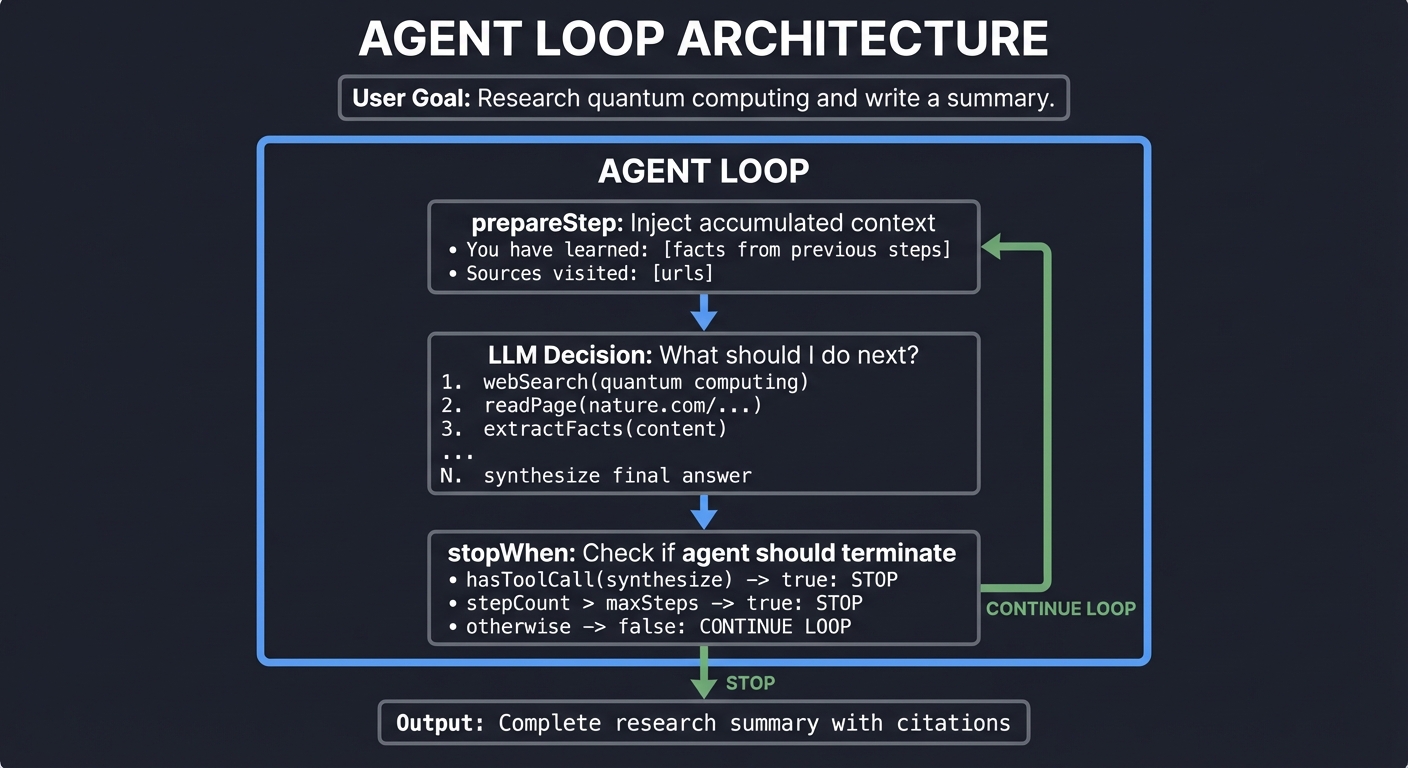
Key Insight: stopWhen and prepareStep are your control mechanisms. prepareStep injects state before each iteration; stopWhen decides when to stop. The agent is autonomous between these boundaries.
const { text, steps } = await generateText({
  model: openai('gpt-4'),
  tools: { search, readPage, synthesize },
  stopWhen: hasToolCall('synthesize'), // Stop when synthesis tool is called
  prepareStep: async ({ previousSteps }) => {
    // Inject accumulated knowledge before each step
    const facts = extractFacts(previousSteps);
    return {
      system: `You are a research agent. Facts learned so far: ${facts}`
    };
  },
  prompt: 'Research quantum computing and write a summary'
});
5. Provider Abstraction: Write Once, Run Anywhere
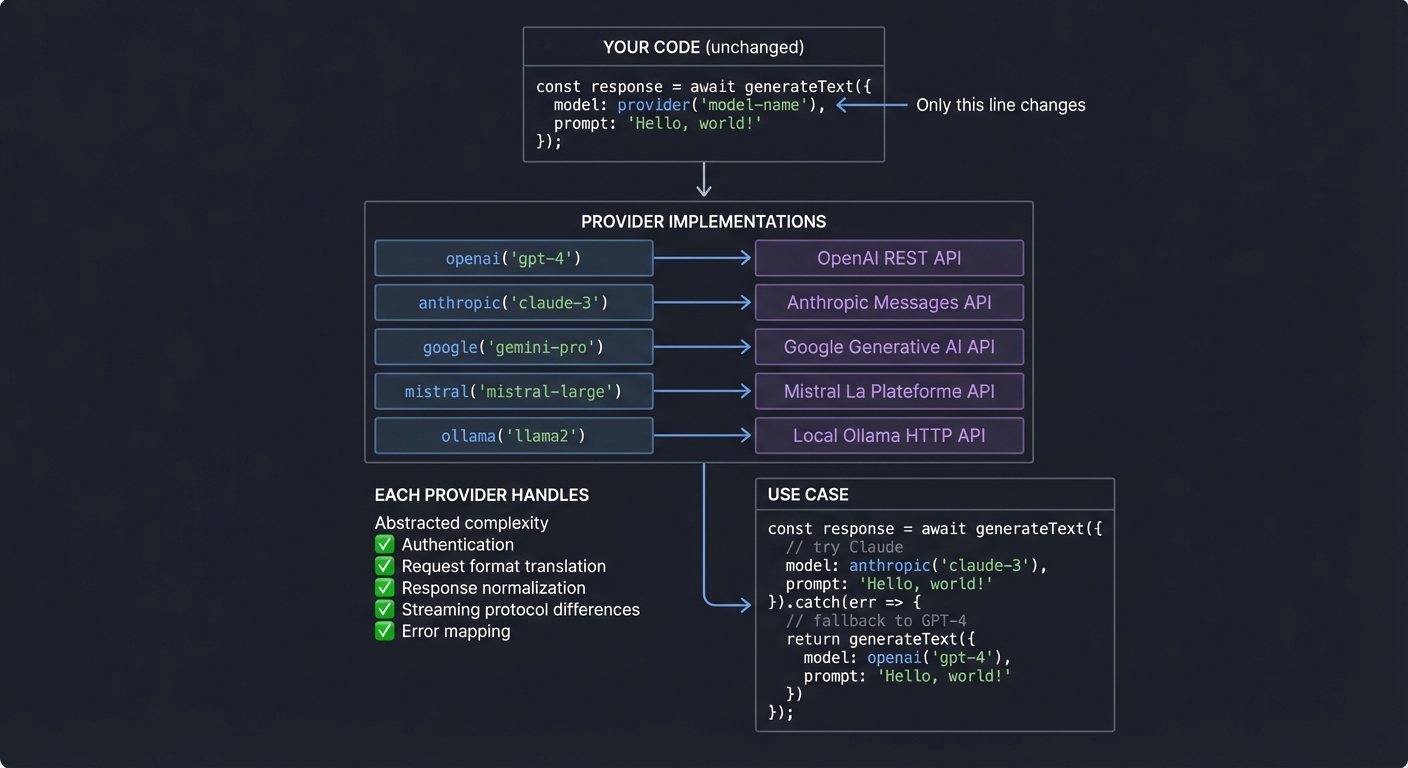
Different LLM providers have different APIs, capabilities, and quirks. The AI SDK normalizes them:
┌────────────────────────────────────────────────────────────────────────────┐
│                     PROVIDER ABSTRACTION                                     │
├────────────────────────────────────────────────────────────────────────────┤
│                                                                              │
│   YOUR CODE (unchanged)                                                      │
│   ─────────────────────                                                      │
│                                                                              │
│   const result = await generateText({                                        │
│     model: provider('model-name'),  ◄── Only this line changes              │
│     prompt: 'Your prompt here'                                               │
│   });                                                                        │
│                                                                              │
│   ┌────────────────────────────────────────────────────────────────────┐    │
│   │                    Provider Implementations                         │    │
│   │                                                                     │    │
│   │   openai('gpt-4')          → OpenAI REST API                       │    │
│   │   anthropic('claude-3')    → Anthropic Messages API                │    │
│   │   google('gemini-pro')     → Google Generative AI API              │    │
│   │   mistral('mistral-large') → Mistral La Plateforme API             │    │
│   │   ollama('llama2')         → Local Ollama HTTP API                 │    │
│   │                                                                     │    │
│   │   Each provider handles:                                            │    │
│   │   • Authentication (API keys, tokens)                              │    │
│   │   • Request format translation                                     │    │
│   │   • Response normalization                                         │    │
│   │   • Streaming protocol differences                                 │    │
│   │   • Error mapping to AI SDK error types                            │    │
│   │                                                                     │    │
│   └────────────────────────────────────────────────────────────────────┘    │
│                                                                              │
│   USE CASE: Fallback chains, cost optimization, capability routing          │
│                                                                              │
│   // Try Claude for reasoning, fall back to GPT-4                           │
│   try {                                                                      │
│     return await generateText({ model: anthropic('claude-3-opus') });       │
│   } catch {                                                                  │
│     return await generateText({ model: openai('gpt-4') });                  │
│   }                                                                          │
│                                                                              │
└────────────────────────────────────────────────────────────────────────────┘
6. Streaming Architecture: Server-Sent Events
Understanding HOW streaming works is crucial for building real-time AI interfaces:
┌────────────────────────────────────────────────────────────────────────────┐
│                    STREAMING DATA FLOW                                       │
├────────────────────────────────────────────────────────────────────────────┤
│                                                                              │
│   Browser                 Next.js API Route              LLM Provider        │
│     │                          │                              │              │
│     │── POST /api/chat ───────►│                              │              │
│     │                          │── streamText() ─────────────►│              │
│     │                          │                              │              │
│     │                          │◄─ AsyncIterableStream ───────│              │
│     │                          │   (yields token by token)    │              │
│     │                          │                              │              │
│     │                   ┌──────┴──────┐                       │              │
│     │                   │ toDataStream│                       │              │
│     │                   │  Response() │                       │              │
│     │                   └──────┬──────┘                       │              │
│     │                          │                              │              │
│     │◄─ SSE: data: {"type":"text","value":"The"} ─────────────│              │
│     │◄─ SSE: data: {"type":"text","value":" quantum"} ────────│              │
│     │◄─ SSE: data: {"type":"text","value":" computer"} ───────│              │
│     │◄─ SSE: data: {"type":"finish"} ─────────────────────────│              │
│     │                          │                              │              │
│   ┌─┴─┐                        │                              │              │
│   │useChat hook               │                              │              │
│   │processes SSE              │                              │              │
│   │updates React state        │                              │              │
│   │triggers re-render         │                              │              │
│   └───┘                        │                              │              │
│                                                                              │
│   SSE Format:                                                                │
│   ───────────                                                                │
│   event: message                                                             │
│   data: {"type":"text-delta","textDelta":"The"}                              │
│                                                                              │
│   data: {"type":"text-delta","textDelta":" answer"}                          │
│                                                                              │
│   data: {"type":"finish","finishReason":"stop"}                              │
│                                                                              │
└────────────────────────────────────────────────────────────────────────────┘
Key Insight: Server-Sent Events are unidirectional (server → client), simpler than WebSockets, and perfect for LLM streaming. The AI SDK handles all the serialization and React state management.
Concept Summary Table
| Concept Cluster | What You Need to Internalize |
|---|---|
| Text Generation | generateText is blocking, streamText is real-time. Both are the foundation for all LLM interactions. |
| Structured Output | generateObject transforms unstructured text into typed, validated data. Zod schemas guide LLM output. Schema descriptions are prompt engineering. |
| Tool Calling | Tools are functions the LLM can invoke. The LLM decides WHEN and WHICH tool to call based on descriptions. You define capabilities; the LLM orchestrates. |
| Agent Loop | An agent is an LLM in a loop, calling tools until a task is complete. stopWhen and prepareStep are your control mechanisms. |
| Provider Abstraction | Switch between OpenAI, Anthropic, Google with one line. The SDK normalizes API differences, auth, streaming protocols. |
| Streaming Architecture | SSE transport, AsyncIterableStream, token-by-token delivery. React hooks (useChat, useCompletion) handle client-side state. |
| Error Handling | AI_NoObjectGeneratedError, provider failures, stream errors. Production AI needs graceful degradation and retry logic. |
| Telemetry | Track tokens, costs, latency per request. Essential for production AI systems and cost optimization. |
Deep Dive Reading By Concept
| Concept | Book Chapters & Resources |
|---|---|
| Text Generation | • “JavaScript: The Definitive Guide” by David Flanagan - Ch. 13 (Asynchronous JavaScript, Promises, async/await) • AI SDK generateText docs • AI SDK streamText docs |
| Structured Output | • “Programming TypeScript” by Boris Cherny - Ch. 3 (Types), Ch. 6 (Advanced Types) • AI SDK generateObject docs • Zod documentation - Schema validation patterns |
| Tool Calling | • “Building LLM Apps” by Harrison Chase (LangChain blog series) • AI SDK Tools and Tool Calling • How to build AI Agents with Vercel |
| Agent Loop | • “ReAct: Synergizing Reasoning and Acting” (Yao et al.) - The academic foundation • AI SDK Agents docs • “Artificial Intelligence: A Modern Approach” by Russell & Norvig - Ch. 2 (Intelligent Agents) |
| Provider Abstraction | • “Design Patterns” by Gang of Four - Adapter pattern • AI SDK Providers docs • “Designing Data-Intensive Applications” by Martin Kleppmann - Ch. 4 (Encoding and Evolution) |
| Streaming Architecture | • “JavaScript: The Definitive Guide” by David Flanagan - Ch. 13 (Async Iteration), Ch. 15.11 (Server-Sent Events) • “Node.js Design Patterns” by Mario Casciaro - Ch. 6 (Streams) • MDN Server-Sent Events • AI SDK UI hooks docs |
| Error Handling | • “Programming TypeScript” by Boris Cherny - Ch. 7 (Handling Errors) • “Release It!, 2nd Edition” by Michael Nygard - Ch. 5 (Stability Patterns) • AI SDK Error Handling docs |
| Telemetry | • AI SDK Telemetry docs • “Designing Data-Intensive Applications” by Martin Kleppmann - Ch. 1 (Reliability, Observability) • OpenTelemetry documentation for observability patterns |
Project 1: AI-Powered Expense Tracker CLI
- File: AI_SDK_LEARNING_PROJECTS.md
- Programming Language: TypeScript
- Coolness Level: Level 2: Practical but Forgettable
- Business Potential: 2. The “Micro-SaaS / Pro Tool”
- Difficulty: Level 1: Beginner
- Knowledge Area: Generative AI / CLI Tools
- Software or Tool: AI SDK / Zod
- Main Book: “Programming TypeScript” by Boris Cherny
What you’ll build: A command-line tool where you describe expenses in natural language (“Spent $45.50 on dinner with client at Italian restaurant”) and it extracts, categorizes, and stores structured expense records.
Why it teaches AI SDK: This forces you to understand generateObject and Zod schemas at their core. You’ll see how the LLM transforms unstructured human text into validated, typed data—the bread and butter of real AI applications.
Core challenges you’ll face:
- Designing Zod schemas that guide LLM output effectively (maps to structured output)
- Handling validation errors when the LLM produces invalid data (maps to error handling)
- Adding schema descriptions to improve extraction accuracy (maps to prompt engineering)
- Supporting multiple categories and edge cases (maps to schema design)
Key Concepts:
- Zod Schema Design: AI SDK Generating Structured Data Docs
- TypeScript Type Inference: “Programming TypeScript” by Boris Cherny - Ch. 3
- CLI Development: “Command-Line Rust” by Ken Youens-Clark (patterns apply to TS too)
Difficulty: Beginner Time estimate: Weekend Prerequisites: Basic TypeScript, npm/pnpm
Learning milestones:
- First
generateObjectcall returns parsed expense → you understand schema-to-output mapping - Adding descriptions to schema fields improves extraction → you grasp how LLMs consume schemas
- Handling
AI_NoObjectGeneratedErrorgracefully → you understand AI SDK error patterns
Real World Outcome
When you run the CLI, here’s exactly what you’ll see in your terminal:
$ expense "Coffee with team $23.40 at Starbucks this morning"

✓ Expense recorded

┌─────────────────────────────────────────────────────────────────┐
│                        EXPENSE RECORD                            │
├─────────────────────────────────────────────────────────────────┤
│  Amount:     $23.40                                              │
│  Category:   dining                                              │
│  Vendor:     Starbucks                                           │
│  Date:       2025-12-22                                          │
│  Notes:      Coffee with team                                    │
├─────────────────────────────────────────────────────────────────┤
│  ID:         exp_a7f3b2c1                                        │
│  Created:    2025-12-22T10:34:12Z                                │
└─────────────────────────────────────────────────────────────────┘

Saved to ~/.expenses/2025-12.json
Try more complex natural language inputs:
$ expense "Took an Uber from airport to hotel, $67.80, for the Chicago conference trip"

✓ Expense recorded

┌─────────────────────────────────────────────────────────────────┐
│                        EXPENSE RECORD                            │
├─────────────────────────────────────────────────────────────────┤
│  Amount:     $67.80                                              │
│  Category:   travel                                              │
│  Vendor:     Uber                                                │
│  Date:       2025-12-22                                          │
│  Notes:      Airport to hotel, Chicago conference                │
├─────────────────────────────────────────────────────────────────┤
│  ID:         exp_b8e4c3d2                                        │
│  Created:    2025-12-22T10:35:45Z                                │
└─────────────────────────────────────────────────────────────────┘
Generate reports:
$ expense report --month 2025-12

┌─────────────────────────────────────────────────────────────────┐
│              EXPENSE REPORT: December 2025                       │
├─────────────────────────────────────────────────────────────────┤
│                                                                  │
│  SUMMARY BY CATEGORY                                             │
│  ───────────────────                                             │
│  dining        │████████████████     │  $234.50  (12 expenses)  │
│  travel        │████████████         │  $567.80  (5 expenses)   │
│  office        │████                 │  $89.20   (3 expenses)   │
│  entertainment │██                   │  $45.00   (2 expenses)   │
│  ─────────────────────────────────────────────────────────────  │
│  TOTAL                                 $936.50  (22 expenses)   │
│                                                                  │
└─────────────────────────────────────────────────────────────────┘

Exported to ~/.expenses/report-2025-12.csv
Handle errors gracefully:
$ expense "bought something"

⚠ Could not extract expense details

Missing information:
  • Amount: No monetary value found
  • Vendor: No vendor/merchant identified

Please include at least an amount, e.g.:
  expense "bought lunch $15 at Chipotle"
The Core Question You’re Answering
“How do I transform messy, unstructured human text into clean, typed, validated data structures using AI?”
This is THE fundamental pattern of modern AI applications. Every chatbot that fills out forms, every assistant that creates calendar events, every tool that extracts data from documents—they all use this pattern. You describe something in plain English, and the AI SDK + LLM extracts structured data.
Before you write code, understand: generateObject is not just “LLM call with schema.” The schema itself is part of the prompt. The LLM sees your Zod schema including field names, types, and descriptions. Better schemas = better extraction.
Concepts You Must Understand First
Stop and research these before coding:
- Zod Schemas as LLM Instructions
- What is a Zod schema and how does TypeScript infer types from it?
- How does
generateObjectsend the schema to the LLM? - Why do
.describe()methods on schema fields improve extraction? - Reference: Zod documentation - Start here
- generateObject vs generateText
- When would you use
generateTextvsgenerateObject? - What happens internally when you call
generateObject? - What is
AI_NoObjectGeneratedErrorand when does it occur? - Reference: AI SDK generateObject docs
- When would you use
- TypeScript Type Inference
- How does
z.infer<typeof schema>work? - Why is this important for type-safe AI applications?
- Book Reference: “Programming TypeScript” by Boris Cherny - Ch. 3 (Types)
- How does
- Error Handling in AI Systems
- What happens when the LLM generates data that doesn’t match the schema?
- How do you handle partial matches or missing fields?
- What’s the difference between validation errors and generation errors?
- Book Reference: “Programming TypeScript” by Boris Cherny - Ch. 7 (Handling Errors)
- CLI Design Patterns
- How do you parse command-line arguments in Node.js?
- What makes a good CLI user experience?
- Book Reference: “Command-Line Rust” by Ken Youens-Clark - Ch. 1-2 (patterns apply to TypeScript)
Questions to Guide Your Design
Before implementing, think through these:
- Schema Design
- What fields does an expense record need? (amount, category, vendor, date, notes?)
- What data types should each field be? (number, enum, string, Date?)
- Which fields are required vs optional?
- How do you handle ambiguous categories? (Is “Uber” travel or transportation?)
- Natural Language Parsing
- How many ways can someone describe “$45.50”? (“45.50”, “$45.50”, “forty-five fifty”, “about 45 bucks”)
- How do you handle relative dates? (“yesterday”, “last Tuesday”, “this morning”)
- What if the vendor is implied but not stated? (“got coffee” → Starbucks?)
- Storage and Persistence
- Where do you store expenses? (JSON file, SQLite, in-memory?)
- How do you organize by month/year for reporting?
- How do you handle concurrent writes?
- Error Recovery
- What do you do when extraction fails completely?
- How do you handle partial extraction (got amount but no vendor)?
- Should you prompt the user for missing information?
- CLI Interface
- What commands do you need? (
add,list,report,export?) - How do you handle interactive vs non-interactive modes?
- What output formats do you support? (JSON, table, CSV?)
- What commands do you need? (
Thinking Exercise
Before coding, design your schema on paper:
// Start with this skeleton and fill in the blanks:

const expenseSchema = z.object({
  // What fields do you need?
  // What types should they be?
  // What descriptions will help the LLM understand what you want?

  amount: z.number().describe('???'),
  category: z.enum(['???']).describe('???'),
  vendor: z.string().describe('???'),
  date: z.string().describe('???'), // or z.date()?
  notes: z.string().optional().describe('???'),
});

// Now trace through these inputs:
// 1. "Coffee $4.50 at Starbucks"
// 2. "Spent around 50 bucks on office supplies at Amazon yesterday"
// 3. "Uber to airport"  ← No amount! What happens?
// 4. "Bought stuff"     ← Very ambiguous! What happens?
Questions while tracing:
- Which inputs will extract cleanly?
- Which will cause validation errors?
- How would you modify your schema to handle more edge cases?
- What descriptions would help the LLM interpret “around 50 bucks”?
The Interview Questions They’ll Ask
Prepare to answer these:
- “What is the difference between generateText and generateObject?”
generateTextreturns unstructured text.generateObjectreturns a typed object validated against a Zod schema. UsegenerateObjectwhen you need structured, validated data.
- “How does Zod work with the AI SDK?”
- Zod schemas define the expected structure. The AI SDK serializes the schema (including descriptions) and sends it to the LLM. The LLM generates JSON matching the schema. The SDK validates the response and returns a typed object.
- “What happens if the LLM generates invalid data?”
- The SDK throws
AI_NoObjectGeneratedError. You can catch this and retry, prompt for more information, or fall back gracefully.
- The SDK throws
- “How do schema descriptions affect LLM output quality?”
- Descriptions are essentially prompt engineering embedded in your type definitions. Clear descriptions with examples dramatically improve extraction accuracy.
- “How would you handle partial extraction?”
- Use optional fields (
z.optional()) for non-critical data. For required fields, validate the error and prompt the user for missing information.
- Use optional fields (
- “What are the tradeoffs of different expense categories?”
z.enum()limits categories but ensures consistency.z.string()is flexible but may result in inconsistent categorization. A middle ground: usez.enum()with a catch-all “other” category.
Hints in Layers
Hint 1: Basic Setup Start with the simplest possible schema and a single command:
import { generateObject } from 'ai';
import { openai } from '@ai-sdk/openai';
import { z } from 'zod';

const expenseSchema = z.object({
  amount: z.number(),
  vendor: z.string(),
});

const { object } = await generateObject({
  model: openai('gpt-4o-mini'),
  schema: expenseSchema,
  prompt: process.argv[2], // "Coffee $5 at Starbucks"
});

console.log(object);
Run it and see what you get. Does it work? What’s missing?
Hint 2: Add Descriptions Descriptions dramatically improve extraction:
const expenseSchema = z.object({
  amount: z.number()
    .describe('The monetary amount spent in US dollars. Extract from phrases like "$45.50", "45 dollars", "about 50 bucks".'),
  vendor: z.string()
    .describe('The business or merchant name where the purchase was made.'),
  category: z.enum(['dining', 'travel', 'office', 'entertainment', 'other'])
    .describe('The expense category. Use "dining" for restaurants and coffee shops, "travel" for transportation and hotels.'),
});
Hint 3: Handle Errors Wrap your call in try/catch:
import { AI_NoObjectGeneratedError } from 'ai';

try {
  const { object } = await generateObject({ ... });
  console.log('✓ Expense recorded');
  console.log(object);
} catch (error) {
  if (error instanceof AI_NoObjectGeneratedError) {
    console.log('⚠ Could not extract expense details');
    console.log('Please include an amount and vendor.');
  } else {
    throw error;
  }
}
Hint 4: Add Persistence Store expenses in a JSON file:
import { readFileSync, writeFileSync, existsSync } from 'fs';

const EXPENSES_FILE = './expenses.json';

function loadExpenses(): Expense[] {
  if (!existsSync(EXPENSES_FILE)) return [];
  return JSON.parse(readFileSync(EXPENSES_FILE, 'utf-8'));
}

function saveExpense(expense: Expense) {
  const expenses = loadExpenses();
  expenses.push({ ...expense, id: crypto.randomUUID(), createdAt: new Date() });
  writeFileSync(EXPENSES_FILE, JSON.stringify(expenses, null, 2));
}
Hint 5: Build the Report Command Group expenses by category:
const expenses = loadExpenses();
const byCategory = Object.groupBy(expenses, (e) => e.category);

for (const [category, items] of Object.entries(byCategory)) {
  const total = items.reduce((sum, e) => sum + e.amount, 0);
  console.log(`${category}: $${total.toFixed(2)} (${items.length} expenses)`);
}
Books That Will Help
| Topic | Book | Chapter |
|---|---|---|
| TypeScript fundamentals | “Programming TypeScript” by Boris Cherny | Ch. 3 (Types), Ch. 6 (Advanced Types) |
| Error handling patterns | “Programming TypeScript” by Boris Cherny | Ch. 7 (Handling Errors) |
| Zod and validation | Zod documentation | Entire guide |
| CLI design patterns | “Command-Line Rust” by Ken Youens-Clark | Ch. 1-2 (patterns apply to TS) |
| Async/await patterns | “JavaScript: The Definitive Guide” by David Flanagan | Ch. 13 (Asynchronous JavaScript) |
| AI SDK structured output | AI SDK Docs | Generating Structured Data |
Recommended reading order:
- Zod documentation (30 min) - Understand schema basics
- AI SDK generateObject docs (30 min) - Understand the API
- Boris Cherny Ch. 3 (1 hour) - Deep TypeScript types
- Then start coding!
Project 2: Real-Time Document Summarizer with Streaming UI
- File: AI_SDK_LEARNING_PROJECTS.md
- Main Programming Language: TypeScript
- Alternative Programming Languages: JavaScript, Python, Go
- Coolness Level: Level 3: Genuinely Clever
- Business Potential: Level 2: The “Micro-SaaS / Pro Tool”
- Difficulty: Level 2: Intermediate (The Developer)
- Knowledge Area: Web Streaming, AI Integration
- Software or Tool: Next.js, AI SDK, React
- Main Book: “JavaScript: The Definitive Guide” by David Flanagan
What you’ll build: A web application where users paste long documents (articles, papers, transcripts) and watch summaries generate in real-time, character by character, with a progress indicator and section-by-section breakdown.
Why it teaches AI SDK: streamText is what makes AI apps feel alive. You’ll implement the streaming pipeline end-to-end: from the SDK’s async iterators through Server-Sent Events to React state updates. This is how ChatGPT-style UIs work.
Core challenges you’ll face:
- Implementing SSE streaming from Next.js API routes (maps to streaming architecture)
- Consuming streams on the client with proper cleanup (maps to async iteration)
- Handling partial updates and rendering in-progress text (maps to state management)
- Graceful error handling mid-stream (maps to error boundaries)
Resources for key challenges:
- “The AI SDK UI docs on useChat/useCompletion” - Shows the React hooks that handle streaming
- “MDN Server-Sent Events guide” - Foundation for understanding the transport layer
Key Concepts:
- Streaming Responses: AI SDK streamText Docs
- React Server Components: “Learning React, 2nd Edition” by Eve Porcello - Ch. 12
- Async Iterators: “JavaScript: The Definitive Guide” by David Flanagan - Ch. 13
Difficulty: Beginner-Intermediate Time estimate: 1 week Prerequisites: React/Next.js basics, TypeScript
Real world outcome:
- Paste a 5,000-word article and watch the summary stream in real-time
- See a “Summarizing…” indicator with word count progress
- Final output shows key points, main themes, and a one-paragraph summary
- Copy button to grab the summary for use elsewhere
Learning milestones:
- First stream renders tokens in real-time → you understand async iteration
- Implementing abort controller cancels mid-stream → you grasp cleanup patterns
- Adding streaming structured output with
streamObject→ you combine both patterns
Real World Outcome
When you open the web app in your browser, here’s exactly what you’ll see and experience:
Initial State:
┌─────────────────────────────────────────────────────────────────────┐
│  📄 Document Summarizer                                              │
├─────────────────────────────────────────────────────────────────────┤
│                                                                      │
│  Paste your document here:                                           │
│  ┌────────────────────────────────────────────────────────────────┐ │
│  │                                                                 │ │
│  │  Paste or type your document text...                           │ │
│  │                                                                 │ │
│  │                                                                 │ │
│  │                                                                 │ │
│  └────────────────────────────────────────────────────────────────┘ │
│                                                                      │
│  Document length: 0 words                   [✨ Summarize]           │
│                                                                      │
└─────────────────────────────────────────────────────────────────────┘
After Pasting a Document (5,000+ words):
┌─────────────────────────────────────────────────────────────────────┐
│  📄 Document Summarizer                                              │
├─────────────────────────────────────────────────────────────────────┤
│                                                                      │
│  Paste your document here:                                           │
│  ┌────────────────────────────────────────────────────────────────┐ │
│  │ The field of quantum computing has seen remarkable progress    │ │
│  │ over the past decade. Recent breakthroughs in error           │ │
│  │ correction, qubit stability, and algorithmic development      │ │
│  │ have brought us closer than ever to practical quantum         │ │
│  │ advantage. This comprehensive analysis examines...            │ │
│  │ [... 5,234 more words ...]                                    │ │
│  └────────────────────────────────────────────────────────────────┘ │
│                                                                      │
│  Document length: 5,847 words               [✨ Summarize]           │
│                                                                      │
└─────────────────────────────────────────────────────────────────────┘
While Streaming (the magic happens!):
┌─────────────────────────────────────────────────────────────────────┐
│  📄 Document Summarizer                                              │
├─────────────────────────────────────────────────────────────────────┤
│                                                                      │
│  📝 Summary                                                          │
│  ─────────────────────────────────────────────────────────────────  │
│  ⏳ Generating...                           Progress: 234 words      │
│  ┌────────────────────────────────────────────────────────────────┐ │
│  │                                                                 │ │
│  │ ## Key Points                                                   │ │
│  │                                                                 │ │
│  │ The article examines recent quantum computing breakthroughs,   │ │
│  │ focusing on three critical areas:                              │ │
│  │                                                                 │ │
│  │ 1. **Error Correction**: IBM's new surface code approach       │ │
│  │    achieves 99.5% fidelity, a significant improvement over     │ │
│  │    previous methods. This breakthrough addresses one of the█   │ │
│  │                                                                 │ │
│  └────────────────────────────────────────────────────────────────┘ │
│                                                                      │
│  [⏹ Cancel]                                                          │
│                                                                      │
└─────────────────────────────────────────────────────────────────────┘
The cursor (█) moves in real-time as each token arrives from the LLM. The user watches the summary build word by word—this is the “ChatGPT effect” that makes AI feel alive.
Completed Summary:
┌─────────────────────────────────────────────────────────────────────┐
│  📄 Document Summarizer                                              │
├─────────────────────────────────────────────────────────────────────┤
│                                                                      │
│  📝 Summary                                           ✓ Complete     │
│  ─────────────────────────────────────────────────────────────────  │
│  Generated in 4.2s                          Total: 312 words         │
│  ┌────────────────────────────────────────────────────────────────┐ │
│  │                                                                 │ │
│  │ ## Key Points                                                   │ │
│  │                                                                 │ │
│  │ The article examines recent quantum computing breakthroughs,   │ │
│  │ focusing on three critical areas:                              │ │
│  │                                                                 │ │
│  │ 1. **Error Correction**: IBM's new surface code approach       │ │
│  │    achieves 99.5% fidelity, a significant improvement...       │ │
│  │                                                                 │ │
│  │ 2. **Qubit Scaling**: Google's 1,000-qubit processor           │ │
│  │    demonstrates exponential progress in hardware capacity...   │ │
│  │                                                                 │ │
│  │ 3. **Commercial Applications**: First production deployments   │ │
│  │    in drug discovery and financial modeling show...            │ │
│  │                                                                 │ │
│  │ ## Main Themes                                                  │ │
│  │ - Race between IBM, Google, and emerging startups              │ │
│  │ - Shift from theoretical to practical quantum advantage        │ │
│  │ - Growing investment from pharmaceutical and finance sectors   │ │
│  │                                                                 │ │
│  │ ## One-Paragraph Summary                                        │ │
│  │ Quantum computing is transitioning from experimental to        │ │
│  │ practical, with major players achieving key milestones in      │ │
│  │ error correction and scaling that enable real-world use cases. │ │
│  │                                                                 │ │
│  └────────────────────────────────────────────────────────────────┘ │
│                                                                      │
│  [📋 Copy to Clipboard]      [🔄 Summarize Again]      [📄 New Doc]  │
│                                                                      │
└─────────────────────────────────────────────────────────────────────┘
Error State (mid-stream failure):
┌─────────────────────────────────────────────────────────────────────┐
│  📄 Document Summarizer                                              │
├─────────────────────────────────────────────────────────────────────┤
│                                                                      │
│  📝 Summary                                           ⚠️ Error       │
│  ─────────────────────────────────────────────────────────────────  │
│  Stopped after 2.1s                         Partial: 156 words       │
│  ┌────────────────────────────────────────────────────────────────┐ │
│  │                                                                 │ │
│  │ ## Key Points                                                   │ │
│  │                                                                 │ │
│  │ The article examines recent quantum computing breakthroughs,   │ │
│  │ focusing on three critical areas:                              │ │
│  │                                                                 │ │
│  │ 1. **Error Correction**: IBM's new surface code approach       │ │
│  │    achieves 99.5% fidelity...                                  │ │
│  │                                                                 │ │
│  │ ─────────────────────────────────────────────────────────────  │ │
│  │ ⚠️ Stream interrupted: Connection timeout                       │ │
│  │    Showing partial results above.                              │ │
│  │                                                                 │ │
│  └────────────────────────────────────────────────────────────────┘ │
│                                                                      │
│  [🔄 Retry]                  [📋 Copy Partial]         [📄 New Doc]  │
│                                                                      │
└─────────────────────────────────────────────────────────────────────┘
Key UX behaviors to implement:
- The text area scrolls automatically to keep the cursor visible
- Word count updates in real-time as tokens arrive
- “Cancel” button appears only during streaming
- Partial results are preserved even on error
- Copy button works even during streaming (copies current content)
The Core Question You’re Answering
“How do I stream LLM responses in real-time to create responsive, interactive UIs?”
This is about understanding the entire streaming pipeline from the AI SDK’s async iterators through Server-Sent Events to React state updates. You’re not just calling an API—you’re building a real-time data flow that makes AI feel alive and responsive.
Concepts You Must Understand First
- Server-Sent Events (SSE) - The transport layer, how events flow from server to client over HTTP
- Async Iterators - The
for await...ofpattern, AsyncIterableStream in JavaScript - React State with Streams - Updating state incrementally as chunks arrive without causing excessive re-renders
- AbortController - Cancellation patterns for stopping streams mid-flight
- Next.js API Routes - Server-side streaming setup with proper headers and response handling
Questions to Guide Your Design
- How do you send streaming responses from Next.js API routes?
- How do you consume Server-Sent Events on the client side?
- What happens if the user navigates away mid-stream? (Memory leaks, cleanup)
- How do you show a loading state vs partial content? (UX considerations)
- What do you do when the stream errors halfway through?
- How do you handle backpressure if the client can’t keep up with the stream?
Thinking Exercise
Draw a diagram of the data flow:
- User pastes text and clicks “Summarize”
- Client sends POST request to
/api/summarizewith document text - API route calls
streamText()from AI SDK - AI SDK returns an AsyncIterableStream
- Next.js converts this to Server-Sent Events (SSE) via
toDataStreamResponse() - Browser EventSource/fetch receives SSE chunks
- React hook (useChat/useCompletion) processes each chunk
- State updates trigger re-renders
- UI shows progressive text with cursor indicator
- Stream completes or user cancels with AbortController
Now trace what happens when:
- The network connection drops mid-stream
- The user clicks “Cancel”
- Two requests are made simultaneously
- The LLM returns an error after 50 tokens
The Interview Questions They’ll Ask
- “Explain the difference between WebSockets and Server-Sent Events”
- Expected answer: SSE is unidirectional (server → client), simpler, built on HTTP, auto-reconnects. WebSockets are bidirectional, require protocol upgrade, more complex but better for chat-like interactions.
- “How would you implement cancellation for a streaming request?”
- Expected answer: Use AbortController on the client, pass signal to fetch, clean up EventSource. On server, handle abort signals in the stream processing.
- “What happens if the stream errors mid-response?”
- Expected answer: Partial data is already rendered, need error boundary to catch and display error state, possibly implement retry logic, show user what was received + error message.
- “How do you handle back-pressure in streaming?”
- Expected answer: Browser EventSource buffers automatically, but you need to consider state update batching in React, potentially throttle/debounce updates, use React 18 transitions for non-urgent updates.
- “Why use Server-Sent Events instead of polling?”
- Expected answer: Lower latency, less server load, real-time updates, no missed messages between polls, built-in reconnection.
Hints in Layers
Hint 1 (Basic Setup): Use the AI SDK’s toDataStreamResponse() helper to convert the stream into a format Next.js can send via SSE.
Hint 2 (Client Integration): The AI SDK provides useChat or useCompletion hooks that handle SSE consumption, state management, and cleanup automatically.
Hint 3 (Cancellation): Implement AbortController on the client side and pass the signal to your fetch request. The AI SDK hooks support this with the abort() function they return.
Hint 4 (Error Handling): Add React Error Boundaries around your streaming component, and handle errors in the onError callback of the AI SDK hooks. Consider showing partial results even when errors occur.
Hint 5 (Progress Tracking): The streamText response includes token counts and metadata. Use onFinish callback to track completion, and parse the streaming chunks to count words/tokens for progress indicators.
Hint 6 (Performance): Use React 18’s useTransition for non-urgent state updates to prevent janky UI. Consider useDeferredValue for the streaming text to keep the UI responsive.
Books That Will Help
| Topic | Book | Chapter/Section |
|---|---|---|
| Async JavaScript & Iterators | “JavaScript: The Definitive Guide” by David Flanagan | Ch. 13 (Asynchronous JavaScript) |
| Server-Sent Events | “JavaScript: The Definitive Guide” by David Flanagan | Ch. 15.11 (Server-Sent Events) |
| React State Management | “Learning React, 2nd Edition” by Eve Porcello | Ch. 8 (Hooks), Ch. 12 (React and Server) |
| Streaming in Node.js | “Node.js Design Patterns, 3rd Edition” by Mario Casciaro | Ch. 6 (Streams) |
| Error Handling Patterns | “Release It!, 2nd Edition” by Michael Nygard | Ch. 5 (Stability Patterns) |
| Web APIs & Fetch | “JavaScript: The Definitive Guide” by David Flanagan | Ch. 15 (Web APIs) |
| React 18 Concurrent Features | “Learning React, 2nd Edition” by Eve Porcello | Ch. 8 (useTransition, useDeferredValue) |
Recommended reading order:
- Start with Flanagan Ch. 13 to understand async/await and async iterators
- Read Flanagan Ch. 15.11 for SSE fundamentals
- Move to Porcello Ch. 8 for React hooks patterns
- Then tackle the AI SDK documentation with this foundation
Online Resources:
- MDN Server-Sent Events
- AI SDK streamText Documentation
- AI SDK UI Hooks
- React 18 Working Group: useTransition
Project 3: Code Review Agent with Tool Calling
- File: AI_SDK_LEARNING_PROJECTS.md
- Main Programming Language: TypeScript
- Alternative Programming Languages: Python, Go, JavaScript
- Coolness Level: Level 3: Genuinely Clever
- Business Potential: Level 2: The “Micro-SaaS / Pro Tool”
- Difficulty: Level 2: Intermediate (The Developer)
- Knowledge Area: AI Agents, Tool Calling
- Software or Tool: AI SDK, GitHub API, CLI
- Main Book: “Building LLM Agents” by Harrison Chase (LangChain blog series)
What you’ll build: A CLI agent that takes a GitHub PR URL or local diff, then autonomously reads files, analyzes code patterns, checks for issues, and generates a structured code review with specific line-by-line feedback.
Why it teaches AI SDK: This is your first real agent—an LLM in a loop calling tools. You’ll define tools for file reading, pattern searching, and issue tracking. The LLM decides which tools to call and when, not you. This is where AI SDK becomes powerful.
Core challenges you’ll face:
- Defining tool schemas that the LLM can understand and invoke correctly (maps to tool definition)
- Implementing the agent loop with
maxStepsorstopWhen(maps to agent architecture) - Managing context as tools return data back to the LLM (maps to conversation state)
- Handling tool execution failures gracefully (maps to error recovery)
Resources for key challenges:
- “AI SDK Agents documentation” - The canonical reference for agentic patterns
- “Building LLM Agents” by Harrison Chase (LangChain blog series) - Mental models for agent design
Key Concepts:
- Tool Definition: AI SDK Tools and Tool Calling
- Agent Loop: AI SDK Agents
- Git/GitHub API: GitHub REST API documentation for PR data
Difficulty: Intermediate Time estimate: 1-2 weeks Prerequisites: Completed Projects 1-2, Git basics
Learning milestones:
- LLM calls your
readFiletool → you understand tool invocation flow - Agent makes multiple tool calls in sequence → you grasp the agentic loop
- Using
onStepFinishto log agent progress → you understand observability patterns - Agent decides it’s “done” autonomously → you understand completion conditions
Real World Outcome
When you run the CLI, here’s exactly what you’ll see in your terminal:
$ review-agent https://github.com/acme/widget-api/pull/47

🔍 Code Review Agent initialized
📋 Fetching PR #47 from acme/widget-api...

[Step 1] 🔧 Tool: fetchPRMetadata
         Title: "Add user authentication middleware"
         Files changed: 5
         Additions: 234, Deletions: 12

[Step 2] 🔧 Tool: readFile("src/middleware/auth.ts")
         Reading 89 lines...

[Step 3] 🔧 Tool: readFile("src/routes/users.ts")
         Reading 156 lines...

[Step 4] 🔧 Tool: searchPattern("password", "*.ts")
         Found 3 matches across 2 files

[Step 5] 🔧 Tool: readFile("src/utils/crypto.ts")
         Reading 45 lines...

[Step 6] 🤔 Agent reasoning: "I've reviewed the authentication
         implementation. I noticed potential security issues with
         password handling and a missing rate limiter. Let me
         generate the review."

[Step 7] 🔧 Tool: generateReview

═══════════════════════════════════════════════════════════════════════
                    CODE REVIEW: PR #47
            "Add user authentication middleware"
═══════════════════════════════════════════════════════════════════════

## 🔴 Security Issues (2)

### Plaintext Password Logging
**File:** `src/middleware/auth.ts:34`
**Severity:** Critical

```typescript
console.log(`Login attempt for user: ${email}, password: ${password}`);
                                                        ^^^^^^^^
Issue: Password is logged in plaintext. This exposes credentials in logs. Fix: Remove password from log statement or mask it.
Missing Rate Limiting
File: src/routes/users.ts:12-45
Severity: High
The /login endpoint has no rate limiting, making it vulnerable to
brute-force attacks.
Recommended: Add rate limiting middleware (e.g., express-rate-limit).
🟡 Code Quality (3)
Magic Number
File: src/middleware/auth.ts:56
const TOKEN_EXPIRY = 86400; // What is this number?
Suggestion: Use named constant: const ONE_DAY_IN_SECONDS = 86400;
Missing Error Type
File: src/utils/crypto.ts:23
} catch (e) {
    throw e;  // No type narrowing
}
Suggestion: Use catch (e: unknown) and proper error handling.
Inconsistent Async Pattern
File: src/routes/users.ts:78
Mixing .then() and async/await. Prefer consistent async/await.
🟢 Suggestions (2)
Add Input Validation
File: src/routes/users.ts:15
Consider adding Zod schema validation for the login request body.
Extract JWT Secret
File: src/middleware/auth.ts:8
JWT_SECRET should come from environment variables, not hardcoded.
Summary
| Category | Count |
|---|---|
| 🔴 Security Issues | 2 |
| 🟡 Code Quality | 3 |
| 🟢 Suggestions | 2 |
Overall: This PR introduces authentication but has critical security issues that must be addressed before merging.
Recommendation: Request changes
═══════════════════════════════════════════════════════════════════════
📁 Full review saved to: review-pr-47.md 🔗 Ready to post as PR comment? [y/N]
If the user confirms, the agent posts the review as a GitHub comment:

```bash
$ y

📤 Posting review to GitHub...
✓ Review posted: https://github.com/acme/widget-api/pull/47#issuecomment-1234567

Done! Agent completed in 12.3s (7 steps, 3 files analyzed)
The Core Question You’re Answering
“How do I build an AI that autonomously takes actions, not just generates text?”
This is the paradigm shift from AI as a “fancy autocomplete” to AI as an “autonomous agent.” You’re not just asking the LLM to write a review—you’re giving it tools to fetch PRs, read files, search patterns, and letting it decide what to do next.
The LLM is now in control of the flow. It chooses which files to read. It decides when it has enough information. It determines when to stop. Your job is to define the tools and constraints, then let the agent work.
Concepts You Must Understand First
Stop and research these before coding:
- Tool Definition with the AI SDK
- What is the
tool()function and how do you define a tool? - How does the LLM “see” your tool? (description + parameters schema)
- What’s the difference between
executeandgeneratein tools? - Reference: AI SDK Tools and Tool Calling
- What is the
- Agent Loop with stopWhen
- What does
stopWhendo ingenerateText? - How does the agent loop work internally?
- What is
hasToolCall()and how do you use it? - Reference: AI SDK Agents
- What does
- Context Management
- How do tool results get fed back to the LLM?
- What happens if the context gets too long?
- How do you use
onStepFinishfor observability? - Reference: AI SDK Agent Events
- GitHub API Basics
- How do you fetch PR metadata with the GitHub REST API?
- How do you get the list of changed files in a PR?
- How do you read file contents from a specific commit?
- Reference: GitHub REST API - Pull Requests
- Error Handling in Agents
- What happens if a tool fails mid-execution?
- How do you implement retry logic for transient failures?
- How do you handle LLM errors vs tool errors?
- Book Reference: “Release It!, 2nd Edition” by Michael Nygard - Ch. 5
Questions to Guide Your Design
Before implementing, think through these:
- What tools does a code review agent need?
fetchPRMetadata: Get PR title, description, files changedreadFile: Read a specific file’s contentssearchPattern: Search for patterns across files (likegrep)getDiff: Get the diff for a specific filegenerateReview: Final tool that triggers review synthesis
- How does the agent know what to review?
- Start with the list of changed files from the PR
- Agent decides which files are important to read
- Agent searches for patterns that indicate issues (e.g., “TODO”, “password”, “console.log”)
- How does the agent know when to stop?
- Use
stopWhen: hasToolCall('generateReview') - Agent calls
generateReviewwhen it has gathered enough information - Add
maxStepsas a safety limit
- Use
- How do you structure the review output?
- Use
generateObjectwith a schema for the review - Categories: security issues, code quality, suggestions
- Each issue has: file, line, description, severity, suggested fix
- Use
- How do you handle large PRs?
- Limit the number of files to analyze
- Summarize file contents if too long
- Prioritize files by extension (
.ts>.md)
Thinking Exercise
Design your tools on paper before implementing:
// Define your tool schemas:

const tools = {
  fetchPRMetadata: tool({
    description: '???', // What should this say?
    parameters: z.object({
      prUrl: z.string().describe('???')
    }),
    execute: async ({ prUrl }) => {
      // What does this return?
      // { title, description, filesChanged, additions, deletions }
    }
  }),

  readFile: tool({
    description: '???',
    parameters: z.object({
      path: z.string().describe('???')
    }),
    execute: async ({ path }) => {
      // Return file contents as string
    }
  }),

  searchPattern: tool({
    description: '???',
    parameters: z.object({
      pattern: z.string(),
      glob: z.string().optional()
    }),
    execute: async ({ pattern, glob }) => {
      // Return matches: [{ file, line, match }]
    }
  }),

  generateReview: tool({
    description: 'Generate the final code review. Call this when you have gathered enough information.',
    parameters: z.object({
      summary: z.string(),
      issues: z.array(issueSchema),
      recommendation: z.enum(['approve', 'request-changes', 'comment'])
    }),
    execute: async (review) => review // Just return the structured review
  })
};

// Trace through a simple PR with 2 files changed:
// 1. What tool does the agent call first?
// 2. How does it decide which file to read?
// 3. When does it decide it has enough information?
// 4. What triggers the generateReview call?
The Interview Questions They’ll Ask
Prepare to answer these:
- “What is an AI agent and how is it different from a simple LLM call?”
- An agent is an LLM in a loop that can call tools. Unlike a single LLM call that just generates text, an agent can take actions (read files, make API calls) and iterate until a task is complete. The agent autonomously decides which actions to take.
- “How do you define a tool for the AI SDK?”
- Use the
tool()function with a description (tells LLM when to use it), a Zod parameters schema (defines the input), and an execute function (performs the action). The description is critical—it’s prompt engineering for tool selection.
- Use the
- “What is stopWhen and how does it work?”
stopWhenis a condition that determines when the agent loop terminates. Common patterns:hasToolCall('finalTool')stops when a specific tool is called, or a custom function that checks step count or context.
- “How do you handle context growth in agents?”
- Use
prepareStepto summarize or filter previous steps. Limit tool output size. Implement context windowing. For code review: only include relevant file snippets, not entire files.
- Use
- “What happens if a tool fails during agent execution?”
- The error is returned to the LLM as a tool result. The LLM can decide to retry, try a different approach, or handle the error gracefully. You can also implement retry logic in the tool’s execute function.
- “How would you test an AI agent?”
- Mock the LLM responses to test tool orchestration. Test tools in isolation. Use deterministic prompts for reproducible behavior. Log all steps for debugging. Implement integration tests with real LLM calls for end-to-end validation.
Hints in Layers
Hint 1: Start with a single tool Get the agent loop working with just one tool:
import { generateText, tool } from 'ai';
import { openai } from '@ai-sdk/openai';
import { z } from 'zod';

const tools = {
  readFile: tool({
    description: 'Read a file from the repository',
    parameters: z.object({
      path: z.string().describe('Path to the file')
    }),
    execute: async ({ path }) => {
      // For now, just return mock content
      return `Contents of ${path}: // TODO: implement`;
    }
  })
};

const { text, steps } = await generateText({
  model: openai('gpt-4'),
  tools,
  prompt: 'Read the file src/index.ts and tell me what it does.'
});

console.log('Steps:', steps.length);
console.log('Result:', text);
Run this and observe how the LLM calls your tool.
Hint 2: Add the agent loop with stopWhen
import { hasToolCall } from 'ai';

const tools = {
  readFile: tool({ ... }),
  generateSummary: tool({
    description: 'Generate the final summary. Call this when done.',
    parameters: z.object({
      summary: z.string()
    }),
    execute: async ({ summary }) => summary
  })
};

const { text, steps } = await generateText({
  model: openai('gpt-4'),
  tools,
  stopWhen: hasToolCall('generateSummary'),
  prompt: 'Read src/index.ts and src/utils.ts, then generate a summary.'
});
Hint 3: Add observability with onStepFinish
const { text, steps } = await generateText({
  model: openai('gpt-4'),
  tools,
  stopWhen: hasToolCall('generateSummary'),
  onStepFinish: ({ stepType, toolCalls }) => {
    console.log(`[Step] Type: ${stepType}`);
    for (const call of toolCalls || []) {
      console.log(`  Tool: ${call.toolName}(${JSON.stringify(call.args)})`);
    }
  },
  prompt: 'Review the PR...'
});
Hint 4: Connect to real GitHub API
const fetchPRMetadata = tool({
  description: 'Fetch metadata for a GitHub Pull Request',
  parameters: z.object({
    owner: z.string(),
    repo: z.string(),
    prNumber: z.number()
  }),
  execute: async ({ owner, repo, prNumber }) => {
    const response = await fetch(
      `https://api.github.com/repos/${owner}/${repo}/pulls/${prNumber}`,
      { headers: { Authorization: `token ${process.env.GITHUB_TOKEN}` } }
    );
    const pr = await response.json();
    return {
      title: pr.title,
      body: pr.body,
      changedFiles: pr.changed_files,
      additions: pr.additions,
      deletions: pr.deletions
    };
  }
});
Hint 5: Structure the review output
const reviewSchema = z.object({
  securityIssues: z.array(z.object({
    file: z.string(),
    line: z.number(),
    severity: z.enum(['critical', 'high', 'medium', 'low']),
    description: z.string(),
    suggestedFix: z.string()
  })),
  codeQuality: z.array(z.object({
    file: z.string(),
    line: z.number(),
    description: z.string(),
    suggestion: z.string()
  })),
  recommendation: z.enum(['approve', 'request-changes', 'comment']),
  summary: z.string()
});

const generateReview = tool({
  description: 'Generate the final structured code review',
  parameters: reviewSchema,
  execute: async (review) => review
});
Books That Will Help
| Topic | Book | Chapter |
|---|---|---|
| Agent mental models | “Artificial Intelligence: A Modern Approach” by Russell & Norvig | Ch. 2 (Intelligent Agents) |
| ReAct pattern | “ReAct: Synergizing Reasoning and Acting” (Yao et al.) | The academic paper |
| Error handling | “Release It!, 2nd Edition” by Michael Nygard | Ch. 5 (Stability Patterns) |
| Tool design | AI SDK Tools Docs | Entire section |
| Agent loops | AI SDK Agents Docs | stopWhen, prepareStep |
| TypeScript patterns | “Programming TypeScript” by Boris Cherny | Ch. 4 (Functions), Ch. 7 (Error Handling) |
| GitHub API | GitHub REST API Docs | Pull Requests, Contents |
| CLI development | “Command-Line Rust” by Ken Youens-Clark | Ch. 1-3 (patterns apply) |
Recommended reading order:
- AI SDK Tools and Tool Calling docs (30 min) - Understand tool definition
- AI SDK Agents docs (30 min) - Understand stopWhen and loop control
- Russell & Norvig Ch. 2 (1 hour) - Deep mental model for agents
- GitHub Pull Requests API (30 min) - Understand the data you’ll work with
- Then start coding!
Project 4: Multi-Provider Model Router
- File: AI_SDK_LEARNING_PROJECTS.md
- Main Programming Language: TypeScript
- Alternative Programming Languages: Python, Go, JavaScript
- Coolness Level: Level 3: Genuinely Clever
- Business Potential: Level 3: The “Service & Support” Model
- Difficulty: Level 2: Intermediate (The Developer)
- Knowledge Area: API Gateway, AI Integration
- Software or Tool: AI SDK, OpenAI, Anthropic, Google AI
- Main Book: “Designing Data-Intensive Applications” by Martin Kleppmann
What you’ll build: A smart API gateway that accepts prompts and dynamically routes them to the optimal model (GPT-4 for reasoning, Claude for long context, Gemini for vision) based on task analysis, with fallback handling and cost tracking.
Why it teaches AI SDK: The SDK’s provider abstraction is its killer feature. You’ll implement a system that uses generateObject to classify tasks, then routes to different providers—all through the unified API. You’ll deeply understand how the SDK normalizes provider differences.
Core challenges you’ll face:
- Configuring multiple providers with their API keys and settings (maps to provider setup)
- Building a task classifier that determines optimal model (maps to structured output)
- Implementing fallback logic when primary provider fails (maps to error handling)
- Tracking token usage and costs across providers (maps to telemetry)
Key Concepts:
- Provider Configuration: AI SDK Providers
- Error Handling: AI SDK Error Handling
- Usage Tracking: AI SDK Telemetry
- API Gateway Patterns: “Designing Data-Intensive Applications” by Martin Kleppmann - Ch. 4
Difficulty: Intermediate Time estimate: 1-2 weeks Prerequisites: Multiple API keys (OpenAI, Anthropic, Google), completed Projects 1-3
Real world outcome:
- REST API endpoint that accepts
{ prompt, preferredCapability: "reasoning" | "vision" | "long-context" } - Automatically selects the best model, falls back on failure
- Dashboard showing requests per provider, costs, latency, and success rates
- Cost savings visible when cheaper models handle simple tasks
Learning milestones:
- Swapping providers with one line change → you understand the abstraction value
- Fallback chain executes on provider error → you grasp resilience patterns
- Telemetry shows cost per request → you understand production observability
Real World Outcome
When you run your Multi-Provider Model Router, here’s exactly what you’ll see and experience:
Testing the Router via HTTP:
$ curl -X POST http://localhost:3000/api/route \
  -H "Content-Type: application/json" \
  -d '{
    "prompt": "Explain quantum entanglement in simple terms",
    "preferredCapability": "reasoning"
  }'

{
  "provider": "openai",
  "model": "gpt-4-turbo",
  "response": "Quantum entanglement is a phenomenon where two particles...",
  "metadata": {
    "latency_ms": 1247,
    "tokens_used": 156,
    "cost_usd": 0.00468,
    "fallback_attempted": false,
    "routing_reason": "capability_match"
  }
}
Vision Task Automatically Routes to Gemini:
$ curl -X POST http://localhost:3000/api/route \
  -H "Content-Type: application/json" \
  -d '{
    "prompt": "What objects are in this image?",
    "image_url": "https://example.com/photo.jpg",
    "preferredCapability": "vision"
  }'

{
  "provider": "google",
  "model": "gemini-2.0-flash-001",
  "response": "The image contains: a wooden table, a laptop computer...",
  "metadata": {
    "latency_ms": 892,
    "tokens_used": 89,
    "cost_usd": 0.00089,
    "fallback_attempted": false,
    "routing_reason": "vision_capability"
  }
}
Fallback Chain in Action (Primary Provider Down):
$ curl -X POST http://localhost:3000/api/route \
  -H "Content-Type: application/json" \
  -d '{
    "prompt": "Summarize this 50-page legal document...",
    "preferredCapability": "long-context"
  }'

{
  "provider": "anthropic",
  "model": "claude-3-7-sonnet-20250219",
  "response": "This legal document outlines a commercial lease agreement...",
  "metadata": {
    "latency_ms": 3421,
    "tokens_used": 1247,
    "cost_usd": 0.03741,
    "fallback_attempted": true,
    "fallback_chain": [
      {
        "provider": "openai",
        "model": "gpt-4-turbo",
        "error": "Rate limit exceeded (429)",
        "timestamp": "2025-12-27T10:23:41Z"
      },
      {
        "provider": "anthropic",
        "model": "claude-3-7-sonnet-20250219",
        "status": "success",
        "timestamp": "2025-12-27T10:23:44Z"
      }
    ],
    "routing_reason": "fallback_success"
  }
}
Dashboard View (Running at http://localhost:3000/dashboard):
┌──────────────────────────────────────────────────────────────────────────┐
│                    🎯 Multi-Provider Router Dashboard                    │
│                     Last updated: 2025-12-27 10:25:43                    │
├──────────────────────────────────────────────────────────────────────────┤
│                                                                          │
│  📊 PROVIDER STATISTICS (Last 24 Hours)                                 │
│  ────────────────────────────────────────────────────────────────────   │
│                                                                          │
│  Provider    │ Requests │ Success │ Avg Latency │ Cost      │ Uptime   │
│  ──────────────────────────────────────────────────────────────────────│
│  OpenAI      │   1,247  │  98.2%  │    1.2s     │ $12.34   │  99.8%   │
│  Anthropic   │    834   │  99.7%  │    2.1s     │ $28.91   │ 100.0%   │
│  Google      │    423   │  97.4%  │    0.9s     │  $4.23   │  98.1%   │
│  ──────────────────────────────────────────────────────────────────────│
│  TOTAL       │   2,504  │  98.6%  │    1.5s     │ $45.48   │  99.3%   │
│                                                                          │
│  💰 COST SAVINGS                                                         │
│  ────────────────────────────────────────────────────────────────────   │
│                                                                          │
│  If all requests used GPT-4: $89.23                                     │
│  Actual cost with routing:    $45.48                                    │
│  Savings:                     $43.75 (49.0%)                            │
│                                                                          │
│  🔄 ROUTING BREAKDOWN                                                    │
│  ────────────────────────────────────────────────────────────────────   │
│                                                                          │
│  reasoning        ████████████████░░░░  62% → OpenAI GPT-4             │
│  vision           ████████░░░░░░░░░░░░  27% → Google Gemini            │
│  long-context     ████░░░░░░░░░░░░░░░░  11% → Anthropic Claude         │
│                                                                          │
│  ⚠️ RECENT FALLBACKS (Last 2 Hours)                                     │
│  ────────────────────────────────────────────────────────────────────   │
│                                                                          │
│  10:23:41 │ OpenAI → Anthropic  │ Rate limit (429)                     │
│  09:47:12 │ Google → OpenAI     │ Timeout (>5s)                        │
│  09:12:34 │ OpenAI → Anthropic  │ Model unavailable (503)              │
│                                                                          │
│  📈 LIVE REQUEST RATE                                                    │
│  ────────────────────────────────────────────────────────────────────   │
│                                                                          │
│  10:20  ▂▄▆█▆▄▂                                                         │
│  10:21  ▄▆█▆▄▂▁                                                         │
│  10:22  ▆█▆▄▂▁▂                                                         │
│  10:23  █▆▄▂▁▂▄                                                         │
│  10:24  ▆▄▂▁▂▄▆                                                         │
│  10:25  ▄▂▁▂▄▆█ ← Current                                               │
│                                                                          │
└──────────────────────────────────────────────────────────────────────────┘
CLI Tool Output:
$ ai-router stats --provider openai

OpenAI Provider Statistics
─────────────────────────────────────────────────
Status:              ✅ Healthy
Last request:        23 seconds ago
Requests today:      1,247
Success rate:        98.2% (1,225 successful)
Average latency:     1.24s
P50 latency:         1.12s
P95 latency:         2.34s
P99 latency:         4.56s

Cost today:          $12.34
Total tokens:        1,247,834
  - Input tokens:    847,234 ($8.47)
  - Output tokens:   400,600 ($3.87)

Models used:
  - gpt-4-turbo:        89% (1,110 requests)
  - gpt-3.5-turbo:      11% (137 requests)

Recent errors:
  [10:23:41] Rate limit exceeded (429)
  [08:15:23] Timeout after 30s
  [07:42:11] Invalid API key (401)
Config File (router.config.json):
{
  "providers": {
    "openai": {
      "apiKey": "${OPENAI_API_KEY}",
      "models": {
        "reasoning": "gpt-4-turbo",
        "fallback": "gpt-3.5-turbo"
      },
      "timeout": 30000,
      "maxRetries": 2,
      "circuitBreaker": {
        "failureThreshold": 5,
        "resetTimeout": 60000
      }
    },
    "anthropic": {
      "apiKey": "${ANTHROPIC_API_KEY}",
      "models": {
        "long-context": "claude-3-7-sonnet-20250219",
        "reasoning": "claude-3-5-sonnet-20241022"
      },
      "timeout": 60000,
      "maxRetries": 2
    },
    "google": {
      "apiKey": "${GOOGLE_AI_API_KEY}",
      "models": {
        "vision": "gemini-2.0-flash-001",
        "reasoning": "gemini-2.0-pro-001"
      },
      "timeout": 20000,
      "maxRetries": 3
    }
  },
  "routing": {
    "defaultProvider": "openai",
    "fallbackChain": ["openai", "anthropic", "google"],
    "capabilityMapping": {
      "reasoning": ["openai", "anthropic"],
      "vision": ["google", "openai"],
      "long-context": ["anthropic", "google"]
    },
    "costOptimization": {
      "enabled": true,
      "preferCheaperModels": true,
      "costThreshold": 0.05
    }
  },
  "telemetry": {
    "enabled": true,
    "logLevel": "info",
    "metricsRetention": "7d",
    "exportFormat": "prometheus"
  }
}
Key behaviors you’ll implement:
- Request classifier analyzes the prompt and determines optimal provider
- Primary provider is attempted first based on capability match
- If primary fails, automatic fallback to secondary providers in chain
- All requests logged with timing, cost, and routing decisions
- Dashboard updates in real-time showing provider health and costs
- Circuit breaker pattern prevents cascading failures
- Cost tracking per request, per provider, and aggregate
The Core Question You’re Answering
“How do I build resilient, production-grade AI systems that don’t go down when a single provider fails?”
In production, relying on a single LLM provider is like having a single point of failure in your infrastructure. OpenAI, Anthropic, and Google have all experienced downtime in 2025. When your primary provider hits rate limits, experiences an outage, or becomes slow, what happens to your users?
This project teaches you the production architecture pattern that 78% of enterprises use: multi-provider routing with automatic fallback. You’re not just calling an LLM—you’re building an intelligent gateway that:
- Routes requests to the optimal model based on task requirements
- Automatically fails over when providers are down
- Tracks costs across all providers to optimize spend
- Provides observability into your AI infrastructure
The AI SDK’s provider abstraction makes this possible without writing provider-specific code. Change one configuration line, and you’ve switched from OpenAI to Anthropic. This is the power of abstraction.
Concepts You Must Understand First
Stop and research these before coding:
- API Gateway Pattern
- What is an API gateway and why do you need one?
- How does a gateway differ from a simple proxy?
- What responsibilities belong in the gateway layer vs application layer?
- Book Reference: “Designing Data-Intensive Applications” by Martin Kleppmann — Ch. 4 (Encoding and Evolution) & Ch. 12 (The Future of Data Systems)
- Circuit Breaker Pattern
- What is a circuit breaker and how does it prevent cascading failures?
- What are the three states: Closed, Open, Half-Open?
- How do you determine failure thresholds and reset timeouts?
- When should you open the circuit vs retry?
- Book Reference: “Release It!, 2nd Edition” by Michael Nygard — Ch. 5 (Stability Patterns)
- Fallback Chains and Resilience
- What’s the difference between retrying the same provider vs falling back to another?
- How do you design a fallback hierarchy?
- What happens if all providers in the chain fail?
- How do you avoid infinite loops in fallback logic?
- Book Reference: “Building Microservices, 2nd Edition” by Sam Newman — Ch. 11 (Resiliency)
- Provider Abstraction in AI SDK
- How does the AI SDK normalize differences between OpenAI, Anthropic, and Google?
- What is the unified interface that all providers implement?
- How do you configure multiple providers in one application?
- What provider-specific features can’t be abstracted?
- Reference: AI SDK Providers Documentation
- Structured Output with
generateObject- How do you use
generateObjectto classify tasks? - What’s the difference between
generateObjectandgenerateText? - How do you define a Zod schema for structured output?
- Why is structured output better than parsing text for classification?
- Reference: AI SDK Structured Outputs
- How do you use
- Telemetry and Observability
- What metrics should you track for LLM requests? (latency, tokens, cost, errors)
- How do you implement request tracing across providers?
- What’s the difference between metrics, logs, and traces?
- How do you aggregate costs across different pricing models?
- Book Reference: “Designing Data-Intensive Applications” by Martin Kleppmann — Ch. 1 (Reliable, Scalable, and Maintainable Applications)
- Rate Limiting and Quotas
- Why do LLM providers rate limit, and how do you handle it?
- What’s the difference between per-second and per-day limits?
- How do you implement client-side rate limiting?
- When should you retry vs fallback on rate limit errors?
- Reference: OpenAI Rate Limits, Anthropic Rate Limits
- Cost Optimization Strategies
- How do you calculate cost per request for different models?
- When should you route to a cheaper model vs a more capable one?
- How do you balance cost, latency, and quality?
- What’s the ROI of using a routing layer? (Hint: 40-50% cost reduction)
- Book Reference: “AI Engineering” by Chip Huyen — Ch. 9 (Cost Optimization)
Questions to Guide Your Design
Before implementing, think through these:
- Task Classification
- How do you determine which capability a request needs? (reasoning, vision, long-context)
- Should classification use an LLM or rule-based logic?
- What if the user’s
preferredCapabilitydoesn’t match the actual task? - How do you handle requests that need multiple capabilities?
- Routing Logic
- Given a capability (e.g., “reasoning”), how do you choose between GPT-4 and Claude?
- Should you always route to the “best” model or consider cost?
- How do you handle provider-specific features (e.g., Anthropic’s tool use)?
- What’s your routing strategy: round-robin, least-latency, cost-based, or capability-based?
- Fallback Chain Design
- What’s the order of your fallback chain? Primary → Secondary → Tertiary
- Do you retry the same model or switch models within a provider?
- How many retries before giving up?
- Should fallback preserve the same model capability or accept degradation?
- Error Handling
- How do you distinguish between retryable errors (503, 429) and non-retryable (401, 400)?
- What do you return to the user when all providers fail?
- Should you log PII from failed requests for debugging?
- How do you prevent error amplification across providers?
- Telemetry Collection
- What data do you capture per request? (provider, model, latency, tokens, cost, status)
- How do you calculate token costs across providers with different pricing?
- Where do you store telemetry? (In-memory, database, metrics service)
- How do you export metrics for monitoring tools like Prometheus or Datadog?
- Circuit Breaker Configuration
- What’s your failure threshold? (e.g., 5 failures in 60 seconds opens the circuit)
- How long should the circuit stay open before trying half-open?
- Should circuit state be per-provider or per-model?
- How do you reset the circuit breaker on success?
- Security and API Keys
- How do you securely store API keys for multiple providers?
- Should keys be in environment variables, config files, or a secrets manager?
- How do you rotate keys without downtime?
- What happens if an API key is revoked mid-request?
Thinking Exercise
Draw the request flow diagram on paper:
User Request
    |
    v
[1] Task Classifier (generateObject)
    |
    v
[2] Capability Detection
    |
    +-- reasoning    → Primary: OpenAI GPT-4
    +-- vision       → Primary: Google Gemini
    +-- long-context → Primary: Anthropic Claude
    |
    v
[3] Check Circuit Breaker State
    |
    +-- OPEN   → Skip provider, use fallback
    +-- CLOSED → Proceed to provider
    |
    v
[4] Primary Provider Request
    |
    +-- Success (200)
    |   |
    |   v
    |   [7] Log Telemetry → Return Response
    |
    +-- Retryable Error (429, 503, timeout)
    |   |
    |   v
    |   [5] Retry or Fallback?
    |       |
    |       +-- Retry (attempt 1, 2) → [4]
    |       +-- Fallback → [6]
    |
    +-- Non-Retryable Error (401, 400)
        |
        v
        [8] Return Error to User
    |
    v
[6] Fallback Chain
    |
    +-- Secondary Provider (Anthropic)
    |   |
    |   +-- Success → [7]
    |   +-- Failure → Tertiary Provider
    |
    +-- Tertiary Provider (Google)
        |
        +-- Success → [7]
        +-- Failure → [8] All providers failed
    |
    v
[7] Update Telemetry
    |
    +-- Increment provider request count
    +-- Record latency (end_time - start_time)
    +-- Calculate cost (tokens * price_per_token)
    +-- Log routing decision and fallback chain
    |
    v
[8] Return to User
Now trace this scenario:
A user sends a vision task request. OpenAI’s vision model times out after 5 seconds. You fall back to Google Gemini, which succeeds in 0.9 seconds. Walk through each step:
- What does the task classifier detect?
- Which provider is tried first? Why?
- What happens when OpenAI times out?
- How does the circuit breaker react?
- Why does Gemini become the fallback?
- What telemetry is logged?
- What does the user see in the response metadata?
Additional scenarios to trace:
- OpenAI rate limit (429) → Retry or fallback immediately?
- All providers return 503 → What do you return to user?
- Request takes 10s on primary, 2s on fallback → Do you set a deadline and fallback preemptively?
- User requests “reasoning” but prompt contains an image → Does classifier override user preference?
The Interview Questions They’ll Ask
Prepare to answer these:
- “Explain the difference between retries and fallbacks in distributed systems.”
- Expected answer: Retries attempt the same operation again (same provider/model) hoping for a transient error to resolve. Fallbacks switch to an alternative provider/model when the primary fails. Retries are for temporary issues (network blip), fallbacks are for sustained failures (provider outage). Use retries with exponential backoff for 5xx errors, fallbacks for provider unavailability.
- “How would you implement a circuit breaker for an LLM provider?”
- Expected answer: Track failures per provider in a sliding time window. When failures exceed threshold (e.g., 5 in 60s), open the circuit—reject requests immediately without calling the provider. After a timeout (e.g., 30s), transition to half-open and allow one test request. If successful, close the circuit; if failed, reopen. This prevents cascading failures and gives the provider time to recover.
- “How do you calculate cost per request when tokens vary per provider?”
- Expected answer: Each provider has different pricing (e.g., OpenAI: $0.01/1K input tokens, Anthropic: $0.015/1K). Capture
usage.promptTokensandusage.completionTokensfrom the response, multiply by the provider’s price per token, and sum. Store pricing in a config map keyed by provider + model. Track cumulative cost per provider and aggregate across all providers.
- Expected answer: Each provider has different pricing (e.g., OpenAI: $0.01/1K input tokens, Anthropic: $0.015/1K). Capture
- “What’s the tradeoff between cost optimization and latency?”
- Expected answer: Cheaper models (GPT-3.5, Claude Haiku) are faster but less capable. Expensive models (GPT-4, Claude Opus) are slower but produce better output. A router can optimize cost by routing simple tasks to cheap models and complex tasks to expensive ones. However, task classification adds latency (~200ms). For latency-critical apps, pre-select models. For cost-critical apps, classify every request.
- “How would you handle a scenario where OpenAI is down for 2 hours?”
- Expected answer: Circuit breaker opens immediately after threshold failures (e.g., 5 failures in 60s). All OpenAI requests automatically route to fallback providers (Anthropic, Google). Telemetry logs the fallback chain. Monitor dashboard shows OpenAI at 0% uptime, fallback providers handling load. When OpenAI recovers, half-open state allows test requests to gradually restore traffic. Users experience minimal disruption—just slightly higher costs (if fallback is more expensive) or different response styles.
- “Why use the AI SDK’s provider abstraction instead of calling APIs directly?”
- Expected answer: Provider abstraction eliminates vendor lock-in and reduces code complexity. Without it, you’d write OpenAI-specific code (
openai.chat.completions.create), Anthropic-specific code (anthropic.messages.create), etc. With AI SDK, you usegenerateText()for all providers—the SDK handles API differences. This makes fallback trivial: just switch the provider parameter. It also future-proofs your code when new providers emerge.
- Expected answer: Provider abstraction eliminates vendor lock-in and reduces code complexity. Without it, you’d write OpenAI-specific code (
- “How do you prevent infinite loops in fallback chains?”
- Expected answer: Set a maximum depth for the fallback chain (e.g., 3 providers). Track which providers have been tried in the current request. If all providers fail, return an error instead of retrying from the beginning. Use a
visitedset to prevent circular fallbacks. Additionally, implement request timeouts at the gateway level (e.g., 30s total) to abort even if fallback logic hasn’t finished.
- Expected answer: Set a maximum depth for the fallback chain (e.g., 3 providers). Track which providers have been tried in the current request. If all providers fail, return an error instead of retrying from the beginning. Use a
- “What metrics would you expose in a production LLM gateway?”
- Expected answer:
- Availability: Success rate per provider (requests succeeded / total requests)
- Latency: P50, P95, P99 response times per provider
- Cost: Total spend per provider, per model, per day
- Throughput: Requests per second, tokens per second
- Errors: Error rate by type (4xx, 5xx, timeout)
- Fallbacks: Fallback invocation count, fallback success rate
- Circuit Breaker: Current state per provider (open/closed/half-open)
Export these in Prometheus format or push to a metrics service (Datadog, CloudWatch).
- Expected answer:
Hints in Layers
Hint 1 (Start with Provider Setup): Configure multiple providers using the AI SDK’s provider system:
import { openai } from '@ai-sdk/openai';
import { anthropic } from '@ai-sdk/anthropic';
import { google } from '@ai-sdk/google';

const providers = {
  openai: openai('gpt-4-turbo'),
  anthropic: anthropic('claude-3-7-sonnet-20250219'),
  google: google('gemini-2.0-flash-001')
};
Hint 2 (Task Classifier with generateObject):
Use generateObject to analyze the prompt and determine optimal capability:
import { generateObject } from 'ai';
import { z } from 'zod';

const classification = await generateObject({
  model: openai('gpt-4o-mini'), // Fast, cheap model for classification
  schema: z.object({
    capability: z.enum(['reasoning', 'vision', 'long-context']),
    reasoning: z.string(),
    confidence: z.number().min(0).max(1)
  }),
  prompt: `Analyze this request and determine the required capability: ${userPrompt}`
});
Hint 3 (Implement Fallback Logic): Wrap provider calls in a try-catch with fallback chain:
async function routeRequest(prompt: string, capability: string) {
  const chain = getProviderChain(capability); // ['openai', 'anthropic', 'google']

  for (const providerName of chain) {
    try {
      const provider = providers[providerName];
      const result = await generateText({
        model: provider,
        prompt: prompt,
        maxRetries: 2 // Retry same provider twice before fallback
      });

      return {
        provider: providerName,
        result,
        fallbackAttempted: chain.indexOf(providerName) > 0
      };
    } catch (error) {
      if (isLastProvider(providerName, chain)) {
        throw new Error('All providers failed');
      }
      // Log error and continue to next provider
      console.error(`Provider ${providerName} failed:`, error);
    }
  }
}
Hint 4 (Cost Tracking): Create a pricing map and calculate cost from token usage:
const pricing = {
  'openai/gpt-4-turbo': { input: 0.01, output: 0.03 }, // per 1K tokens
  'anthropic/claude-3-7-sonnet-20250219': { input: 0.015, output: 0.075 },
  'google/gemini-2.0-flash-001': { input: 0.001, output: 0.002 }
};

function calculateCost(usage: any, provider: string, model: string) {
  const key = `${provider}/${model}`;
  const prices = pricing[key];

  const inputCost = (usage.promptTokens / 1000) * prices.input;
  const outputCost = (usage.completionTokens / 1000) * prices.output;

  return inputCost + outputCost;
}
Hint 5 (Circuit Breaker Pattern): Implement a simple circuit breaker per provider:
class CircuitBreaker {
  private failures = 0;
  private lastFailureTime = 0;
  private state: 'CLOSED' | 'OPEN' | 'HALF_OPEN' = 'CLOSED';

  constructor(
    private threshold = 5,
    private resetTimeout = 60000 // 1 minute
  ) {}

  async execute<T>(fn: () => Promise<T>): Promise<T> {
    if (this.state === 'OPEN') {
      if (Date.now() - this.lastFailureTime > this.resetTimeout) {
        this.state = 'HALF_OPEN';
      } else {
        throw new Error('Circuit breaker is OPEN');
      }
    }

    try {
      const result = await fn();
      this.onSuccess();
      return result;
    } catch (error) {
      this.onFailure();
      throw error;
    }
  }

  private onSuccess() {
    this.failures = 0;
    this.state = 'CLOSED';
  }

  private onFailure() {
    this.failures++;
    this.lastFailureTime = Date.now();
    if (this.failures >= this.threshold) {
      this.state = 'OPEN';
    }
  }
}

const circuitBreakers = {
  openai: new CircuitBreaker(),
  anthropic: new CircuitBreaker(),
  google: new CircuitBreaker()
};
Hint 6 (Telemetry with onFinish):
Use the AI SDK’s onFinish callback to capture metrics:
const result = await generateText({
  model: provider,
  prompt: prompt,
  onFinish: ({ text, usage, finishReason }) => {
    const cost = calculateCost(usage, providerName, modelName);

    telemetry.log({
      provider: providerName,
      model: modelName,
      tokens: usage.totalTokens,
      cost: cost,
      latency: Date.now() - startTime,
      finishReason: finishReason,
      timestamp: new Date().toISOString()
    });
  }
});
Hint 7 (Build a Simple Dashboard): Create an HTTP endpoint that aggregates telemetry:
app.get('/api/stats', (req, res) => {
  const stats = {
    providers: telemetry.getProviderStats(),
    totalCost: telemetry.getTotalCost(),
    requestCount: telemetry.getRequestCount(),
    fallbackRate: telemetry.getFallbackRate(),
    recentErrors: telemetry.getRecentErrors(10)
  };

  res.json(stats);
});
Use a frontend (React, Vue, or even static HTML) to poll this endpoint and display charts.
Books That Will Help
| Topic | Book | Chapter/Section |
|---|---|---|
| API Gateway Patterns | “Designing Data-Intensive Applications” by Martin Kleppmann | Ch. 4 (Encoding and Evolution), Ch. 12 (The Future of Data Systems) |
| Circuit Breaker Pattern | “Release It!, 2nd Edition” by Michael Nygard | Ch. 5 (Stability Patterns: Circuit Breaker) |
| Fallback and Resilience | “Building Microservices, 2nd Edition” by Sam Newman | Ch. 11 (Microservices at Scale: Resiliency) |
| Distributed System Design | “Designing Data-Intensive Applications” by Martin Kleppmann | Ch. 1 (Reliable, Scalable, and Maintainable Applications) |
| Observability and Telemetry | “Designing Data-Intensive Applications” by Martin Kleppmann | Ch. 1 (Maintainability: Operability) |
| Error Handling Strategies | “Release It!, 2nd Edition” by Michael Nygard | Ch. 4 (Stability Antipatterns), Ch. 5 (Stability Patterns) |
| Cost Optimization | “AI Engineering” by Chip Huyen | Ch. 9 (Model Deployment and Serving: Cost Optimization) |
| Production AI Systems | “AI Engineering” by Chip Huyen | Ch. 8 (Model Deployment), Ch. 10 (Infrastructure and Tooling) |
| Service Reliability | “Fundamentals of Software Architecture” by Mark Richards and Neal Ford | Ch. 10 (Architectural Characteristics: Reliability) |
| TypeScript for Production | “Effective TypeScript” by Dan Vanderkam | Ch. 6 (Types Declarations and @types), Ch. 7 (Write and Run Your Code) |
Recommended reading order:
- Start with Kleppmann Ch. 1 to understand what makes systems maintainable and observable
- Read Nygard Ch. 5 to master circuit breakers and retry patterns
- Move to Newman Ch. 11 for resilience strategies in distributed systems
- Dive into Huyen Ch. 9 for AI-specific cost optimization techniques
- Reference AI SDK documentation alongside coding
Online Resources:
- AI SDK Providers Documentation
- AI SDK Error Handling
- AI SDK Telemetry
- LiteLLM Router Patterns
- Helicone AI Gateway Architecture
- AWS Multi-LLM Routing Strategies
- Circuit Breaker Pattern (Martin Fowler)
Sources for Further Research:
- Top 5 LLM Gateways in 2025
- Building the AI Control Plane
- LLM Router: Best strategies to route failed LLM requests
- Beyond Model Fallbacks: Building Provider-Level Resilience
- AI Monitoring Explained
- The 17 Best AI Observability Tools
- Dev Proxy v0.28: Telemetry for LLM Usage and Cost Analysis
Project 5: Autonomous Research Agent with Memory
- File: AI_SDK_LEARNING_PROJECTS.md
- Main Programming Language: TypeScript
- Alternative Programming Languages: Python, Go, JavaScript
- Coolness Level: Level 4: Hardcore Tech Flex
- Business Potential: Level 4: The “Open Core” Infrastructure
- Difficulty: Level 3: Advanced (The Engineer)
- Knowledge Area: AI Agents, Knowledge Graphs
- Software or Tool: AI SDK, Web Search APIs, Graph Databases
- Main Book: “Graph Algorithms the Fun Way” by Jeremy Kubica
What you’ll build: An agent that takes a research question, autonomously searches the web, reads pages, extracts facts, maintains a knowledge graph of discovered information, and synthesizes a final research report with citations.
Why it teaches AI SDK: This is a complex multi-tool agent with state management. You’ll implement tools for web search, page reading, fact extraction, and graph updates. The agent must decide when to search more vs. when to synthesize—real autonomous decision-making.
Core challenges you’ll face:
- Building tools that interact with external APIs (search, fetch) (maps to tool implementation)
- Maintaining state across agent iterations (knowledge graph) (maps to agent state)
- Using
prepareStepto inject context before each iteration (maps to loop control) - Implementing
stopWhenfor intelligent termination (maps to completion criteria)
Resources for key challenges:
- “AI SDK 5 Agent documentation” - The
stopWhenandprepareStepAPIs - “ReAct: Synergizing Reasoning and Acting” (Yao et al.) - The academic foundation for tool-using agents
Key Concepts:
- Agent Loop Control: AI SDK Agents - Advanced
- State Management: “Fluent Python, 2nd Edition” by Luciano Ramalho - Ch. 22 (patterns apply)
- Knowledge Graphs: “Graph Algorithms the Fun Way” by Jeremy Kubica - Ch. 2-3
Difficulty: Advanced Time estimate: 2-3 weeks Prerequisites: Completed Projects 1-4
Real world outcome:
- Ask “What are the latest developments in quantum computing 2025?”
- Watch the agent search, read articles, extract facts, build connections
- Final output: 2-3 page research report with inline citations, confidence scores
- Knowledge graph visualization showing how facts connect
Learning milestones:
- Agent chains 5+ tool calls to gather information → you understand complex orchestration
prepareStepinjects accumulated knowledge → you grasp context management- Agent decides “enough research, time to write” → you understand autonomous planning
- Structured citations extracted with
generateObject→ you combine all SDK patterns
Real World Outcome
Show EXACT command-line output with agent steps:
$ research "What are the latest breakthroughs in quantum computing as of 2025?"

🔬 Research Agent initialized
📚 Knowledge graph: empty

[Step 1] 🔍 Tool: webSearch("quantum computing breakthroughs 2025")
         → Found 15 relevant results

[Step 2] 📖 Tool: readPage("https://nature.com/quantum-error-correction-2025")
         → Extracted 12 facts about error correction advances

[Step 3] 📝 Tool: addToGraph({
           entity: "IBM Quantum",
           relation: "achieved",
           target: "1000+ qubit processor"
         })
         → Knowledge graph: 12 nodes, 8 edges

[Step 4] 🔍 Tool: webSearch("Google quantum supremacy 2025")
         → Found 8 relevant results

...

[Step 12] 🤔 Agent reasoning: "I have gathered sufficient information
          on error correction, qubit scaling, and commercial applications.
          Time to synthesize the research report."

[Step 13] 📊 Tool: synthesizeReport()

═══════════════════════════════════════════════════════════════════════
                 RESEARCH REPORT: QUANTUM COMPUTING 2025
═══════════════════════════════════════════════════════════════════════

## Executive Summary

Quantum computing achieved several major milestones in 2025, with
breakthroughs in error correction, qubit scaling, and commercial...

## Key Findings

### Error Correction (High Confidence: 0.92)
IBM and Google independently demonstrated...

### Commercial Applications (Medium Confidence: 0.78)
First production use cases emerged in...

## Knowledge Graph Visualization

    ┌─────────────┐      achieved      ┌────────────────────┐
    │  IBM Quantum │ ────────────────► │ 1000+ qubit proc.  │
    └──────┬──────┘                    └────────────────────┘
           │
    competes with
           │
           ▼
    ┌──────────────┐     published     ┌────────────────────┐
    │ Google Quant │ ────────────────► │ Error correction   │
    └──────────────┘                   │ breakthrough       │
                                       └────────────────────┘

## Sources

[1] Nature: "Quantum Error Correction Advances" (2025-03-15)
    Confidence: 0.95
    https://nature.com/quantum-error-correction-2025

[2] ArXiv: "Scaling Quantum Processors" (2025-06-22)
    Confidence: 0.88
    ...

═══════════════════════════════════════════════════════════════════════

📁 Full report saved to: research_quantum_2025-12-22.md
📊 Knowledge graph exported to: knowledge_graph.json
The Core Question You’re Answering
“How do I build an agent that autonomously explores, learns, and synthesizes information?”
This is about understanding complex multi-tool agents with state management, autonomous decision-making, and knowledge accumulation. You’re not just calling tools—you’re building a system that thinks, learns, and decides when it knows enough.
Concepts You Must Understand First
- Multi-Tool Orchestration - Coordinating multiple tools with different purposes (search, read, extract, store)
- Agent State Management - Maintaining state (knowledge graph) across iterations
- prepareStep - Injecting accumulated context before each LLM call
- stopWhen - Intelligent termination conditions based on agent reasoning
- Knowledge Graphs - Representing and querying accumulated facts as entities and relationships
Include ASCII diagram of the research loop:
┌──────────────────────────────────────────────────────────────────┐
│                    RESEARCH AGENT ARCHITECTURE                    │
├──────────────────────────────────────────────────────────────────┤
│                                                                   │
│   ┌─────────────────────────────────────────────────────────┐    │
│   │                    AGENT STATE                           │    │
│   │  ┌───────────────┐  ┌────────────────┐  ┌────────────┐  │    │
│   │  │ Knowledge     │  │ Sources        │  │ Confidence │  │    │
│   │  │ Graph         │  │ Collected      │  │ Scores     │  │    │
│   │  └───────────────┘  └────────────────┘  └────────────┘  │    │
│   └─────────────────────────────────────────────────────────┘    │
│                              ▲                                    │
│                              │ prepareStep injects state          │
│                              │                                    │
│   ┌──────────────────────────┴───────────────────────────────┐   │
│   │                      AGENT LOOP                           │   │
│   │                                                           │   │
│   │   ┌──────┐    ┌─────────────────────────────────────┐    │   │
│   │   │ LLM  │ ──►│ Tools: search, read, extract, graph │    │   │
│   │   └──▲───┘    └───────────────────┬─────────────────┘    │   │
│   │      │                            │                       │   │
│   │      └────────────────────────────┘                       │   │
│   │                                                           │   │
│   │   stopWhen: agent says "research complete"                │   │
│   └───────────────────────────────────────────────────────────┘   │
│                                                                   │
│   Output: Synthesized report + Knowledge graph + Citations        │
└──────────────────────────────────────────────────────────────────┘
Questions to Guide Your Design
- What tools does a research agent need?
- webSearch: Find relevant sources on the web
- readPage: Extract content from URLs
- extractFacts: Parse content into structured facts with generateObject
- addToGraph: Store facts as knowledge graph nodes/edges
- queryGraph: Find related information already collected
- synthesizeReport: Generate final output with citations
- How do you represent the knowledge graph?
- Nodes: entities (people, organizations, concepts, technologies)
- Edges: relationships (achieved, published, competes with, enables)
- Metadata: confidence scores, source URLs, timestamps
- Consider: in-memory Map, SQLite with graph queries, or Neo4j
- How does the agent know when to stop searching and start writing?
- stopWhen condition: “I have sufficient information to answer the question”
- Agent reasons about coverage: multiple sources, key topics addressed, confidence threshold
- Step limit as safety: maxSteps to prevent infinite loops
- How do you assign confidence scores to facts?
- Source credibility: .edu/.gov = high, blogs = medium
- Corroboration: multiple sources = higher confidence
- Recency: newer sources = higher confidence for current events
- Extract confidence as part of the fact schema
Thinking Exercise
Design the knowledge graph data structure before implementing:
// What should your types look like?
interface KnowledgeNode {
  id: string;
  type: 'entity' | 'concept' | 'event';
  name: string;
  description: string;
  sourceUrls: string[];
  confidence: number;
}

interface KnowledgeEdge {
  from: string;  // node id
  relation: string;
  to: string;    // node id
  confidence: number;
  sourceUrl: string;
}

// How will you query it?
// How will you update it?
// How will you serialize it for prepareStep?
The Interview Questions They’ll Ask
- “How do you maintain state across agent iterations?”
- Answer: Use prepareStep to inject the serialized knowledge graph as context
- The LLM sees what it has already learned before deciding the next action
- State lives outside the agent loop, updated after each tool call
- “What is prepareStep and when would you use it?”
- Answer: prepareStep is a callback that runs before each agent iteration
- It lets you inject dynamic context (like accumulated knowledge)
- Use it when the agent needs to “remember” previous findings
- “How would you implement a research termination condition?”
- Answer: stopWhen with agent reasoning: “Do I have enough information?”
- Agent evaluates coverage of key topics, number of sources, confidence levels
- Fallback: maxSteps limit to prevent runaway loops
- “How do you handle conflicting information from different sources?”
- Answer: Track confidence scores, store multiple facts with different sources
- Flag conflicts in the knowledge graph (contradicts relationship)
- Let the synthesis tool weigh evidence and present both views
Hints in Layers
Hint 1: Start with search + readPage tools only
- Get the basic agent loop working: search → read → search → read
- Don’t worry about knowledge graphs yet
- Just accumulate raw text in an array
Hint 2: Add a simple in-memory fact store
- Define a Facts array with { fact: string, source: string }
- Add an extractFacts tool that uses generateObject
- Store facts in memory, no graph yet
Hint 3: Use prepareStep to inject accumulated facts
- Before each LLM call, serialize facts to text
- Inject as context: “So far you have learned: [facts]”
- Agent now “remembers” what it found
Hint 4: Add synthesizeReport as the final tool
- When agent decides it’s done, it calls synthesizeReport
- This tool uses generateObject to structure the final report
- Include citations by matching facts to their source URLs
Hint 5: Upgrade to a real knowledge graph
- Replace Facts array with nodes and edges
- Add queryGraph tool so agent can search its own memory
- Visualize with ASCII or export to JSON for external tools
Books That Will Help
| Topic | Book | Chapter |
|---|---|---|
| Knowledge Graphs | “Graph Algorithms the Fun Way” by Jeremy Kubica | Ch. 2-3 (Graph representation) |
| Agent Patterns | “Building LLM Apps” by Harrison Chase | Agent loops, tool design |
| ReAct Pattern | “ReAct: Synergizing Reasoning and Acting” (paper) | The academic foundation |
| State Management | “Fluent Python, 2nd Edition” by Luciano Ramalho | Ch. 22 (patterns apply to TS) |
| Async Iteration | “JavaScript: The Definitive Guide” by David Flanagan | Ch. 13 (agent loop internals) |
| Web Scraping | “Web Scraping with Python” by Ryan Mitchell | Ch. 2-4 (readPage implementation) |
| Structured Output | “Programming TypeScript” by Boris Cherny | Ch. 3 (Zod schemas for facts) |
Project Comparison
| Project | Difficulty | Time | Depth of Understanding | Fun Factor |
|---|---|---|---|---|
| Expense Tracker CLI | Beginner | Weekend | ⭐⭐ | ⭐⭐⭐ |
| Streaming Summarizer | Beginner-Intermediate | 1 week | ⭐⭐⭐ | ⭐⭐⭐⭐ |
| Code Review Agent | Intermediate | 1-2 weeks | ⭐⭐⭐⭐ | ⭐⭐⭐⭐⭐ |
| Model Router | Intermediate | 1-2 weeks | ⭐⭐⭐⭐ | ⭐⭐⭐ |
| Research Agent | Advanced | 2-3 weeks | ⭐⭐⭐⭐⭐ | ⭐⭐⭐⭐⭐ |
Recommendation
Based on learning the AI SDK deeply, I recommend this progression:
-
Start with Project 1 (Expense Tracker) - Gets you comfortable with the core API patterns in a low-risk CLI environment. You’ll have something working in a weekend.
-
Move to Project 2 (Streaming Summarizer) - Adds the streaming dimension and web UI integration. This is where AI apps become fun.
-
Tackle Project 3 (Code Review Agent) - This is the inflection point where you go from “using AI” to “building AI systems.” Tool calling changes everything.
-
Projects 4-5 based on your interests - Model Router if you’re building production systems; Research Agent if you want to push agent capabilities.
Final Overall Project: Personal AI Command Center
What you’ll build: A unified personal AI assistant hub with multiple specialized agents (research agent, code helper, email manager, calendar assistant) that can be invoked via CLI, web UI, or API. Each agent has its own tools and state, but they can collaborate and share context through a central orchestration layer.
Why it teaches everything: This is the synthesis project. You’ll use:
- generateText/streamText for real-time interactions
- generateObject for structured task routing and data extraction
- Tools for each agent’s specific capabilities
- Agent loops for autonomous task completion
- Provider abstraction to route different tasks to optimal models
- Telemetry for usage tracking and debugging
- Streaming UI for interactive web interface
Core challenges you’ll face:
- Designing an agent orchestration layer that routes to specialized agents (maps to architecture)
- Implementing shared context/memory across agents (maps to state management)
- Building a unified tool registry that agents can discover (maps to tool design)
- Creating a streaming web UI with multiple concurrent agent conversations (maps to real-time systems)
- Implementing cost controls and rate limiting across providers (maps to production concerns)
Key Concepts:
- Multi-Agent Architecture: AI SDK 6 Agent Abstraction docs
- Event-Driven Architecture: “Designing Data-Intensive Applications” by Martin Kleppmann - Ch. 11
- React Concurrent Features: “Learning React, 2nd Edition” by Eve Porcello - Ch. 8
- API Design: “Design and Build Great Web APIs” by Mike Amundsen - Ch. 3-5
Difficulty: Advanced Time estimate: 1 month+ Prerequisites: All previous projects
Real world outcome:
- Web dashboard showing all your agents and their status
- Natural language command: “Research quantum computing, then draft an email to my team summarizing it”
- Watch agents collaborate: research agent gathers info → email agent drafts message
- CLI access:
ai research "topic",ai email draft "context" - API endpoint for integration with other tools
- Usage dashboard showing costs, requests, model usage by agent
Learning milestones:
- Single agent works end-to-end → you’ve internalized the agent pattern
- Two agents share context successfully → you understand inter-agent communication
- Web UI streams multiple agent responses → you’ve mastered concurrent streaming
- Cost tracking shows optimization opportunities → you think about production AI systems
- Someone else can use your command center → you’ve built a real product
Real World Outcome
Show EXACT what the web dashboard and CLI look like:
┌─────────────────────────────────────────────────────────────────────────────┐
│  🤖 Personal AI Command Center                              [Dashboard]     │
├─────────────────────────────────────────────────────────────────────────────┤
│                                                                              │
│  ACTIVE AGENTS                                  RECENT ACTIVITY              │
│  ─────────────                                  ───────────────              │
│  🔬 Research Agent    [Idle]                    10:34 Drafted email to team  │
│  📧 Email Agent       [Processing...]           10:32 Research completed     │
│  📅 Calendar Agent    [Idle]                    10:28 Scheduled meeting      │
│  💻 Code Helper       [Idle]                    10:15 Reviewed PR #234       │
│                                                                              │
│  ─────────────────────────────────────────────────────────────────────────  │
│                                                                              │
│  CURRENT TASK: Drafting email summary of quantum research                   │
│  ┌─────────────────────────────────────────────────────────────────────┐    │
│  │                                                                      │    │
│  │  📧 Email Agent streaming...                                         │    │
│  │                                                                      │    │
│  │  Subject: Quantum Computing Research Summary                         │    │
│  │                                                                      │    │
│  │  Hi Team,                                                            │    │
│  │                                                                      │    │
│  │  I wanted to share some exciting findings from my research on█       │    │
│  │                                                                      │    │
│  └─────────────────────────────────────────────────────────────────────┘    │
│                                                                              │
│  ─────────────────────────────────────────────────────────────────────────  │
│                                                                              │
│  COST TRACKING (This Month)                                                 │
│  ───────────────────────────                                                │
│  Total: $23.45                                                              │
│  ├── Research Agent:  $12.30 (Claude Opus)                                  │
│  ├── Email Agent:     $5.20 (GPT-4)                                         │
│  ├── Calendar Agent:  $2.15 (GPT-3.5)                                       │
│  └── Code Helper:     $3.80 (Claude Sonnet)                                 │
│                                                                              │
└─────────────────────────────────────────────────────────────────────────────┘
CLI access:
$ ai "Research quantum computing, then draft an email to my team summarizing it"

🤖 Orchestrator analyzing task...
📋 Execution plan:
   1. Research Agent → gather quantum computing info
   2. Email Agent → draft summary email

[Research Agent] 🔬 Starting research...
[Research Agent] ✓ Completed (12 facts gathered)

[Email Agent] 📧 Drafting email...
[Email Agent] ✓ Draft ready

Would you like me to send this email? [y/N]
The Core Question You’re Answering
“How do I build a system where multiple specialized agents collaborate to complete complex tasks?”
This is the synthesis of everything you’ve learned…
Concepts You Must Understand First
- Multi-Agent Orchestration - Coordinating multiple agents
- Agent-to-Agent Communication - Sharing context between agents
- Task Decomposition - Breaking complex tasks into agent subtasks
- Unified Tool Registry - Agents discovering and using shared tools
- Streaming with Multiple Agents - Concurrent streaming in web UI
- Cost Management - Tracking and controlling costs across agents
Include ASCII diagram:
┌─────────────────────────────────────────────────────────────────────────┐
│                      AI COMMAND CENTER ARCHITECTURE                      │
├─────────────────────────────────────────────────────────────────────────┤
│                                                                          │
│   User Input: "Research X, then email summary to team"                   │
│        │                                                                 │
│        ▼                                                                 │
│   ┌─────────────────────────────────────────────────────────────────┐   │
│   │                    ORCHESTRATION LAYER                           │   │
│   │                                                                  │   │
│   │   Task Decomposition → Agent Selection → Execution Plan          │   │
│   └──────────────────────────────┬──────────────────────────────────┘   │
│                                  │                                       │
│          ┌───────────────────────┼───────────────────────┐              │
│          │                       │                       │              │
│          ▼                       ▼                       ▼              │
│   ┌─────────────┐        ┌─────────────┐        ┌─────────────┐        │
│   │  Research   │        │   Email     │        │  Calendar   │        │
│   │   Agent     │        │   Agent     │        │   Agent     │        │
│   │             │        │             │        │             │        │
│   │ Tools:      │        │ Tools:      │        │ Tools:      │        │
│   │ - search    │        │ - compose   │        │ - schedule  │        │
│   │ - read      │        │ - send      │        │ - check     │        │
│   │ - extract   │        │ - list      │        │ - invite    │        │
│   └──────┬──────┘        └──────┬──────┘        └──────┬──────┘        │
│          │                      │                      │                │
│          └──────────────────────┴──────────────────────┘                │
│                                 │                                        │
│                                 ▼                                        │
│   ┌─────────────────────────────────────────────────────────────────┐   │
│   │                     SHARED CONTEXT STORE                         │   │
│   │                                                                  │   │
│   │   Accumulated knowledge, user preferences, conversation history  │   │
│   └─────────────────────────────────────────────────────────────────┘   │
│                                                                          │
│   ┌─────────────────────────────────────────────────────────────────┐   │
│   │                     PROVIDER ABSTRACTION                         │   │
│   │         OpenAI  │  Anthropic  │  Google  │  Local Models         │   │
│   └─────────────────────────────────────────────────────────────────┘   │
└─────────────────────────────────────────────────────────────────────────┘
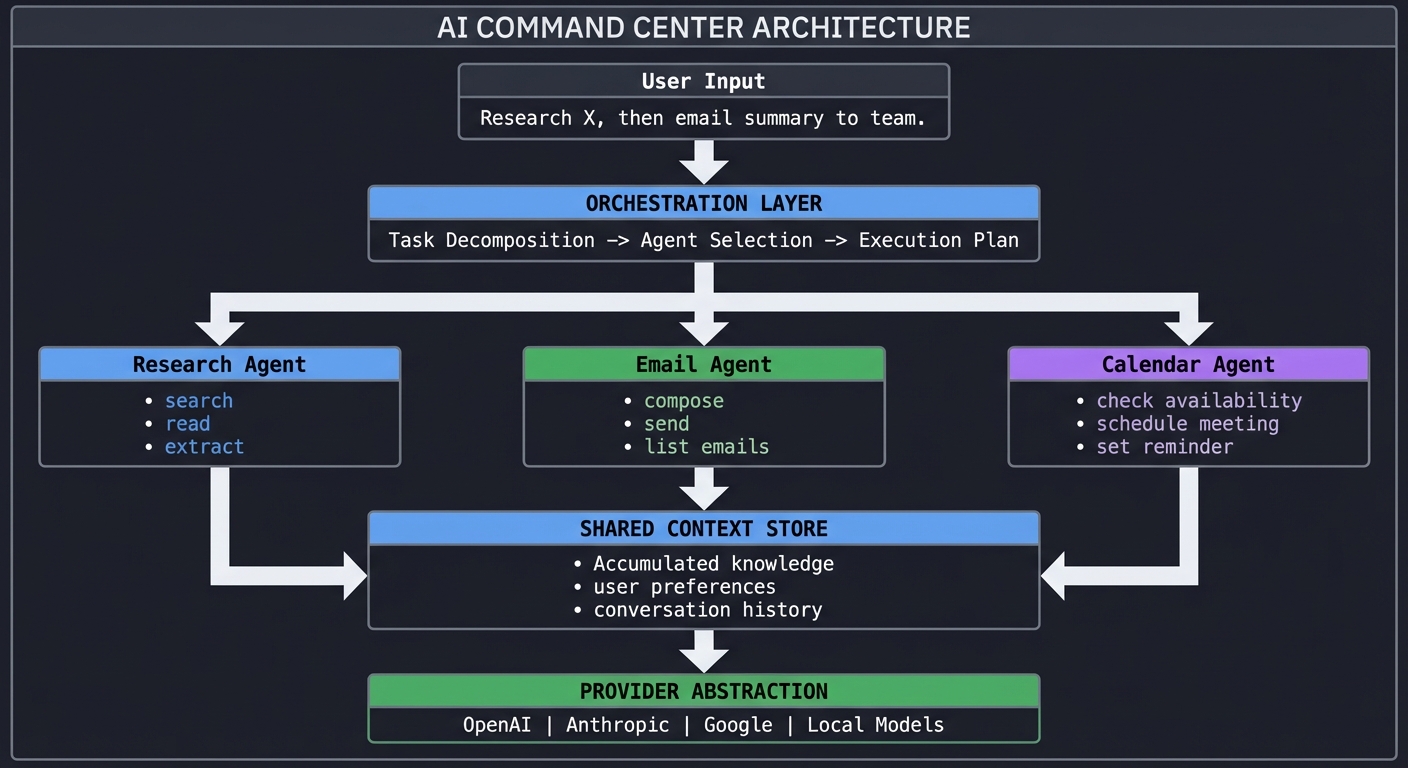
Questions to Guide Your Design
- How do agents communicate with each other?
- How do you handle agent failures in a chain?
- How do you stream multiple agent outputs to the UI?
- How do you implement cost controls per agent?
Thinking Exercise
Design the orchestration layer before implementing - how does it decompose tasks and select agents?
The Interview Questions They’ll Ask
- “How would you design a multi-agent system?”
- “How do you handle context sharing between agents?”
- “What’s your strategy for cost control in production AI?”
- “How would you test a multi-agent system?”
Hints in Layers
- Hint 1: Start with one agent end-to-end
- Hint 2: Add a simple orchestrator that routes to agents
- Hint 3: Implement shared context store
- Hint 4: Add concurrent streaming to the web UI
Books That Will Help
| Topic | Book | Chapter |
|---|---|---|
| Event-Driven Architecture | “Designing Data-Intensive Applications” | Ch. 11 |
| Multi-Agent Systems | “Artificial Intelligence: A Modern Approach” | Ch. 2 |
| API Design | “Design and Build Great Web APIs” | Ch. 3-5 |
| React Patterns | “Learning React” by Eve Porcello | Ch. 8, 12 |
Sources
- AI SDK Official Documentation
- AI SDK Core Overview
- AI SDK 5 Announcement - Vercel Blog
- AI SDK GitHub Repository
- VoltAgent: What is Vercel AI SDK?
- Vercel Ship AI 2025 - InfoQ
AI SDK 6 + AI Gateway Expansion (2026)
This section adds 10 new projects focused on AI SDK 6 and Vercel AI Gateway capabilities that were not covered in the original set.
What changed in AI SDK 6 (researched update, verified on February 11, 2026)
- Vercel announced AI SDK 6 beta on August 7, 2025, then announced AI SDK 6 stable on December 22, 2025, with highlights including agents, MCP tools, tool call approvals, AI SDK DevTools, and a more flexible output API.
- The AI SDK migration guide states that
generateObjectandstreamObjectare deprecated in AI SDK 6, and documents codemods/migration steps from 5.x. - AI Gateway docs describe it as a single endpoint for multi-provider access with monitoring, load balancing, failover, and budget controls.
- Vercel reports Gateway scale and latency claims such as billions of tokens/day, sub-20ms p95 global endpoint latency, and higher default request limits, which is why these projects emphasize cost, routing, and reliability engineering instead of only prompt design.
AI Gateway-first Mental Model
                    +----------------------------+
                    |      Product Features      |
                    | chat, extraction, agents   |
                    +-------------+--------------+
                                  |
                                  v
                    +----------------------------+
                    |       AI SDK 6 Layer       |
                    | stream, tools, outputs     |
                    +-------------+--------------+
                                  |
                                  v
                    +----------------------------+
                    |       AI Gateway Layer     |
                    | routing, quotas, budgets,  |
                    | observability, fallback     |
                    +------+------+------+-------+
                           |      |      |
                           v      v      v
                      OpenAI  Anthropic  Google ...
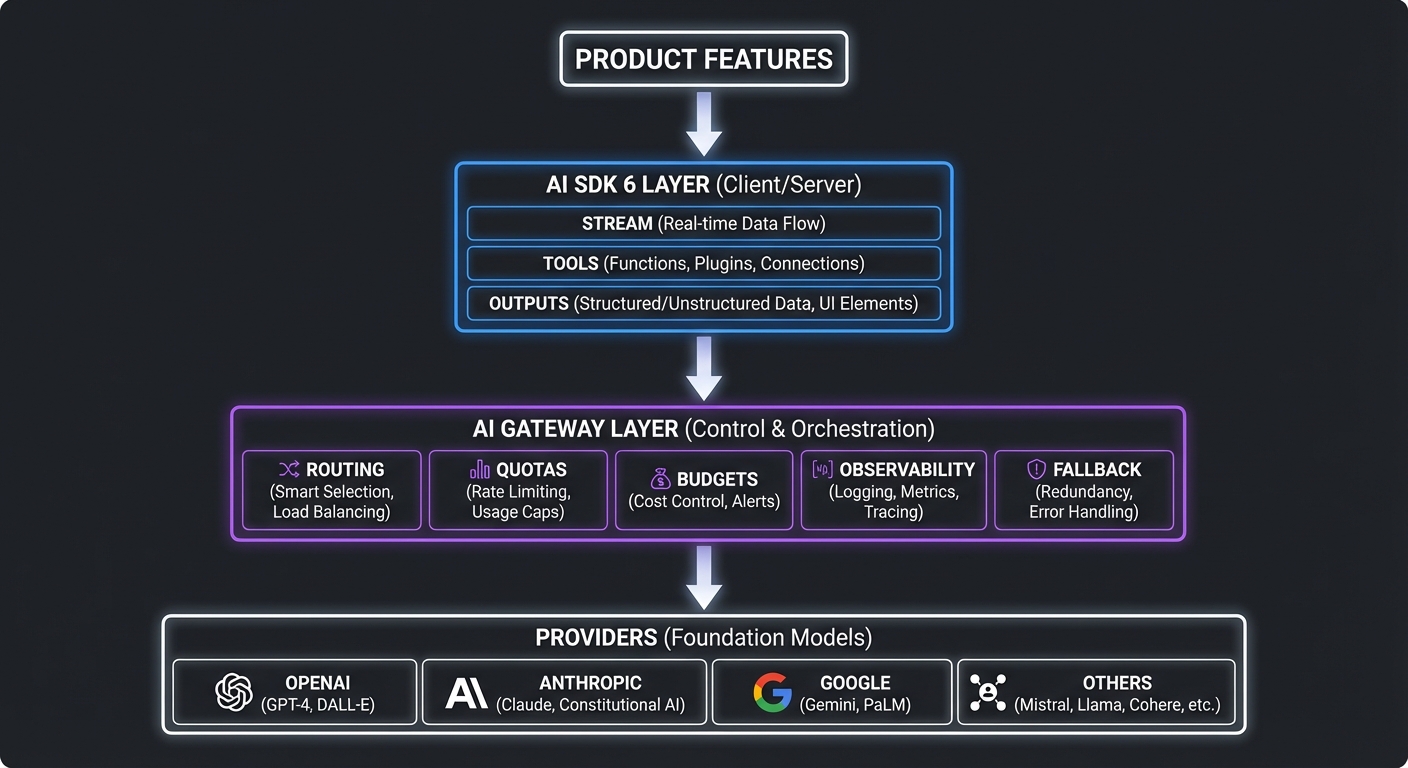
Project Overview Table
| # | Project | Difficulty | Time | Focus |
|---|---|---|---|---|
| 7 | Gateway Budget Sentinel | L2: Intermediate | 12-24h | Vercel AI Gateway + AI SDK 6 |
| 8 | BYOK Multi-Provider Switchboard | L3: Advanced | 12-24h | AI Gateway BYOK + AI SDK 6 |
| 9 | Gateway Reliability Lab (Failover + Circuit Breakers) | L3: Advanced | 12-24h | AI Gateway routing + fallback |
| 10 | MCP Service Mesh Agent | L3: Advanced | 12-24h | AI SDK 6 MCP tools |
| 11 | Human Approval Console for Risky Tool Calls | L3: Advanced | 12-24h | AI SDK 6 tool execution approval |
| 12 | Multimodal Support Triage via Gateway | L2: Intermediate | 12-24h | AI Gateway multimodal routing + AI SDK 6 |
| 13 | Streaming Incident Copilot (SSE + UIMessage) | L2: Intermediate | 12-24h | AI SDK 6 data stream protocol |
| 14 | Evaluation Harness for AI Gateway Routing | L3: Advanced | 12-24h | AI SDK 6 evals + AI Gateway model classes |
| 15 | RAG Reliability Project with Gateway Fallback | L3: Advanced | 12-24h | AI SDK + AI Gateway + vector DB |
| 16 | AI Command Center v2 (Gateway + Agents + FinOps) | L4: Expert | 12-24h | AI SDK 6 + AI Gateway + MCP + Approvals |
Project List
Project 7: Gateway Budget Sentinel
- File: AI_SDK_LEARNING_PROJECTS.md
- Main Programming Language: TypeScript
- Alternative Programming Languages: Go, Python
- Coolness Level: Level 3: Cool and Practical
- Business Potential: 3. Internal Platform Product
- Difficulty: Level 2: Intermediate
- Knowledge Area: AI FinOps / Observability
- Software or Tool: Vercel AI Gateway + AI SDK 6
- Main Book: Designing Data-Intensive Applications (Kleppmann)
What you will build: A guardrail service that routes all model calls through AI Gateway, tracks daily spend, and blocks low-priority traffic when budget thresholds are crossed.
Why it teaches AI SDK 6 and AI Gateway: Forces you to combine AI Gateway budgets, request metadata, AI SDK 6 usage telemetry, and policy decisions under real operational pressure.
Core challenges you will face:
- Policy threshold design -> cost control and SLO tradeoffs
- Provider fallback under budget pressure -> routing + reliability
- Team-level cost attribution -> telemetry and metadata discipline
Real World Outcome
$ ai-budget check --team growth --date 2026-02-11
Team: growth
Daily budget: $400.00
Current spend: $362.14 (90.54%)
Policy mode: WARNING
Next action at 95%: block non-critical prompts and route to cheaper class
The Core Question You’re Answering
“How do you enforce budget guardrails without destroying product quality?”
Concepts You Must Understand First
- AI Gateway budgets and quotas
- Reference: https://vercel.com/docs/ai-gateway
- AI SDK telemetry metadata
- Reference: https://ai-sdk.dev/docs/reference/ai-sdk-core/generate-text
- Rate limiting strategies
- Reference: Release It! (Nygard), Stability patterns
Questions to Guide Your Design
- What fields must be attached to every request (
team,feature,priority,customer_tier)? - When do you hard-block vs degrade to lower-cost models?
- How will you communicate policy decisions to downstream products?
Thinking Exercise
Draw a policy state machine with NORMAL -> WARNING -> THROTTLED -> CRITICAL, and annotate transitions by spend percentage and incident severity.
The Interview Questions They’ll Ask
- “How would you implement FinOps guardrails for LLM workloads?”
- “What data do you need for per-team chargeback?”
- “How do you prevent alert fatigue in budget systems?”
- “What is the tradeoff between strict blocking and graceful degradation?”
- “How do you test budget policies before enabling them globally?”
Hints in Layers
Hint 1: Start with metadata contracts Define required request tags before writing any routing logic.
Hint 2: Build a policy table Represent thresholds and actions as data, not hard-coded branches.
Hint 3: Pseudocode IF spend_pct >= 95 THEN deny low_priority; ELSE IF spend_pct >= 85 THEN route_low_cost; ELSE allow_default
Hint 4: Debug path Replay yesterday’s traffic against new policy in dry-run mode and compare projected spend.
Books That Will Help
| Topic | Book | Chapter |
|---|---|---|
| Provider-agnostic architecture | “Designing Data-Intensive Applications” by Martin Kleppmann | Ch. 1, Ch. 4 |
| Resilience and operations | “Release It!” by Michael Nygard | Stability patterns chapters |
| Productive architecture decisions | “Fundamentals of Software Architecture” by Mark Richards, Neal Ford | Tradeoff analysis chapters |
Common Pitfalls and Debugging
Problem 1: “Budget resets happen in the wrong timezone”
- Why: Mismatched timezone assumptions
- Fix: Normalize all budget windows to UTC and display local projections separately
- Quick test:
$ ai-budget validate-window --team growth --day 2026-02-11
Problem 2: “Teams bypass gateway directly”
- Why: Lack of enforcement at network boundary
- Fix: Block direct provider egress and require gateway tokens
- Quick test:
$ ai-budget audit-egress --last-24h
Definition of Done
- Core functionality works on reference workflows
- Edge cases are tested and documented
- Fallback behavior is deterministic and observable
- Cost, latency, and quality metrics are exported
- Security and approval policies are enforced
Project 8: BYOK Multi-Provider Switchboard
- File: AI_SDK_LEARNING_PROJECTS.md
- Main Programming Language: TypeScript
- Alternative Programming Languages: Python, Rust
- Coolness Level: Level 4: Very Cool
- Business Potential: 4. B2B SaaS Feature
- Difficulty: Level 3: Advanced
- Knowledge Area: Provider Abstraction / Platform
- Software or Tool: AI Gateway BYOK + AI SDK 6
- Main Book: Design Patterns (Gamma et al.)
What you will build: A tenant-aware switchboard where each customer can bring provider keys while your app still uses one AI SDK 6 call path.
Why it teaches AI SDK 6 and AI Gateway: You will internalize adapter-style design with strict isolation between tenant credentials, routing rules, and model contracts.
Core challenges you will face:
- Tenant key isolation -> security boundaries
- Capability normalization -> provider abstraction
- Routing precedence conflicts -> policy engines
Real World Outcome
$ ai-switchboard resolve --tenant acme --task "legal-summary"
Tenant: acme
Primary provider: anthropic (BYOK)
Fallback provider: openai (platform key)
Resolved model class: long-context-premium
Decision trace ID: swb_94f1d2
The Core Question You’re Answering
“How do you let tenants bring keys without fragmenting your architecture?”
Concepts You Must Understand First
- AI Gateway BYOK concepts
- Reference: https://vercel.com/docs/ai-gateway
- AI SDK provider and model abstraction
- Reference: https://ai-sdk.dev/docs/introduction
- Multi-tenant security controls
- Reference: OWASP ASVS + practical tenancy patterns
Questions to Guide Your Design
- What is the exact precedence for tenant rules vs global policy?
- How will you rotate and revoke tenant keys safely?
- How do you detect capability mismatch before runtime?
Thinking Exercise
Create a conflict matrix for routing decisions when tenant preference, global reliability rules, and compliance policy disagree.
The Interview Questions They’ll Ask
- “What are the security risks of BYOK in a shared control plane?”
- “How would you implement capability discovery across providers?”
- “How do you test tenant isolation at scale?”
- “How should key rotation events propagate to active sessions?”
- “What observability fields are mandatory for auditing?”
Hints in Layers
Hint 1: Model capability registry first Store context limits, tool support, and modality support by provider/model.
Hint 2: Explicit precedence graph Encode rule resolution in one deterministic function.
Hint 3: Pseudocode resolved = resolve(globalPolicy, tenantPolicy, modelCapabilities, runtimeHealth)
Hint 4: Debug path Capture a decision trace for every route selection and expose it in ops UI.
Books That Will Help
| Topic | Book | Chapter |
|---|---|---|
| Provider-agnostic architecture | “Designing Data-Intensive Applications” by Martin Kleppmann | Ch. 1, Ch. 4 |
| Resilience and operations | “Release It!” by Michael Nygard | Stability patterns chapters |
| Productive architecture decisions | “Fundamentals of Software Architecture” by Mark Richards, Neal Ford | Tradeoff analysis chapters |
Common Pitfalls and Debugging
Problem 1: “Tenant can select unsupported model feature”
- Why: Missing capability validation
- Fix: Validate requested mode before request dispatch
- Quick test:
$ ai-switchboard lint-rules --tenant acme
Problem 2: “Key leakage in logs”
- Why: Logging full secrets
- Fix: Mask secrets and use structured redaction middleware
- Quick test:
$ ai-switchboard redaction-test
Definition of Done
- Core functionality works on reference workflows
- Edge cases are tested and documented
- Fallback behavior is deterministic and observable
- Cost, latency, and quality metrics are exported
- Security and approval policies are enforced
Project 9: Gateway Reliability Lab (Failover + Circuit Breakers)
- File: AI_SDK_LEARNING_PROJECTS.md
- Main Programming Language: TypeScript
- Alternative Programming Languages: Go, Java
- Coolness Level: Level 4: Very Cool
- Business Potential: 4. B2B Reliability Feature
- Difficulty: Level 3: Advanced
- Knowledge Area: Reliability Engineering
- Software or Tool: AI Gateway routing + fallback
- Main Book: Release It! (Nygard)
What you will build: A chaos test harness that injects provider failures and validates fallback, retry, and circuit-breaker behavior through AI Gateway.
Why it teaches AI SDK 6 and AI Gateway: You learn why AI reliability is mostly systems engineering: retries, deadlines, degradation plans, and measurable error budgets.
Core challenges you will face:
- Synthetic failure injection -> chaos engineering
- Fallback correctness -> semantic and latency tradeoffs
- Circuit breaker tuning -> stability patterns
Real World Outcome
$ reliability-lab run --scenario provider-timeout-storm
Scenario: provider-timeout-storm
Requests: 5000
Primary failure rate: 42%
Fallback success rate: 97.8%
P95 latency: 1.8s
SLO verdict: PASS
The Core Question You’re Answering
“What reliability guarantees can you make when upstream models are volatile?”
Concepts You Must Understand First
- Fallback and load balancing in AI Gateway
- Reference: https://vercel.com/docs/ai-gateway
- Latency percentiles and SLOs
- Reference: SRE Workbook (Google)
- Circuit breaker mechanics
- Reference: Release It!
Questions to Guide Your Design
- How do you classify retriable vs non-retriable failures?
- What is the max retry budget before user experience collapses?
- How should fallback preserve prompt compatibility and output contracts?
Thinking Exercise
Build a timeline diagram for one failed request showing timeout, retry, fallback, and final user-visible response.
The Interview Questions They’ll Ask
- “How would you design resilience for a multi-provider LLM platform?”
- “What metrics indicate a failing provider before hard outages?”
- “How do you prevent retry storms?”
- “Why can fallback increase cost while reducing incidents?”
- “How do you rehearse disaster scenarios safely?”
Hints in Layers
Hint 1: Model compatibility sets Only fallback to models that satisfy the same output contract.
Hint 2: Timeout budgets Set per-hop and end-to-end deadlines explicitly.
Hint 3: Pseudocode if timeout(primary) then retry_once; if fail then fallback(provider_b)
Hint 4: Debug path Run synthetic traces and verify every branch emits a reason code.
Books That Will Help
| Topic | Book | Chapter |
|---|---|---|
| Provider-agnostic architecture | “Designing Data-Intensive Applications” by Martin Kleppmann | Ch. 1, Ch. 4 |
| Resilience and operations | “Release It!” by Michael Nygard | Stability patterns chapters |
| Productive architecture decisions | “Fundamentals of Software Architecture” by Mark Richards, Neal Ford | Tradeoff analysis chapters |
Common Pitfalls and Debugging
Problem 1: “Fallback response format breaks consumer”
- Why: No contract testing across models
- Fix: Add cross-model contract tests for critical prompts
- Quick test:
$ reliability-lab contract-test --suite checkout-bot
Problem 2: “Retry loop amplifies outage”
- Why: Missing breaker threshold
- Fix: Trip circuit after N failures in rolling window
- Quick test:
$ reliability-lab breaker-inspect
Definition of Done
- Core functionality works on reference workflows
- Edge cases are tested and documented
- Fallback behavior is deterministic and observable
- Cost, latency, and quality metrics are exported
- Security and approval policies are enforced
Project 10: MCP Service Mesh Agent
- File: AI_SDK_LEARNING_PROJECTS.md
- Main Programming Language: TypeScript
- Alternative Programming Languages: Python, Kotlin
- Coolness Level: Level 5: Interview-Magnet
- Business Potential: 4. Platform Capability
- Difficulty: Level 3: Advanced
- Knowledge Area: Agent Tooling / Integration
- Software or Tool: AI SDK 6 MCP tools
- Main Book: Designing Data-Intensive Applications
What you will build: An agent that discovers and uses MCP servers for CRM, ticketing, and analytics with strict permission boundaries.
Why it teaches AI SDK 6 and AI Gateway: Directly applies AI SDK 6 MCP support and forces disciplined tool contracts across heterogeneous backends.
Core challenges you will face:
- MCP client/server boundaries -> protocol comprehension
- Tool schema consistency -> contract design
- Permission scoping -> security and governance
Real World Outcome
$ service-agent "Create a renewal risk report for Acme and open a ticket if risk > 0.7"
Connected MCP servers: crm, billing, support
Tools executed: 4
Risk score: 0.78
Action: ticket SUP-9221 created
Evidence links: crm://account/acme, billing://invoice/2026-01
The Core Question You’re Answering
“How do you let an agent act across many systems without losing control?”
Concepts You Must Understand First
- Model Context Protocol in AI SDK
- Reference: https://ai-sdk.dev/docs/ai-sdk-core/tools-and-tool-calling
- Schema-first API contracts
- Reference: API design best practices
- Least-privilege system design
- Reference: OWASP + platform security patterns
Questions to Guide Your Design
- Which operations should require explicit human approval?
- How do you version tool schemas without breaking old prompts?
- What evidence must every automated action store?
Thinking Exercise
Model one full task graph that starts in CRM data, computes risk, and optionally writes to support systems.
The Interview Questions They’ll Ask
- “What is MCP and why does it matter for production agents?”
- “How do you handle tool call retries with side effects?”
- “How do you implement tool-level RBAC?”
- “What logs are needed for non-repudiation?”
- “How do you test schema drift?”
Hints in Layers
Hint 1: Start read-only Ship read-only tools first, then introduce write tools behind approval gates.
Hint 2: Normalize tool outputs Return a common evidence envelope for every tool call.
Hint 3: Pseudocode for step in plan: call_tool(step); append_evidence(step_result)
Hint 4: Debug path Replay plan with deterministic mock tool responses before live writes.
Books That Will Help
| Topic | Book | Chapter |
|---|---|---|
| Provider-agnostic architecture | “Designing Data-Intensive Applications” by Martin Kleppmann | Ch. 1, Ch. 4 |
| Resilience and operations | “Release It!” by Michael Nygard | Stability patterns chapters |
| Productive architecture decisions | “Fundamentals of Software Architecture” by Mark Richards, Neal Ford | Tradeoff analysis chapters |
Common Pitfalls and Debugging
Problem 1: “Agent loops on same tool”
- Why: No stop condition or duplicate detection
- Fix: Track repeated tool signatures and stop on recursion threshold
- Quick test:
$ service-agent trace --id run_1021
Problem 2: “Inconsistent IDs across systems”
- Why: No canonical entity mapping
- Fix: Maintain a global identity map service
- Quick test:
$ service-agent validate-entity-map
Definition of Done
- Core functionality works on reference workflows
- Edge cases are tested and documented
- Fallback behavior is deterministic and observable
- Cost, latency, and quality metrics are exported
- Security and approval policies are enforced
Project 11: Human Approval Console for Risky Tool Calls
- File: AI_SDK_LEARNING_PROJECTS.md
- Main Programming Language: TypeScript
- Alternative Programming Languages: Python, Elixir
- Coolness Level: Level 4: Very Cool
- Business Potential: 4. Enterprise Trust Feature
- Difficulty: Level 3: Advanced
- Knowledge Area: Governance / Human-in-the-Loop
- Software or Tool: AI SDK 6 tool execution approval
- Main Book: Release It! + Practical Security
What you will build: A review queue that pauses risky agent actions, asks a reviewer for approval, and resumes execution with immutable audit events.
Why it teaches AI SDK 6 and AI Gateway: You operationalize AI SDK 6 approval loops where human decisions become first-class runtime events.
Core challenges you will face:
- Risk scoring for tool calls -> policy modeling
- Pause/resume orchestration -> state machines
- Reviewer UX and auditability -> compliance engineering
Real World Outcome
$ approval-queue pending
Pending approvals: 3
1) send_wire_transfer amount=$14,000 risk=0.93 status=WAITING
2) close_customer_account risk=0.88 status=WAITING
3) delete_dataset risk=0.91 status=WAITING
$ approval-queue approve 1 --reviewer "ops.lead"
Approval recorded. Agent resumed. Trace ID: appr_7712
The Core Question You’re Answering
“Where should human judgment sit in an otherwise autonomous agent flow?”
Concepts You Must Understand First
- AI SDK tool approval patterns
- Reference: https://vercel.com/blog/ai-sdk-6-beta
- Workflow state machines
- Reference: Designing Event-Driven Systems
- Audit logging principles
- Reference: Compliance engineering references
Questions to Guide Your Design
- Which risk factors should trigger mandatory approval?
- How long can a request remain paused before timeout escalation?
- What minimum evidence is required for reviewers?
Thinking Exercise
Design the transition graph for DRAFT -> WAITING_APPROVAL -> APPROVED|REJECTED -> EXECUTED.
The Interview Questions They’ll Ask
- “How do you prevent approval bottlenecks?”
- “How do you avoid reviewer fatigue?”
- “What if reviewers disagree?”
- “How do you re-run rejected tasks safely?”
- “What evidence model supports audits?”
Hints in Layers
Hint 1: Separate risk engine from executor Policies evolve faster than business logic.
Hint 2: Idempotent resume tokens Resumes must be safe on duplicate clicks.
Hint 3: Pseudocode if risk>=threshold: enqueue_approval(); await decision(); then execute()
Hint 4: Debug path Reproduce each approval outcome from immutable event history.
Books That Will Help
| Topic | Book | Chapter |
|---|---|---|
| Provider-agnostic architecture | “Designing Data-Intensive Applications” by Martin Kleppmann | Ch. 1, Ch. 4 |
| Resilience and operations | “Release It!” by Michael Nygard | Stability patterns chapters |
| Productive architecture decisions | “Fundamentals of Software Architecture” by Mark Richards, Neal Ford | Tradeoff analysis chapters |
Common Pitfalls and Debugging
Problem 1: “Agent executes before approval finalized”
- Why: Race condition in state updates
- Fix: Use transactional state transitions with optimistic locking
- Quick test:
$ approval-queue race-test
Problem 2: “Missing reviewer context”
- Why: Insufficient evidence payload
- Fix: Attach prompt, tool args, projected impact, and rollback plan
- Quick test:
$ approval-queue validate-evidence
Definition of Done
- Core functionality works on reference workflows
- Edge cases are tested and documented
- Fallback behavior is deterministic and observable
- Cost, latency, and quality metrics are exported
- Security and approval policies are enforced
Project 12: Multimodal Support Triage via Gateway
- File: AI_SDK_LEARNING_PROJECTS.md
- Main Programming Language: TypeScript
- Alternative Programming Languages: Python, Ruby
- Coolness Level: Level 4: Very Cool
- Business Potential: 4. Support Automation Product
- Difficulty: Level 2: Intermediate
- Knowledge Area: Multimodal AI / Operations
- Software or Tool: AI Gateway multimodal routing + AI SDK 6
- Main Book: Designing Data-Intensive Applications
What you will build: An intake service that classifies tickets from text, screenshots, and PDFs, then routes to specialized queues with confidence scoring.
Why it teaches AI SDK 6 and AI Gateway: Applies AI Gateway multimodal model access and robust schema-driven extraction across noisy user input.
Core challenges you will face:
- Cross-modality normalization -> data modeling
- Confidence scoring thresholds -> decision systems
- PII redaction before model calls -> security and privacy
Real World Outcome
$ triage ingest --ticket TCK-2091 --attachments 2
Ticket: TCK-2091
Modalities: text,image,pdf
Predicted queue: billing-dispute
Confidence: 0.89
Auto-actions: tagged=urgent, SLA=4h, escalation=false
The Core Question You’re Answering
“How do you make multimodal AI decisions reliable enough for real operations?”
Concepts You Must Understand First
- AI Gateway multimodal capabilities
- Reference: https://vercel.com/docs/ai-gateway
- Schema validation and extraction
- Reference: AI SDK structured output docs
- PII handling in support workflows
- Reference: privacy engineering guides
Questions to Guide Your Design
- What confidence threshold enables auto-routing vs manual review?
- How do you preserve attachment lineage for audits?
- What fallback path exists when file parsing fails?
Thinking Exercise
Sketch a confidence-vs-risk matrix that decides auto route, assisted route, or human-only route.
The Interview Questions They’ll Ask
- “How would you evaluate multimodal triage quality?”
- “What failure modes are unique to image/PDF inputs?”
- “How do you redact sensitive data safely?”
- “How do you measure drift over time?”
- “How do you prevent silent misrouting?”
Hints in Layers
Hint 1: Start with deterministic rules + AI scoring Hybrid systems reduce catastrophic errors.
Hint 2: Store modality provenance Keep explicit references to each evidence source.
Hint 3: Pseudocode classify(input_bundle) -> {queue, confidence, rationale, evidence[]}
Hint 4: Debug path Review false positives weekly and tune confidence bands.
Books That Will Help
| Topic | Book | Chapter |
|---|---|---|
| Provider-agnostic architecture | “Designing Data-Intensive Applications” by Martin Kleppmann | Ch. 1, Ch. 4 |
| Resilience and operations | “Release It!” by Michael Nygard | Stability patterns chapters |
| Productive architecture decisions | “Fundamentals of Software Architecture” by Mark Richards, Neal Ford | Tradeoff analysis chapters |
Common Pitfalls and Debugging
Problem 1: “Misclassification spikes after policy update”
- Why: No baseline regression suite
- Fix: Run replay tests on labeled historical tickets before deploy
- Quick test:
$ triage replay --dataset jan-2026
Problem 2: “Large PDF timeout”
- Why: No chunking strategy
- Fix: Split files and summarize chunks before final decision
- Quick test:
$ triage stress --file large-contract.pdf
Definition of Done
- Core functionality works on reference workflows
- Edge cases are tested and documented
- Fallback behavior is deterministic and observable
- Cost, latency, and quality metrics are exported
- Security and approval policies are enforced
Project 13: Streaming Incident Copilot (SSE + UIMessage)
- File: AI_SDK_LEARNING_PROJECTS.md
- Main Programming Language: TypeScript
- Alternative Programming Languages: Go, C#
- Coolness Level: Level 4: Very Cool
- Business Potential: 3. Internal Productivity Product
- Difficulty: Level 2: Intermediate
- Knowledge Area: Realtime UX / Incident Response
- Software or Tool: AI SDK 6 data stream protocol
- Main Book: Node.js Design Patterns
What you will build: A live incident assistant where responders see partial reasoning, tool updates, and evolving action plans in real time.
Why it teaches AI SDK 6 and AI Gateway: Uses AI SDK 6 streaming/UIMessage upgrades and operational UX patterns where latency and visibility matter.
Core challenges you will face:
- Stream transport durability -> network behavior
- Message protocol design -> frontend-backend contracts
- Backpressure and reconnect handling -> reliability
Real World Outcome
$ incident-copilot watch INC-4412
Connected to stream: inc_4412_stream
[00:00.420] partial: "Investigating elevated checkout latency..."
[00:01.102] tool:update get_metrics p95=2.3s err=4.1%
[00:01.889] action: "Shift traffic from us-east-1 to us-west-2"
[00:03.200] summary: incident stabilized
The Core Question You’re Answering
“How do you make AI output actionable before the model is fully done?”
Concepts You Must Understand First
- AI SDK streaming and UI messages
- Reference: https://ai-sdk.dev/docs/introduction
- SSE semantics
- Reference: MDN SSE docs
- Incident response runbooks
- Reference: SRE best practices
Questions to Guide Your Design
- What message types should the frontend render (partial text, tool progress, decisions)?
- How do you resume streams after client reconnect?
- What ordering guarantees are required for incident logs?
Thinking Exercise
Design an event schema where every message has type, sequence, timestamp, and trace_id.
The Interview Questions They’ll Ask
- “When should you choose SSE vs WebSocket for AI streaming?”
- “How do you guarantee idempotent rendering?”
- “How would you test network drop/reconnect behavior?”
- “How do you avoid leaking sensitive intermediate thoughts?”
- “How do you control token burn during incident spikes?”
Hints in Layers
Hint 1: Model stream as append-only log The UI should be a projection of durable events.
Hint 2: Sequence numbers are mandatory They solve out-of-order and replay issues.
Hint 3: Pseudocode for event in stream: if event.seq > last_seq then apply(event)
Hint 4: Debug path Capture stream transcripts and diff frontend render output.
Books That Will Help
| Topic | Book | Chapter |
|---|---|---|
| Provider-agnostic architecture | “Designing Data-Intensive Applications” by Martin Kleppmann | Ch. 1, Ch. 4 |
| Resilience and operations | “Release It!” by Michael Nygard | Stability patterns chapters |
| Productive architecture decisions | “Fundamentals of Software Architecture” by Mark Richards, Neal Ford | Tradeoff analysis chapters |
Common Pitfalls and Debugging
Problem 1: “Duplicate messages after reconnect”
- Why: No resume cursor
- Fix: Use last acknowledged sequence as cursor
- Quick test:
$ incident-copilot replay --from-seq 120
Problem 2: “Frontend freezes on long incidents”
- Why: Unbounded in-memory transcript
- Fix: Virtualize message rendering and snapshot checkpoints
- Quick test:
$ incident-copilot profile-ui
Definition of Done
- Core functionality works on reference workflows
- Edge cases are tested and documented
- Fallback behavior is deterministic and observable
- Cost, latency, and quality metrics are exported
- Security and approval policies are enforced
Project 14: Evaluation Harness for AI Gateway Routing
- File: AI_SDK_LEARNING_PROJECTS.md
- Main Programming Language: TypeScript
- Alternative Programming Languages: Python, Julia
- Coolness Level: Level 5: Interview-Magnet
- Business Potential: 4. Core Platform Capability
- Difficulty: Level 3: Advanced
- Knowledge Area: Evaluation / ML Ops
- Software or Tool: AI SDK 6 evals + AI Gateway model classes
- Main Book: Designing Machine Learning Systems (Chip Huyen)
What you will build: A benchmark suite that compares quality, latency, and cost across Gateway routing policies using fixed prompt sets and rubrics.
Why it teaches AI SDK 6 and AI Gateway: Turns intuition into measurable decisions and prevents regressions when model classes or provider rules change.
Core challenges you will face:
- Ground-truth design -> evaluation science
- Cost-quality frontier analysis -> tradeoff optimization
- Drift detection over time -> continuous validation
Real World Outcome
$ eval-harness run --suite support-v3 --policies baseline,cheap,balanced,premium
Suite: support-v3 (400 prompts)
Policy baseline: quality=0.81 latency=1.2s cost=$14.20
Policy cheap: quality=0.74 latency=0.9s cost=$7.10
Policy balanced: quality=0.80 latency=1.0s cost=$9.45
Recommended policy: balanced
The Core Question You’re Answering
“How do you prove a routing policy is better instead of just feeling it is better?”
Concepts You Must Understand First
- Evaluation methodology basics
- Reference: ML systems references
- AI Gateway routing models/classes
- Reference: https://vercel.com/docs/ai-gateway
- Experiment design and statistics
- Reference: practical experimentation texts
Questions to Guide Your Design
- What rubric converts subjective output quality into reproducible scores?
- How many prompts are needed for statistical confidence?
- How will you fail CI when policy quality regresses?
Thinking Exercise
Plot cost vs quality for four routing policies and identify the Pareto frontier.
The Interview Questions They’ll Ask
- “How do you build reliable eval datasets for LLM systems?”
- “What causes benchmark overfitting?”
- “How do you include latency and cost in pass/fail criteria?”
- “How do you continuously evaluate in production?”
- “What would trigger rollback of a new routing policy?”
Hints in Layers
Hint 1: Freeze prompt suites Version prompts, expected outcomes, and rubric weights.
Hint 2: Track variance, not just means High variance is operationally risky.
Hint 3: Pseudocode score = w_qualityq - w_costc - w_latency*l
Hint 4: Debug path Replay failed prompts with trace capture for error taxonomy.
Books That Will Help
| Topic | Book | Chapter |
|---|---|---|
| Provider-agnostic architecture | “Designing Data-Intensive Applications” by Martin Kleppmann | Ch. 1, Ch. 4 |
| Resilience and operations | “Release It!” by Michael Nygard | Stability patterns chapters |
| Productive architecture decisions | “Fundamentals of Software Architecture” by Mark Richards, Neal Ford | Tradeoff analysis chapters |
Common Pitfalls and Debugging
Problem 1: “Evaluation set is too easy”
- Why: Poorly representative prompts
- Fix: Add adversarial and long-tail cases to suite
- Quick test:
$ eval-harness lint-suite --name support-v3
Problem 2: “Quality improves but latency doubles”
- Why: Single-objective optimization
- Fix: Enforce multi-objective guardrails in CI gates
- Quick test:
$ eval-harness gate --policy balanced
Definition of Done
- Core functionality works on reference workflows
- Edge cases are tested and documented
- Fallback behavior is deterministic and observable
- Cost, latency, and quality metrics are exported
- Security and approval policies are enforced
Project 15: RAG Reliability Project with Gateway Fallback
- File: AI_SDK_LEARNING_PROJECTS.md
- Main Programming Language: TypeScript
- Alternative Programming Languages: Python, Java
- Coolness Level: Level 4: Very Cool
- Business Potential: 4. Enterprise Knowledge Feature
- Difficulty: Level 3: Advanced
- Knowledge Area: RAG / Knowledge Systems
- Software or Tool: AI SDK + AI Gateway + vector DB
- Main Book: Designing Data-Intensive Applications
What you will build: A citation-first RAG assistant with retrieval diagnostics, answer confidence bands, and model fallback for degraded contexts.
Why it teaches AI SDK 6 and AI Gateway: You combine retrieval quality controls with model routing so answer quality remains stable under varying context quality.
Core challenges you will face:
- Retrieval recall/precision balance -> IR fundamentals
- Citation faithfulness checks -> hallucination mitigation
- Fallback model compatibility -> contract-based generation
Real World Outcome
$ rag-assistant ask "What changed in refund policy in Q1 2026?"
Answer confidence: 0.82
Citations: 3 (policy_v2.md#L88, release_notes_q1.md#L24, legal_faq.md#L12)
Retrieval diagnostics: top_k=8 overlap=0.71 freshness=0.96
Model path: primary=openai/gpt-5-mini fallback=anthropic/claude-sonnet-4
The Core Question You’re Answering
“How do you keep RAG answers trustworthy when retrieval is imperfect and models vary?”
Concepts You Must Understand First
- RAG architecture basics
- Reference: RAG docs and papers
- AI Gateway routing/fallback
- Reference: https://vercel.com/docs/ai-gateway
- Evaluation metrics (faithfulness, groundedness)
- Reference: LLM evaluation references
Questions to Guide Your Design
- Which retrieval metrics should gate answer emission?
- When should the system answer vs abstain?
- How do you test citation correctness automatically?
Thinking Exercise
Design a decision policy that emits answer, answer-with-warning, or abstain based on retrieval and model confidence.
The Interview Questions They’ll Ask
- “What is the difference between relevance and faithfulness?”
- “How would you reduce hallucinations in RAG?”
- “How do you evaluate retrieval independently of generation?”
- “How do you handle stale or conflicting documents?”
- “How does model fallback change prompt design in RAG?”
Hints in Layers
Hint 1: Make citations mandatory Never return final answers without evidence IDs.
Hint 2: Add abstention mode Wrong answers are worse than partial uncertainty in enterprise settings.
Hint 3: Pseudocode if retrieval_score < t1 then abstain; else generate_with_citations()
Hint 4: Debug path Store retrieval traces and compare false-positive/false-negative patterns weekly.
Books That Will Help
| Topic | Book | Chapter |
|---|---|---|
| Provider-agnostic architecture | “Designing Data-Intensive Applications” by Martin Kleppmann | Ch. 1, Ch. 4 |
| Resilience and operations | “Release It!” by Michael Nygard | Stability patterns chapters |
| Productive architecture decisions | “Fundamentals of Software Architecture” by Mark Richards, Neal Ford | Tradeoff analysis chapters |
Common Pitfalls and Debugging
Problem 1: “Assistant answers with no evidence”
- Why: Prompt/pipeline missing strict citation contract
- Fix: Reject outputs lacking citation IDs
- Quick test:
$ rag-assistant audit --window 24h
Problem 2: “Fallback model ignores citation format”
- Why: Prompt not provider-agnostic
- Fix: Use explicit output schema and post-parse validator
- Quick test:
$ rag-assistant contract-test --model anthropic/claude-sonnet-4
Definition of Done
- Core functionality works on reference workflows
- Edge cases are tested and documented
- Fallback behavior is deterministic and observable
- Cost, latency, and quality metrics are exported
- Security and approval policies are enforced
Project 16: AI Command Center v2 (Gateway + Agents + FinOps)
- File: AI_SDK_LEARNING_PROJECTS.md
- Main Programming Language: TypeScript
- Alternative Programming Languages: Go, Python
- Coolness Level: Level 5: Portfolio Centerpiece
- Business Potential: 5. Startup-Grade Product
- Difficulty: Level 4: Expert
- Knowledge Area: End-to-End Platform
- Software or Tool: AI SDK 6 + AI Gateway + MCP + Approvals
- Main Book: Designing Data-Intensive Applications + Release It!
What you will build: A full control plane that orchestrates specialized agents, enforces approvals, routes through AI Gateway, and exposes cost/reliability dashboards.
Why it teaches AI SDK 6 and AI Gateway: This is synthesis: architecture, reliability, governance, product UX, and business-level operational controls in one system.
Core challenges you will face:
- Cross-agent orchestration -> distributed workflow design
- Policy enforcement consistency -> governance architecture
- End-to-end observability -> operations and debugging
Real World Outcome
$ command-center run "Investigate churn spike, propose actions, draft exec email"
Plan generated: 5 steps
Agents used: research, analytics, writer
Approval requests: 1 (customer bulk-email)
Gateway route summary: 12 calls, 3 providers, 1 fallback
Cost this run: $2.94
Final deliverables: report.md, action_plan.csv, email_draft.txt
The Core Question You’re Answering
“How do you ship a multi-agent system that is fast, safe, auditable, and economically viable?”
Concepts You Must Understand First
- All prior projects P01-P15
- Reference: this guide
- AI SDK 6 agents + streaming + outputs
- Reference: https://ai-sdk.dev/docs/introduction
- AI Gateway controls and telemetry
- Reference: https://vercel.com/docs/ai-gateway
Questions to Guide Your Design
- What are your platform-wide invariants for safety, cost, and latency?
- How do you debug a failed run across multiple agents and providers?
- What is your rollout strategy from sandbox to production?
Thinking Exercise
Write the system invariants first (e.g., no high-risk tool call without approval, every answer with cost trace), then design architecture to enforce them.
The Interview Questions They’ll Ask
- “How do you design a production AI control plane?”
- “Which parts should be event-driven vs synchronous?”
- “How do you expose trust signals to end users?”
- “How do you run postmortems for agent incidents?”
- “How do you evolve policies without destabilizing product teams?”
Hints in Layers
Hint 1: Define invariants up front Architecture should implement policy, not rely on conventions.
Hint 2: Separate orchestration from execution Makes policies testable and easier to evolve.
Hint 3: Pseudocode plan -> approve_gated_steps -> execute -> verify -> publish_artifacts
Hint 4: Debug path Store one trace ID that links prompts, tools, approvals, provider calls, and costs.
Books That Will Help
| Topic | Book | Chapter |
|---|---|---|
| Provider-agnostic architecture | “Designing Data-Intensive Applications” by Martin Kleppmann | Ch. 1, Ch. 4 |
| Resilience and operations | “Release It!” by Michael Nygard | Stability patterns chapters |
| Productive architecture decisions | “Fundamentals of Software Architecture” by Mark Richards, Neal Ford | Tradeoff analysis chapters |
Common Pitfalls and Debugging
Problem 1: “No unified trace across subsystems”
- Why: Fragmented observability
- Fix: Adopt a single trace context propagated to every component
- Quick test:
$ command-center trace audit --run rc_2026_02_11_12
Problem 2: “Policy bypass through legacy endpoint”
- Why: Parallel legacy paths
- Fix: Deprecate direct model access and enforce gateway-only routing
- Quick test:
$ command-center policy-scan
Definition of Done
- Core functionality works on reference workflows
- Edge cases are tested and documented
- Fallback behavior is deterministic and observable
- Cost, latency, and quality metrics are exported
- Security and approval policies are enforced
AI SDK 6 + Gateway Sources (verified on February 11, 2026)
- AI SDK Introduction
- AI SDK Migration Guide 5.x -> 6.x
- AI SDK 6 Beta announcement (Vercel, August 7, 2025)
- AI SDK 6 Stable announcement (Vercel, December 22, 2025)
- AI Gateway Overview
- Use AI Gateway
- Models and Providers via AI Gateway
- AI Gateway GA and scale updates (Vercel Changelog)
- Fluid compute and AI Gateway token volume note (Vercel)