Advanced UNIX Programming Mastery - Real World Projects
Goal: Deeply understand UNIX systems programming from first principles—the system calls that form the foundation of every application running on Linux, macOS, and BSD. You will implement file systems, process managers, signal handlers, thread pools, daemon services, IPC mechanisms, network servers, and terminal emulators. By the end, you won’t just call
fork()orselect(); you’ll understand exactly what happens in the kernel and why UNIX was designed this way. This knowledge is the bedrock of all systems programming—everything from Docker to nginx to PostgreSQL is built on these primitives.
Why Advanced UNIX Programming Matters
In 1969, Ken Thompson and Dennis Ritchie created UNIX at Bell Labs. Over 55 years later, its design principles power virtually every server on the internet, every Android phone, every Mac, and the vast majority of embedded systems. Understanding UNIX isn’t just learning an old operating system—it’s understanding the grammar of computing itself.
The UNIX Family Tree (Simplified)
                    ┌─────────────────────────────────────────────────────┐
                    │                    UNIX (1969)                       │
                    │              Ken Thompson, Dennis Ritchie            │
                    └──────────────────────┬──────────────────────────────┘
                                           │
           ┌───────────────┬───────────────┼───────────────┬───────────────┐
           │               │               │               │               │
           v               v               v               v               v
    ┌──────────┐    ┌──────────┐    ┌──────────┐    ┌──────────┐    ┌──────────┐
    │  BSD     │    │ System V │    │  Minix   │    │  Xenix   │    │  Plan 9  │
    │ (1977)   │    │  (1983)  │    │  (1987)  │    │  (1980)  │    │  (1992)  │
    └────┬─────┘    └────┬─────┘    └────┬─────┘    └──────────┘    └──────────┘
         │               │               │
         v               v               v
    ┌──────────┐    ┌──────────┐    ┌──────────┐
    │ FreeBSD  │    │ Solaris  │    │  Linux   │
    │ OpenBSD  │    │  HP-UX   │    │  (1991)  │
    │ NetBSD   │    │   AIX    │    │  Linus   │
    └────┬─────┘    └──────────┘    └────┬─────┘
         │                               │
         v                               v
    ┌──────────┐                   ┌──────────────────────────────────┐
    │  macOS   │                   │  Android, Chrome OS, Embedded,   │
    │  (2001)  │                   │  Cloud Infrastructure, Servers   │
    └──────────┘                   └──────────────────────────────────┘

The Numbers Don’t Lie (2025)
Market Dominance:
- 96.3% of the top 1 million web servers run Linux/UNIX (Linux Statistics 2025)
- 100% of the top 500 supercomputers run Linux (continuing since 2017)
- 53% of all servers globally run Linux, vs 30% Windows Server, ~9% UNIX (Server Statistics 2025)
- 49.2% of global cloud workloads run on Linux as of Q2 2025
- 72.7% of Fortune 1000 companies use Linux container orchestration (Kubernetes)
Enterprise & Development:
- 78.5% of SAP clients deploy applications on Linux systems
- 90.1% of cloud-native developers work on Linux environments
- 68.2% of DevOps teams prefer Linux for their infrastructure (Linux Interview Guide 2025)
- 47% of professional developers use Unix/Linux as their primary development OS
- 60%+ of public cloud Linux instances run Ubuntu distributions
Scale & Economics:
- 3+ billion Android devices run a Linux kernel
- The Linux kernel has 27+ million lines of C code, all using UNIX APIs
- 5,000+ active kernel developers contribute each release cycle
- Linux server OS market: $22.28 billion (2025) → projected $34.12 billion by 2030 (Market Growth Reports)
- Expected CAGR of 8.87% through 2034
Why W. Richard Stevens’ Book Remains Essential
“Advanced Programming in the UNIX Environment” (APUE) by Stevens and Rago is called “The Bible of UNIX Programming” for good reason. While kernels evolve, the POSIX API is remarkably stable. Code written using Stevens’ techniques in 1992 still compiles and runs today.
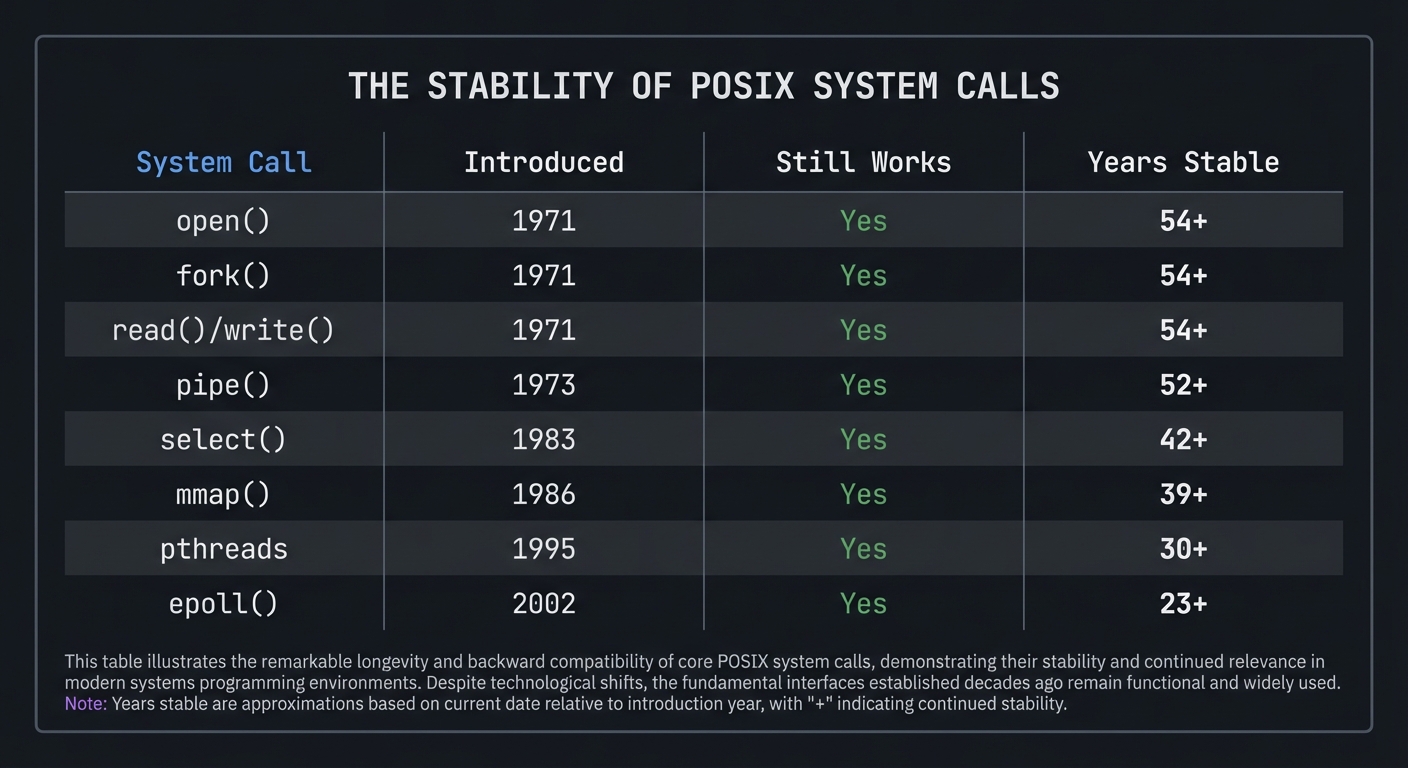
The Stability of POSIX System Calls

System Call    │ Introduced │ Still Works │ Years Stable
───────────────┼────────────┼─────────────┼─────────────
open()         │    1971    │     Yes     │    54+
fork()         │    1971    │     Yes     │    54+
read()/write() │    1971    │     Yes     │    54+
pipe()         │    1973    │     Yes     │    52+
select()       │    1983    │     Yes     │    42+
mmap()         │    1986    │     Yes     │    39+
pthreads       │    1995    │     Yes     │    30+
epoll()        │    2002    │     Yes     │    23+
The UNIX philosophy endures:
- Everything is a file (devices, sockets, pipes)
- Small programs that do one thing well
- Text streams as universal interface
- Composability through pipes and shell
- Simple, powerful primitives
What You’ll Actually Understand
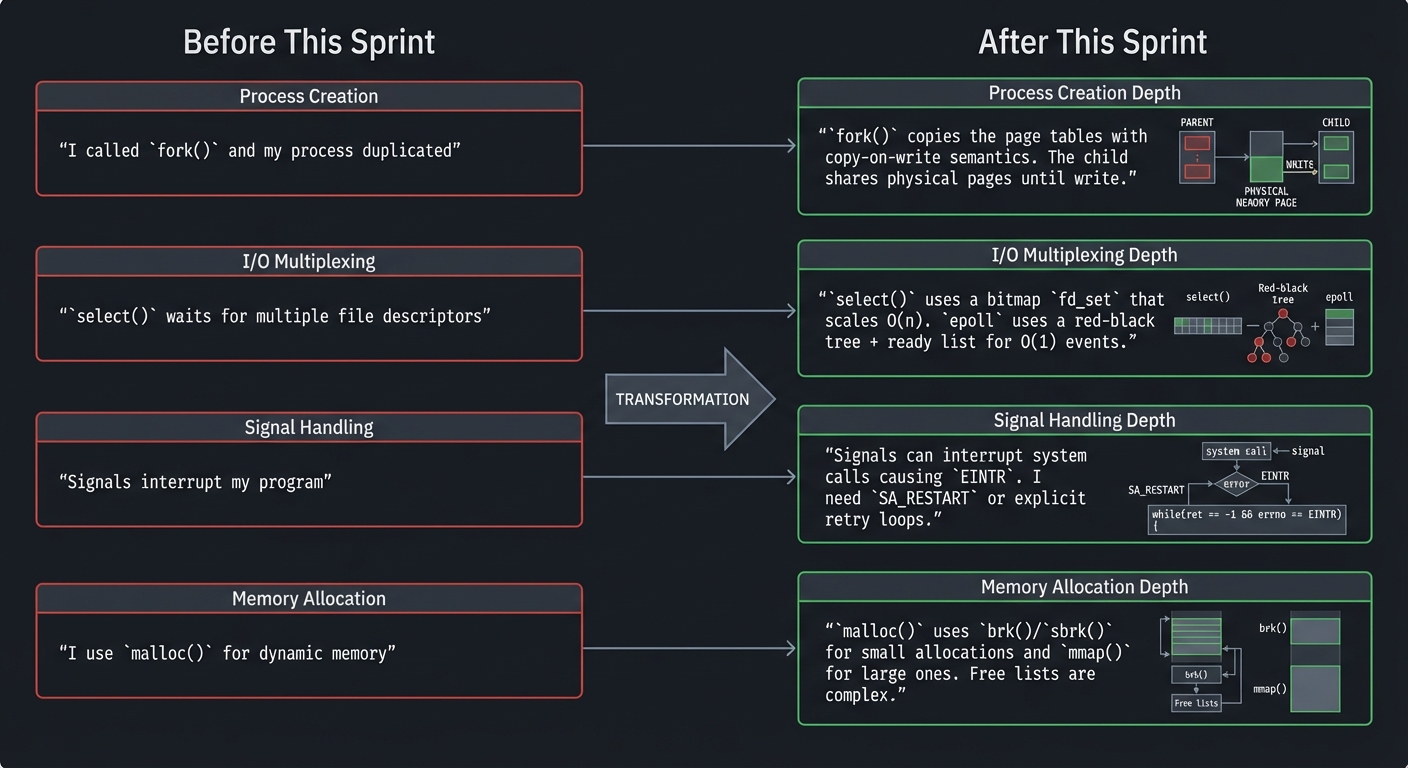
After completing these projects, you’ll understand:
Before This Sprint                     After This Sprint
┌──────────────────────────┐          ┌──────────────────────────────────────┐
│ "I called fork() and     │          │ "fork() copies the page tables with  │
│  my process duplicated"  │    =>    │  copy-on-write semantics. The child  │
│                          │          │  shares physical pages until write." │
├──────────────────────────┤          ├──────────────────────────────────────┤
│ "select() waits for      │          │ "select() uses a bitmap fd_set that  │
│  multiple file           │    =>    │  scales O(n). epoll uses a red-black │
│  descriptors"            │          │  tree + ready list for O(1) events." │
├──────────────────────────┤          ├──────────────────────────────────────┤
│ "Signals interrupt       │          │ "Signals can interrupt system calls  │
│  my program"             │    =>    │  causing EINTR. I need SA_RESTART or │
│                          │          │  explicit retry loops."              │
├──────────────────────────┤          ├──────────────────────────────────────┤
│ "I use malloc() for      │          │ "malloc() uses brk()/sbrk() for      │
│  dynamic memory"         │    =>    │  small allocations and mmap() for    │
│                          │          │  large ones. Free lists are complex."│
└──────────────────────────┘          └──────────────────────────────────────┘
Interview Readiness & Career Impact
What Top Companies Ask (2025):
Systems programming knowledge is tested in technical interviews at companies like Google, Amazon, Meta, Microsoft, and unicorn startups. Based on current interview trends (Top Linux Interview Questions 2025, GeeksforGeeks Linux Questions), expect questions on:
Core Systems Programming:
- “What’s the difference between a process and a thread?”
- “Explain how fork() works and what happens to file descriptors”
- “What is a race condition and how do you prevent it?”
- “How does the Linux kernel handle interrupts?”
- “Explain virtual memory and page tables”
IPC & Networking:
- “What’s the fastest IPC mechanism and why?” (Answer: Shared memory)
- “Explain the difference between select(), poll(), and epoll()”
- “How would you debug a program using strace?”
- “What happens during a TCP three-way handshake?”
File Systems & I/O:
- “What is an inode and what information does it contain?”
- “Explain the difference between hard links and symbolic links”
- “How does the kernel handle blocking vs. non-blocking I/O?”
- “What role does the page cache play in I/O performance?”
Practical Skills Tested:
- Live coding: Implement a thread-safe queue
- System design: Design a high-performance web server
- Debugging: Find a race condition in provided code
- Trade-offs: Compare different IPC mechanisms for a use case
The Career Advantage:
After completing these projects, you’ll qualify for roles like:
- Systems Engineer ($140K-$220K): Build infrastructure at scale (Meta, Google, AWS)
- Kernel Developer ($150K-$250K): Work on Linux, BSD, or embedded OS
- Database Engineer ($130K-$200K): PostgreSQL, MongoDB internals teams
- Performance Engineer ($140K-$210K): Optimize critical paths at high-scale companies
- Site Reliability Engineer (SRE) ($130K-$200K): Google, Netflix, Stripe
- Embedded Systems Developer ($120K-$180K): IoT, automotive, aerospace
Industry Reality: A senior engineer who deeply understands UNIX systems programming can command $50K-$100K more than one who only knows frameworks.
Prerequisites & Background Knowledge
Before starting these projects, you should have foundational understanding in these areas:
Essential Prerequisites (Must Have)
C Programming (Critical):
- Comfortable with pointers, pointer arithmetic, and memory management
- Understanding of structs, unions, and bitfields
- Familiarity with the C preprocessor (#define, #ifdef)
- Experience with header files and multi-file compilation
- Recommended Reading: “The C Programming Language” by Kernighan & Ritchie — The entire book
- Alternative: “C Programming: A Modern Approach” by K.N. King — Ch. 1-20
Basic UNIX/Linux Usage:
- Comfortable in a terminal (bash/zsh)
- Understanding of file permissions (rwx, chmod, chown)
- Basic shell scripting (variables, loops, conditionals)
- Experience with make and Makefiles
- Recommended Reading: “The Linux Command Line” by Shotts — Part 1-2
Computer Architecture Basics:
- Understanding of memory hierarchy (registers, cache, RAM, disk)
- What a CPU does (fetch-decode-execute cycle)
- Difference between user mode and kernel mode
- Recommended Reading: “Computer Systems: A Programmer’s Perspective” by Bryant & O’Hallaron — Ch. 1, 6, 8
Helpful But Not Required
Operating Systems Theory:
- What a process is vs. a thread
- Virtual memory concepts
- Basic scheduling
- Can learn during: Projects 4-8
- Book: “Operating Systems: Three Easy Pieces” by Arpaci-Dusseau
Networking Fundamentals:
- TCP/IP basics
- Sockets concept
- Client-server model
- Can learn during: Projects 12-14
- Book: “TCP/IP Illustrated, Volume 1” by Stevens
Self-Assessment Questions
Before starting, ask yourself:
- ✅ Can you write a C program that reads a file and prints its contents?
- ✅ Do you know what
argcandargvare inmain()? - ✅ Can you explain what happens when you dereference a NULL pointer?
- ✅ Do you know the difference between a process and a program?
- ✅ Can you use
ls -land explain what each field means? - ✅ Have you used
gccto compile a multi-file C program? - ✅ Can you explain what
#include <stdio.h>actually does?
If you answered “no” to questions 1-4: Spend 2-4 weeks on C programming fundamentals before starting. If you answered “no” to questions 5-7: Spend 1 week on UNIX basics before starting. If you answered “yes” to all 7: You’re ready to begin!
Development Environment Setup
Required Tools:
- A UNIX-like system: Linux (Ubuntu 22.04+, Fedora 38+), macOS, or FreeBSD
- GCC or Clang compiler (gcc 11+, clang 14+)
- GNU Make
- GDB debugger
strace(Linux) ordtruss(macOS) for system call tracing- A text editor (vim, emacs, VS Code with C extension)
Recommended Tools:
valgrindfor memory debugging (Linux only)ltracefor library call tracingperffor performance analysis (Linux)tmuxfor terminal multiplexingbearfor generating compile_commands.json (IDE integration)
Testing Your Setup:
# Verify C compiler
$ gcc --version
gcc (Ubuntu 13.2.0-23ubuntu4) 13.2.0

# Verify make
$ make --version
GNU Make 4.3

# Verify debugger
$ gdb --version
GNU gdb (Ubuntu 14.1-0ubuntu1) 14.1

# Verify strace (critical for these projects)
$ strace --version
strace -- version 6.5

# Test compilation of a simple program
$ echo '#include <stdio.h>
int main(void) { printf("Hello, UNIX!\\n"); return 0; }' > test.c
$ gcc -Wall -o test test.c
$ ./test
Hello, UNIX!
$ rm test test.c
Time Investment:
- Foundation projects (1-3): 1-2 weeks each (10-20 hours)
- Core projects (4-9): 2-3 weeks each (20-40 hours)
- Advanced projects (10-14): 2-4 weeks each (30-60 hours)
- Integration projects (15-18): 3-4 weeks each (40-80 hours)
- Total sprint: 6-12 months if doing all projects sequentially
Important Reality Check:
UNIX systems programming is hard. The APIs are unforgiving—a single wrong pointer crashes your program. Race conditions appear randomly. Signal handlers can corrupt your data. This is by design: UNIX gives you power and expects you to use it correctly.
The learning process looks like this:
- Week 1: “This makes no sense”
- Week 2: “I think I understand but it doesn’t work”
- Week 3: “It works but I don’t know why”
- Week 4: “It works AND I know why”
- Week 5: “I see why they designed it this way”
Don’t skip steps. The struggle is the learning.
Core Concept Analysis
1. File Descriptors: The Universal Handle
In UNIX, everything is a file—regular files, directories, devices, network connections, pipes. A file descriptor is a small non-negative integer that serves as a handle to any open “file.”
File Descriptor Table (Per-Process)
┌─────┬────────────────────────────────────────────────────────────┐
│ FD  │  What It Points To                                         │
├─────┼────────────────────────────────────────────────────────────┤
│  0  │  Standard Input  (keyboard, or pipe, or file)              │
│  1  │  Standard Output (terminal, or pipe, or file)              │
│  2  │  Standard Error  (terminal, or file)                       │
│  3  │  /home/user/data.txt (regular file, opened for reading)    │
│  4  │  /dev/null (device file)                                   │
│  5  │  TCP socket to 192.168.1.1:80 (network connection)         │
│  6  │  Pipe read end (IPC with child process)                    │
│  7  │  Unix domain socket (local IPC)                            │
└─────┴────────────────────────────────────────────────────────────┘

       File Descriptor → File Table Entry → Inode/Socket/Pipe
             │                  │                    │
             │                  │                    │
        [Integer]          [Offset,Flags]      [Actual Resource]
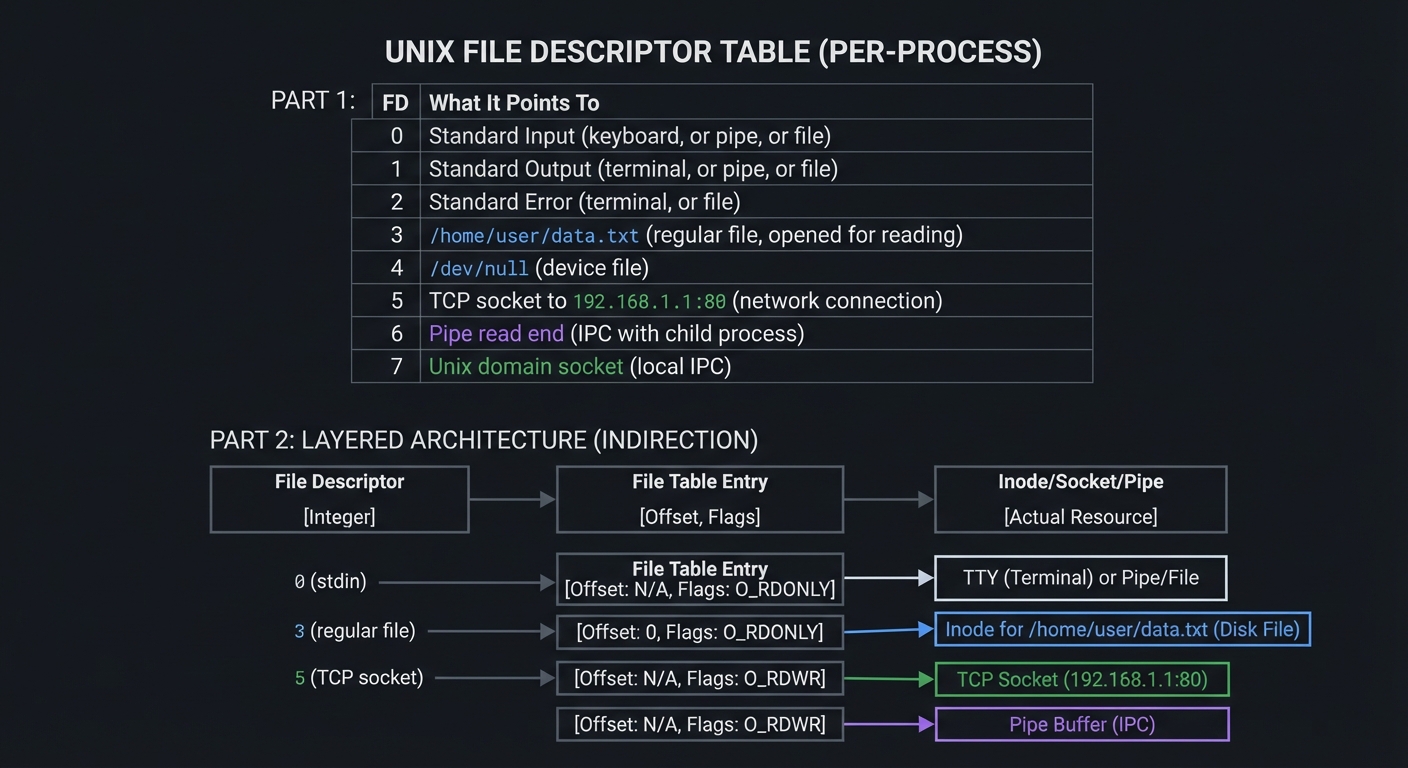
Key Insight: When you call read(fd, buf, n), you don’t specify whether fd is a file, socket, or pipe. The kernel dispatches to the correct driver. This abstraction enables composition: cat file.txt | grep pattern works because both sides speak “file descriptor.”
2. Processes: Isolated Execution Environments
A process is a running program with its own:
- Virtual address space (isolated memory)
- File descriptor table
- Environment variables
- Process ID (PID), parent PID, user/group IDs
- Signal handlers and masks
- Current working directory
Process Memory Layout (Virtual Address Space)
┌──────────────────────────────────────────────┐  High Address (0x7FFFFFFF...)
│                   Stack                       │  ← Local variables, return addresses
│                    ↓                          │    Grows downward
│                   ...                         │
│                    ↑                          │
│                   Heap                        │  ← malloc(), grows upward
├──────────────────────────────────────────────┤
│              Uninitialized Data (BSS)        │  ← Global vars initialized to 0
├──────────────────────────────────────────────┤
│              Initialized Data                 │  ← Global vars with initial values
├──────────────────────────────────────────────┤
│                   Text (Code)                 │  ← Executable instructions (read-only)
└──────────────────────────────────────────────┘  Low Address (0x00400000...)

           Stack grows DOWN    Heap grows UP
                  ↓                ↑
           ┌─────────────────────────────┐
           │  [Stack]  ...gap...  [Heap] │
           └─────────────────────────────┘

3. fork(): The UNIX Way of Creating Processes
Unlike other systems that have “spawn” or “create process” calls, UNIX has fork(): the current process clones itself.
fork() Creates an Almost-Identical Copy

BEFORE fork()                    AFTER fork()
┌─────────────────┐              ┌─────────────────┐
│ Process (PID=42)│              │ Parent (PID=42) │
│                 │              │ fork() returns  │
│   Code          │              │ child PID (43)  │
│   Data          │     ═══>     └─────────────────┘
│   Heap          │                      │
│   Stack         │              ┌───────┴───────┐
│   FDs           │              │               │
└─────────────────┘              v               v
                         ┌─────────────────┐  ┌─────────────────┐
                         │ Parent (PID=42) │  │ Child (PID=43)  │
                         │ Continues...    │  │ fork() returns 0│
                         │                 │  │                 │
                         │ Same code       │  │ Same code       │
                         │ Same data(COW)  │  │ Same data(COW)  │
                         │ Same FDs        │  │ Same FDs        │
                         └─────────────────┘  └─────────────────┘

COW = Copy-On-Write: Physical memory is shared until either process writes

Why this design? It’s elegant: creating a process and running a different program are separate operations. This allows the child to:
- Redirect file descriptors before exec
- Change environment, directory, limits
- Set up pipes and IPC before loading new code
4. Signals: Asynchronous Notifications
Signals are software interrupts—the kernel taps your process on the shoulder and says “hey, deal with this.”
Signal Flow
                                          ┌─────────────────┐
   [External Event]                       │ Signal Handler  │
        │                                 │ (Your Function) │
        v                                 └────────┬────────┘
┌───────────────┐                                  │
│ Kernel detects│  ────>  Kernel posts signal      │
│ event (Ctrl-C │         to process               │
│ or SIGCHLD)   │                                  v
└───────────────┘                         ┌─────────────────┐
        │                                 │ Process resumes │
        v                                 │ normal execution│
┌───────────────────┐                     │ (or terminates) │
│ Process execution │ ←─── Signal        └─────────────────┘
│ is interrupted    │      delivered
│                   │      when process
│ (at any point!)   │      next scheduled
└───────────────────┘

Common Signals:
  SIGINT  (2)  - Interrupt (Ctrl-C)
  SIGTERM (15) - Termination request
  SIGKILL (9)  - Force kill (cannot be caught!)
  SIGSEGV (11) - Segmentation fault
  SIGCHLD (17) - Child process terminated
  SIGPIPE (13) - Write to pipe with no readers
  SIGALRM (14) - Alarm timer expired
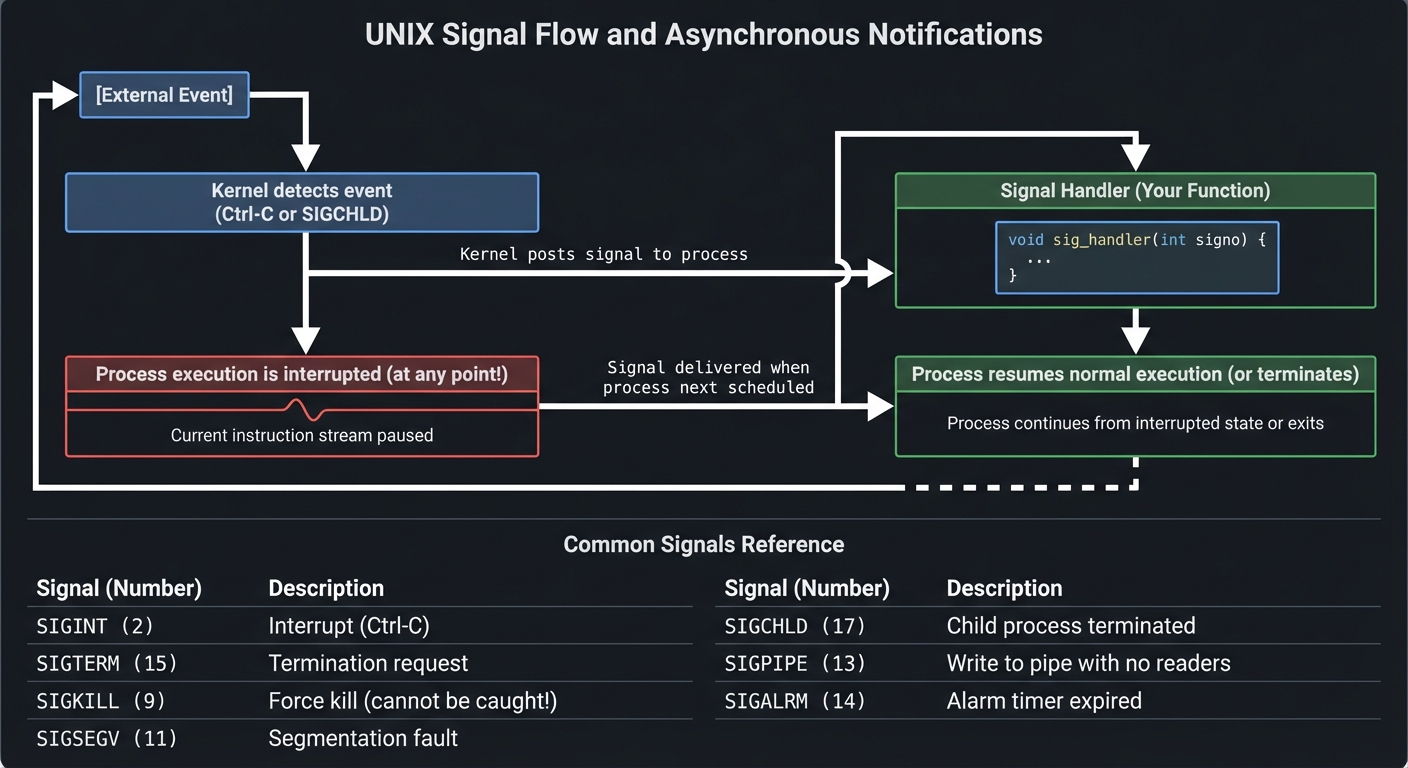
The Danger: Signal handlers can run at almost ANY point in your code. If you’re in the middle of updating a linked list and a signal fires, your handler might see corrupted data. This is why signals are notoriously tricky.
5. Threads vs. Processes
Processes: Separate Everything              Threads: Shared Address Space
┌─────────────┐   ┌─────────────┐           ┌─────────────────────────────┐
│ Process A   │   │ Process B   │           │          Process            │
│ ┌─────────┐ │   │ ┌─────────┐ │           │  ┌───────┐ ┌───────┐       │
│ │ Memory  │ │   │ │ Memory  │ │           │  │Thread1│ │Thread2│ ...   │
│ │ (own)   │ │   │ │ (own)   │ │           │  │ Stack │ │ Stack │       │
│ └─────────┘ │   │ └─────────┘ │           │  └───┬───┘ └───┬───┘       │
│ ┌─────────┐ │   │ ┌─────────┐ │           │      │         │           │
│ │  FDs    │ │   │ │  FDs    │ │           │      └────┬────┘           │
│ │ (own)   │ │   │ │ (own)   │ │           │           v                │
│ └─────────┘ │   │ └─────────┘ │           │  ┌─────────────────┐       │
└─────────────┘   └─────────────┘           │  │ Shared Memory   │       │
     │                  │                    │  │ Shared FDs      │       │
     │  IPC (pipes,     │                    │  │ Shared Heap     │       │
     └──── sockets) ────┘                    │  └─────────────────┘       │
                                             └─────────────────────────────┘

Process Context Switch: EXPENSIVE (TLB flush, cache miss)
Thread Context Switch:  CHEAPER (same address space)

BUT: Threads share memory → Race conditions, deadlocks
     Processes isolated  → Safer, but communication overhead

6. I/O Multiplexing: Handling Many Connections
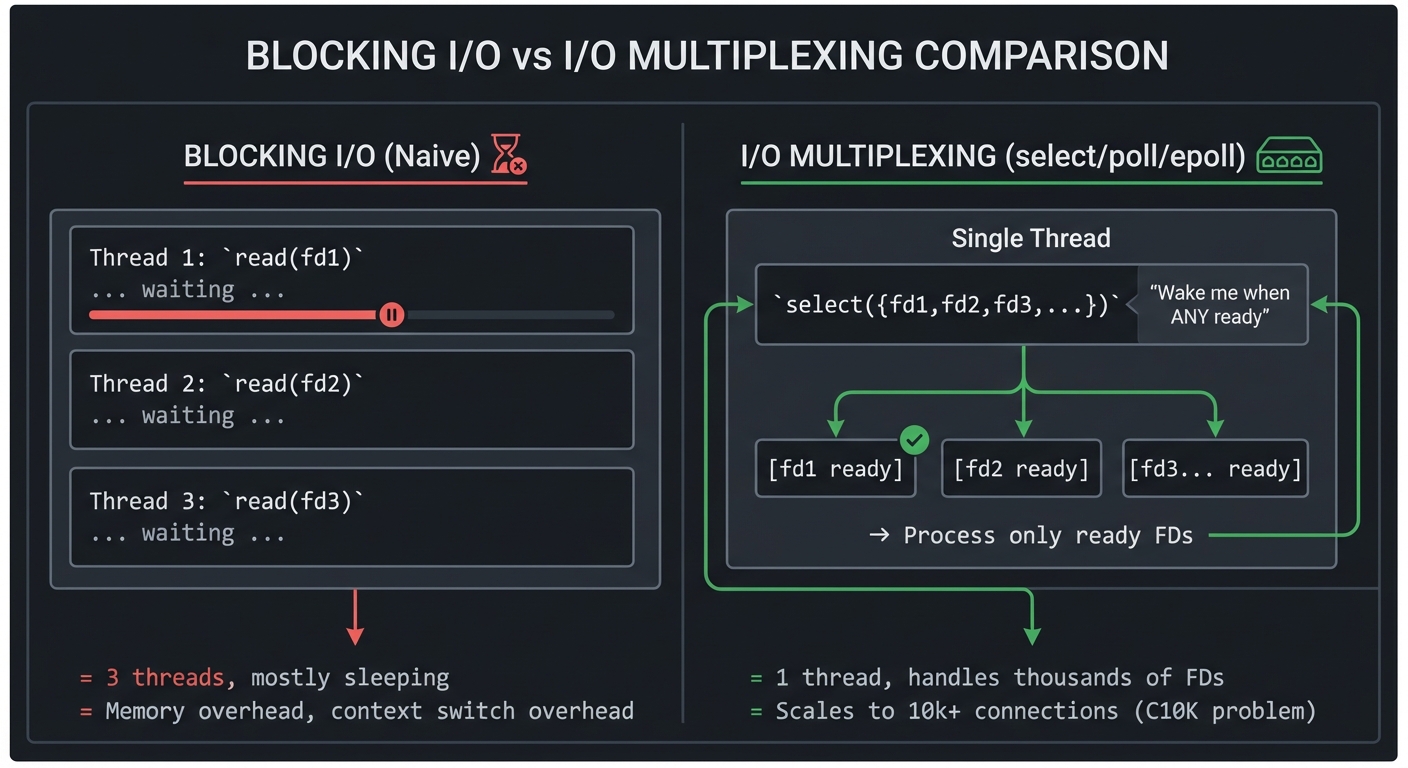
How does a web server handle 10,000 simultaneous connections? Not 10,000 threads—that’s too expensive. Instead: I/O multiplexing.
Blocking I/O (Naive)              I/O Multiplexing (select/poll/epoll)
┌─────────────────────┐           ┌─────────────────────────────────────┐
│ Thread 1: read(fd1) │           │           Single Thread             │
│   ... waiting ...   │           │                                     │
├─────────────────────┤           │  ┌─────────────────────────────┐    │
│ Thread 2: read(fd2) │           │  │ select({fd1,fd2,fd3,...})   │    │
│   ... waiting ...   │           │  │   "Wake me when ANY ready"  │    │
├─────────────────────┤           │  └──────────────┬──────────────┘    │
│ Thread 3: read(fd3) │           │                 │                   │
│   ... waiting ...   │           │     ┌───────────┼───────────┐       │
└─────────────────────┘           │     v           v           v       │
                                  │  [fd1 ready] [fd2 ready] [fd3...]   │
= 3 threads, mostly sleeping      │                                     │
= Memory overhead, context        │  → Process only ready FDs           │
  switch overhead                 │  → Loop back to select()            │
                                  └─────────────────────────────────────┘

                                  = 1 thread, handles thousands of FDs
                                  = Scales to 10k+ connections (C10K problem)
7. Interprocess Communication (IPC) Hierarchy
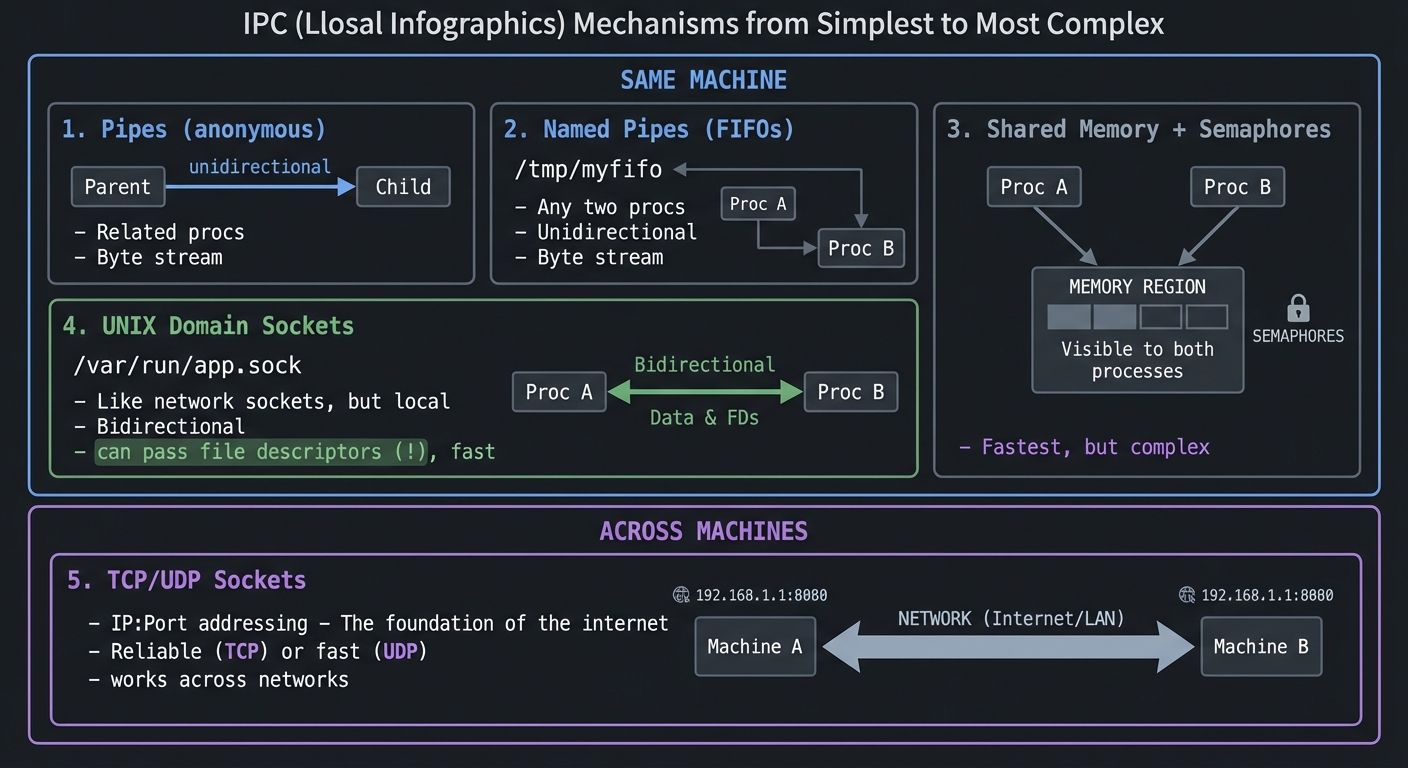
IPC Mechanisms from Simplest to Most Complex

┌─────────────────────────────────────────────────────────────────────────┐
│                          SAME MACHINE                                   │
│  ┌─────────────────┐  ┌─────────────────┐  ┌─────────────────────────┐ │
│  │     Pipes       │  │   Named Pipes   │  │    Shared Memory        │ │
│  │  (anonymous)    │  │    (FIFOs)      │  │    + Semaphores         │ │
│  │                 │  │                 │  │                         │ │
│  │ Parent ─────>   │  │ /tmp/myfifo     │  │ ┌─────────────────────┐ │ │
│  │         Child   │  │                 │  │ │ Memory region       │ │ │
│  │                 │  │ Any two procs   │  │ │ visible to both     │ │ │
│  │ Unidirectional  │  │ Unidirectional  │  │ │ processes           │ │ │
│  │ Related procs   │  │ Unrelated OK    │  │ └─────────────────────┘ │ │
│  │ Byte stream     │  │ Byte stream     │  │ Fastest, but complex    │ │
│  └─────────────────┘  └─────────────────┘  └─────────────────────────┘ │
│                                                                         │
│  ┌─────────────────────────────────────────────────────────────────┐   │
│  │                      UNIX Domain Sockets                         │   │
│  │   /var/run/app.sock   -  Like network sockets, but local         │   │
│  │   Bidirectional, can pass file descriptors (!), fast             │   │
│  └─────────────────────────────────────────────────────────────────┘   │
└─────────────────────────────────────────────────────────────────────────┘

┌─────────────────────────────────────────────────────────────────────────┐
│                        ACROSS MACHINES                                  │
│  ┌─────────────────────────────────────────────────────────────────┐   │
│  │                      TCP/UDP Sockets                             │   │
│  │   IP:Port addressing  -  The foundation of the internet          │   │
│  │   Reliable (TCP) or fast (UDP), works across networks            │   │
│  └─────────────────────────────────────────────────────────────────┘   │
└─────────────────────────────────────────────────────────────────────────┘
8. The Terminal Subsystem
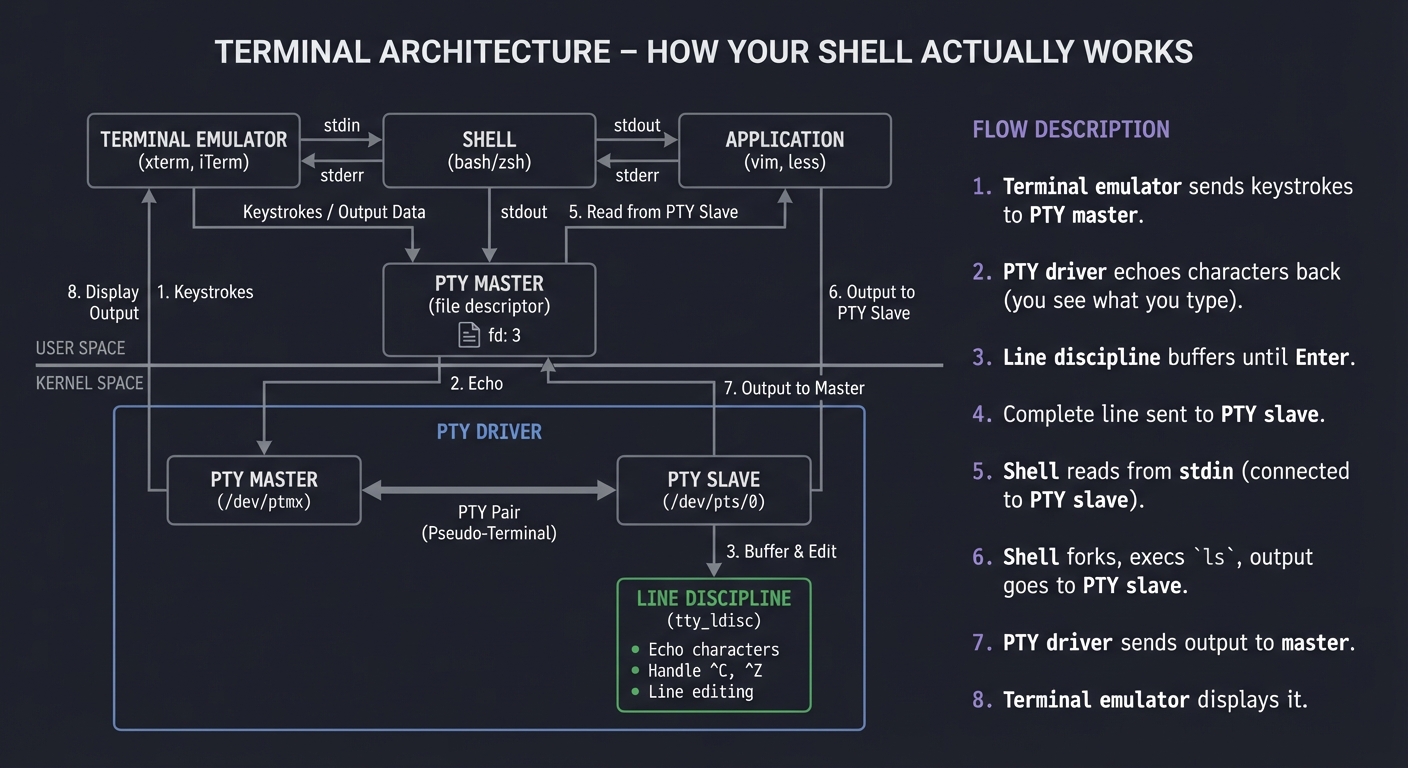
Terminal Architecture (How Your Shell Actually Works)

┌────────────────────────────────────────────────────────────────────────┐
│                           USER SPACE                                   │
│  ┌────────────────┐    ┌────────────────┐    ┌────────────────┐       │
│  │ Terminal       │    │     Shell      │    │   Application   │       │
│  │ Emulator       │←──→│   (bash/zsh)   │←──→│   (vim, less)   │       │
│  │ (xterm, iTerm) │    │                │    │                 │       │
│  └───────┬────────┘    └───────┬────────┘    └───────┬────────┘       │
│          │                     │                     │                 │
│          └──────────────┬──────┴─────────────────────┘                 │
│                         │                                              │
│                    PTY Master                                          │
│                   (file descriptor)                                    │
└─────────────────────────┼──────────────────────────────────────────────┘
                          │
┌─────────────────────────┼──────────────────────────────────────────────┐
│                   KERNEL SPACE                                         │
│                         │                                              │
│  ┌─────────────────────────────────────────────────────────────────┐  │
│  │                    PTY Driver                                    │  │
│  │   ┌───────────────┐           ┌───────────────┐                 │  │
│  │   │  PTY Master   │←─────────→│  PTY Slave    │                 │  │
│  │   │  /dev/ptmx    │           │  /dev/pts/0   │                 │  │
│  │   └───────────────┘           └───────┬───────┘                 │  │
│  │                                       │                          │  │
│  │                           ┌───────────┴───────────┐             │  │
│  │                           │   Line Discipline     │             │  │
│  │                           │   (tty_ldisc)         │             │  │
│  │                           │   - Echo characters   │             │  │
│  │                           │   - Handle ^C, ^Z     │             │  │
│  │                           │   - Line editing      │             │  │
│  │                           └───────────────────────┘             │  │
│  └─────────────────────────────────────────────────────────────────┘  │
└────────────────────────────────────────────────────────────────────────┘

When you type 'ls' and press Enter:
1. Terminal emulator sends keystrokes to PTY master
2. PTY driver echoes characters back (you see what you type)
3. Line discipline buffers until Enter
4. Complete line sent to PTY slave
5. Shell reads from stdin (connected to PTY slave)
6. Shell forks, execs 'ls', output goes to PTY slave
7. PTY driver sends output to master
8. Terminal emulator displays it
Concept Summary Table
This section provides a map of the mental models you will build during these projects.
| Concept Cluster | What You Need to Internalize |
|---|---|
| File Descriptors | Everything is a file. FDs are indices into a per-process table. The abstraction enables composition. |
| Process Model | Processes are isolated by default. fork() clones, exec() replaces. The combination is powerful. |
| Virtual Memory | Each process has its own address space. The kernel maps virtual to physical. Copy-on-write is key. |
| Signals | Asynchronous notifications that interrupt at any point. Signal-safe functions are limited. Use with care. |
| Threads | Shared address space within a process. Cheaper than processes but require synchronization. |
| Synchronization | Mutexes protect data, condition variables signal events, read-write locks optimize read-heavy workloads. |
| I/O Multiplexing | select/poll/epoll let one thread handle thousands of connections efficiently. |
| IPC | Pipes for simple cases, shared memory for speed, sockets for flexibility. Choose wisely. |
| Terminal I/O | PTY pairs, line discipline, canonical vs raw mode. Essential for building shells and editors. |
| Daemon Processes | Background services that survive logout. Double fork, setsid(), proper signal handling. |
Deep Dive Reading by Concept
This section maps each concept to specific book chapters for deeper understanding.
File I/O & File Systems
| Concept | Book & Chapter | Why This Matters |
|---|---|---|
| File descriptors & open/read/write | “APUE” by Stevens — Ch. 3 | The foundation of all UNIX I/O |
| File system structure | “The Linux Programming Interface” by Kerrisk — Ch. 14-18 | Understand inodes, directories, links |
| Buffered vs unbuffered I/O | “APUE” by Stevens — Ch. 5 | Know when stdio helps and when it hurts |
| Low-level I/O details | “Computer Systems: A Programmer’s Perspective” — Ch. 10 | See how the kernel implements it |
Process Management
| Concept | Book & Chapter | Why This Matters |
|---|---|---|
| fork/exec/wait | “APUE” by Stevens — Ch. 7, 8 | The UNIX process model |
| Process groups & sessions | “APUE” by Stevens — Ch. 9 | Essential for job control |
| Memory layout | “Computer Systems: A Programmer’s Perspective” — Ch. 9 | Virtual memory explained |
| The kernel view | “Linux Kernel Development” by Love — Ch. 3, 5 | See it from the other side |
Signals
| Concept | Book & Chapter | Why This Matters |
|---|---|---|
| Signal fundamentals | “APUE” by Stevens — Ch. 10 | The complete treatment |
| Reliable signals | “The Linux Programming Interface” — Ch. 20-22 | Avoid the pitfalls |
| Signal-safe programming | “APUE” by Stevens — Ch. 10.6 | What you can/can’t do in handlers |
Threads & Synchronization
| Concept | Book & Chapter | Why This Matters |
|---|---|---|
| POSIX threads basics | “APUE” by Stevens — Ch. 11, 12 | Creating and managing threads |
| Synchronization | “The Linux Programming Interface” — Ch. 29-33 | Mutexes, conditions, barriers |
| Lock-free techniques | “Rust Atomics and Locks” by Mara Bos | Modern concurrency patterns |
Advanced I/O & IPC
| Concept | Book & Chapter | Why This Matters |
|---|---|---|
| select/poll/epoll | “The Linux Programming Interface” — Ch. 63 | I/O multiplexing in depth |
| Pipes & FIFOs | “APUE” by Stevens — Ch. 15 | Simple IPC |
| System V IPC | “APUE” by Stevens — Ch. 15 | Shared memory, semaphores, queues |
| UNIX domain sockets | “The Linux Programming Interface” — Ch. 57 | Local socket IPC |
Network Programming
| Concept | Book & Chapter | Why This Matters |
|---|---|---|
| Socket API | “UNIX Network Programming, Vol. 1” by Stevens — Ch. 1-8 | The definitive reference |
| TCP/IP internals | “TCP/IP Illustrated, Vol. 1” by Stevens — All | Protocol deep dive |
| High-performance servers | “The Linux Programming Interface” — Ch. 59-61 | Real-world patterns |
Terminal I/O & Daemons
| Concept | Book & Chapter | Why This Matters |
|---|---|---|
| Terminal drivers | “APUE” by Stevens — Ch. 18 | Line discipline, modes |
| Pseudo terminals | “APUE” by Stevens — Ch. 19 | PTY programming |
| Daemon processes | “APUE” by Stevens — Ch. 13 | Background services |
Quick Start: Your First 48 Hours
Feeling overwhelmed? Start here instead of reading everything:
Day 1 (4 hours):
- Read only the “File Descriptors” and “Processes” sections above
- Set up your development environment (gcc, make, strace)
- Start Project 1 - just get a basic file copy working
- Run
strace ./mycp source destand look at the system calls
Day 2 (4 hours):
- Add error handling to your file copy (what if source doesn’t exist?)
- Compare your output with
strace cp source dest - Read “The Core Question You’re Answering” for Project 1
- Try copying a large file (100MB) and time it with different buffer sizes
End of Weekend: You now understand that:
- Everything goes through file descriptors
- System calls are the kernel interface
- Buffer size matters for performance
- Error handling is not optional
That’s the foundation. Everything else builds on this.
Next Steps:
- If it clicked: Continue to Project 2 (stat and file information)
- If confused: Re-read Project 1’s “Concepts You Must Understand First”
- If frustrated: Try Chapter 3 of Stevens’ APUE with the example code
Recommended Learning Path
Path 1: The Systems Programmer (Recommended Start)
Best for: Those aiming for systems programming roles, kernel development, or infrastructure engineering
- Start with Project 1 (File Copy) - Understand file descriptors and the basic I/O model
- Then Project 2 (File Info) - Learn the stat family and file metadata
- Then Project 4 (Shell) - Master fork/exec/wait through building a shell
- Then Project 6 (Signal Handler) - Understand asynchronous events
- Then Project 8 (Thread Pool) - Concurrency fundamentals
- Then Project 11 (Event Server) - I/O multiplexing at scale
Path 2: The Networking Engineer
Best for: Those building network services, distributed systems, or backend infrastructure
- Start with Project 1 (File Copy) - Still foundational
- Then Project 12 (Echo Server) - Socket programming basics
- Then Project 13 (HTTP Server) - Protocol implementation
- Then Project 11 (Event Server) - Handle thousands of connections
- Then Project 14 (IPC Hub) - Local communication patterns
Path 3: The DevOps/SRE Path
Best for: Those managing production systems, debugging issues, writing automation
- Start with Project 5 (Process Monitor) - Understanding /proc filesystem
- Then Project 9 (Daemon) - How services actually work
- Then Project 4 (Shell) - What happens when you run commands
- Then Project 15 (Terminal Emulator) - The terminal magic revealed
- Then Project 10 (Log Watcher) - File system events and monitoring
Path 4: The Completionist
Best for: Those building a complete understanding of UNIX systems
Phase 1: Foundation (Weeks 1-4)
- Project 1: File Copy Utility
- Project 2: File Information Tool
- Project 3: Directory Walker
Phase 2: Processes (Weeks 5-8)
- Project 4: Simple Shell
- Project 5: Process Monitor
- Project 6: Signal Handler
Phase 3: Concurrency (Weeks 9-12)
- Project 7: Producer-Consumer
- Project 8: Thread Pool
- Project 9: Daemon Service
Phase 4: Advanced I/O (Weeks 13-16)
- Project 10: Log Watcher
- Project 11: Event-Driven Server
- Project 12: Echo Server
Phase 5: Integration (Weeks 17-24)
- Project 13: HTTP Server
- Project 14: IPC Message Hub
- Project 15: Terminal Emulator
- Project 16: Database Engine
- Project 17: Complete Shell (Final Project)
Testing & Debugging Strategies
UNIX systems programming requires rigorous testing and debugging. Here’s how to verify your implementations work correctly.
Essential Testing Tools
1. strace - System Call Tracer
# See every system call your program makes
$ strace ./myprogram

# Count system calls (find inefficiencies)
$ strace -c ./myprogram

# Trace specific calls only
$ strace -e open,read,write ./myprogram

# Trace a running process
$ strace -p <PID>
Use cases: Understand what your code does, find performance bottlenecks, debug “it doesn’t work” issues
2. gdb - GNU Debugger
# Compile with debug symbols
$ gcc -g -o myprogram myprogram.c

# Basic debugging session
$ gdb ./myprogram
(gdb) break main
(gdb) run
(gdb) next         # Step over
(gdb) step         # Step into
(gdb) print variable
(gdb) backtrace    # Show call stack
Use cases: Segmentation faults, logic errors, understanding control flow
3. valgrind - Memory Debugger
# Detect memory leaks and invalid access
$ valgrind --leak-check=full ./myprogram

# Detect threading issues
$ valgrind --tool=helgrind ./myprogram
Use cases: Memory leaks, use-after-free, race conditions
4. ltrace - Library Call Tracer
# See library calls (malloc, printf, etc.)
$ ltrace ./myprogram
5. lsof - List Open Files
# See all files/sockets opened by a process
$ lsof -p <PID>

# Find who's using a port
$ lsof -i :8080
Verification Checklist Per Project
For each project, verify:
✅ Correctness:
- Does it produce the expected output?
- Test with edge cases (empty files, huge files, special characters)
- Compare against standard UNIX tools (cp, ls, etc.)
✅ Error Handling:
- What if the file doesn’t exist?
- What if you run out of memory?
- What if a system call is interrupted (EINTR)?
- Test with
ulimitto restrict resources
✅ Resource Cleanup:
- Run with
valgrind- zero memory leaks? - All file descriptors closed? (
lsof -p <PID>after exit) - Threads properly joined?
✅ Performance:
- Compare with standard tools (time your program vs.
cp) - Run
strace -c- reasonable number of syscalls? - Profile with
perffor hot spots
Common Debugging Scenarios
Scenario 1: “Segmentation Fault”
# Get a backtrace
$ gdb ./myprogram
(gdb) run
Program received signal SIGSEGV
(gdb) backtrace
# Look for NULL dereferences, buffer overruns
Scenario 2: “It Hangs”
# Attach to running process
$ gdb -p <PID>
(gdb) thread apply all backtrace
# Look for deadlocks, infinite loops
Scenario 3: “Memory Leak”
$ valgrind --leak-check=full --show-leak-kinds=all ./myprogram
# Every malloc must have a matching free
Scenario 4: “Race Condition”
$ valgrind --tool=helgrind ./myprogram
# Look for data races on shared variables
Scenario 5: “File Descriptor Leak”
# Before running
$ ls -l /proc/<PID>/fd | wc -l

# After operation
$ ls -l /proc/<PID>/fd | wc -l
# Numbers should be the same
Testing Best Practices
1. Test the Happy Path First
- Get basic functionality working with normal inputs
- Example: Copy a small text file
2. Then Test Edge Cases
- Empty files (0 bytes)
- Large files (> memory size)
- Files you don’t have permission to read
- Non-existent files
- Symbolic links
- Directories (when expecting files)
3. Test Error Paths
# Simulate out of memory
$ ulimit -v 10000  # Limit virtual memory
$ ./myprogram

# Simulate out of file descriptors
$ ulimit -n 10
$ ./myprogram

# Test with read-only filesystem
$ mkdir readonly && chmod 444 readonly
$ ./myprogram -o readonly/output
4. Fuzz Testing
- Feed random/malformed input
- See what breaks
- Fix crashes and undefined behavior
5. Integration Testing
# Test with real workloads
$ ./myserver &
$ SERVER_PID=$!
$ ab -n 10000 -c 100 http://localhost:8080/
$ kill $SERVER_PID
Measuring Success
Each project should pass these tests:
| Test Type | What It Verifies | Tool |
|---|---|---|
| Unit tests | Core logic works | Custom test harness |
| Memory safety | No leaks, no invalid access | valgrind |
| System call efficiency | Minimal syscalls | strace -c |
| Concurrency correctness | No races, no deadlocks | helgrind, tsan |
| Performance | Comparable to standard tools | time, perf |
| Resource cleanup | All FDs/memory freed | lsof, /proc |
The “Production-Ready” Standard
Your code is production-ready when:
- Zero compiler warnings (
gcc -Wall -Wextra -Werror) - Zero valgrind errors on all test cases
- Handles EINTR properly (system calls interrupted by signals)
- Graceful error messages (not just “Error: -1”)
- Resource limits respected (doesn’t assume infinite memory/FDs)
- Signal-safe (if using signals, only async-signal-safe functions)
- Thread-safe (if multithreaded, proper synchronization)
Remember: Production code is 90% error handling. Your educational implementations should be too.
Project List
The following projects guide you from basic file I/O to building complete systems. Each project teaches specific UNIX concepts through hands-on implementation.
Project 1: High-Performance File Copy Utility
- File:
mycp.c - Main Programming Language: C
- Alternative Programming Languages: Rust, Go
- Coolness Level: Level 2 - Practical but Foundational
- Business Potential: Level 1 - Resume Gold (Educational)
- Difficulty: Level 2 - Intermediate
- Knowledge Area: File I/O, System Calls
- Software or Tool: Core UNIX utilities (cp)
- Main Book: “Advanced Programming in the UNIX Environment” by Stevens — Ch. 3
What you’ll build: A file copy utility that uses low-level system calls (open, read, write, close) with configurable buffer sizes and performance measurement.
Why it teaches UNIX: This is the “Hello World” of systems programming. Every UNIX application ultimately does I/O through these calls. You’ll understand file descriptors, blocking I/O, and the real cost of system calls.
Core challenges you’ll face:
- Choosing buffer size → Understanding I/O performance tradeoffs
- Handling partial reads/writes → Learning that read() can return less than requested
- Proper error handling → Every system call can fail; you must check
- File permissions and modes → The third argument to open()
Real World Outcome
What you will see:
- A working copy utility: Copies any file correctly, byte-for-byte identical
- Performance comparison: Measure time with different buffer sizes
- strace output: See exactly which system calls your program makes
Command Line Outcome Example:
# 1. Create a test file
$ dd if=/dev/urandom of=testfile bs=1M count=100
100+0 records in
100+0 records out
104857600 bytes (105 MB) copied, 0.542 s, 193 MB/s

# 2. Run your copy utility
$ ./mycp testfile copyfile
mycp: copied 104857600 bytes in 0.089 seconds (1.1 GB/s)

# 3. Verify the copy is identical
$ md5sum testfile copyfile
7f9e5d1a2b3c4d5e6f7a8b9c0d1e2f3a  testfile
7f9e5d1a2b3c4d5e6f7a8b9c0d1e2f3a  copyfile

# 4. TEST: Different buffer sizes
$ ./mycp -b 1 testfile copy1       # 1 byte buffer
mycp: copied 104857600 bytes in 47.3 seconds (2.1 MB/s)  # SLOW!

$ ./mycp -b 4096 testfile copy2    # 4KB buffer
mycp: copied 104857600 bytes in 0.21 seconds (476 MB/s)

$ ./mycp -b 65536 testfile copy3   # 64KB buffer
mycp: copied 104857600 bytes in 0.089 seconds (1.1 GB/s)

$ ./mycp -b 1048576 testfile copy4 # 1MB buffer
mycp: copied 104857600 bytes in 0.087 seconds (1.1 GB/s)  # Diminishing returns

# 5. Trace system calls
$ strace -c ./mycp testfile copyfile
% time     calls  syscall
---------- ------ --------
 50.21      1601  read
 49.12      1601  write
  0.34         3  openat
  0.18         2  close
  0.15         1  fstat
The Core Question You’re Answering
“What is the actual cost of a system call, and how does buffer size affect I/O performance?”
Before you write any code, sit with this question. Each read() and write() crosses the user-kernel boundary—there’s a context switch, privilege level change, and cache pollution. But larger buffers mean more memory. The sweet spot depends on the storage device, OS, and workload.
Concepts You Must Understand First
Stop and research these before coding:
- File Descriptors
- What number does
open()return? Why that number? - What happens to file descriptors across
fork()? - Book Reference: “APUE” Ch. 3.2 - Stevens
- What number does
- The open() System Call
- What are O_RDONLY, O_WRONLY, O_CREAT, O_TRUNC?
- What is the
mode_targument and when is it used? - Book Reference: “APUE” Ch. 3.3
- Partial Reads and Writes
- Why might
read(fd, buf, 4096)return only 1000? - What must you do when
write()returns less than requested? - Book Reference: “APUE” Ch. 3.6
- Why might
- Error Handling with errno
- What is
errnoand when is it valid? - What does
perror()do vsstrerror()?
- What is
Questions to Guide Your Design
Before implementing, think through these:
- Buffer Management
- Where should the buffer be allocated—stack or heap?
- What if the file is smaller than the buffer?
- Error Paths
- What if the source file doesn’t exist?
- What if you don’t have permission to write the destination?
- What if you run out of disk space mid-copy?
- Edge Cases
- Should you handle copying a file onto itself?
- What about symbolic links—follow them or copy the link?
Thinking Exercise
Trace Through a System Call
Before coding, trace what happens when you call read(fd, buf, 4096):
User Space                    Kernel Space
    │
    │ read(3, buf, 4096)
    │
    └──────────────────────────────────────────────┐
                                                   │
    ┌──────────────────────────────────────────────┘
    │
    │  1. Trap into kernel (syscall instruction)
    │  2. Save user registers
    │  3. Look up fd 3 in process's fd table
    │  4. Find the file object (inode, position)
    │  5. Check if data in page cache
    │  6.   If not: schedule disk I/O, sleep
    │  7.   If yes: copy from page cache to buf
    │  8. Update file position
    │  9. Restore user registers
    │  10. Return to user space
    │
    └──────────────────────────────────────────────┐
                                                   │
    ┌──────────────────────────────────────────────┘
    │
    │ Returns: number of bytes read (or -1 on error)
Questions while tracing:
- Why is step 6 expensive?
- What makes step 7 fast?
- Why does buffer size matter given step 7?
The Interview Questions They’ll Ask
Prepare to answer these:
- “What’s the difference between
read()andfread()?” - “Why might you prefer
open()overfopen()?” - “How would you efficiently copy a 10GB file?”
- “What happens if
read()is interrupted by a signal?” - “Explain the O_DIRECT flag and when you’d use it.”
Hints in Layers
Hint 1: Basic Structure Your main loop reads from source, writes to destination, until read returns 0 (EOF).
Hint 2: The Read Loop Pattern You need to handle partial reads. The pattern is: read into buffer, then write everything that was read. Check return values.
Hint 3: Handling Partial Writes
// Pseudocode for robust write
while (bytes_to_write > 0) {
    written = write(fd, buf + offset, bytes_to_write)
    if (written < 0) {
        if (errno == EINTR) continue  // Interrupted, retry
        // Handle error
    }
    bytes_to_write -= written
    offset += written
}
Hint 4: Measuring Performance
Use clock_gettime(CLOCK_MONOTONIC, &ts) for accurate timing. Print bytes/second at the end.
Books That Will Help
| Topic | Book | Chapter |
|---|---|---|
| File I/O fundamentals | “APUE” by Stevens | Ch. 3 |
| System call mechanics | “Computer Systems: A Programmer’s Perspective” | Ch. 8, 10 |
| I/O performance | “The Linux Programming Interface” by Kerrisk | Ch. 13 |
Common Pitfalls & Debugging
Problem 1: “Copy works but destination has wrong size”
- Why: Not handling partial writes, or not writing all bytes read
- Fix: Use a write loop that handles partial writes
- Quick test:
ls -l source destand compare sizes
Problem 2: “Program hangs on large files”
- Why: Possibly using 1-byte buffer
- Debug: Run with
strace -cto count syscalls - Fix: Use at least 4KB buffer
Problem 3: “Permission denied on destination”
- Why: Missing mode argument to
open()with O_CREAT - Fix:
open(dest, O_WRONLY|O_CREAT|O_TRUNC, 0644)
Testing Your Copy:
# Create test files of various sizes
$ dd if=/dev/zero of=tiny bs=1 count=1
$ dd if=/dev/zero of=small bs=1K count=10
$ dd if=/dev/zero of=medium bs=1M count=10
$ dd if=/dev/zero of=large bs=1M count=100

# Copy each and verify
$ for f in tiny small medium large; do
    ./mycp $f ${f}_copy && \
    cmp $f ${f}_copy && echo "$f: OK" || echo "$f: FAILED"
done
Project 2: Advanced File Information Tool
- File:
mystat.c - Main Programming Language: C
- Alternative Programming Languages: Rust, Go
- Coolness Level: Level 2 - Practical but Foundational
- Business Potential: Level 1 - Resume Gold
- Difficulty: Level 2 - Intermediate
- Knowledge Area: File System, Metadata
- Software or Tool: stat, ls -l
- Main Book: “Advanced Programming in the UNIX Environment” by Stevens — Ch. 4
What you’ll build: A comprehensive file information tool that displays all metadata available from the stat structure—permissions, ownership, timestamps, inode numbers, block counts, and file type.
Why it teaches UNIX: Understanding the stat structure reveals how UNIX filesystems actually store file metadata. This is essential for backup tools, file managers, and security applications.
Core challenges you’ll face:
- Parsing the mode field → Extracting file type and permission bits
- Resolving user/group names → Connecting UIDs to usernames
- Handling symbolic links → stat vs lstat behavior
- Understanding timestamps → atime, mtime, ctime meanings
Real World Outcome
What you will see:
- Complete file metadata: More detailed than
statcommand - Human-readable output: Permissions shown as rwxr-xr-x
- Type detection: Regular file, directory, symlink, device, etc.
Command Line Outcome Example:
# 1. Check a regular file
$ ./mystat /bin/ls
File: /bin/ls
Type: regular file
Size: 142144 bytes (139 KiB)
Blocks: 280 (of 512 bytes each)
IO Block: 4096
Device: 8,1 (major,minor)
Inode: 131073
Links: 1
Access: -rwxr-xr-x (0755)
Uid: root (0)
Gid: root (0)
Access Time: 2024-03-15 10:23:45.123456789 -0700
Modify Time: 2023-11-10 08:15:32.000000000 -0800
Change Time: 2024-01-02 14:30:00.123456789 -0800

# 2. Check a directory
$ ./mystat /tmp
File: /tmp
Type: directory
Size: 4096 bytes (4 KiB)
...
Access: drwxrwxrwt (1777)  # Note the sticky bit!

# 3. Check a symbolic link (with lstat)
$ ./mystat -L /usr/bin/python3
File: /usr/bin/python3 -> python3.11
Type: symbolic link
Size: 10 bytes  # Size of the link itself
Link Target: python3.11

# 4. Check a block device
$ ./mystat /dev/sda
File: /dev/sda
Type: block special
Device: 8,0
...
The Core Question You’re Answering
“How does UNIX store and represent file metadata, and what’s the difference between a file’s data and its attributes?”
Every file has two parts: the data (contents) and the inode (metadata). Understanding the inode structure explains why hard links work, why mv is instant within a filesystem, and why permissions are per-file, not per-name.
Concepts You Must Understand First
Stop and research these before coding:
- The stat Structure
- What fields does
struct statcontain? - What’s the difference between
stat()andlstat()? - Book Reference: “APUE” Ch. 4.2
- What fields does
- File Types in UNIX
- Regular file, directory, character device, block device, FIFO, socket, symbolic link
- How are these encoded in
st_mode? - Book Reference: “APUE” Ch. 4.3
- Permission Bits
- What do r, w, x mean for files vs directories?
- What are setuid, setgid, and sticky bits?
- Book Reference: “APUE” Ch. 4.5-4.6
- The Three Timestamps
- Access time (atime), modification time (mtime), change time (ctime)
- Which operations update which timestamps?
Questions to Guide Your Design
Before implementing, think through these:
- Output Format
- Should you match
statcommand format or design your own? - How to display times—Unix epoch or human-readable?
- Should you match
- Symlink Handling
- Should you follow symlinks by default or not?
- How to show both link info and target info?
- Error Messages
- How to handle permission denied?
- How to handle non-existent files?
Thinking Exercise
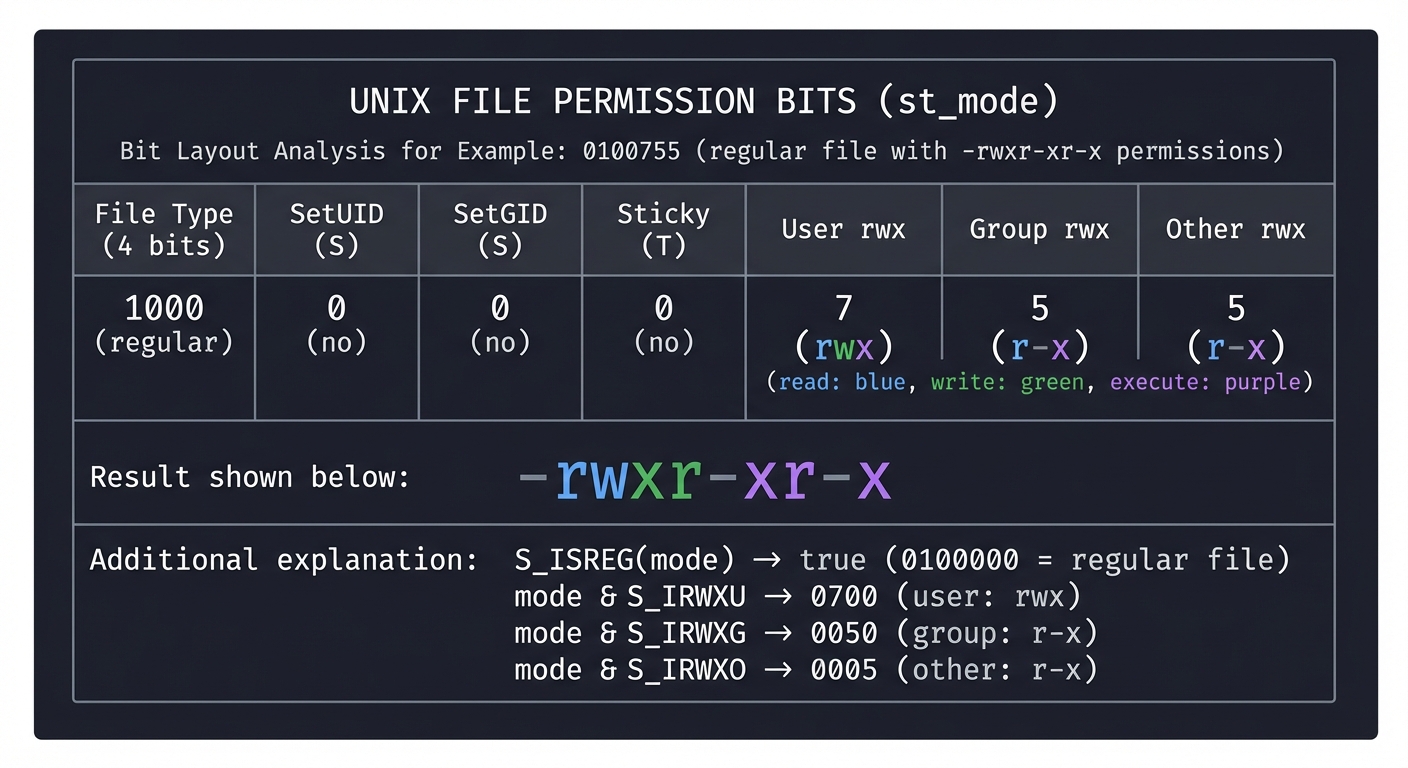
Decode a Mode Value
Given st_mode = 0100755 (octal), decode it:
st_mode bits:
┌────────────────────────────────────────────────────────┐
│   File Type   │ SetUID │ SetGID │ Sticky │ User │Group│Other│
│   (4 bits)    │   S    │   S    │   T    │ rwx  │ rwx │ rwx │
├───────────────┼────────┼────────┼────────┼──────┼─────┼─────┤
│    1000       │   0    │   0    │   0    │  7   │  5  │  5  │
│  (regular)    │  (no)  │  (no)  │  (no)  │ rwx  │ r-x │ r-x │
└────────────────────────────────────────────────────────┘

Result: -rwxr-xr-x

S_ISREG(mode) → true (0100000 = regular file)
mode & S_IRWXU → 0700 (user: rwx)
mode & S_IRWXG → 0050 (group: r-x)
mode & S_IRWXO → 0005 (other: r-x)
Questions:
- What would
st_mode = 040755represent? - What about
st_mode = 0104755?
The Interview Questions They’ll Ask
- “What’s the difference between stat() and lstat()?”
- “How are hard links implemented at the filesystem level?”
- “Why does
rmon a file sometimes not free disk space?” - “What’s the sticky bit and when would you use it?”
- “How would you find all setuid programs on a system?”
Hints in Layers
Hint 1: Getting Started
Call stat() or lstat() on the file path. Check the return value for errors.
Hint 2: File Type Detection
Use the macros: S_ISREG(mode), S_ISDIR(mode), S_ISLNK(mode), etc.
Hint 3: Permission String
// Pseudocode for permission string
char perms[11];
perms[0] = type_char(mode);  // - d l c b p s
perms[1] = (mode & S_IRUSR) ? 'r' : '-';
perms[2] = (mode & S_IWUSR) ? 'w' : '-';
perms[3] = (mode & S_IXUSR) ? 'x' : '-';  // or 's' if setuid
// ... continue for group and other
Hint 4: Username Lookup
Use getpwuid(st.st_uid) to get the username from UID. Returns NULL if not found.
Books That Will Help
| Topic | Book | Chapter |
|---|---|---|
| File metadata | “APUE” by Stevens | Ch. 4 |
| Filesystem structure | “The Linux Programming Interface” | Ch. 14-18 |
| Inode details | “Understanding the Linux Kernel” | Ch. 12 |
Common Pitfalls & Debugging
Problem 1: “Always shows ‘regular file’ for symlinks”
- Why: Using
stat()instead oflstat() - Fix: Use
lstat()to get info about the link itself
Problem 2: “Permission bits wrong for special files”
- Why: Not handling setuid/setgid/sticky in permission string
- Fix: Check
S_ISUID,S_ISGID,S_ISVTXand modify x to s/S or t/T
Problem 3: “getpwuid returns NULL”
- Why: User doesn’t exist (e.g., file from another system)
- Fix: Display numeric UID when lookup fails
Project 3: Recursive Directory Walker
- File:
myfind.c - Main Programming Language: C
- Alternative Programming Languages: Rust, Go
- Coolness Level: Level 3 - Genuinely Clever
- Business Potential: Level 2 - Micro-SaaS (specialized search tools)
- Difficulty: Level 3 - Advanced
- Knowledge Area: Filesystems, Recursion, Directory Operations
- Software or Tool: find, tree, du
- Main Book: “Advanced Programming in the UNIX Environment” by Stevens — Ch. 4
What you’ll build: A recursive directory traversal tool that walks entire directory trees, reporting files, computing sizes, and optionally filtering by criteria (name pattern, size, type).
Why it teaches UNIX: Directory traversal is fundamental to backup programs, search tools, synchronization utilities, and build systems. You’ll understand opendir/readdir, path construction, and handling of filesystem cycles.
Core challenges you’ll face:
- Building paths correctly → Avoiding buffer overflows in path construction
- Handling cycles → Symbolic links can create loops
- Efficient traversal → nftw() vs manual recursion
- Filtering and matching → Pattern matching with fnmatch()
Real World Outcome
What you will see:
- Directory tree display: Like
treecommand - Size computation: Like
ducommand - File search: Like simplified
findcommand
Command Line Outcome Example:
# 1. Basic tree display
$ ./myfind --tree /usr/include
/usr/include
├── assert.h
├── complex.h
├── errno.h
├── linux/
│   ├── capability.h
│   ├── fs.h
│   └── types.h
├── sys/
│   ├── socket.h
│   ├── stat.h
│   └── types.h
└── unistd.h
4 directories, 10 files

# 2. Disk usage mode
$ ./myfind --du /var/log
12K     /var/log/apt
4K      /var/log/apt/history.log
8K      /var/log/apt/term.log
256K    /var/log/journal
1.2M    /var/log
Total: 1.2M in 23 files, 5 directories

# 3. Find files matching pattern
$ ./myfind --name "*.h" /usr/include | head -5
/usr/include/assert.h
/usr/include/complex.h
/usr/include/errno.h
/usr/include/features.h
/usr/include/float.h

# 4. Find files larger than 1MB
$ ./myfind --size +1M /usr
/usr/lib/libc.so.6
/usr/lib/libLLVM-14.so.1
/usr/bin/clang
...

# 5. Handle symbolic link cycle gracefully
$ ln -s . loop
$ ./myfind --tree .
.
├── file.txt
└── loop -> . (symlink, skipping to avoid cycle)
The Core Question You’re Answering
“How do you traverse an entire filesystem efficiently while handling all the edge cases (permissions, symlinks, mount points)?”
This question underlies every backup tool, search utility, and file synchronizer ever written. The naive approach (recursion with string concatenation) fails on deep trees and cyclic links.
Concepts You Must Understand First
Stop and research these before coding:
- Directory as a File
- A directory is a file containing name→inode mappings
- What does opendir/readdir/closedir return?
- Book Reference: “APUE” Ch. 4.21-4.22
- Path Construction
- How to join directory path with filename?
- Maximum path length (PATH_MAX)
- Book Reference: “APUE” Ch. 4.14
- Symbolic Link Handling
- When to follow vs. when to skip?
- How to detect cycles?
- nftw() vs Manual Recursion
- What does nftw() provide?
- When would you prefer manual control?
- Book Reference: “APUE” Ch. 4.22
Questions to Guide Your Design
Before implementing, think through these:
- Recursion Strategy
- Use actual recursion or maintain a work queue?
- How deep can the call stack go?
- Memory Management
- How to handle paths—static buffer or malloc?
- How to track visited inodes for cycle detection?
- Error Handling
- What if you can’t read a directory (permission)?
- What if a file disappears mid-traversal (TOCTOU)?
Thinking Exercise
Model the Directory Structure
Consider this filesystem:
/home/user/
├── file1.txt (inode 100)
├── subdir/ (inode 101)
│   └── file2.txt (inode 102)
├── link1 -> subdir (symlink, inode 103)
└── hardlink.txt (inode 100, same as file1.txt!)

What happens if you:
1. Traverse without following symlinks?
2. Follow symlinks but don't track inodes?
3. Count bytes for hardlink.txt—double count or not?
The Interview Questions They’ll Ask
- “How would you find all files modified in the last 24 hours?”
- “How does
duavoid counting hardlinked files twice?” - “What’s the difference between depth-first and breadth-first traversal for filesystems?”
- “How would you make a parallel directory walker?”
- “What is a TOCTOU race in filesystem operations?”
Hints in Layers
Hint 1: Basic Structure
Open directory with opendir(), loop with readdir(), skip “.” and “..”, recurse on directories, close with closedir().
Hint 2: Path Building
// Safe path construction
char path[PATH_MAX];
int len = snprintf(path, sizeof(path), "%s/%s", dir, entry->d_name);
if (len >= sizeof(path)) {
    // Path too long!
}
Hint 3: Using nftw()
// nftw callback signature
int callback(const char *fpath, const struct stat *sb,
             int typeflag, struct FTW *ftwbuf) {
    // typeflag: FTW_F (file), FTW_D (directory), etc.
    // ftwbuf->level: depth in tree
}
nftw(path, callback, max_fds, flags);
Hint 4: Cycle Detection Track (device, inode) pairs in a hash set. Before entering a directory, check if already visited.
Books That Will Help
| Topic | Book | Chapter |
|---|---|---|
| Directory operations | “APUE” by Stevens | Ch. 4.21-4.22 |
| nftw() details | “The Linux Programming Interface” | Ch. 18 |
| Filesystem internals | “Understanding the Linux Kernel” | Ch. 12 |
Common Pitfalls & Debugging
Problem 1: “Crashes on deep directory trees”
- Why: Stack overflow from recursion
- Fix: Use iterative approach with explicit stack, or increase stack size
Problem 2: “Infinite loop with symlinks”
- Why: Following symlinks without cycle detection
- Fix: Use
FTW_PHYSflag with nftw(), or track visited inodes
Problem 3: “Wrong sizes reported”
- Why: Not using lstat() for symlinks, or double-counting hardlinks
- Fix: Use lstat(), track (dev, ino) pairs for hardlink dedup
Project 4: Complete Shell Implementation
- File:
mysh.c - Main Programming Language: C
- Alternative Programming Languages: Rust (with unsafe blocks)
- Coolness Level: Level 4 - Hardcore Tech Flex
- Business Potential: Level 1 - Resume Gold
- Difficulty: Level 4 - Expert
- Knowledge Area: Process Control, Signals, Job Control
- Software or Tool: bash, sh, dash
- Main Book: “Advanced Programming in the UNIX Environment” by Stevens — Ch. 7, 8, 9
What you’ll build: A functional UNIX shell with command execution, pipelines, I/O redirection, background jobs, and basic job control (Ctrl-C, Ctrl-Z).
Why it teaches UNIX: The shell is the textbook example of process control. You’ll implement fork/exec/wait, signal handling, process groups, and pipeline construction. This project alone covers chapters 7-9 of Stevens.
Core challenges you’ll face:
- Pipeline construction → Creating pipes, forking, connecting file descriptors
- Job control → Process groups, sessions, controlling terminal
- Signal handling → SIGCHLD, SIGINT, SIGTSTP in parent vs child
- Parsing → Handling quotes, escapes, variables
Real World Outcome
What you will see:
- Interactive shell: Prompt, execute commands, show results
- Pipelines:
ls | grep foo | wc -lworks - Redirection:
cmd > file,cmd < file,cmd 2>&1 - Background jobs:
cmd &with job table - Job control: Ctrl-C interrupts, Ctrl-Z stops, fg/bg resume
Command Line Outcome Example:
# 1. Start your shell
$ ./mysh
mysh>

# 2. Basic command execution
mysh> echo hello world
hello world
mysh> ls -la
total 48
drwxr-xr-x  5 user user 4096 Mar 15 10:00 .
...

# 3. Pipelines
mysh> cat /etc/passwd | grep root | cut -d: -f1
root

mysh> ls -la | sort -k5 -n | tail -5
-rw-r--r--  1 user user 1024 Mar 14 09:00 small.txt
-rw-r--r--  1 user user 4096 Mar 15 10:00 medium.txt
...

# 4. I/O Redirection
mysh> echo "hello" > output.txt
mysh> cat < output.txt
hello
mysh> ls nosuchfile 2>&1 | grep -i "no such"
ls: cannot access 'nosuchfile': No such file or directory

# 5. Background jobs
mysh> sleep 10 &
[1] 12345
mysh> sleep 20 &
[2] 12346
mysh> jobs
[1]  Running    sleep 10
[2]  Running    sleep 20

# 6. Job control
mysh> sleep 100
^Z
[1]+ Stopped    sleep 100
mysh> bg
[1]+ sleep 100 &
mysh> fg
sleep 100
^C
mysh>

# 7. Exit
mysh> exit
$
The Core Question You’re Answering
“How does the shell coordinate multiple processes, connect their inputs and outputs, and manage them as jobs while the user interacts with the terminal?”
The shell is the conductor of an orchestra of processes. Understanding this teaches you everything about UNIX process management that you’ll need for any systems programming.
Concepts You Must Understand First
Stop and research these before coding:
- fork/exec/wait Pattern
- Why are these separate system calls?
- What does each exec variant do (execl, execv, execvp)?
- Book Reference: “APUE” Ch. 8
- Process Groups and Sessions
- What’s a process group? Why do they exist?
- What’s a session? What’s a controlling terminal?
- Book Reference: “APUE” Ch. 9
- File Descriptor Manipulation
- dup(), dup2(), and their role in redirection
- How pipes connect processes
- Book Reference: “APUE” Ch. 3.12, 15.2
- Signal Handling for Shells
- SIGCHLD—child process status changed
- SIGINT, SIGTSTP—keyboard interrupts
- When should the shell ignore vs handle these?
- Book Reference: “APUE” Ch. 10
Questions to Guide Your Design
Before implementing, think through these:
- Process Structure
- Does each pipeline stage fork from the shell, or from the previous stage?
- Who creates the pipes?
- Terminal Control
- Which process should receive Ctrl-C?
- How do you give the terminal to a foreground job?
- Job Tracking
- How to track running/stopped jobs?
- When to reap zombies vs wait for foreground?
Thinking Exercise
Trace Pipeline Execution
For command ls | sort | head, trace process creation:
Shell (pid 100, pgid 100, sid 100)
   │
   ├─ fork() ─────────────────────────────────────────────────────┐
   │                                                               │
   │                                                               v
   │                                              ┌────────────────────┐
   │  1. Create pipe1: [read_fd, write_fd]        │ Child1 (pid 101)   │
   │  2. fork() for ls                            │ - setpgid(0, 101)  │
   │  3. In child: dup2(pipe1_write, STDOUT)      │ - close pipe read  │
   │             close unused pipe ends           │ - exec("ls")       │
   │                                              └────────────────────┘
   │
   ├─ fork() ─────────────────────────────────────────────────────┐
   │                                                               v
   │                                              ┌────────────────────┐
   │  4. Create pipe2: [read_fd, write_fd]        │ Child2 (pid 102)   │
   │  5. fork() for sort                          │ - setpgid(0, 101)  │
   │  6. In child: dup2(pipe1_read, STDIN)        │   (same group!)    │
   │             dup2(pipe2_write, STDOUT)        │ - exec("sort")     │
   │             close unused ends                └────────────────────┘
   │
   ├─ fork() ─────────────────────────────────────────────────────┐
   │                                                               v
   │                                              ┌────────────────────┐
   │  7. fork() for head                          │ Child3 (pid 103)   │
   │  8. In child: dup2(pipe2_read, STDIN)        │ - setpgid(0, 101)  │
   │             close unused ends                │ - exec("head")     │
   │             exec("head")                     └────────────────────┘
   │
   │  9. Shell: close all pipe ends
   │  10. Shell: tcsetpgrp(tty_fd, 101)  // Give terminal to job
   │  11. Shell: waitpid(-101, ...) for all children
   │  12. Shell: tcsetpgrp(tty_fd, 100)  // Take back terminal
Questions:
- Why must all children be in the same process group?
- What happens if shell forgets to close pipe write end?
- Why does shell wait AFTER giving terminal to job?
The Interview Questions They’ll Ask
- “Explain how a pipeline like
cat file | grep pattern | wc -lis set up.” - “What happens when you press Ctrl-C while a command is running?”
- “How do you prevent zombie processes in a shell?”
- “What’s the difference between a foreground and background job?”
- “How would you implement command substitution $(cmd)?”
Hints in Layers
Hint 1: Start Simple Begin with just executing single commands (fork, exec, wait). No pipes, no redirection. Get this working first.
Hint 2: Add Redirection Before exec(), use dup2() to redirect stdin/stdout to files. Remember to close the original file descriptor.
Hint 3: Pipelines
// For each pair of adjacent commands:
int pipefd[2];
pipe(pipefd);
// Left command gets pipefd[1] as stdout
// Right command gets pipefd[0] as stdin
Hint 4: Job Control Signals In the shell (parent):
- Ignore SIGINT, SIGTSTP, SIGTTIN, SIGTTOU
- Handle SIGCHLD to track job state changes
In child before exec:
- Reset all signals to SIG_DFL
Books That Will Help
| Topic | Book | Chapter |
|---|---|---|
| Process control | “APUE” by Stevens | Ch. 8 |
| Process relationships | “APUE” by Stevens | Ch. 9 |
| Signals | “APUE” by Stevens | Ch. 10 |
| Job control | “The Linux Programming Interface” | Ch. 34 |
Common Pitfalls & Debugging
Problem 1: “Pipeline hangs forever”
- Why: Forgot to close write end of pipe; reader never sees EOF
- Fix: Close ALL unused pipe ends in ALL processes
Problem 2: “Ctrl-C kills the shell”
- Why: Shell didn’t ignore SIGINT
- Fix: Shell must
signal(SIGINT, SIG_IGN)and reset in children
Problem 3: “Background job immediately stopped”
- Why: Background job tried to read from terminal (SIGTTIN)
- Fix: Redirect stdin from /dev/null for background jobs
Problem 4: “Zombie processes accumulating”
- Why: Not handling SIGCHLD properly
- Fix: Install SIGCHLD handler that calls waitpid(-1, …, WNOHANG)
Project 5: Process Monitor and /proc Explorer
- File:
myps.c - Main Programming Language: C
- Alternative Programming Languages: Rust, Go, Python (for prototyping)
- Coolness Level: Level 3 - Genuinely Clever
- Business Potential: Level 2 - Micro-SaaS (monitoring tools)
- Difficulty: Level 3 - Advanced
- Knowledge Area: Process Environment, /proc Filesystem
- Software or Tool: ps, top, htop
- Main Book: “Advanced Programming in the UNIX Environment” by Stevens — Ch. 6, 7
What you’ll build: A process monitor that reads /proc filesystem to display running processes with their state, memory usage, CPU time, open files, and environment variables.
Why it teaches UNIX: The /proc filesystem exposes kernel data structures as files. Understanding it reveals how processes work internally and how monitoring tools like top and htop function.
Core challenges you’ll face:
- Parsing /proc entries → Each file has different formats
- Calculating CPU usage → Requires sampling and delta calculation
- Handling race conditions → Processes can die while you read
- Terminal UI → Refreshing display without flicker
Real World Outcome
What you will see:
- Process listing: Like
ps auxwith more control - Real-time updates: Like
topbut showing your metrics - Per-process details: Memory maps, open files, environment
Command Line Outcome Example:
# 1. Basic process list
$ ./myps
PID   PPID  USER      STATE  %CPU  %MEM   VSZ    RSS  COMMAND
    1     0  root      S     0.0   0.1  167M   12M  /sbin/init
   42     1  root      S     0.0   0.0   23M    5M  /lib/systemd/systemd-journald
 1234     1  user      S     0.5   2.3  450M   94M  /usr/bin/python3 app.py
 5678  1234  user      R     1.2   0.5   12M    4M  ./myps
...
Total: 234 processes, 2 running, 232 sleeping

# 2. Detailed view of specific process
$ ./myps -p 1234
PID: 1234
Name: python3
State: S (Sleeping)
Parent PID: 1
Thread Count: 4
Priority: 20 (nice: 0)

Memory:
  Virtual: 450 MB
  Resident: 94 MB
  Shared: 12 MB
  Text: 8 MB
  Data: 86 MB

CPU:
  User Time: 45.32 seconds
  System Time: 12.45 seconds
  Start Time: Mar 15 10:00:00

Open Files (5):
  0: /dev/pts/0 (terminal)
  1: /dev/pts/0 (terminal)
  2: /dev/pts/0 (terminal)
  3: socket:[12345] (TCP 0.0.0.0:8080)
  4: /var/log/app.log (regular file)

Environment (truncated):
  PATH=/usr/local/bin:/usr/bin:/bin
  HOME=/home/user
  PYTHONPATH=/app/lib

# 3. Real-time mode (like top)
$ ./myps --top
myps - 10:23:45 up 5 days, 3:21, 2 users, load: 0.52 0.38 0.31

PID   USER      %CPU  %MEM  COMMAND
5678  user      25.3   4.2  ffmpeg
1234  user       5.1   2.3  python3
...

[Press 'q' to quit, 'k' to kill, 'r' to renice]
The Core Question You’re Answering
“How does the operating system expose process internals, and how can we inspect running processes without special privileges?”
The /proc filesystem is Linux’s window into the kernel. Understanding it teaches you what information the kernel tracks about each process and how to access it from userspace.
Concepts You Must Understand First
Stop and research these before coding:
- The /proc Filesystem
- What is /proc? Is it a real filesystem?
- What files exist in /proc/[pid]/?
- Book Reference: “The Linux Programming Interface” Ch. 12
- Process States
- R (Running), S (Sleeping), D (Uninterruptible), Z (Zombie), T (Stopped)
- What causes each state?
- Memory Metrics
- What’s the difference between VSZ and RSS?
- What is shared memory?
- Book Reference: “APUE” Ch. 7.6
- CPU Time Accounting
- User time vs system time
- How to calculate CPU percentage?
Questions to Guide Your Design
Before implementing, think through these:
- Data Collection
- Which /proc files give you which information?
- How to handle parsing errors gracefully?
- CPU Percentage
- This requires two samples—how to structure that?
- What time interval to use?
- Error Handling
- Process disappears between opendir and reading—what to do?
- Permission denied on some /proc entries?
Thinking Exercise
Parse /proc/[pid]/stat
This single line contains most process info:
$ cat /proc/1234/stat
1234 (python3) S 1 1234 1234 0 -1 4194304 12345 0 0 0 452 124 0 0 20 0 4 0
     ^    ^    ^ ^ ^    ^    ^        ^     ^         ^   ^
     |    |    | | |    |    |        |     |         |   |
    PID  comm  | | |   SID  TTY    flags  minflt    utime stime
              state
               PPID
                 PGID
Fields (selected):
- 1: PID
- 2: comm (executable name in parens)
- 3: state (R, S, D, Z, T, etc.)
- 4: ppid
- 14: utime (user mode jiffies)
- 15: stime (kernel mode jiffies)
- 20: num_threads
- 23: vsize (virtual memory size in bytes)
- 24: rss (resident set size in pages)
Exercise: Write code to parse this line. Watch out for comm containing spaces or parentheses!
The Interview Questions They’ll Ask
- “How would you find which process is using the most CPU?”
- “What’s the difference between /proc/meminfo and /proc/[pid]/status?”
- “How does top calculate CPU percentage?”
- “What information can you get about a process without being root?”
- “How would you detect if a process is leaking file descriptors?”
Hints in Layers
Hint 1: Start with /proc/[pid]/stat This file has most of what you need. Parse it carefully—the comm field can contain spaces.
Hint 2: Directory Scanning
// List all processes
DIR *dir = opendir("/proc");
while ((entry = readdir(dir)) != NULL) {
    if (isdigit(entry->d_name[0])) {
        // This is a process directory
    }
}
Hint 3: CPU Percentage Calculation
// Sample 1: record utime1 + stime1, total_time1
// Sleep for interval (e.g., 100ms)
// Sample 2: record utime2 + stime2, total_time2

cpu_percent = 100.0 * (utime2 + stime2 - utime1 - stime1) /
              (total_time2 - total_time1)
Hint 4: Open Files from /proc/[pid]/fd
This is a directory of symlinks. readlink() each entry to get the file path.
Books That Will Help
| Topic | Book | Chapter |
|---|---|---|
| /proc filesystem | “The Linux Programming Interface” | Ch. 12 |
| Process environment | “APUE” by Stevens | Ch. 7 |
| Memory management | “Understanding the Linux Kernel” | Ch. 8-9 |
Common Pitfalls & Debugging
Problem 1: “Segfault when parsing comm field”
- Why: Process name contains ‘)’ or spaces
- Fix: Find the LAST ‘)’ in the line, not the first
Problem 2: “CPU percentage over 100%”
- Why: Multi-threaded processes can use more than 100% (one core)
- Fix: This is correct for SMP. Divide by num_cores for normalized percentage.
Problem 3: “Permission denied on /proc/[pid]/fd”
- Why: Can only read fd directory for your own processes (unless root)
- Fix: Skip or show “permission denied” gracefully
Problem 4: “Process vanishes mid-read”
- Why: Process exited between directory scan and file read
- Fix: Handle ENOENT gracefully—the process simply ended
Project 6: Robust Signal Handler Framework
- File:
sighandler.c - Main Programming Language: C
- Alternative Programming Languages: Rust (with unsafe), Go (limited signal support)
- Coolness Level: Level 4 - Hardcore Tech Flex
- Business Potential: Level 1 - Resume Gold
- Difficulty: Level 4 - Expert
- Knowledge Area: Signals, Asynchronous Events
- Software or Tool: Daemon services, graceful shutdown handlers
- Main Book: “Advanced Programming in the UNIX Environment” by Stevens — Ch. 10
What you’ll build: A signal handling framework that properly handles SIGINT, SIGTERM, SIGCHLD, SIGALRM, and SIGUSR1/SIGUSR2, demonstrating safe practices for signal-aware programming.
Why it teaches UNIX: Signals are UNIX’s asynchronous notification system. Mishandling them causes race conditions, crashes, and security vulnerabilities. This project forces you to understand reliability, reentrancy, and the subtleties of signal delivery.
Core challenges you’ll face:
- Async-signal-safety → Only certain functions are safe in handlers
- Race conditions → Signal can arrive at any point in your code
- Reliable signal handling → sigaction() vs signal(), signal masks
- Self-pipe trick → Converting signals to I/O events
Real World Outcome
What you will see:
- Graceful shutdown: SIGTERM triggers cleanup and exit
- Child reaping: SIGCHLD handled without zombies
- Periodic timers: SIGALRM for scheduled tasks
- Signal logging: Track and display all signals received
Command Line Outcome Example:
# 1. Start the signal demo program
$ ./sigdemo
Signal handler framework running (PID 12345)
Press Ctrl-C to test SIGINT handling
Send signals: kill -TERM 12345, kill -USR1 12345, etc.

# 2. Send signals from another terminal
$ kill -USR1 12345
$ kill -USR2 12345
$ kill -TERM 12345

# 3. Output from sigdemo:
[10:30:01.123] Received SIGUSR1 (10) - User defined signal 1
[10:30:02.456] Received SIGUSR2 (12) - User defined signal 2
[10:30:03.789] Received SIGTERM (15) - Termination signal
[10:30:03.790] Beginning graceful shutdown...
[10:30:03.791] Flushing buffers...
[10:30:03.792] Closing connections...
[10:30:03.793] Shutdown complete. Exiting.

# 4. Child process handling
$ ./sigdemo --fork-children 5
Forked 5 child processes
[10:30:10.000] Child 12346 exited with status 0
[10:30:10.100] Child 12347 exited with status 0
[10:30:10.200] Child 12348 exited with status 0
[10:30:10.300] Child 12349 exited with status 0
[10:30:10.400] Child 12350 exited with status 0
All children reaped. No zombies!

# 5. Timer demonstration
$ ./sigdemo --timer 2
Setting SIGALRM every 2 seconds
[10:30:00] Timer fired! Count: 1
[10:30:02] Timer fired! Count: 2
[10:30:04] Timer fired! Count: 3
^C
Caught SIGINT. Stopping timers and exiting...
The Core Question You’re Answering
“How do you handle asynchronous events safely in a program where a signal can interrupt literally any line of code?”
This question is fundamental to any long-running server or daemon. The answer involves understanding async-signal-safety, the self-pipe trick, and proper use of sigaction().
Concepts You Must Understand First
Stop and research these before coding:
- Signal Delivery Mechanics
- When exactly does a signal get delivered?
- What happens to blocked signals?
- Book Reference: “APUE” Ch. 10.2-10.4
- Async-Signal-Safety
- Which functions are safe to call in a handler?
- Why is printf() not safe?
- Book Reference: “APUE” Ch. 10.6
- sigaction() vs signal()
- Why is signal() unreliable?
- What does SA_RESTART mean?
- Book Reference: “APUE” Ch. 10.14
- Signal Sets and Masks
- sigset_t, sigfillset(), sigaddset()
- sigprocmask() and blocking signals
- Book Reference: “APUE” Ch. 10.11-10.12
Questions to Guide Your Design
Before implementing, think through these:
- Handler Design
- Should handlers do work or just set flags?
- How to safely communicate from handler to main code?
- Critical Sections
- Which parts of your code must not be interrupted?
- How to protect them?
- Error Handling
- What if a signal arrives during a slow system call?
- How to handle EINTR?
Thinking Exercise
The Self-Pipe Trick
The self-pipe trick converts signals (async) to file descriptor events (sync). Study this pattern:
Setup:
1. Create a pipe: pipe(pipefd)
2. Set both ends non-blocking
3. In signal handler: write(pipefd[1], "x", 1)
4. In main loop: select() includes pipefd[0]

Flow:
┌─────────────────┐
│   Main Loop     │
│                 │
│  select() on:   │
│  - client sockets
│  - pipefd[0]  ◄─────────┐
│                 │         │
│  When pipefd[0] │         │
│  is readable:   │         │
│  → signal       │         │
│    received!    │         │
└─────────────────┘         │
                            │
    Signal arrives          │
    at ANY point            │
         │                  │
         v                  │
┌─────────────────┐         │
│ Signal Handler  │         │
│                 │         │
│ write(pipefd[1],│─────────┘
│       "x", 1)   │
│                 │
│ (async-safe!)   │
└─────────────────┘
Questions:
- Why must the pipe be non-blocking?
- What if multiple signals arrive quickly?
- Why is write() async-signal-safe?
The Interview Questions They’ll Ask
- “What functions are async-signal-safe and why?”
- “Explain the difference between sigaction() and signal().”
- “How do you prevent a signal handler from interrupting itself?”
- “What is the self-pipe trick and when would you use it?”
- “How does SIGCHLD work and why is it important to handle it?”
Hints in Layers
Hint 1: Use sigaction() Always use sigaction(), never signal(). Set sa_flags appropriately.
Hint 2: Minimal Handler
// The handler should be minimal:
volatile sig_atomic_t got_signal = 0;
void handler(int signo) {
    got_signal = signo;
}
// Main loop checks got_signal
Hint 3: SA_RESTART vs EINTR Either use SA_RESTART to auto-retry interrupted syscalls, or check for EINTR in your code and retry manually.
Hint 4: Signal Mask for SIGCHLD When handling SIGCHLD, call waitpid() in a loop with WNOHANG because multiple children may exit before handler runs.
Books That Will Help
| Topic | Book | Chapter |
|---|---|---|
| Signal fundamentals | “APUE” by Stevens | Ch. 10 |
| Reliable signals | “The Linux Programming Interface” | Ch. 20-22 |
| Advanced techniques | “Linux System Programming” by Love | Ch. 10 |
Common Pitfalls & Debugging
Problem 1: “printf() in handler causes crashes”
- Why: printf() is not async-signal-safe (uses locks)
- Fix: Use write() or set a flag and print in main code
Problem 2: “Sometimes miss signals”
- Why: Using signal() which resets to SIG_DFL on some systems
- Fix: Use sigaction() with SA_RESTART
Problem 3: “Zombie children despite SIGCHLD handler”
- Why: Only calling waitpid() once, but multiple children exited
- Fix: Loop:
while (waitpid(-1, NULL, WNOHANG) > 0);
Problem 4: “Deadlock when signal arrives”
- Why: Main code holds lock, signal tries same lock
- Fix: Block signals around critical sections, or use self-pipe trick
Project 7: Producer-Consumer with POSIX Threads
- File:
prodcons.c - Main Programming Language: C
- Alternative Programming Languages: Rust, Go, C++
- Coolness Level: Level 3 - Genuinely Clever
- Business Potential: Level 1 - Resume Gold
- Difficulty: Level 3 - Advanced
- Knowledge Area: Threads, Synchronization
- Software or Tool: Thread pools, work queues
- Main Book: “Advanced Programming in the UNIX Environment” by Stevens — Ch. 11
What you’ll build: A producer-consumer system with multiple producer and consumer threads sharing a bounded buffer, using mutexes and condition variables for synchronization.
Why it teaches UNIX: This is the canonical threading problem. You’ll learn mutex locking, condition variables, and how to avoid deadlocks and race conditions. These patterns appear in every multi-threaded application.
Core challenges you’ll face:
- Mutual exclusion → Protecting shared data with mutexes
- Condition variables → Signaling between threads
- Bounded buffer → Blocking when full or empty
- Deadlock prevention → Ordering locks correctly
Real World Outcome
What you will see:
- Producers adding items: Multiple threads producing work
- Consumers processing items: Multiple threads consuming work
- Correct synchronization: No lost items, no duplicates, no crashes
- Performance metrics: Throughput and latency measurements
Command Line Outcome Example:
# 1. Run with default settings
$ ./prodcons
Starting producer-consumer demo
Buffer size: 10, Producers: 2, Consumers: 2, Items: 1000

Producer 0: produced item 0
Producer 1: produced item 1
Consumer 0: consumed item 0 (produced by P0)
Consumer 1: consumed item 1 (produced by P1)
Producer 0: produced item 2
...
Producer 1: produced item 999
Consumer 0: consumed item 998
Consumer 1: consumed item 999

All items produced: 1000
All items consumed: 1000
No items lost or duplicated!
Throughput: 50,000 items/second

# 2. Stress test with more threads
$ ./prodcons -p 8 -c 8 -n 100000 -b 100
Buffer size: 100, Producers: 8, Consumers: 8, Items: 100000

Running...

Summary:
  Items produced: 100000
  Items consumed: 100000
  Errors: 0
  Elapsed time: 1.23 seconds
  Throughput: 81,300 items/second

# 3. Watch buffer fill/drain
$ ./prodcons --verbose -b 5
Buffer [     ] 0/5
Producer 0 added item 1
Buffer [#    ] 1/5
Producer 1 added item 2
Buffer [##   ] 2/5
Producer 0 added item 3
Buffer [###  ] 3/5
Consumer 0 took item 1
Buffer [##   ] 2/5
...
The Core Question You’re Answering
“How do you coordinate multiple threads accessing shared data without losing updates, corrupting state, or deadlocking?”
This is the central question of concurrent programming. The producer-consumer pattern with bounded buffer is the distilled essence of all synchronization problems.
Concepts You Must Understand First
Stop and research these before coding:
- POSIX Threads Basics
- pthread_create(), pthread_join()
- Thread arguments and return values
- Book Reference: “APUE” Ch. 11.4-11.5
- Mutexes
- pthread_mutex_lock(), pthread_mutex_unlock()
- Why mutexes are needed
- Book Reference: “APUE” Ch. 11.6
- Condition Variables
- pthread_cond_wait(), pthread_cond_signal(), pthread_cond_broadcast()
- Why you must hold the mutex when waiting
- Book Reference: “APUE” Ch. 11.6
- Spurious Wakeups
- Why condition waits must be in a while loop
- The “while (!condition) cond_wait()” pattern
Questions to Guide Your Design
Before implementing, think through these:
- Buffer Data Structure
- Array-based circular buffer or linked list?
- How to track head, tail, and count?
- Signaling Strategy
- When to signal vs broadcast?
- One CV or two (for “not full” and “not empty”)?
- Shutdown Coordination
- How do consumers know producers are done?
- How to wake up blocked consumers for exit?
Thinking Exercise
The Condition Variable Pattern
Study this critical pattern:
WRONG (no loop):                    RIGHT (with loop):
┌────────────────────────┐          ┌────────────────────────┐
│ mutex_lock(&mtx)       │          │ mutex_lock(&mtx)       │
│                        │          │                        │
│ if (buffer_empty) {    │          │ while (buffer_empty) { │
│   cond_wait(&cv, &mtx);│          │   cond_wait(&cv, &mtx);│
│ }                      │          │ }                      │
│                        │          │                        │
│ // consume item        │          │ // consume item        │
│ // BUG: what if        │          │ // SAFE: we re-check   │
│ // buffer is still     │          │ // after every wakeup  │
│ // empty???            │          │                        │
│                        │          │                        │
│ mutex_unlock(&mtx)     │          │ mutex_unlock(&mtx)     │
└────────────────────────┘          └────────────────────────┘

Why can buffer still be empty after wakeup?
1. Spurious wakeup (pthread spec allows this)
2. Another consumer grabbed the item first
3. Signal was sent but condition already false
The Interview Questions They’ll Ask
- “Why must you check the condition in a while loop, not an if?”
- “What’s the difference between pthread_cond_signal and pthread_cond_broadcast?”
- “Can you have a deadlock with just one mutex?”
- “How would you implement a thread-safe queue?”
- “What is priority inversion and how do you prevent it?”
Hints in Layers
Hint 1: Circular Buffer
Use an array with head and tail indices. Compute next index with (idx + 1) % size.
Hint 2: Two Condition Variables
pthread_cond_t not_full;   // producers wait on this
pthread_cond_t not_empty;  // consumers wait on this
Hint 3: Producer Pattern
mutex_lock(&mtx);
while (count == capacity) {
cond_wait(¬_full, &mtx);
}
// add item to buffer
count++;
cond_signal(¬_empty);
mutex_unlock(&mtx);
Hint 4: Graceful Shutdown
Add a done flag. Producers set it when finished. Consumers check it after each wait and exit if done and buffer empty.
Books That Will Help
| Topic | Book | Chapter |
|---|---|---|
| POSIX threads | “APUE” by Stevens | Ch. 11 |
| Synchronization | “The Linux Programming Interface” | Ch. 29-30 |
| Advanced patterns | “Rust Atomics and Locks” by Bos | Ch. 1-5 |
Common Pitfalls & Debugging
Problem 1: “Consumer hangs forever”
- Why: Producer exited without signaling consumers
- Fix: Set done flag and broadcast to all waiters on exit
Problem 2: “Items lost”
- Why: Not holding mutex during buffer modification
- Fix: Always lock before touching shared state
Problem 3: “Deadlock”
- Why: Forgot to unlock mutex on error path
- Fix: Use RAII pattern (in C++/Rust) or careful error handling
Problem 4: “Occasionally wrong count”
- Why: Race condition—didn’t hold mutex when reading count
- Fix: Any access to shared state needs the mutex
Project 8: Thread Pool Implementation
- File:
threadpool.c - Main Programming Language: C
- Alternative Programming Languages: Rust, Go, C++
- Coolness Level: Level 4 - Hardcore Tech Flex
- Business Potential: Level 3 - Service & Support (foundational for servers)
- Difficulty: Level 4 - Expert
- Knowledge Area: Thread Control, Synchronization, Resource Management
- Software or Tool: Web servers, task queues
- Main Book: “Advanced Programming in the UNIX Environment” by Stevens — Ch. 12
What you’ll build: A reusable thread pool that accepts work items, distributes them to worker threads, and handles graceful shutdown—the foundation of every high-performance server.
Why it teaches UNIX: Thread pools extend the producer-consumer pattern to a reusable library. You’ll learn thread attributes, cleanup handlers, and how to design thread-safe APIs.
Core challenges you’ll face:
- Work queue management → Thread-safe task submission and retrieval
- Thread lifecycle → Creating, reusing, and terminating worker threads
- Graceful shutdown → Completing pending work vs immediate stop
- Thread-local storage → Per-thread data when needed
Real World Outcome
What you will see:
- Pool creation: Spawn N worker threads on initialization
- Task submission: Submit work from any thread
- Parallel execution: Workers process tasks concurrently
- Clean shutdown: All pending work completed before exit
Command Line Outcome Example:
# 1. Basic thread pool demo
$ ./threadpool_demo
Creating thread pool with 4 workers...
Pool created. Submitting 20 tasks...

[Worker 0] Processing task 1: computing...
[Worker 1] Processing task 2: computing...
[Worker 2] Processing task 3: computing...
[Worker 3] Processing task 4: computing...
[Worker 0] Task 1 complete (result: 42)
[Worker 0] Processing task 5: computing...
...
[Worker 2] Task 20 complete (result: 840)

All 20 tasks completed.
Destroying pool...
Pool destroyed. Workers joined.

# 2. Performance benchmark
$ ./threadpool_bench -w 8 -t 10000
Thread pool benchmark
Workers: 8
Tasks: 10000 (each simulates 1ms of work)

Single-threaded baseline: 10.02 seconds
Thread pool (8 workers): 1.28 seconds
Speedup: 7.83x

# 3. Graceful shutdown test
$ ./threadpool_demo --shutdown-test
Submitting 100 slow tasks (100ms each)...
After 500ms, requesting shutdown...

[Worker 0] Processing task 1...
[Worker 1] Processing task 2...
...
Shutdown requested. Completing pending tasks...
[Worker 3] Task 8 complete (last pending)

Tasks completed: 8
Tasks cancelled: 92
Shutdown complete.

# 4. Use as a library
$ cat my_app.c
#include "threadpool.h"

void my_task(void *arg) {
    printf("Processing: %s\n", (char *)arg);
}

int main() {
    threadpool_t *pool = threadpool_create(4);
    threadpool_submit(pool, my_task, "task 1");
    threadpool_submit(pool, my_task, "task 2");
    threadpool_destroy(pool, 1);  // 1 = wait for completion
    return 0;
}
The Core Question You’re Answering
“How do you efficiently reuse threads to handle arbitrary work items while providing a clean API for clients?”
Thread creation is expensive (1-10ms). A thread pool amortizes this cost over many tasks. This pattern underlies nginx, Apache, database connection pools, and virtually every server.
Concepts You Must Understand First
Stop and research these before coding:
- Thread Attributes
- pthread_attr_t and its settings
- Stack size, detached vs joinable
- Book Reference: “APUE” Ch. 12.3
- Thread Cancellation
- pthread_cancel(), cancellation points
- Cleanup handlers
- Book Reference: “APUE” Ch. 12.7
- Thread-Specific Data
- pthread_key_create(), pthread_setspecific()
- When you need per-thread storage
- Book Reference: “APUE” Ch. 12.6
- Work Queue Design
- How to store function pointers and arguments
- FIFO vs priority queue
Questions to Guide Your Design
Before implementing, think through these:
- API Design
- What does threadpool_submit() return?
- How does the caller know when a task completes?
- Shutdown Semantics
- Should shutdown wait for pending tasks?
- How to handle tasks submitted during shutdown?
- Error Handling
- What if a task throws an exception (in C++)?
- What if malloc fails?
Thinking Exercise
Thread Pool State Machine
Model the worker thread state machine:
                    ┌──────────────┐
                    │   Created    │
                    └──────┬───────┘
                           │ start()
                           v
              ┌────────────────────────┐
              │                        │
              │         Idle           │◄────────────┐
              │   (waiting for work)   │             │
              │                        │             │
              └────────────┬───────────┘             │
                           │ task available          │
                           v                         │
              ┌────────────────────────┐             │
              │                        │             │
              │       Executing        │─────────────┘
              │    (running task)      │   task done
              │                        │
              └────────────┬───────────┘
                           │ shutdown signal
                           v
              ┌────────────────────────┐
              │                        │
              │      Terminating       │
              │  (cleanup, then exit)  │
              │                        │
              └────────────────────────┘

Questions:
- What happens if shutdown while executing?
- How does idle->executing transition work atomically?
- What wakes up idle threads?
The Interview Questions They’ll Ask
- “How would you size a thread pool for CPU-bound vs I/O-bound work?”
- “What happens if a worker thread crashes?”
- “How do you handle work stealing in a thread pool?”
- “What’s the difference between a thread pool and an executor?”
- “How would you add priority to the work queue?”
Hints in Layers
Hint 1: Work Item Structure
typedef struct {
    void (*function)(void *);
    void *arg;
} task_t;
Hint 2: Pool Structure
typedef struct {
    pthread_t *threads;
    int num_threads;
    task_t *queue;
    int queue_size;
    int queue_head, queue_tail, queue_count;
    pthread_mutex_t mutex;
    pthread_cond_t work_available;
    pthread_cond_t work_done;
    int shutdown;
} threadpool_t;
Hint 3: Worker Function
void *worker(void *arg) {
    pool = (threadpool_t *)arg;
    while (1) {
        lock(mutex);
        while (queue_empty && !shutdown) wait(work_available);
        if (shutdown && queue_empty) { unlock; return; }
        task = dequeue();
        unlock(mutex);
        task.function(task.arg);
    }
}
Hint 4: Graceful Shutdown Set shutdown flag, broadcast to all workers, then join all threads. Workers check shutdown flag after each task.
Books That Will Help
| Topic | Book | Chapter |
|---|---|---|
| Thread control | “APUE” by Stevens | Ch. 12 |
| Thread attributes | “The Linux Programming Interface” | Ch. 29-30 |
| Real-world patterns | “C++ Concurrency in Action” by Williams | Ch. 9 |
Common Pitfalls & Debugging
Problem 1: “Threads don’t exit on shutdown”
- Why: Workers blocked on cond_wait, no one signals
- Fix: broadcast() to all workers after setting shutdown flag
Problem 2: “Tasks execute multiple times”
- Why: Didn’t remove task from queue before unlocking
- Fix: Dequeue atomically while holding lock
Problem 3: “Pool crashes under load”
- Why: Queue overflow, null pointer, or use-after-free
- Fix: Bound the queue and block on full, or use dynamic resizing
Project 9: System Daemon with Proper Daemonization
- File:
mydaemon.c - Main Programming Language: C
- Alternative Programming Languages: Rust, Go
- Coolness Level: Level 4 - Hardcore Tech Flex
- Business Potential: Level 3 - Service & Support
- Difficulty: Level 3 - Advanced
- Knowledge Area: Daemon Processes, Process Relationships
- Software or Tool: systemd units, background services
- Main Book: “Advanced Programming in the UNIX Environment” by Stevens — Ch. 13
What you’ll build: A properly daemonized background service that detaches from terminal, handles signals for clean shutdown, implements single-instance locking, and logs through syslog.
Why it teaches UNIX: Daemons are the workhorses of UNIX—web servers, databases, schedulers all run as daemons. The daemonization ritual (double-fork, setsid, chdir, close fds) embodies deep UNIX process knowledge.
Core challenges you’ll face:
- Detaching from terminal → The double-fork and setsid() ritual
- PID file locking → Ensuring single instance
- Logging → Using syslog without a terminal
- Signal handling → SIGHUP for config reload, SIGTERM for shutdown
Real World Outcome
What you will see:
- Daemon starts and backgrounds: Prompt returns immediately
- Survives logout: Process keeps running after terminal closes
- Logs to syslog: No terminal output, proper logging
- Single instance: Second start fails if already running
Command Line Outcome Example:
# 1. Start the daemon
$ ./mydaemon
mydaemon: starting (pid 12345)
mydaemon: daemonizing...
$                          # Prompt returns immediately!

# 2. Check it's running
$ ps aux | grep mydaemon
root     12346  0.0  0.1  12345  1234 ?  Ss  10:00  0:00 mydaemon

# 3. Check PID file
$ cat /var/run/mydaemon.pid
12346

# 4. Check logs
$ tail /var/log/syslog
Mar 15 10:00:00 host mydaemon[12346]: Daemon started successfully
Mar 15 10:00:01 host mydaemon[12346]: Waiting for signals...

# 5. Send SIGHUP to reload config
$ kill -HUP 12346
$ tail /var/log/syslog
Mar 15 10:01:00 host mydaemon[12346]: Received SIGHUP, reloading config

# 6. Try to start second instance
$ ./mydaemon
mydaemon: error: already running (pid 12346)

# 7. Stop daemon gracefully
$ kill -TERM 12346
$ tail /var/log/syslog
Mar 15 10:02:00 host mydaemon[12346]: Received SIGTERM, shutting down
Mar 15 10:02:00 host mydaemon[12346]: Cleanup complete
Mar 15 10:02:00 host mydaemon[12346]: Daemon stopped

$ ps aux | grep mydaemon
# (no output - daemon is gone)

$ cat /var/run/mydaemon.pid
# (file removed on clean shutdown)
The Core Question You’re Answering
“How do you create a process that runs in the background, survives terminal logout, and behaves properly as a system service?”
This is what every web server, database, and background service must do. The daemonization ritual exists because of how UNIX process groups and controlling terminals work.
Concepts You Must Understand First
Stop and research these before coding:
- Sessions and Controlling Terminal
- What’s a session? What’s setsid()?
- What is the controlling terminal?
- Book Reference: “APUE” Ch. 9.5-9.6
- The Double-Fork Pattern
- Why fork twice?
- Why can’t a session leader get a controlling terminal?
- Book Reference: “APUE” Ch. 13.3
- File Descriptor Cleanup
- Why close stdin/stdout/stderr?
- Where should they point instead?
- Syslog
- openlog(), syslog(), closelog()
- Syslog priorities and facilities
- Book Reference: “APUE” Ch. 13.4
Questions to Guide Your Design
Before implementing, think through these:
- Single Instance
- Where to store PID file?
- How to lock it (fcntl vs flock)?
- Config Reload
- How to re-read config without restart?
- What state can safely be changed?
- Startup Dependencies
- What if the daemon needs a network or database?
- How to handle startup failures?
Thinking Exercise
Trace the Double-Fork
Why does the daemonization ritual require TWO forks?
Original Process (pid 100, pgid 100, sid 100)
    │
    │ fork()
    │
    ├───────────────────────────────────────────┐
    │                                           │
    │ Parent                                    │ Child (pid 101, pgid 100, sid 100)
    │ exit(0)                                   │
    │ (This disconnects from shell)             │ setsid()
                                                │ (Now: pid 101, pgid 101, sid 101)
                                                │ (Child is SESSION LEADER)
                                                │
                                                │ fork() AGAIN
                                                │
                                    ┌───────────┴───────────┐
                                    │                       │
                              Child (101)              Grandchild (102)
                              exit(0)                  pgid 101, sid 101
                              (session leader          BUT NOT session leader!
                               is gone)
                                                       Can NEVER get a
                                                       controlling terminal!

                                                       This is the daemon.

Why?
- After first fork: child can call setsid() (parent was session leader)
- setsid() makes child the session leader of NEW session (no controlling tty)
- BUT: session leaders CAN acquire a controlling terminal by opening one
- Second fork: grandchild is NOT session leader (child was)
- Therefore: grandchild can NEVER acquire a controlling terminal
- This is the point: daemon can't accidentally get a tty
The Interview Questions They’ll Ask
- “Why do daemons fork twice?”
- “What happens to a process when the controlling terminal closes?”
- “How do you prevent multiple instances of a daemon?”
- “What’s the difference between SIGHUP and SIGTERM for daemons?”
- “How does systemd change daemon startup?”
Hints in Layers
Hint 1: Basic Structure
1. Parse command line
2. Read config file
3. Daemonize (or skip if running from systemd)
4. Write PID file
5. Set up signal handlers
6. Main loop
7. Cleanup on exit
Hint 2: Daemonize Function
First fork
  Parent exits
  Child calls setsid()
Second fork
  Parent exits
  Grandchild continues

Then:
  chdir("/")
  umask(0)
  close(STDIN/STDOUT/STDERR)
  open /dev/null for fd 0,1,2
Hint 3: PID File Locking
fd = open("/var/run/mydaemon.pid", O_RDWR|O_CREAT, 0644);
if (flock(fd, LOCK_EX|LOCK_NB) == -1) {
    // Already running!
}
ftruncate(fd, 0);
dprintf(fd, "%d\n", getpid());
// Keep fd open - lock released on process exit
Hint 4: Signal Handling Handle SIGHUP (reload config), SIGTERM (graceful stop), and optionally SIGUSR1 (status dump).
Books That Will Help
| Topic | Book | Chapter |
|---|---|---|
| Daemon processes | “APUE” by Stevens | Ch. 13 |
| Process relationships | “APUE” by Stevens | Ch. 9 |
| Modern daemons | “The Linux Programming Interface” | Ch. 37 |
Common Pitfalls & Debugging
Problem 1: “Daemon exits immediately”
- Why: No main loop, or didn’t wait for signals
- Fix: Add infinite loop with pause() or select()
Problem 2: “Can’t see any log output”
- Why: Not using syslog, or wrong facility
- Fix: openlog() with correct facility, check /var/log/syslog
Problem 3: “Zombie children”
- Why: Daemon forks but doesn’t wait
- Fix: Handle SIGCHLD, or double-fork child to orphan
Problem 4: “Files created with wrong permissions”
- Why: Inherited umask from shell
- Fix: Call umask(0) early in daemon initialization
Project 10: File Change Watcher with inotify
- File:
mywatcher.c - Main Programming Language: C
- Alternative Programming Languages: Rust, Go
- Coolness Level: Level 3 - Genuinely Clever
- Business Potential: Level 3 - Service & Support (monitoring tools)
- Difficulty: Level 3 - Advanced
- Knowledge Area: Advanced I/O, Filesystems
- Software or Tool: inotify, fswatch, log monitoring
- Main Book: “The Linux Programming Interface” by Kerrisk — Ch. 19
What you’ll build: A file system watcher that monitors directories for changes (create, modify, delete, rename) using Linux’s inotify API, useful for build systems, sync tools, and log monitoring.
Why it teaches UNIX: Traditional polling wastes CPU. inotify demonstrates efficient event-driven I/O at the kernel level. This pattern underlies every build tool (make, webpack), sync service (dropbox), and log watcher.
Core challenges you’ll face:
- inotify API → Watches, events, and event batching
- Recursive watching → Directories created after initial setup
- Event coalescing → Handling rapid successive events
- Buffer management → Reading variable-size events
Real World Outcome
What you will see:
- Real-time notifications: Changes appear immediately
- Recursive watching: Subdirectories automatically tracked
- Event details: What changed, what type of change
- Action triggers: Run commands on specific events
Command Line Outcome Example:
# 1. Watch a directory
$ ./mywatcher /home/user/project
Watching /home/user/project (recursive)

# In another terminal, make changes:
$ echo "hello" > /home/user/project/test.txt
$ mkdir /home/user/project/subdir
$ mv /home/user/project/test.txt /home/user/project/subdir/
$ rm /home/user/project/subdir/test.txt

# Output from watcher:
[CREATE]  /home/user/project/test.txt
[MODIFY]  /home/user/project/test.txt
[CLOSE_WRITE] /home/user/project/test.txt
[CREATE]  /home/user/project/subdir/
[ISDIR]   Now watching: /home/user/project/subdir
[MOVED_FROM] /home/user/project/test.txt
[MOVED_TO]   /home/user/project/subdir/test.txt
[DELETE]  /home/user/project/subdir/test.txt

# 2. Trigger actions on events
$ ./mywatcher --exec "echo 'Changed: {}'" /var/log
[MODIFY]  /var/log/syslog
Changed: /var/log/syslog
[MODIFY]  /var/log/auth.log
Changed: /var/log/auth.log

# 3. Filter by event type
$ ./mywatcher --events=create,delete /tmp
[CREATE]  /tmp/tempfile.abc123
[DELETE]  /tmp/tempfile.abc123

# 4. Build system integration
$ ./mywatcher --glob "*.c" --exec "make" ./src
Watching for *.c changes in ./src
[MODIFY]  ./src/main.c
Running: make
gcc -c main.c -o main.o
gcc main.o -o program
Build successful
The Core Question You’re Answering
“How do you efficiently detect file system changes without continuously polling the disk?”
The answer is inotify—a kernel subsystem that delivers file change events. This is the foundation of every “hot reload” feature, every build watcher, every file sync service.
Concepts You Must Understand First
Stop and research these before coding:
- inotify API
- inotify_init(), inotify_add_watch(), read()
- Watch descriptors vs file descriptors
- Book Reference: “The Linux Programming Interface” Ch. 19
- Event Types
- IN_CREATE, IN_MODIFY, IN_DELETE, IN_MOVED_FROM, IN_MOVED_TO
- Combining events with masks
- Event Structure
- struct inotify_event
- Variable-length name field
- Event cookies for rename tracking
- Limitations
- Not recursive by default
- Watch limits (adjustable)
- Overflow events
Questions to Guide Your Design
Before implementing, think through these:
- Recursive Watching
- How to watch subdirectories created after start?
- How to handle deep hierarchies efficiently?
- Event Batching
- Many events for one operation (create+open+write+close)
- How to coalesce into meaningful changes?
- Memory Management
- Event buffer sizing
- Watch descriptor to path mapping
Thinking Exercise
Event Sequences
What events fire when you echo "hello" > file.txt?
Shell: echo "hello" > file.txt

This causes:
1. open(file.txt, O_WRONLY|O_CREAT|O_TRUNC)
   → IN_CREATE (if new) or IN_OPEN (if exists)
   → IN_OPEN

2. write(fd, "hello\n", 6)
   → IN_MODIFY

3. close(fd)
   → IN_CLOSE_WRITE

For `mv a.txt b.txt`:
   → IN_MOVED_FROM (a.txt) with cookie X
   → IN_MOVED_TO (b.txt) with cookie X
   The cookies match - it's the same operation!

For `rm file.txt`:
   → IN_DELETE

For `mkdir subdir`:
   → IN_CREATE | IN_ISDIR
   (You must add a new watch for subdir!)
The Interview Questions They’ll Ask
- “What’s the difference between inotify and polling?”
- “How does inotify handle recursive directory watching?”
- “What happens when events arrive faster than you can process?”
- “How would you track file renames across directories?”
- “What are the limitations of inotify?”
Hints in Layers
Hint 1: Basic Setup
int ifd = inotify_init1(IN_NONBLOCK);
int wd = inotify_add_watch(ifd, path, IN_ALL_EVENTS);
// Store mapping: wd -> path
Hint 2: Reading Events
char buf[4096];
ssize_t len = read(ifd, buf, sizeof(buf));
// buf contains one or more struct inotify_event
// Each event is variable length!
Hint 3: Parsing Events
char *ptr = buf;
while (ptr < buf + len) {
    struct inotify_event *event = (struct inotify_event *)ptr;
    // event->wd = watch descriptor
    // event->mask = event type(s)
    // event->len = length of name (may be 0)
    // event->name = filename (if len > 0)
    ptr += sizeof(struct inotify_event) + event->len;
}
Hint 4: Recursive Watching When you see IN_CREATE with IN_ISDIR, immediately add a watch for the new directory. Walk it to catch any files already inside.
Books That Will Help
| Topic | Book | Chapter |
|---|---|---|
| inotify | “The Linux Programming Interface” | Ch. 19 |
| File systems | “APUE” by Stevens | Ch. 4 |
| Event-driven I/O | “The Linux Programming Interface” | Ch. 63 |
Common Pitfalls & Debugging
Problem 1: “Miss events for new subdirectories”
- Why: Didn’t add watch for new directory
-
Fix: On IN_CREATE IN_ISDIR, add watch for new directory
Problem 2: “Events out of order”
- Why: Events can arrive in batches, or out of order
- Fix: Use cookie to match MOVED_FROM/MOVED_TO pairs
Problem 3: “Hit watch limit”
- Why: Default limit is ~8192 watches
- Fix: Increase /proc/sys/fs/inotify/max_user_watches
Problem 4: “IN_Q_OVERFLOW events”
- Why: Event queue overflowed (too many events)
- Fix: Read faster, or do full rescan on overflow
Project 11: Event-Driven TCP Server with epoll
- File:
myepollserver.c - Main Programming Language: C
- Alternative Programming Languages: Rust, Go
- Coolness Level: Level 4 - Hardcore Tech Flex
- Business Potential: Level 4 - Open Core Infrastructure
- Difficulty: Level 4 - Expert
- Knowledge Area: Advanced I/O, I/O Multiplexing, Networking
- Software or Tool: nginx, redis, memcached
- Main Book: “The Linux Programming Interface” by Kerrisk — Ch. 63
What you’ll build: A high-performance event-driven TCP server using epoll that can handle 10,000+ concurrent connections with a single thread, implementing the reactor pattern used by nginx and Redis.
Why it teaches UNIX: This project demonstrates why I/O multiplexing is essential for scalable servers. You’ll understand the C10K problem, edge vs level triggering, and the reactor pattern that powers the modern internet.
Core challenges you’ll face:
- epoll API → epoll_create, epoll_ctl, epoll_wait
- Edge vs level triggering → When to use ET vs LT mode
- Non-blocking I/O → Handling EAGAIN, partial reads/writes
- Connection state machine → Managing per-connection state
Real World Outcome
What you will see:
- High concurrency: Handle 10,000+ simultaneous connections
- Low latency: Sub-millisecond response times
- Efficient CPU usage: Single thread handles all connections
- Connection statistics: Real-time metrics
Command Line Outcome Example:
# 1. Start the server
$ ./myepollserver -p 8080
Starting epoll server on port 8080
Using edge-triggered mode
Max events per wait: 1024

# 2. Run a load test (from another terminal)
$ ./loadtest -c 10000 -r 100000 localhost:8080
Connections: 10000
Requests: 100000
Concurrency: 10000

Results:
  Total time: 2.34 seconds
  Requests/sec: 42,735
  Avg latency: 0.23 ms
  P99 latency: 1.2 ms
  Errors: 0

# 3. Server output during load test
$ ./myepollserver -p 8080 --stats
[10:00:01] Connections: 10000 active, 0 pending
[10:00:01] Requests: 42735/sec, Bytes: 4.2 MB/sec
[10:00:02] Connections: 10000 active, 0 pending
[10:00:02] Requests: 43102/sec, Bytes: 4.3 MB/sec
...

# 4. Graceful shutdown
^C
Received SIGINT, shutting down...
Closing 10000 connections...
All connections closed.
Final stats: 100000 requests served, 0 errors
The Core Question You’re Answering
“How do you handle thousands of concurrent network connections efficiently without creating thousands of threads?”
This is the C10K problem. The answer is I/O multiplexing (epoll on Linux, kqueue on BSD). One thread monitors all file descriptors and processes only those that are ready.
Concepts You Must Understand First
Stop and research these before coding:
- The C10K Problem
- Why thread-per-connection doesn’t scale
- Memory overhead of threads
- Context switch costs
- I/O Multiplexing Evolution
- select() → poll() → epoll()
- Why epoll is faster: O(1) vs O(n)
- Book Reference: “The Linux Programming Interface” Ch. 63
- Edge vs Level Triggering
- Level: ready as long as data available
- Edge: ready only when NEW data arrives
- Book Reference: “The Linux Programming Interface” Ch. 63.4
- Non-blocking Sockets
- O_NONBLOCK flag
- EAGAIN/EWOULDBLOCK handling
- Partial reads and writes
Questions to Guide Your Design
Before implementing, think through these:
- Connection State
- What state does each connection need?
- How to store per-connection data?
- Event Loop Structure
- What happens when epoll_wait returns?
- How to handle accept vs read vs write?
- Buffer Management
- What if you can’t write everything at once?
- How to handle fragmented reads?
Thinking Exercise
The Reactor Pattern
Study this event loop structure:
┌─────────────────────────────────────────────────────────────┐
│                     EVENT LOOP                               │
│                                                              │
│  ┌──────────────────────────────────────────────────────┐   │
│  │                  epoll_wait()                         │   │
│  │            (blocks until events ready)                │   │
│  └──────────────────────────────────────────────────────┘   │
│                          │                                   │
│                          v                                   │
│           ┌──────────────────────────────┐                  │
│           │   For each ready event:       │                  │
│           │                               │                  │
│           │   if (fd == listen_socket)    │──────────────┐  │
│           │       handle_accept()         │              │  │
│           │   else if (event & EPOLLIN)   │───────┐      │  │
│           │       handle_read(fd)         │       │      │  │
│           │   else if (event & EPOLLOUT)  │──┐    │      │  │
│           │       handle_write(fd)        │  │    │      │  │
│           └──────────────────────────────┘  │    │      │  │
│                                              │    │      │  │
│    ┌─────────────────────────────────────────┘    │      │  │
│    │                                              │      │  │
│    v                                              v      v  │
│  ┌──────────────┐  ┌──────────────┐  ┌────────────────┐   │
│  │ Write buffer │  │ Read data    │  │ Accept new     │   │
│  │ to socket    │  │ into buffer  │  │ connection     │   │
│  │              │  │ Process data │  │ Add to epoll   │   │
│  │ If EAGAIN:   │  │ If complete: │  │ Set nonblock   │   │
│  │ add EPOLLOUT │  │ send response│  └────────────────┘   │
│  └──────────────┘  └──────────────┘                        │
│                                                              │
│  Loop back to epoll_wait()                                  │
└─────────────────────────────────────────────────────────────┘
The Interview Questions They’ll Ask
- “What’s the difference between select, poll, and epoll?”
- “Explain edge-triggered vs level-triggered epoll.”
- “How would you handle a slow client that can’t receive data fast enough?”
- “What happens if you don’t read all data from an edge-triggered fd?”
- “How does nginx handle 10,000 concurrent connections?”
Hints in Layers
Hint 1: Basic epoll Setup
int epfd = epoll_create1(0);
struct epoll_event ev;
ev.events = EPOLLIN;
ev.data.fd = listen_fd;
epoll_ctl(epfd, EPOLL_CTL_ADD, listen_fd, &ev);
Hint 2: Event Loop
struct epoll_event events[MAX_EVENTS];
while (1) {
    int n = epoll_wait(epfd, events, MAX_EVENTS, -1);
    for (int i = 0; i < n; i++) {
        if (events[i].data.fd == listen_fd)
            handle_accept();
        else
            handle_client(events[i].data.fd, events[i].events);
    }
}
Hint 3: Edge-Triggered Reading With EPOLLET, you MUST read until EAGAIN:
while (1) {
    ssize_t n = read(fd, buf, sizeof(buf));
    if (n == -1 && errno == EAGAIN) break;  // Done
    if (n == 0) { close(fd); break; }       // Client closed
    process_data(buf, n);
}
Hint 4: Handling EAGAIN on Write If write() returns EAGAIN, add EPOLLOUT and buffer remaining data. When EPOLLOUT fires, try writing buffer again.
Books That Will Help
| Topic | Book | Chapter |
|---|---|---|
| I/O multiplexing | “The Linux Programming Interface” | Ch. 63 |
| Socket programming | “UNIX Network Programming, Vol 1” by Stevens | Ch. 6 |
| Non-blocking I/O | “APUE” by Stevens | Ch. 14 |
Common Pitfalls & Debugging
Problem 1: “Miss events with edge-triggered”
- Why: Didn’t read until EAGAIN
- Fix: Always drain the socket in ET mode
Problem 2: “Connections stuck”
- Why: Forgot to handle EPOLLOUT after partial write
- Fix: Track write buffer, add EPOLLOUT when needed
Problem 3: “File descriptor leak”
- Why: Didn’t epoll_ctl(DEL) before close()
- Fix: Always remove from epoll before closing
Problem 4: “Thundering herd on accept”
- Why: Multiple threads waiting on same listen socket
- Fix: Use SO_REUSEPORT, or EPOLLEXCLUSIVE
Project 12: Multi-Client Chat Server with Pipes and Sockets
- File:
mychat.c - Main Programming Language: C
- Alternative Programming Languages: Rust, Go
- Coolness Level: Level 3 - Genuinely Clever
- Business Potential: Level 2 - Micro-SaaS
- Difficulty: Level 3 - Advanced
- Knowledge Area: IPC, Sockets, Message Broadcasting
- Software or Tool: IRC, Slack backend concepts
- Main Book: “UNIX Network Programming, Vol 1” by Stevens — Ch. 1-6
What you’ll build: A multi-client chat server where users can connect via TCP, join rooms, and exchange messages in real-time, demonstrating both network sockets and local IPC mechanisms.
Why it teaches UNIX: Chat servers require handling multiple connections, broadcasting messages efficiently, and managing client state. This project combines socket programming with I/O multiplexing and message routing.
Core challenges you’ll face:
- Multiple clients → Handling many simultaneous connections
- Message broadcasting → Sending to all clients except sender
- Room management → Grouping clients into channels
- Protocol design → Framing messages over TCP
Real World Outcome
What you will see:
- Server running: Accept multiple client connections
- Real-time chat: Messages instantly appear to all users
- Room support: /join and /leave commands
- User list: See who’s online
Command Line Outcome Example:
# 1. Start server
$ ./mychatd -p 9999
Chat server started on port 9999
Waiting for connections...

# 2. Client 1 connects
$ ./mychat localhost 9999
Connected to localhost:9999
Enter username: alice
Welcome, alice! Type /help for commands.

alice> /join #general
Joined #general (3 users online)

alice> Hello everyone!

# 3. Client 2 connects (separate terminal)
$ ./mychat localhost 9999
Enter username: bob
Welcome, bob!

bob> /join #general
Joined #general
[#general] alice: Hello everyone!

bob> Hi alice!

# 4. Alice sees bob's message
alice> /join #general
[#general] bob joined
[#general] bob: Hi alice!

alice> /users
Users in #general:
  * alice (you)
  * bob
  * charlie

alice> /msg bob Hey, private message!
[PM to bob] Hey, private message!

# 5. Bob receives private message
bob>
[PM from alice] Hey, private message!

# 6. Commands
alice> /help
Commands:
  /join #room    - Join a room
  /leave         - Leave current room
  /rooms         - List all rooms
  /users         - List users in room
  /msg user text - Private message
  /quit          - Disconnect
The Core Question You’re Answering
“How do you efficiently route messages between multiple clients while maintaining low latency and proper isolation?”
This is the foundational question for any real-time messaging system. The answer involves connection management, message framing, and efficient broadcasting.
Concepts You Must Understand First
Stop and research these before coding:
- TCP Socket Programming
- socket(), bind(), listen(), accept()
- connect(), send(), recv()
- Book Reference: “UNIX Network Programming” Ch. 4
- Message Framing
- TCP is a stream, not messages
- Length-prefixed vs delimiter-based framing
- Book Reference: “UNIX Network Programming” Ch. 3
- Broadcast Patterns
- Loop through all clients
- Skip sender
- Handle slow clients
- Client State Management
- What to store per-client
- Room membership data structures
Questions to Guide Your Design
Before implementing, think through these:
- Message Format
- How to distinguish message types (join, chat, pm)?
- Binary or text protocol?
- Room Data Structure
- How to efficiently find all users in a room?
- How to handle user leaving?
- Slow Client Problem
- What if one client’s buffer fills up?
- Drop messages or disconnect?
Thinking Exercise
Message Flow
Trace what happens when alice sends “Hello” to #general:
alice's client                Server                    bob's client
     │                          │                            │
     │  SEND: "MSG #general Hello"                           │
     │  ─────────────────────>  │                            │
     │                          │                            │
     │                    ┌─────┴─────┐                      │
     │                    │ Parse msg │                      │
     │                    │ Find room │                      │
     │                    │ Get users │                      │
     │                    └─────┬─────┘                      │
     │                          │                            │
     │                          │  For each user in room:    │
     │                          │  except alice:             │
     │                          │                            │
     │                          │  SEND: "MSG #general alice: Hello"
     │                          │  ──────────────────────────>│
     │                          │                            │
     │  ACK or nothing?         │                            │
     │  <────────────────────   │                            │
     │                          │                            │

Questions:
- What if bob's send buffer is full?
- What if bob disconnected during send?
- How to avoid blocking the server?
The Interview Questions They’ll Ask
- “How do you handle the case where TCP combines multiple messages?”
- “What happens if a client stops reading (slow consumer)?”
- “How would you scale this to multiple servers?”
- “What’s the difference between TCP and UDP for chat?”
- “How would you add message persistence?”
Hints in Layers
Hint 1: Message Framing Use length-prefix: 4-byte length + message content. Or newline-delimited for simplicity.
Hint 2: Client Structure
typedef struct {
    int fd;
    char username[32];
    char room[32];
    char recv_buf[4096];
    size_t recv_len;
    char send_buf[4096];
    size_t send_len;
} client_t;
Hint 3: Broadcast Function
void broadcast(room_t *room, client_t *sender, const char *msg) {
    for (int i = 0; i < room->num_clients; i++) {
        if (room->clients[i] != sender) {
            // Queue message to send buffer
            // Don't block!
        }
    }
}
Hint 4: Non-blocking Sends If send() would block, buffer the message and add EPOLLOUT to epoll. Send when socket becomes writable.
Books That Will Help
| Topic | Book | Chapter |
|---|---|---|
| Socket basics | “UNIX Network Programming, Vol 1” by Stevens | Ch. 1-5 |
| Multiplexed I/O | “UNIX Network Programming, Vol 1” by Stevens | Ch. 6 |
| Protocol design | “TCP/IP Illustrated, Vol 1” by Stevens | Ch. 1-2 |
Common Pitfalls & Debugging
Problem 1: “Messages arrive merged or split”
- Why: TCP is a stream, not message-based
- Fix: Implement proper message framing
Problem 2: “Server hangs when client disconnects”
- Why: Blocking on send() to dead client
- Fix: Non-blocking sockets, handle EPIPE
Problem 3: “Messages lost”
- Why: Send buffer full, message dropped
- Fix: Per-client send queue, or disconnect slow clients
Project 13: HTTP/1.1 Server Implementation
- File:
myhttpd.c - Main Programming Language: C
- Alternative Programming Languages: Rust, Go
- Coolness Level: Level 4 - Hardcore Tech Flex
- Business Potential: Level 3 - Service & Support
- Difficulty: Level 4 - Expert
- Knowledge Area: Networking, Protocol Implementation
- Software or Tool: Apache, nginx, lighttpd
- Main Book: “UNIX Network Programming, Vol 1” by Stevens + RFC 7230-7235
What you’ll build: A compliant HTTP/1.1 server that serves static files, handles keep-alive connections, supports chunked transfer encoding, and parses HTTP headers correctly.
Why it teaches UNIX: HTTP is THE protocol of the internet. Building a server from scratch teaches you protocol parsing, file I/O, MIME types, caching headers, and all the edge cases that real web servers handle.
Core challenges you’ll face:
- HTTP parsing → Request line, headers, body
- Keep-alive → Reusing connections
- Range requests → Partial content delivery
- Error handling → Proper status codes
Real World Outcome
What you will see:
- Serve web pages: Works with real browsers
- Static files: HTML, CSS, JS, images
- Keep-alive: Multiple requests per connection
- Proper headers: Content-Type, Content-Length, Cache-Control
Command Line Outcome Example:
# 1. Start server
$ ./myhttpd -p 8080 -d /var/www
HTTP server started
Document root: /var/www
Listening on port 8080

# 2. Test with curl
$ curl -v http://localhost:8080/index.html
*   Trying 127.0.0.1:8080...
* Connected to localhost (127.0.0.1) port 8080 (#0)
> GET /index.html HTTP/1.1
> Host: localhost:8080
> User-Agent: curl/8.1.2
> Accept: */*
>
< HTTP/1.1 200 OK
< Content-Type: text/html
< Content-Length: 1234
< Connection: keep-alive
< Last-Modified: Sat, 15 Mar 2024 10:00:00 GMT
<
<!DOCTYPE html>
<html>...

# 3. Test keep-alive
$ curl -v http://localhost:8080/file1.txt http://localhost:8080/file2.txt
* Connection #0 reused (for file2.txt)

# 4. Test 404
$ curl -i http://localhost:8080/nonexistent
HTTP/1.1 404 Not Found
Content-Type: text/html
Content-Length: 123

<html><body><h1>404 Not Found</h1></body></html>

# 5. Test directory listing (if enabled)
$ curl http://localhost:8080/images/
<html><body>
<h1>Index of /images/</h1>
<ul>
  <li><a href="photo1.jpg">photo1.jpg</a></li>
  <li><a href="photo2.png">photo2.png</a></li>
</ul>
</body></html>

# 6. Test range request (for video streaming)
$ curl -H "Range: bytes=0-999" -i http://localhost:8080/video.mp4
HTTP/1.1 206 Partial Content
Content-Range: bytes 0-999/1000000
Content-Length: 1000
The Core Question You’re Answering
“How does HTTP—the protocol that powers the web—actually work at the byte level?”
Understanding HTTP deeply is essential for any web developer or systems programmer. You’ll see why headers are case-insensitive, why chunked encoding exists, and how keep-alive improves performance.
Concepts You Must Understand First
Stop and research these before coding:
- HTTP/1.1 Message Format
- Request line: method, path, version
- Headers: key-value pairs
- Body: optional, with Content-Length
- Reference: RFC 7230-7235
- Keep-Alive Connections
- Connection header
- When to close vs keep open
- Timeout handling
- Content Types (MIME)
- File extension → Content-Type mapping
- text/html, application/json, image/png, etc.
- Error Responses
- 2xx Success, 3xx Redirect, 4xx Client Error, 5xx Server Error
- Proper error pages
Questions to Guide Your Design
Before implementing, think through these:
- Request Parsing
- How to handle incomplete requests?
- What if headers are spread across packets?
- File Serving
- How to handle large files efficiently?
- Should you use sendfile()?
- Security
- How to prevent path traversal (../../../etc/passwd)?
- What about symbolic links?
Thinking Exercise
Parse an HTTP Request
Parse this request byte by byte:
GET /index.html HTTP/1.1\r\n
Host: localhost:8080\r\n
Connection: keep-alive\r\n
Accept: text/html\r\n
\r\n

State machine:
1. REQUEST_LINE: read until \r\n
   Parse: method="GET", path="/index.html", version="HTTP/1.1"

2. HEADERS: read lines until \r\n\r\n (empty line)
   For each line: split on ": " → key, value
   Store in hash table or array

3. Check for Content-Length header
   If present: read that many bytes for body
   If absent: no body (for GET/HEAD)

4. Request complete! Process it.

Edge cases:
- What if "\r\n" is split across recv() calls?
- What if Content-Length is wrong?
- What if path has URL encoding (%20)?
The Interview Questions They’ll Ask
- “What’s the difference between HTTP/1.0, HTTP/1.1, and HTTP/2?”
- “How does HTTP keep-alive work?”
- “What is chunked transfer encoding and why does it exist?”
- “How would you handle a POST request with a large body?”
- “What is the Host header and why is it required in HTTP/1.1?”
Hints in Layers
Hint 1: Request Parser State Machine Use states: READING_REQUEST_LINE, READING_HEADERS, READING_BODY, REQUEST_COMPLETE.
Hint 2: Simple MIME Type Detection
const char *get_content_type(const char *path) {
    const char *ext = strrchr(path, '.');
    if (!ext) return "application/octet-stream";
    if (strcmp(ext, ".html") == 0) return "text/html";
    if (strcmp(ext, ".css") == 0) return "text/css";
    if (strcmp(ext, ".js") == 0) return "application/javascript";
    if (strcmp(ext, ".png") == 0) return "image/png";
    if (strcmp(ext, ".jpg") == 0) return "image/jpeg";
    return "application/octet-stream";
}
Hint 3: Response Builder
char response[4096];
int len = snprintf(response, sizeof(response),
    "HTTP/1.1 200 OK\r\n"
    "Content-Type: %s\r\n"
    "Content-Length: %ld\r\n"
    "Connection: keep-alive\r\n"
    "\r\n",
    content_type, file_size);
Hint 4: Efficient File Sending Use sendfile() system call to avoid copying file data through userspace.
Books That Will Help
| Topic | Book | Chapter |
|---|---|---|
| HTTP protocol | RFC 7230-7235 | All |
| Socket programming | “UNIX Network Programming, Vol 1” by Stevens | Ch. 4-6 |
| Web servers | “HTTP: The Definitive Guide” by Gourley & Totty | Ch. 1-5 |
Common Pitfalls & Debugging
Problem 1: “Browser shows blank page”
- Why: Missing Content-Length or wrong value
- Fix: stat() the file, send exact size
Problem 2: “Connection reset by peer”
- Why: Closing connection before client finished reading
- Fix: Shutdown write side, wait for client to close
Problem 3: “Path traversal vulnerability”
- Why: Not sanitizing “..” in paths
- Fix: realpath() and verify result is under document root
Problem 4: “Keep-alive not working”
- Why: Not sending Connection: keep-alive header, or closing too soon
- Fix: Check Connection header in request, honor timeout
Project 14: IPC Message Hub with Multiple Mechanisms
- File:
myipchub.c - Main Programming Language: C
- Alternative Programming Languages: Rust
- Coolness Level: Level 4 - Hardcore Tech Flex
- Business Potential: Level 2 - Micro-SaaS
- Difficulty: Level 4 - Expert
- Knowledge Area: IPC, Shared Memory, Message Queues
- Software or Tool: D-Bus, ZeroMQ concepts
- Main Book: “Advanced Programming in the UNIX Environment” by Stevens — Ch. 15
What you’ll build: A message broker that supports multiple IPC mechanisms—pipes, FIFOs, UNIX domain sockets, POSIX message queues, and shared memory with semaphores—allowing different processes to communicate through the same hub.
Why it teaches UNIX: This project forces you to understand ALL major IPC mechanisms and their tradeoffs. You’ll see when to use pipes vs shared memory, why UNIX sockets are preferred for local communication, and how to synchronize shared memory.
Core challenges you’ll face:
- Multiple IPC types → Unified interface over different mechanisms
- Shared memory → Proper synchronization with semaphores
- Message routing → Publishing to multiple subscribers
- Resource cleanup → Removing shared resources on exit
Real World Outcome
What you will see:
- Central hub: Single process managing multiple IPC channels
- Publisher/subscriber: Processes pub/sub to named channels
- Multiple backends: Same API, different transport
- Performance comparison: Benchmark each mechanism
Command Line Outcome Example:
# 1. Start the hub
$ ./myipchub
IPC Hub started
Backends available: pipe, fifo, socket, mqueue, shm
Listening for connections...

# 2. Publisher using UNIX socket
$ ./myipcpub --backend socket --channel weather
Connected to hub via UNIX socket
Publishing to 'weather' channel...
> {"temp": 72, "humidity": 45}
Published (12 subscribers)
> {"temp": 73, "humidity": 44}
Published (12 subscribers)

# 3. Subscriber using shared memory (fastest)
$ ./myipcsub --backend shm --channel weather
Connected to hub via shared memory
Subscribed to 'weather'
[weather] {"temp": 72, "humidity": 45}
[weather] {"temp": 73, "humidity": 44}

# 4. Subscriber using POSIX message queue
$ ./myipcsub --backend mqueue --channel weather
Connected to hub via message queue
[weather] {"temp": 72, "humidity": 45}

# 5. Performance benchmark
$ ./myipcbench
IPC Mechanism Benchmark (1M messages, 1KB each)

Mechanism          Throughput      Latency (avg)
─────────────────────────────────────────────────
Shared Memory      2.1 GB/sec      0.5 μs
UNIX Socket        850 MB/sec      1.2 μs
POSIX MQueue       420 MB/sec      2.4 μs
Named Pipe (FIFO)  350 MB/sec      2.9 μs
Anonymous Pipe     380 MB/sec      2.6 μs

Recommendation:
  High throughput: Use shared memory
  Simplicity: Use UNIX sockets
  Message boundaries: Use POSIX message queues
The Core Question You’re Answering
“What are all the ways processes can communicate on a UNIX system, and when should you use each?”
This is a comprehensive question about IPC. Each mechanism has different performance characteristics, complexity, and use cases. Understanding all of them makes you a complete UNIX programmer.
Concepts You Must Understand First
Stop and research these before coding:
- Pipes and FIFOs
- Anonymous pipes: parent-child only
- Named pipes (FIFOs): unrelated processes
- Book Reference: “APUE” Ch. 15.2-15.5
- UNIX Domain Sockets
- AF_UNIX address family
- SOCK_STREAM vs SOCK_DGRAM
- Passing file descriptors
- Book Reference: “The Linux Programming Interface” Ch. 57
- POSIX Message Queues
- mq_open, mq_send, mq_receive
- Priority-based ordering
- Book Reference: “APUE” Ch. 15.7
- Shared Memory + Semaphores
- shm_open, mmap
- sem_open, sem_wait, sem_post
- Book Reference: “APUE” Ch. 15.9
Questions to Guide Your Design
Before implementing, think through these:
- Unified API
- How to abstract over different mechanisms?
- What operations are common?
- Shared Memory Challenges
- How to handle variable-size messages?
- Reader/writer synchronization?
- Resource Cleanup
- What happens if a process crashes?
- How to clean up shared resources?
Thinking Exercise
Compare IPC Mechanisms
Fill in this table:
Mechanism      │ Relationship │ Direction │ Message │ Persist │ Speed
───────────────┼──────────────┼───────────┼─────────┼─────────┼───────
Pipe           │ Parent-child │ One-way   │ Stream  │ No      │ Fast
FIFO           │ Any          │ One-way   │ Stream  │ File    │ Fast
UNIX Socket    │ Any          │ Two-way   │ Both    │ File    │ Fast
Msg Queue      │ Any          │ Both      │ Message │ Kernel  │ Medium
Shared Mem     │ Any          │ Both      │ Custom  │ Name    │ Fastest

Questions:
- Why is shared memory fastest?
- Why do pipes only work parent-child?
- What makes UNIX sockets preferred for daemons?
The Interview Questions They’ll Ask
- “Compare pipes, sockets, and shared memory for IPC.”
- “How do you synchronize shared memory access?”
- “What’s the advantage of UNIX domain sockets over TCP localhost?”
- “How would you pass a file descriptor to another process?”
- “What IPC mechanism would you choose for a database connection pool?”
Hints in Layers
Hint 1: Abstract Interface
typedef struct {
    int (*connect)(const char *channel);
    int (*send)(int fd, const void *buf, size_t len);
    int (*recv)(int fd, void *buf, size_t len);
    void (*close)(int fd);
} ipc_backend_t;
Hint 2: Shared Memory Ring Buffer
typedef struct {
    sem_t mutex;
    sem_t items;      // Count of items in buffer
    sem_t spaces;     // Count of empty slots
    size_t head;
    size_t tail;
    char data[RING_SIZE];
} shm_ring_t;
Hint 3: UNIX Domain Socket Setup
int fd = socket(AF_UNIX, SOCK_STREAM, 0);
struct sockaddr_un addr;
addr.sun_family = AF_UNIX;
strcpy(addr.sun_path, "/tmp/myipc.sock");
bind(fd, (struct sockaddr *)&addr, sizeof(addr));
Hint 4: Passing File Descriptors Use sendmsg()/recvmsg() with SCM_RIGHTS control message.
Books That Will Help
| Topic | Book | Chapter |
|---|---|---|
| All IPC mechanisms | “APUE” by Stevens | Ch. 15 |
| POSIX IPC | “The Linux Programming Interface” | Ch. 51-55 |
| UNIX sockets | “UNIX Network Programming, Vol 1” | Ch. 15 |
Common Pitfalls & Debugging
Problem 1: “Shared memory corruption”
- Why: Missing synchronization
- Fix: Use semaphores around all access
Problem 2: “FIFO blocks forever”
- Why: No reader when opening for write
- Fix: Open with O_NONBLOCK, or ensure reader opens first
Problem 3: “Message queue full”
- Why: mq_maxmsg limit hit
- Fix: Increase limit or block with mq_send
Problem 4: “Orphaned IPC resources”
- Why: Process crashed without cleanup
- Fix: Use shm_unlink(), sem_unlink(), unlink() on exit/signal
Project 15: Terminal Emulator with PTY
- File:
myterm.c - Main Programming Language: C
- Alternative Programming Languages: Rust
- Coolness Level: Level 5 - Pure Magic
- Business Potential: Level 2 - Micro-SaaS
- Difficulty: Level 5 - Master
- Knowledge Area: Terminal I/O, Pseudo Terminals
- Software or Tool: xterm, gnome-terminal, tmux
- Main Book: “Advanced Programming in the UNIX Environment” by Stevens — Ch. 18, 19
What you’ll build: A terminal emulator that creates a PTY pair, forks a shell, and translates between the shell’s output and a simple curses-based display, understanding exactly how xterm and iTerm work internally.
Why it teaches UNIX: Terminals are magic to most developers. Building a terminal emulator demystifies how keystrokes become input, how programs control cursor position, and how the entire TTY subsystem works.
Core challenges you’ll face:
- PTY creation → posix_openpt, grantpt, unlockpt, ptsname
- Terminal modes → Raw vs canonical, echo, signal generation
- ANSI escape codes → Parsing cursor movement, colors, etc.
- Job control → How the shell controls foreground/background
Real World Outcome
What you will see:
- Working terminal: Run shell and programs
- Full interaction: Vim, htop, etc. work correctly
- Resize handling: SIGWINCH propagation
- Color support: ANSI colors rendered
Command Line Outcome Example:
# 1. Start your terminal emulator
$ ./myterm
┌────────────────────────────────────────────────────────┐
│ myterm v1.0                                             │
│                                                         │
│ user@host:~$                                            │
│                                                         │
│                                                         │
│                                                         │
│                                                         │
│                                                         │
└────────────────────────────────────────────────────────┘

# 2. Run commands
user@host:~$ ls -la --color
drwxr-xr-x  5 user user 4096 Mar 15 10:00 .
-rw-r--r--  1 user user  123 Mar 15 09:00 file.txt  # (colors shown!)

# 3. Run vim
user@host:~$ vim test.txt
┌────────────────────────────────────────────────────────┐
│ ~                                                       │
│ ~                                                       │
│ ~                                                       │
│ ~                                                       │
│ "test.txt" [New File]                  1,1          All│
└────────────────────────────────────────────────────────┘

# 4. Run htop (full-screen curses app)
user@host:~$ htop
┌────────────────────────────────────────────────────────┐
│  CPU[|||||||||                          20.0%]          │
│  Mem[||||||||||||||||||||               2.1G/8.0G]      │
│                                                         │
│  PID USER      PRI  NI  VIRT   RES   SHR S CPU% MEM%    │
│  123 user       20   0  450M   94M   12M S  5.0  2.3    │
│  ...                                                    │
└────────────────────────────────────────────────────────┘

# 5. Resize window
(Window resized)
[Shell receives SIGWINCH, redraws correctly]
The Core Question You’re Answering
“How does a terminal emulator translate between a shell process and what you see on screen?”
This is the deepest dive into UNIX TTY handling. You’ll understand PTY pairs, line discipline, terminal attributes, and the entire escape code protocol that powers every terminal.
Concepts You Must Understand First
Stop and research these before coding:
- Pseudo Terminals
- Master/slave PTY pair
- posix_openpt() API
- Book Reference: “APUE” Ch. 19
- Terminal Attributes (termios)
- c_iflag, c_oflag, c_cflag, c_lflag
- Raw mode vs canonical mode
- Book Reference: “APUE” Ch. 18
- ANSI Escape Codes
- CSI sequences: ESC [ …
- Cursor movement, colors, clear screen
- Reference: ECMA-48 standard
- TTY and Line Discipline
- What the kernel does between master/slave
- Echo, line editing, signal generation
Questions to Guide Your Design
Before implementing, think through these:
- Input Handling
- How to detect special keys (arrows, F1-F12)?
- How to handle Ctrl+C, Ctrl+Z?
- Output Parsing
- State machine for escape sequences
- How to handle malformed sequences?
- Screen Buffer
- How to represent the terminal screen?
- Scrollback history?
Thinking Exercise
Trace a Keystroke
Follow a key press through the system:
User presses 'A'
     │
     v
┌────────────────┐
│ Keyboard/OS    │ → Hardware interrupt
└───────┬────────┘
        │ (via X11/Wayland/etc.)
        v
┌────────────────┐
│ Your Terminal  │ → read() from stdin
│ Emulator       │    got 'A' (0x41)
└───────┬────────┘
        │ write(master_fd, "A", 1)
        v
┌────────────────┐
│ PTY Master     │ → Kernel
└───────┬────────┘
        │ (through line discipline)
        v
┌────────────────┐
│ PTY Slave      │ → Connected to shell's stdin
└───────┬────────┘
        │ (if ECHO is set, 'A' is echoed back to master)
        v
┌────────────────┐
│ Shell (bash)   │ → read() returns 'A'
└───────┬────────┘
        │ (shell does nothing until Enter)
        │
        │ ... user presses Enter ...
        │
        │ shell writes output to stdout
        │ (which is PTY slave)
        v
┌────────────────┐
│ PTY Master     │ → Becomes readable
└───────┬────────┘
        │ read(master_fd, ...)
        v
┌────────────────┐
│ Your Terminal  │ → Got output bytes
│ Emulator       │   Parse & display
└────────────────┘

Questions:
- What if ECHO is disabled?
- What happens with Ctrl+C?
- Where do escape sequences like "ESC[H" come from?
The Interview Questions They’ll Ask
- “Explain the difference between a PTY master and slave.”
- “What is the line discipline in UNIX terminals?”
- “How do terminal programs like vim know the window size?”
- “What happens when you press Ctrl+C in a terminal?”
- “How would you implement a terminal multiplexer like tmux?”
Hints in Layers
Hint 1: Creating a PTY
int master = posix_openpt(O_RDWR);
grantpt(master);
unlockpt(master);
char *slave_name = ptsname(master);
int slave = open(slave_name, O_RDWR);
Hint 2: Setting Raw Mode
struct termios raw;
tcgetattr(STDIN_FILENO, &raw);
raw.c_lflag &= ~(ECHO | ICANON | ISIG | IEXTEN);
raw.c_iflag &= ~(IXON | ICRNL | BRKINT | INPCK | ISTRIP);
raw.c_oflag &= ~(OPOST);
raw.c_cflag |= CS8;
tcsetattr(STDIN_FILENO, TCSAFLUSH, &raw);
Hint 3: Fork and Connect Shell
pid_t pid = fork();
if (pid == 0) {
    // Child: become session leader
    setsid();
    // Open slave as controlling terminal
    int slave = open(slave_name, O_RDWR);
    dup2(slave, 0); dup2(slave, 1); dup2(slave, 2);
    close(slave);
    execl("/bin/bash", "bash", NULL);
}
// Parent: read/write to master
Hint 4: Escape Sequence Parser State machine: NORMAL → ESC → CSI → PARAMS → FINAL
Books That Will Help
| Topic | Book | Chapter |
|---|---|---|
| Terminal I/O | “APUE” by Stevens | Ch. 18 |
| Pseudo terminals | “APUE” by Stevens | Ch. 19 |
| PTY programming | “The Linux Programming Interface” | Ch. 64 |
Common Pitfalls & Debugging
Problem 1: “Shell doesn’t get signals (Ctrl+C)”
- Why: Shell isn’t session leader, no controlling terminal
- Fix: Child must call setsid(), then open slave (becomes controlling tty)
Problem 2: “Programs output garbage”
- Why: Not parsing escape sequences
- Fix: Implement at least basic CSI parser
Problem 3: “Window size wrong”
- Why: Didn’t set TIOCSWINSZ on slave
- Fix: ioctl(slave, TIOCSWINSZ, &ws) with correct dimensions
Problem 4: “Output is buffered”
- Why: stdio buffering on PTY
- Fix: Set PTY to unbuffered, or handle in your parser
Project 16: Simple Database Library with Record Locking
- File:
mydb.c - Main Programming Language: C
- Alternative Programming Languages: Rust
- Coolness Level: Level 5 - Pure Magic
- Business Potential: Level 4 - Open Core Infrastructure
- Difficulty: Level 5 - Master
- Knowledge Area: Record Locking, B-tree, Concurrent Access
- Software or Tool: Berkeley DB, LMDB, SQLite internals
- Main Book: “Advanced Programming in the UNIX Environment” by Stevens — Ch. 14, 20
What you’ll build: A persistent key-value database library with record locking for concurrent access, demonstrating how databases use file locking, memory-mapped I/O, and B-tree indexing.
Why it teaches UNIX: This is the capstone project combining file I/O, locking, mmap(), and data structures. You’ll understand how real databases like SQLite and Berkeley DB implement ACID properties using UNIX primitives.
Core challenges you’ll face:
- Record locking → fcntl() advisory locks for concurrency
- B-tree implementation → Efficient key-value indexing
- Crash recovery → Write-ahead logging or copy-on-write
- Memory-mapped files → Using mmap() for performance
Real World Outcome
What you will see:
- Key-value API: Store and retrieve data by key
- Concurrent access: Multiple processes can read/write safely
- Persistence: Data survives process restart
- Performance: Efficient lookups via B-tree index
Command Line Outcome Example:
# 1. Create and populate database
$ ./mydb create mydata.db
Database created: mydata.db

$ ./mydb put mydata.db user:1 '{"name": "Alice", "email": "alice@example.com"}'
Inserted: user:1

$ ./mydb put mydata.db user:2 '{"name": "Bob", "email": "bob@example.com"}'
Inserted: user:2

$ ./mydb put mydata.db config:timeout '30'
Inserted: config:timeout

# 2. Query data
$ ./mydb get mydata.db user:1
{"name": "Alice", "email": "alice@example.com"}

$ ./mydb get mydata.db user:999
Key not found: user:999

# 3. List all keys with prefix
$ ./mydb scan mydata.db "user:"
user:1
user:2

# 4. Concurrent access test
$ ./mydb_stress_test mydata.db --writers 4 --readers 8 --ops 10000
Running stress test...
Writers: 4, Readers: 8
Total operations: 10000

Results:
  Writes: 4000 (100% success)
  Reads: 6000 (100% success)
  Lock contentions: 127
  Deadlocks: 0
  Throughput: 25,432 ops/sec

# 5. Show database stats
$ ./mydb stats mydata.db
Database: mydata.db
File size: 4.2 MB
Records: 10,000
B-tree depth: 3
Fill factor: 67%
Free space: 1.4 MB

# 6. Use as library
$ cat myapp.c
#include "mydb.h"

int main() {
    DB *db = db_open("mydata.db", DB_CREATE);
    db_put(db, "key1", "value1", strlen("value1"));

    char *value;
    size_t len;
    if (db_get(db, "key1", &value, &len) == 0) {
        printf("Got: %.*s\n", (int)len, value);
        free(value);
    }
    db_close(db);
}
The Core Question You’re Answering
“How do databases ensure data integrity when multiple processes access the same file concurrently?”
This question is fundamental to understanding database internals. The answer involves advisory file locking, write-ahead logging, and careful ordering of operations to survive crashes.
Concepts You Must Understand First
Stop and research these before coding:
- fcntl() Record Locking
- F_SETLK, F_SETLKW, F_GETLK
- Read locks vs write locks
- Byte-range locking
- Book Reference: “APUE” Ch. 14.3
- Memory-Mapped Files
- mmap(), munmap(), msync()
- MAP_SHARED vs MAP_PRIVATE
- When mmap() is faster than read/write
- Book Reference: “APUE” Ch. 14.8
- B-tree Data Structures
- Node structure, splitting, merging
- Why B-trees for disk storage
- Book Reference: “Algorithms” by Sedgewick — Ch. 6
- Write-Ahead Logging (WAL)
- Log before data modification
- Crash recovery procedure
- Checkpoints
Questions to Guide Your Design
Before implementing, think through these:
- File Layout
- How to structure the database file?
- Where to store metadata, index, and data?
- Locking Granularity
- Lock whole file, pages, or individual records?
- Trade-offs of each approach?
- Crash Recovery
- What if process crashes mid-write?
- How to detect and recover from corruption?
Thinking Exercise
Design the File Layout
Consider this database file structure:
Offset 0                                           File End
┌─────────────┬────────────────┬─────────────────────────────┐
│   Header    │   B-tree Index │        Data Pages           │
│  (4 KB)     │   (variable)   │        (variable)           │
└─────────────┴────────────────┴─────────────────────────────┘

Header (4KB):
┌─────────────────────────────────────────────────────────────┐
│ Magic: "MYDB" (4 bytes)                                     │
│ Version: 1 (4 bytes)                                        │
│ Page size: 4096 (4 bytes)                                   │
│ Root page: offset of B-tree root (8 bytes)                  │
│ Free list head: offset of first free page (8 bytes)        │
│ Record count: total number of records (8 bytes)             │
│ ... padding to 4KB ...                                      │
└─────────────────────────────────────────────────────────────┘

B-tree Node (4KB page):
┌─────────────────────────────────────────────────────────────┐
│ Node type: LEAF or INTERNAL (1 byte)                        │
│ Key count: number of keys (2 bytes)                         │
│ Next leaf: offset (for leaf nodes) (8 bytes)                │
│ ┌─────────────────────────────────────────────────────────┐ │
│ │ Key 0 (offset, length) │ Child/Value pointer 0          │ │
│ │ Key 1 (offset, length) │ Child/Value pointer 1          │ │
│ │ ...                    │ ...                            │ │
│ └─────────────────────────────────────────────────────────┘ │
│ [Key data stored at end of page, growing backward]          │
└─────────────────────────────────────────────────────────────┘

Locking strategy:
- Header lock: protects metadata updates
- Page locks: each B-tree page can be locked independently
- Record locks: for individual key-value pairs
The Interview Questions They’ll Ask
- “How does fcntl() locking differ from flock()?”
- “What is a write-ahead log and why is it used?”
- “How do databases handle the ‘phantom read’ problem?”
- “What’s the difference between mmap() and read/write for databases?”
- “How would you implement range queries efficiently?”
Hints in Layers
Hint 1: Simple Record Locking
struct flock fl;
fl.l_type = F_WRLCK;    // Write lock
fl.l_whence = SEEK_SET;
fl.l_start = offset;    // Start of lock region
fl.l_len = length;      // Length (0 = to EOF)

if (fcntl(fd, F_SETLKW, &fl) == -1) {
    // Handle error (deadlock if EDEADLK)
}
Hint 2: Memory-Mapped Access
void *addr = mmap(NULL, file_size, PROT_READ | PROT_WRITE,
                  MAP_SHARED, fd, 0);
// Now access file as memory
header = (db_header_t *)addr;
// Write through to file:
msync(addr, file_size, MS_SYNC);
Hint 3: Simple B-tree Insert
1. Search for leaf where key belongs
2. If leaf has room: insert key-value, done
3. If leaf full: split leaf
   - Create new leaf
   - Move half the keys to new leaf
   - Insert separator key into parent
   - If parent full: recursively split
Hint 4: Crash Recovery with WAL
1. Write intended change to log file (with transaction ID)
2. fsync() the log
3. Apply change to database file
4. Mark transaction committed in log
On startup:
- Replay any uncommitted transactions from log
- Or roll back incomplete transactions
Books That Will Help
| Topic | Book | Chapter |
|---|---|---|
| Record locking | “APUE” by Stevens | Ch. 14.3 |
| mmap() | “APUE” by Stevens | Ch. 14.8 |
| Database internals | Stevens’ APUE | Ch. 20 |
| B-trees | “Algorithms” by Sedgewick | Ch. 6 |
| SQLite internals | SQLite documentation | Architecture |
Common Pitfalls & Debugging
Problem 1: “Deadlock between processes”
- Why: Circular lock dependency
- Fix: Order locks consistently, or use F_SETLK with timeout
Problem 2: “Data corruption after crash”
- Why: Wrote data but not metadata (or vice versa)
- Fix: Use write-ahead logging, fsync() at correct times
Problem 3: “mmap changes not persisted”
- Why: Forgot to msync() before close
- Fix: msync(MS_SYNC) before munmap()
Problem 4: “Performance degrades over time”
- Why: B-tree fragmentation, deleted space not reclaimed
- Fix: Implement compaction/vacuuming
Project 17: Final Project - Complete UNIX System Shell
- File:
myunixsh/ - Main Programming Language: C
- Alternative Programming Languages: Rust
- Coolness Level: Level 5 - Pure Magic
- Business Potential: Level 1 - Resume Gold
- Difficulty: Level 5 - Master
- Knowledge Area: Everything from this sprint
- Software or Tool: bash, zsh, fish
- Main Book: All chapters of “APUE” by Stevens
What you’ll build: A fully-featured UNIX shell combining everything you’ve learned: process control, job control, signals, pipes, redirection, environment variables, command history, tab completion, and scripting support.
Why it teaches UNIX: This is the integration project. Building a complete shell requires mastery of every topic in Stevens’ book. It’s the ultimate test of your UNIX systems programming knowledge.
Core challenges you’ll face:
- Integration complexity → Combining all previous concepts
- Scripting → Parsing and executing shell scripts
- Completion → Readline-like tab completion
- Robustness → Handling all edge cases gracefully
Real World Outcome
What you will see:
- Full interactive shell: Prompt, history, completion
- Job control: fg, bg, jobs, Ctrl-Z
- Scripting: Execute shell scripts
- Builtins: cd, export, alias, and more
Command Line Outcome Example:
# 1. Start your shell
$ ./mysh
Welcome to mysh v1.0
mysh$

# 2. Basic commands with pipes and redirection
mysh$ ls -la | grep "\.c$" | wc -l
15
mysh$ cat /etc/passwd | sort | head -5 > sorted_users.txt
mysh$ grep root < /etc/passwd
root:x:0:0:root:/root:/bin/bash

# 3. Environment variables
mysh$ export MYVAR="Hello World"
mysh$ echo $MYVAR
Hello World
mysh$ env | grep MYVAR
MYVAR=Hello World

# 4. Job control
mysh$ sleep 100 &
[1] 12345
mysh$ sleep 200 &
[2] 12346
mysh$ jobs
[1]  Running    sleep 100 &
[2]  Running    sleep 200 &
mysh$ fg 1
sleep 100
^Z
[1]+ Stopped    sleep 100
mysh$ bg 1
[1]+ sleep 100 &
mysh$ kill %1
[1]  Terminated  sleep 100

# 5. Command history
mysh$ history
   1  ls -la | grep "\.c$" | wc -l
   2  cat /etc/passwd | sort | head -5 > sorted_users.txt
   3  export MYVAR="Hello World"
   4  echo $MYVAR
mysh$ !3
export MYVAR="Hello World"
mysh$ !!
echo $MYVAR
Hello World

# 6. Tab completion
mysh$ cd /usr/lo<TAB>
mysh$ cd /usr/local/
mysh$ ls /usr/local/bi<TAB>
mysh$ ls /usr/local/bin/

# 7. Aliases
mysh$ alias ll="ls -la"
mysh$ ll
total 48
drwxr-xr-x  5 user user 4096 Mar 15 10:00 .
...

# 8. Scripting
mysh$ cat > myscript.sh << 'EOF'
#!/usr/bin/mysh
for i in 1 2 3; do
    echo "Count: $i"
done
EOF
mysh$ chmod +x myscript.sh
mysh$ ./myscript.sh
Count: 1
Count: 2
Count: 3

# 9. Signal handling
mysh$ trap "echo Caught SIGINT" INT
mysh$ ^C
Caught SIGINT
mysh$

# 10. Builtin commands
mysh$ cd /tmp
mysh$ pwd
/tmp
mysh$ type ls
ls is /bin/ls
mysh$ type cd
cd is a shell builtin
The Core Question You’re Answering
“How do you build a complete, production-quality UNIX shell that handles all the edge cases real users encounter?”
This is the ultimate integration challenge. Every concept from this sprint comes together: processes, signals, file descriptors, terminals, and more.
Concepts You Must Understand First
All previous projects provide the foundation:
- From Project 4 (Shell) → Basic fork/exec/wait, pipes, redirection
- From Project 6 (Signals) → Signal handling, job control signals
- From Project 9 (Daemon) → Session management, controlling terminal
- From Project 15 (Terminal) → Raw mode for editing, line discipline
Additional concepts:
- Readline-style line editing
- History expansion (!, !!, !n)
- Variable expansion ($VAR, ${VAR:-default})
- Control structures (if, for, while)
Questions to Guide Your Design
Before implementing, think through these:
- Parser Architecture
- Lexer, parser, AST?
- How to handle nested quotes?
- Completion Engine
- How to enumerate files, commands, variables?
- How to handle custom completers?
- Script Execution
- Separate parsing from interactive mode?
- How to handle syntax errors?
Thinking Exercise
The Command Pipeline
Trace the full lifecycle of: VAR=hello echo $VAR | grep h > out.txt &
1. LEXER:
   Tokens: [ASSIGNMENT(VAR=hello), WORD(echo), VARIABLE($VAR),
            PIPE, WORD(grep), WORD(h), REDIRECT_OUT(>),
            WORD(out.txt), BACKGROUND(&)]

2. PARSER:
   AST:
   ┌─────────────────────────────────────────────────────────┐
   │ BackgroundJob                                           │
   │   └── Pipeline                                          │
   │         ├── SimpleCommand                               │
   │         │     assignments: [VAR=hello]                  │
   │         │     words: [echo, $VAR]                       │
   │         │     redirects: []                             │
   │         └── SimpleCommand                               │
   │               assignments: []                           │
   │               words: [grep, h]                          │
   │               redirects: [STDOUT -> out.txt]            │
   └─────────────────────────────────────────────────────────┘

3. EXPANSION:
   $VAR → "hello"
   (Environment lookup, or local assignment if prefix)

4. EXECUTION:
   - Create pipe for pipeline
   - Fork for first command (echo)
     - Set VAR=hello in child environment
     - dup2(pipe_write, STDOUT)
     - exec("echo", ["echo", "hello"])
   - Fork for second command (grep)
     - dup2(pipe_read, STDIN)
     - Open out.txt, dup2 to STDOUT
     - exec("grep", ["grep", "h"])
   - Parent: close pipe, add job to job table
   - Don't wait (background job)

5. OUTPUT:
   [1] 12345
   mysh$  (prompt returns immediately)
Features Checklist
Basic Features:
- Command execution with PATH search
-
[ ] Pipes (cmd1 cmd2 cmd3) - Input/output redirection (>, », <, 2>)
- Background jobs (&)
- Environment variables ($VAR, export)
- Exit status ($?)
- Basic builtins (cd, pwd, exit, echo)
Job Control:
- Job table (jobs command)
- Foreground/background (fg, bg)
- Ctrl-C, Ctrl-Z handling
- Job notifications
Interactive Features:
- Command history
- History expansion (!!, !n, !string)
- Line editing (arrows, backspace)
- Tab completion (files, commands)
- Prompt customization ($PS1)
Advanced Features:
- Aliases
- Functions
- Control structures (if, for, while)
- Here documents («)
- Command substitution ($(cmd))
- Glob expansion (*, ?, [])
Hints in Layers
Hint 1: Build Incrementally Start with what you built in Project 4. Add features one at a time. Test thoroughly after each addition.
Hint 2: Separate Concerns
lexer.c   → Tokenize input
parser.c  → Build AST
expand.c  → Variable/glob expansion
execute.c → Fork/exec/pipe
builtins.c → cd, export, etc.
jobs.c    → Job table management
history.c → Command history
complete.c → Tab completion
main.c    → REPL loop
Hint 3: Use Existing Libraries Consider using:
- readline or libedit for line editing
- glob() for glob expansion
- But implement core features yourself for learning
Hint 4: Test with Real Scripts Try running real shell scripts. Fix what breaks. This is how you find edge cases.
Books That Will Help
| Topic | Book | Chapter |
|---|---|---|
| Shell implementation | “APUE” by Stevens | All chapters |
| Parsing techniques | “Compilers” by Aho et al. | Ch. 2-4 |
| Shell scripting | “Classic Shell Scripting” | All |
| Real shell source | Bash/Zsh source code | Study it! |
Common Pitfalls & Debugging
Problem 1: “Pipes work for simple commands but fail with builtins”
- Why: Builtins execute in the shell process, can’t be piped normally
- Fix: Fork for pipelines even when builtin, or special-case
Problem 2: “History expansion breaks quoted strings”
- Why: Expanding ! before parsing quotes
- Fix: Handle quotes in lexer before history expansion
Problem 3: “Background jobs print output randomly”
- Why: Background job writes to terminal while user typing
- Fix: Capture output or print with proper synchronization
Problem 4: “Script works in bash but not your shell”
- Why: Missing feature or different behavior
- Fix: Study bash/POSIX specification, implement correctly
Project Comparison Table
| Project | Difficulty | Time | Topics Covered | APUE Chapters |
|---|---|---|---|---|
| 1. File Copy | Level 2 | Weekend | File I/O, syscalls | Ch. 3 |
| 2. File Info | Level 2 | Weekend | stat, permissions | Ch. 4 |
| 3. Dir Walker | Level 3 | 1 Week | Directories, recursion | Ch. 4 |
| 4. Shell | Level 4 | 2-3 Weeks | Process control, signals | Ch. 7-10 |
| 5. Process Monitor | Level 3 | 1 Week | /proc, process info | Ch. 6-7 |
| 6. Signal Handler | Level 4 | 1-2 Weeks | Signals, async-safe | Ch. 10 |
| 7. Producer-Consumer | Level 3 | 1 Week | Threads, mutexes | Ch. 11 |
| 8. Thread Pool | Level 4 | 2 Weeks | Thread control, pools | Ch. 12 |
| 9. Daemon | Level 3 | 1 Week | Daemons, syslog | Ch. 13 |
| 10. File Watcher | Level 3 | 1 Week | inotify, events | TLPI Ch. 19 |
| 11. epoll Server | Level 4 | 2 Weeks | I/O multiplexing | Ch. 14 |
| 12. Chat Server | Level 3 | 1-2 Weeks | Sockets, broadcast | Ch. 16 |
| 13. HTTP Server | Level 4 | 2-3 Weeks | HTTP, protocol | Ch. 16 |
| 14. IPC Hub | Level 4 | 2 Weeks | All IPC mechanisms | Ch. 15 |
| 15. Terminal | Level 5 | 3-4 Weeks | PTY, terminal I/O | Ch. 18-19 |
| 16. Database | Level 5 | 3-4 Weeks | Locking, B-tree | Ch. 14, 20 |
| 17. Complete Shell | Level 5 | 4-6 Weeks | Everything | All |
Recommendation
If you are new to UNIX systems programming: Start with Project 1 (File Copy). It introduces the fundamental concept that everything is a file descriptor. Then do Projects 2, 3, 4 in order. By the time you finish Project 4 (Shell), you’ll understand 80% of UNIX process management.
If you are a web developer wanting systems knowledge: Start with Project 11 (epoll Server) and Project 13 (HTTP Server). These directly relate to how web servers work. Then go back to earlier projects to fill in gaps.
If you want to become a kernel developer: Do ALL projects in order. Every one teaches essential concepts. Pay special attention to Projects 6 (Signals), 9 (Daemons), 14 (IPC), and 16 (Database). Then read the Linux kernel source for the same features.
If you’re preparing for systems programming interviews: Focus on Projects 4 (Shell), 6 (Signals), 7-8 (Threading), and 11 (epoll). These cover the most common interview topics. Be ready to discuss trade-offs and explain the “why” behind design choices.
Final Overall Project: The UNIX Workstation
The Goal: Combine all your projects into a complete UNIX workstation simulation.
- Start your daemon (Project 9) as the “init” of your workstation
- Launch your shell (Project 17) as the user interface
- Use your terminal emulator (Project 15) for interaction
- Store persistent data in your database (Project 16)
- Monitor processes with your process monitor (Project 5)
- Serve files with your HTTP server (Project 13)
- Exchange messages via your IPC hub (Project 14)
- Watch for changes with your file watcher (Project 10)
Success Criteria: You can boot your “workstation,” log in via your terminal, run commands in your shell, serve a web page, and shut down cleanly—all using code you wrote.
From Learning to Production: What’s Next?
After completing these projects, you’ve built educational implementations. Here’s how to transition to production-grade systems:
What You Built vs. What Production Needs
| Your Project | Production Equivalent | Gap to Fill |
|---|---|---|
| File Copy | rsync, cp | Sparse files, ACLs, xattrs |
| Shell | bash, zsh | POSIX compliance, edge cases |
| Thread Pool | Intel TBB, Go scheduler | Work stealing, NUMA |
| epoll Server | nginx, libuv | Load balancing, TLS |
| HTTP Server | nginx, Apache | HTTP/2, HTTP/3, compression |
| Database | SQLite, LMDB | SQL, transactions, replication |
Skills You Now Have
You can confidently discuss:
- Process creation and lifecycle
- Signal handling and race conditions
- Thread synchronization patterns
- I/O multiplexing and the reactor pattern
- IPC mechanisms and trade-offs
- Terminal architecture
- File locking and concurrent access
You can read source code of:
- nginx (epoll, processes)
- Redis (event loop, persistence)
- SQLite (file format, locking)
- bash/zsh (parsing, execution)
- tmux (terminal, PTY)
You can architect:
- High-performance network services
- Concurrent data processing pipelines
- Background daemon services
- Custom database solutions
Recommended Next Steps
1. Contribute to Open Source:
- Redis: Well-written C, manageable codebase
- nginx: Study the event loop architecture
- SQLite: Excellent documentation, C89
2. Dive into Kernel Development:
- Linux Kernel Module Programming (LKMPG)
- FreeBSD kernel for cleaner code
- Write a simple character device driver
3. Explore Modern Alternatives:
- Rust for systems programming with safety
- Go for concurrent servers
- io_uring for next-gen async I/O
Career Paths Unlocked
With this knowledge, you can pursue:
Systems Engineer ($140K-$220K)
- Companies: Meta, Google, AWS, Microsoft Azure, Cloudflare
- Build infrastructure at scale, design distributed systems
- Required: Deep understanding of Linux internals, networking, I/O optimization
- Your projects: 11 (epoll), 13 (HTTP), 14 (IPC), 16 (Database)
Kernel Developer ($150K-$250K)
- Companies: Red Hat, Canonical, SUSE, Intel, AMD, NVIDIA
- Work on Linux kernel, BSD kernels, or embedded RTOS
- Required: C expertise, understanding of process/memory/IO subsystems
- Your projects: All projects map directly to kernel subsystems
Database Engineer ($130K-$200K)
- Companies: PostgreSQL, MongoDB, CockroachDB, ScyllaDB, FoundationDB
- Work on storage engines, query optimization, replication
- Required: File I/O, concurrency, locking, crash recovery
- Your projects: 7-8 (threading), 11 (epoll), 16 (database)
Performance Engineer ($140K-$210K)
- Companies: Google, Netflix, Meta, trading firms (Jane Street, Citadel)
- Optimize critical paths in latency-sensitive systems
- Required: System call tracing, profiling, CPU/memory architecture
- Your projects: 1 (I/O), 8 (thread pools), 11 (epoll), 13 (HTTP)
Site Reliability Engineer (SRE) ($130K-$200K)
- Companies: Google, Netflix, Stripe, Datadog, HashiCorp
- Debug production issues, build observability, ensure reliability
- Required: strace/gdb expertise, signal handling, daemon management
- Your projects: 5 (monitoring), 6 (signals), 9 (daemons), 10 (file watching)
Embedded Systems Developer ($120K-$180K)
- Companies: Tesla, Apple, Qualcomm, SpaceX, automotive/aerospace
- Build firmware, device drivers, real-time systems
- Required: Low-level C, hardware interface, resource constraints
- Your projects: 1-3 (file I/O), 6 (signals), 15 (PTY/terminal)
Network Systems Engineer ($135K-$200K)
- Companies: Cisco, Juniper, Palo Alto Networks, F5, Cloudflare
- Build routers, firewalls, load balancers, CDN infrastructure
- Required: Socket programming, protocol implementation, epoll/io_uring
- Your projects: 11 (epoll), 12 (chat), 13 (HTTP), 14 (IPC)
2025 Reality: According to industry data, senior engineers with deep UNIX systems programming skills are in the top 5% of compensation for software engineers. Companies pay premium for engineers who can debug kernel panics, optimize system calls, and build high-performance infrastructure from first principles.
Summary
This learning path covers Advanced UNIX Programming through 17 hands-on projects.
| # | Project Name | Main Language | Difficulty | Time Estimate |
|---|---|---|---|---|
| 1 | File Copy Utility | C | Level 2 | Weekend |
| 2 | File Information Tool | C | Level 2 | Weekend |
| 3 | Directory Walker | C | Level 3 | 1 Week |
| 4 | Shell Implementation | C | Level 4 | 2-3 Weeks |
| 5 | Process Monitor | C | Level 3 | 1 Week |
| 6 | Signal Handler | C | Level 4 | 1-2 Weeks |
| 7 | Producer-Consumer | C | Level 3 | 1 Week |
| 8 | Thread Pool | C | Level 4 | 2 Weeks |
| 9 | System Daemon | C | Level 3 | 1 Week |
| 10 | File Watcher | C | Level 3 | 1 Week |
| 11 | epoll Server | C | Level 4 | 2 Weeks |
| 12 | Chat Server | C | Level 3 | 1-2 Weeks |
| 13 | HTTP Server | C | Level 4 | 2-3 Weeks |
| 14 | IPC Hub | C | Level 4 | 2 Weeks |
| 15 | Terminal Emulator | C | Level 5 | 3-4 Weeks |
| 16 | Database Library | C | Level 5 | 3-4 Weeks |
| 17 | Complete Shell | C | Level 5 | 4-6 Weeks |
Expected Outcomes
After completing these projects, you will:
- Understand every chapter of Stevens’ “Advanced Programming in the UNIX Environment”
- Be able to read and understand the source code of production systems
- Know exactly what happens when you run a command in the terminal
- Understand how servers handle thousands of concurrent connections
- Know how databases ensure data integrity
- Be able to debug complex systems issues using strace, gdb, and /proc
- Have a deep appreciation for UNIX’s elegant design
You’ll have built a complete UNIX ecosystem from first principles.
Additional Resources & References
Standards & Specifications
- POSIX.1-2017 (IEEE Std 1003.1)
- Single UNIX Specification
- Linux man pages
- RFC 7230-7235 (HTTP/1.1)
- ECMA-48 (ANSI escape codes)
Industry Analysis
Books
UNIX Systems Programming (Core):
- “Advanced Programming in the UNIX Environment, 3rd Edition” by W. Richard Stevens and Stephen A. Rago - The Bible
- “The Linux Programming Interface” by Michael Kerrisk - The modern Linux reference
- “Linux System Programming” by Robert Love - Practical focus
Networking:
- “UNIX Network Programming, Vol 1” by W. Richard Stevens - Socket programming
- “TCP/IP Illustrated, Vol 1” by W. Richard Stevens - Protocol deep dive
Systems Internals:
- “Linux Kernel Development” by Robert Love - Kernel overview
- “Understanding the Linux Kernel” by Bovet & Cesati - Deep internals
- “Computer Systems: A Programmer’s Perspective” by Bryant & O’Hallaron - Foundation
Concurrency:
- “Rust Atomics and Locks” by Mara Bos - Modern concurrency patterns
- “C++ Concurrency in Action” by Anthony Williams - Thread patterns
Foundations (from your library):
- “The C Programming Language” by Kernighan & Ritchie - The C Bible
- “Operating Systems: Three Easy Pieces” by Arpaci-Dusseau - OS concepts
- “Computer Organization and Design” by Patterson & Hennessy - Architecture
Sources & References
Market Statistics & Industry Data (2025):
- Linux Statistics 2025: Desktop, Server, Cloud & Community Trends
- Linux Operating System Market Size & Forecast [2034]
- Server Statistics Report 2025
- Linux Server Market Share (2026)
Technical Interview Resources:
- Top Linux Interview Questions and Answers (2025) - InterviewBit
- Top 70 Linux Interview Questions (2025) - GeeksforGeeks
- Linux Interview Guide: 100+ Q&A for 2025
- 15 Must-Ask Linux Kernel Interview Questions
- Linux Kernel Technical Interview Questions - Sanfoundry
Kernel & Systems Resources: